Nonprofit Accounting Software A Guide for Churches
Nonprofit accounting software guide for churches. Grain Ledger provides fund-based double-entry accounting, giving platform integrations, and GAAP-style reporting.
It's tempting for churches to grab standard business software off the shelf to manage their finances. The problem is, it's like using a world map to find a specific street address. It’s a powerful tool, but it wasn't built for the unique financial world of a ministry, where every dollar has a purpose and stewardship is everything.
About Grain Ledger: This guide includes Grain Ledger, church fund accounting software built for designated gifts and ministry funds. It connects giving platforms (Planning Center, Pushpay, Tithely, Stripe), syncs bank activity with Plaid, and produces fund-level financial reports. Schedule a demo to see how it compares for your church.
See Grain Ledger for your church
Fund accounting, giving integrations, and bank reconciliation in one platform. Free migration support for churches switching from QuickBooks or Aplos.
Why Generic Software Fails Your Ministry
Trying to make generic accounting tools work for a church is like forcing a square peg into a round hole. It’s a constant struggle. For-profit businesses are built to track one primary thing: profitability. Their software is designed to answer questions like, “Are we making money?” and “What are our profit margins?”
But a church’s financial health isn’t measured by profit. It’s measured by faithfulness, accountability, and the impact of its mission. This fundamental difference creates a ton of friction.
When a donation arrives designated for the "Youth Mission Trip," standard software just sees it as income. It has no native ability to wall off that money and ensure it’s only spent on youth mission expenses. This forces treasurers and volunteers to invent complicated, error-prone workarounds just to keep things straight.
The Stewardship Mandate
For a church, stewardship isn't just a spiritual idea—it's a financial requirement. It means proving with absolute clarity that every dollar given for a specific purpose was used for that exact purpose. This is where generic software completely misses the mark.
True financial stewardship requires more than just tracking income and expenses. It demands a system built on transparency and accountability, ensuring that donor intent is honored from the moment a gift is received to the final report.
Without the right system, your team might spend hours manually tracking separate funds in spreadsheets, completely disconnected from your main accounting software. This disjointed process doesn't just waste precious time; it dramatically increases the risk of mistakes that can damage the trust you've built with your congregation. For a deeper look at these challenges, you can explore the specific issues with using QuickBooks for church accounting.
The Rise of Purpose-Built Tools
Recognizing these challenges, the nonprofit accounting software market has grown significantly. Valued at USD 1.5 billion in 2024, it’s projected to hit USD 3.2 billion by 2033. This boom is a direct response to the needs of over 1.5 million nonprofit organizations in the United States alone.
For churches, this means better access to tools designed from the ground up for fund-based accounting. You can finally manage restricted donations without the headaches and risks of generic software. You can find more insights about this growing market and its impact. This shift empowers ministries to finally adopt a financial system that actually supports their core mission of stewardship.
Understanding True Fund Accounting
The term "fund accounting" might sound a bit complex, but the idea behind it is actually quite simple. Think about how you might manage your own household budget using a set of labeled envelopes: one for groceries, another for rent, and maybe one for a family vacation. You wouldn't dip into the "Rent" envelope to pay for a vacation, right? That money has a specific, vital job.
That’s the essence of fund accounting. It’s not just about tracking how much money comes in and goes out; it’s about making sure every single dollar is used exactly as intended. For a church, this isn't just good practice—it's the foundation of financial stewardship.
Instead of all your church's money sitting in one big pot, it’s divided into distinct funds. Each one acts like its own small, self-contained bank account with a specific purpose.
The right financial approach connects your ministry's goals directly to the trust your donors place in you, as this graphic shows.
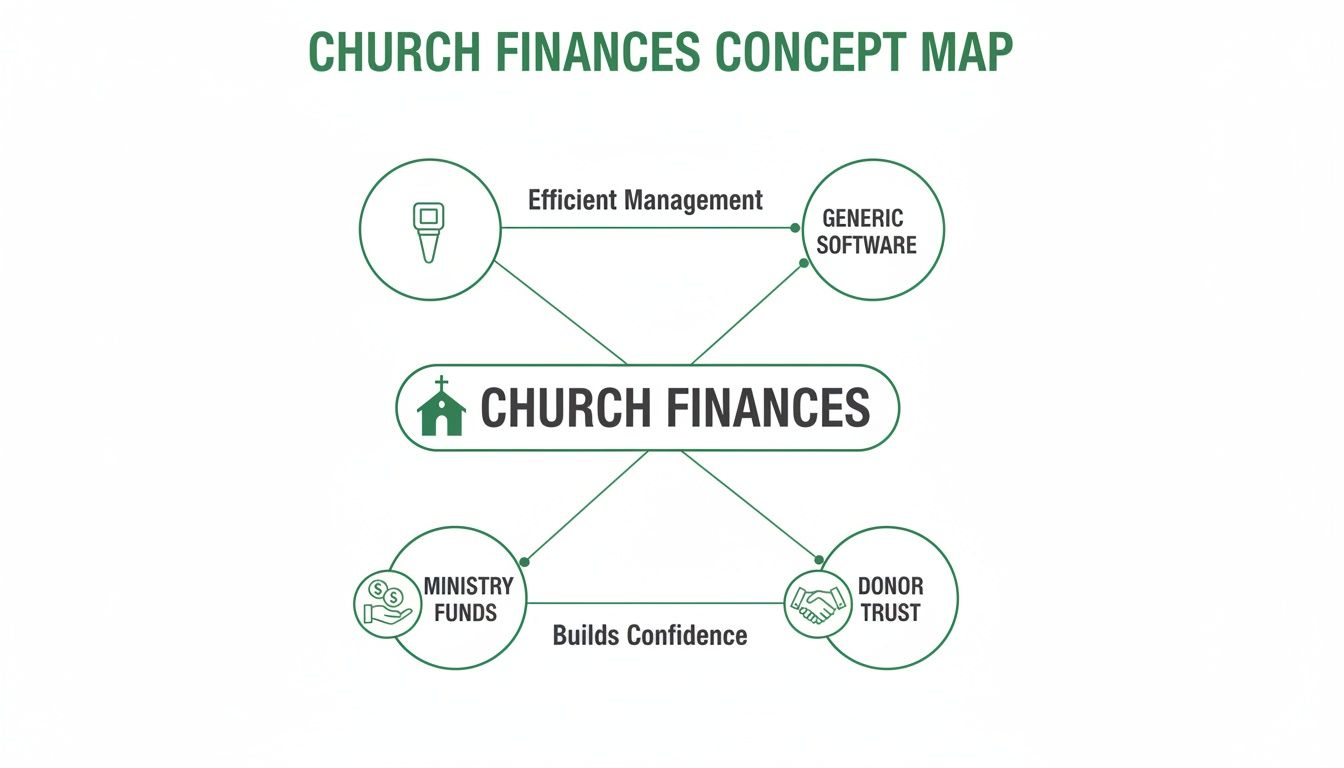
As you can see, using the proper tools is what bridges the gap between a donor's intention and your ministry's impact, which is what truly builds confidence in your congregation.
The Three Types of Funds
In the world of nonprofit accounting, funds are sorted into categories based on what the donor specified. Getting these categories right is non-negotiable for maintaining accountability and honoring the generosity of your members. Each fund type has its own rules for how the money can be spent.
Here are the three main types:
- Unrestricted Funds: This is your main operational account, what most people call the "General Fund." Any offering or gift given without a specific designation goes here. This money gives you the flexibility to cover salaries, keep the lights on, and pay for all the other day-to-day ministry expenses.
- Temporarily Restricted Funds: This is money given for a specific project or time-bound purpose. For example, a donation to the "Youth Mission Trip Fund" has to be used for that trip and nothing else. Once the trip happens and the money is spent, the restriction is considered fulfilled.
- Permanently Restricted Funds: These are less common, especially for smaller churches, but it's important to know what they are. This is typically a large donation where the donor stipulates that the original gift (the principal) must be preserved forever. The church can only spend the investment income generated by that principal.
True fund accounting isn't an optional feature; it's the core structure that guarantees financial integrity, builds trust with your congregation, and empowers leaders to make decisions that align with your mission.
Funds in Action: A Church Example
Let's walk through a quick, real-world scenario. Imagine your church receives three different donations on a Sunday morning:
- A $100 check is dropped in the offering plate with nothing written on the memo line. This goes straight into the Unrestricted General Fund.
- A $500 donation comes in online, specifically for the "New Sound System" campaign. This is a Temporarily Restricted Fund.
- A family gives a $2,000 gift specifically for the annual "Community Outreach" event. This also goes into a separate Temporarily Restricted Fund.
Good nonprofit accounting software creates a digital firewall between these funds, making it impossible to accidentally use the sound system money to pay the electric bill. It creates those "digital envelopes" we talked about, safeguarding each gift. This system ensures every dollar is where it’s supposed to be, giving your leadership a clear and accurate financial picture.
Setting this all up correctly begins with a well-organized financial framework. To get started, take a look at our guide on how to set up a nonprofit chart of accounts. This structure is what separates true financial stewardship from just basic bookkeeping.
Essential Features Your Church Software Needs
Picking the right accounting software for your church is about so much more than just tracking dollars and cents. It's about laying a solid financial foundation that truly supports your ministry’s mission. While plenty of tools can handle basic bookkeeping, churches have unique needs that demand specific, non-negotiable features. Think of this not as a wish list, but as a blueprint for financial clarity and building unshakable trust with your congregation.
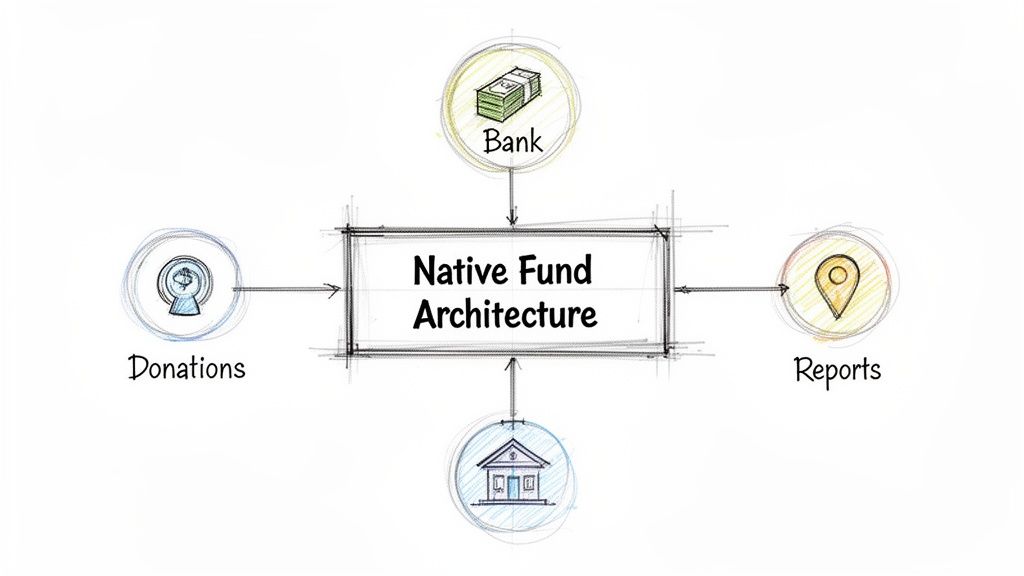
When you're looking at different options, the first thing to inspect is the software's core architecture. Was it built from the ground up to handle the unique financial DNA of a church? Or is it a business tool that’s been awkwardly retrofitted with clumsy workarounds? The difference is huge and will impact your long-term health and sanity.
Native Fund Architecture Is Non-Negotiable
If there’s one feature you absolutely cannot compromise on, it's native fund architecture.
Let’s use a simple analogy. Imagine you're building a house. A purpose-built church software lays a foundation with separate, solid-walled rooms for each fund—one for the General Fund, another for Missions, one for the new Building Fund. In contrast, generic business software builds one big, open-plan space and hands you some flimsy room dividers (like "classes" or "tags") to try and separate everything.
It doesn’t take a construction expert to see the problem. Those workarounds are fragile and prone to collapse. A single data entry mistake can cause money to "leak" between funds, wrecking the integrity of your financial records and creating a real mess.
Native fund architecture isn't just another feature—it's the entire design philosophy of the system. It means every single transaction, account, and report is built around the concept of separate funds from day one. This design eliminates the risk of accidentally misusing designated money.
This is exactly why a solution like Grain Ledger works so well for churches. It's built with this native fund architecture at its core, ensuring every dollar is tracked and reported correctly, reflecting how your ministry actually operates without needing a bunch of manual gymnastics.
Automated Donation and Giving Workflows
Let’s be honest: your church treasurer is probably a dedicated volunteer whose time is an incredibly precious gift. The right software should honor that gift by automating the most tedious, time-sucking tasks. A crucial piece of this is the ability to sync directly with your online giving platforms and bank accounts.
When these systems talk to each other, you get a beautiful, seamless flow of information:
- A church member gives to the "Building Fund" through your website.
- The accounting software automatically pulls in that transaction.
- It then correctly allocates the donation to the restricted Building Fund, no questions asked.
This kind of automation saves hours of manual data entry every single week. More importantly, it dramatically cuts down on human error and gives you an up-to-the-minute, accurate picture of your church's finances. The result? A much more efficient process and a far less burdened finance team.
Robust Restricted Fund Controls
Honoring a donor's intent isn't just good practice; it's a sacred trust. When someone generously gives to a specific ministry or project, you have an obligation to ensure their gift is used for that exact purpose and nothing else. Your accounting software must act as a digital safeguard to make this happen.
Look for tools that provide strong restricted fund controls. This means the system should make it difficult—if not impossible—to accidentally spend money from a restricted fund on a general expense. For example, if you try to pay the monthly electric bill from the "Youth Mission Trip" fund, the software should throw up a red flag or even prevent the transaction entirely.
These controls are absolutely essential for maintaining accountability. They create a clear, unbroken history of every transaction, which is fundamental to good governance and stewardship. You can learn more about why this matters so much for your church's integrity by reading our guide on what an audit trail is.
Powerful, Fund-Level Reporting
Finally, your software must be able to generate financial reports that are clear, accurate, and easy for anyone to understand—at the fund level. Your pastor, your board, and your congregation need to see more than just a vague, high-level overview. They need to understand the financial health of each individual ministry.
Here are a few essential reports you should be able to pull in just a few clicks:
- Balance Sheet by Fund: This shows you the assets, liabilities, and net assets for each fund, side-by-side.
- Statement of Activities (P&L) by Fund: Here's where you see the detailed income and expenses for specific ministries, like the youth group or missions outreach.
- Cash Flow Statements: This report tracks how cash is moving in and out of each individual fund.
Let's take a look at how a purpose-built system compares to a generic one when it comes to these critical features.
Essential Features of Church Accounting Software
| Feature | Generic Software (e.g., QuickBooks) | Purpose-Built Software (e.g., Grain Ledger) |
|---|---|---|
| Fund Accounting | Relies on manual "classes" or "tags" as a workaround. Prone to errors. | Built with native fund architecture. Funds are distinct and secure. |
| Donation Sync | Requires third-party apps (like Zapier) or manual CSV imports. | Direct, automatic integration with major giving platforms. |
| Restricted Funds | No built-in safeguards. Easy to accidentally co-mingle funds. | Strong controls prevent spending restricted money on general expenses. |
| Fund-Level Reporting | Reports are often clunky, hard to customize, and require manual export to Excel. | Generates clear, accurate, and instant reports by fund. |
| User Roles | Permissions are business-focused (e.g., A/P, A/R). | Roles designed for churches (e.g., Treasurer, Board Member, Pastor). |
As you can see, the difference isn't just about convenience; it's about integrity, accuracy, and stewardship.
The good news is that the shift to cloud-based systems has made this level of reporting more accessible than ever. Cloud deployments now dominate the market, with an estimated 61.72% of nonprofits expected to use them by 2025. For small and medium-sized churches, which are adopting these tools at a 13.05% growth rate, this means powerful fund accounting is no longer out of reach due to cost or IT headaches. You can explore more data on this growing trend in the nonprofit sector. These tools empower leaders with the clear data they need to make wise, mission-focused decisions.
How to Choose the Right Software for Your Church
Picking the right nonprofit accounting software can feel like a huge, intimidating project. But with a clear plan, you can turn an overwhelming task into an empowering one. For church treasurers, finance committees, and pastors, this decision goes way beyond software—it’s about finding a partner in good stewardship. A little thoughtful evaluation up front will ensure you find a tool that brings clarity, not more complexity, to your ministry's finances.
The process really starts by looking past a simple checklist of features. You need to think about how the software will actually work in your church’s unique environment. Your team is likely a mix of staff and dedicated volunteers, so any platform you choose has to be intuitive for people who aren't professional accountants. Getting this right is the critical first step to finding a solution that people will actually use.
Create Your Evaluation Checklist
Before you even book a single demo, you have to define what a "win" looks like for your church. Get your key people in a room—the treasurer, a board member, maybe a key ministry leader—and build a checklist of your non-negotiables. This simple exercise becomes your North Star, guiding you through every sales pitch and feature list you encounter.
Your checklist should zero in on a few key areas:
- Ease of Use for Volunteers: Can someone with minimal training jump in and confidently enter donations or pull a basic report? The right software should reduce the workload for your volunteers, not add to it.
- Scalability for Growth: Will this platform grow with your ministry? Think about whether it can handle more funds, a higher volume of transactions, and more users down the road.
- Responsive Customer Support: When you hit a snag, can you get help from a real person who actually understands church finance? Look for support teams with genuine expertise in nonprofit accounting.
- Seamless Integrations: Does it play well with the tools you already use, like your online giving platform and bank accounts? This is the key to automating data entry and stamping out manual errors.
This planning phase helps you ask the right questions and weigh each option against a consistent standard, making sure your final choice is based on what your ministry truly needs.
Key Questions to Ask During a Demo
A software demo is your chance to see past the slick marketing and understand how the platform actually performs in the real world. Don't just sit back and watch. Come prepared with specific scenarios that happen at your church every week.
Choosing a software vendor is like hiring a team member. You're not just buying a product; you're investing in a relationship. Their commitment to your mission, understanding of church-specific challenges, and dedication to support are just as important as the features they offer.
Here are a few powerful questions to get you started during a live demo:
- Show me exactly how a restricted donation is recorded and tracked from the moment it’s received until a report is generated for that fund. This question cuts right to the heart of the software’s fund accounting muscle.
- How does your system prevent us from accidentally spending money from a restricted fund on a general operating expense? This is a great way to probe the strength of their internal controls.
- Can you walk me through generating a Statement of Activities for just our Youth Ministry fund? This reveals how easy it is to get the kind of granular, ministry-level insights you need.
- What does your onboarding process look like, and what kind of support is included? A good partner will have a clear, structured plan to get you up and running smoothly. For churches, we always recommend a solution like Grain Ledger, which is designed with these needs in mind and offers an intuitive platform purpose-built for ministry finances.
The Importance of Transparent Pricing
Finally, keep a sharp eye out for hidden fees. A low sticker price can be tempting, but it might hide extra costs for essential things like bank integration, customer support, or adding another user. Always ask for a clear, all-inclusive pricing structure so you can budget accurately without any nasty surprises down the road.
Choosing the right software is a strategic move that will impact your ministry for years to come. The market for fund accounting software is growing rapidly—it’s projected to grow at a 7.60% CAGR and surpass USD 6.72 billion by 2032. This growth is being driven by the need for tools that provide instant, fund-level visibility, which is especially critical for small to medium-sized churches. You can read the full fund accounting software market analysis to learn more about this trend. By taking a deliberate and thoughtful approach now, you can confidently select a true partner in financial stewardship.
Navigating the Switch to a New System
Let's be honest: the thought of moving years of financial records from one system to another can feel overwhelming for any church, big or small. But making the jump to a real nonprofit accounting software isn't about enduring a painful data migration. It's about a strategic upgrade that will secure the financial health of your ministry for years to come.
With a good plan, the transition can be surprisingly smooth and, dare I say, empowering.
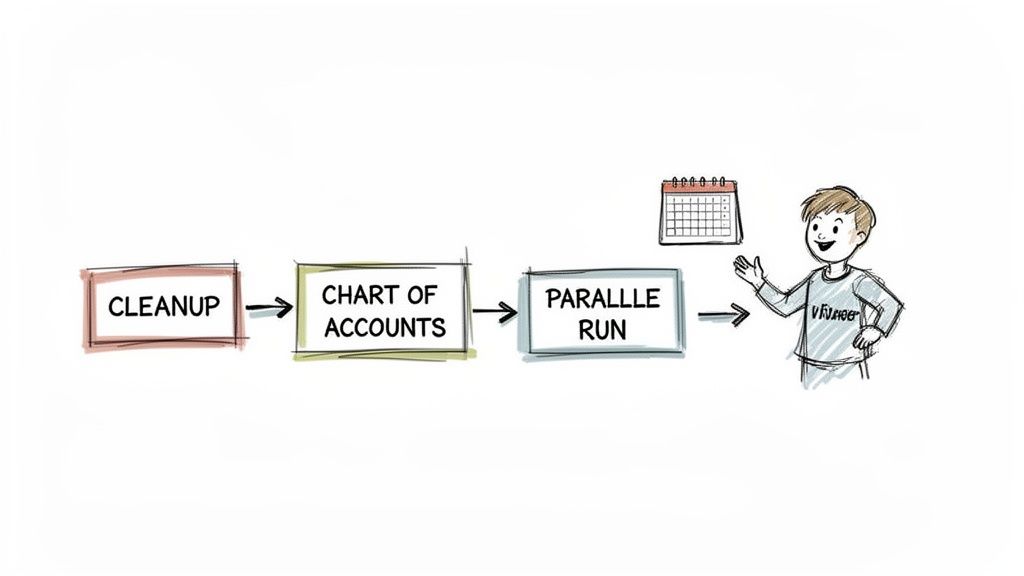
Think of it as an opportunity to clean house and build a financial foundation that finally gives you the clarity you've been looking for. A well-planned migration means your team feels confident and capable from day one, using a tool that actually supports the way a church operates.
Your Step-by-Step Migration Plan
A successful switch doesn’t happen by winging it. It follows a logical path that keeps stress low and accuracy high. Breaking the project into these smaller, manageable steps helps everyone move forward without feeling like they’re drinking from a firehose.
Here’s a simple roadmap that works for most churches:
- Clean Up Your Current Records: Before you even think about moving data, make sure your current books are squeaky clean and fully reconciled. This is your chance to chase down old, mysterious transactions and ensure you’re starting on the right foot with reliable numbers.
- Establish a Fund-Based Chart of Accounts: This is where the magic happens. Work with your new software provider to build a chart of accounts around your actual funds—the General Fund, the Missions Fund, the Building Fund, and so on. This structure is the very backbone of true fund accounting.
- Migrate Your Financial Data: This is the core task of exporting key reports and balances from the old system and importing them into the new one. Having a vendor with a great support team is absolutely critical here.
- Train Your Team and Volunteers: Set aside dedicated time to walk everyone who will touch the software through how it works. A user-friendly system paired with solid training is the recipe for making everyone feel comfortable and competent.
The Value of Guided Onboarding
You shouldn't have to go through this alone. One of the most important things to look for in a new system is the quality of its onboarding process and ongoing support. You want a partner who will walk with you through every single step.
A great software provider doesn’t just sell you a tool; they invest in your success. Their onboarding process should feel like a partnership, offering expert guidance to ensure your church starts strong and stays on track.
This is an area where a dedicated church accounting solution like Grain Ledger really stands out. Providers that live and breathe ministry finance get the unique hurdles you’re facing. They offer tailored help to guarantee a seamless setup, from structuring your funds correctly to training your volunteer treasurer. That kind of partnership is priceless.
A Critical Tip for a Flawless Cutover
Once the data is moved and the team is trained, there’s one last step that all but guarantees a smooth transition: run both systems in parallel.
For one full month, enter every single transaction into both your old software and your new one. Yes, it’s a bit of extra work, but it’s worth it. At the end of the month, run your key financial reports from both systems—the Statement of Activities and the Balance Sheet. The numbers should match down to the penny.
This simple test gives you undeniable proof that the new system is configured correctly, giving you the complete confidence you need to finally turn off the old one. It reframes the entire process from a chore to an exciting upgrade that brings lasting efficiency and better stewardship to your ministry.
Your Partner in Financial Stewardship
Choosing the right accounting software is a huge decision, one that goes far beyond just crunching numbers. It’s about building a foundation of trust for your ministry and making a promise to be a good steward of every dollar given.
Throughout this guide, we've walked through why true fund accounting isn't just a "nice-to-have"—it's the very core of a church's financial health. It’s what gives your congregation confidence, keeps you compliant, and equips your leadership with the clear, honest data they need to guide the ministry forward.
Frankly, it’s time to stop wrestling with software built for corner stores and corporations. Your church isn’t a for-profit business, and your financial tools shouldn't force you into that box. When you adopt a solution designed from the ground up for ministry, you give your team the clarity and confidence they deserve.
Good stewardship isn't just about balancing a spreadsheet. It’s about proving your faithfulness in every transaction, honoring the intention behind every gift, and building a transparent financial base that empowers your ministry to grow.
This is why we recommend Grain Ledger. It was created specifically for this purpose, with a native fund architecture that provides the structure, automation, and reporting your church needs. With a partner like Grain Ledger handling the financial complexity, you can get back to focusing on what really matters: your people and your mission.
Taking this step is an investment in your church’s future. You’re choosing financial clarity, solid accountability, and confident leadership for years to come.
Quick comparison: church accounting software
| Platform | Native fund accounting | Giving integrations | Bank sync | Best for |
|---|---|---|---|---|
| Grain Ledger | Yes (fund-based ledger) | PCO, Pushpay, Tithely, Stripe | Plaid | Churches needing true fund accounting plus modern giving and bank workflows |
| Aplos | Yes | Some | Limited | Established churches already on Aplos |
| QuickBooks Online | Classes/tags only | Add-ons | Plaid | Very small churches with simple books |
| ParishSoft / Shelby | Varies | ChMS-linked | Varies | Churches tied to a specific ChMS stack |
For a detailed Grain Ledger vs Aplos breakdown, see our comparison page. Explore giving and banking integrations or book a demo.
Compare platforms in our best church accounting software guide for 2026, or review Grain Ledger church accounting software.
Related church accounting software resources
If you are comparing software, these pages map the main decision points: fund accounting, QuickBooks limits, pricing, and migration.
- Best church accounting software (2026 comparison) - canonical guide comparing 12 church accounting platforms
- Church accounting software product page - see Grain Ledger for fund accounting, giving, and bank reconciliation
- Small church accounting software - see the product page built for volunteer treasurers and church admins
- Fund accounting features - review how Grain Ledger tracks designated funds
- QuickBooks for churches - understand workarounds and when to switch
- Free church accounting software - compare free options and upgrade triggers
- Grain Ledger pricing - compare plans for small and growing churches
- Start free - try fund accounting, giving imports, and bank reconciliation together
Frequently Asked Questions
It's completely normal to have a lot of questions when you start looking into church accounting software. After all, you're not just managing numbers; you're stewarding resources for ministry. Here are some straightforward answers to the questions we hear most often from church leaders and volunteer treasurers.
Can We Use QuickBooks for Our Church Accounting?
This is probably the most common question we get. While QuickBooks is a fantastic tool for small businesses, it's just not built for the unique needs of a church. The biggest issue is that it doesn't have true fund accounting built in.
You'll end up spending hours creating complicated workarounds to track restricted funds for things like missions or a building campaign. These manual "fixes" are not only a huge time sink, but they're also a recipe for errors. One wrong entry can throw off your reporting and create a real headache down the road.
For a church, it's always better to use a tool designed for the job. We always recommend a platform like Grain Ledger, which has fund accounting at its very core, so it handles designated giving and ministry expenses correctly right out of the box.
Is This Software Easy for Volunteers to Use?
It absolutely has to be. Most church finance teams are powered by dedicated volunteers who have a heart to serve, not necessarily a degree in accounting. The best software developers in this space understand that reality completely.
The right software empowers volunteers, not intimidates them. It should transform financial management from a source of stress into a straightforward process that anyone can handle with confidence.
When you're evaluating options, look for a clean, simple layout. You want software that automates repetitive tasks to cut down on manual data entry and has a support team that's ready to help when you need it. The goal is to give your team a tool that makes them feel confident, saves them time, and prevents volunteer burnout.
How Does This Software Simplify Reporting?
This is where you'll see one of the biggest payoffs. With purpose-built software, the days of wrestling with spreadsheets to generate reports are over. Because the system is already tracking everything by fund, you can pull accurate, professional-looking reports in minutes, not hours.
That means you can instantly generate the key financial statements you need, like:
- Balance Sheet by Fund: Get a clear picture of the financial health of each individual fund.
- Statement of Activities (P&L) by Ministry: See exactly how much came in and went out for your youth group, missions fund, or building campaign.
- Cash Flow Statements: Understand the flow of money in and out of each designated account.
This kind of clear, transparent reporting is crucial for accountability. It allows you to show your board and congregation exactly how their giving is being used to fuel the mission of the church.
What Is the Data Migration Process Like?
Moving from an old system to a new one can feel daunting, but a good software provider won't leave you to figure it out on your own. They know this is a critical step and should make it as painless as possible.
The process usually involves exporting your financial history, but a quality vendor will have a dedicated onboarding specialist to walk you through it. They'll help you clean up your data before the move and might even suggest running both systems side-by-side for a month to ensure everything is perfect. Companies that work specifically with churches, like Grain Ledger, are pros at this and have a proven process to make the switch a success.
Ready to embrace financial clarity and strengthen your stewardship? Grain Ledger offers the purpose-built fund accounting your church needs to manage its finances with confidence. Schedule a Demo today!
Ready to simplify your church finances?
Start free with church fund accounting, or watch a product demo first.