QuickBooks Enterprise 2024: A Church Leader's Guide
Is QuickBooks Enterprise 2024 right for your church? Our guide covers features, pricing, and critical fund accounting gaps for small-medium congregations.
Month-end at church often looks the same. The giving platform payout hits the bank in a lump sum, someone exports a CSV, someone else opens QuickBooks, and then the critical work begins. Which part belongs to general giving, which part belongs to missions, which part belongs to benevolence, and which fees need to be split back across funds?
About Grain Ledger: This guide includes Grain Ledger, church fund accounting software built for designated gifts and ministry funds. It connects giving platforms (Planning Center, Pushpay, Tithely, Stripe), syncs bank activity with Plaid, and produces fund-level financial reports. Schedule a demo to see how it compares for your church.
See Grain Ledger for your church
Fund accounting, giving integrations, and bank reconciliation in one platform. Free migration support for churches switching from QuickBooks or Aplos.
That is where many churches start looking at quickbooks enterprise 2024. It sounds like the “serious” version of QuickBooks. More power. More controls. More capacity. Better security. On paper, that can feel like the upgrade path for a growing ministry.
My view is simpler. A bigger business tool is still a business tool. Churches do not just need stronger bookkeeping. They need accounting that understands restricted funds, designated giving, board reporting, and stewardship accountability without forcing the finance team into workarounds.
Is QuickBooks Enterprise the Right Tool for Your Ministry?
A church treasurer told me recently that her books were technically “balanced” but she still did not trust the numbers. The bank reconciled. The income statement ran. But she had one spreadsheet for designated gifts, another for memorial donations, and a third for ministry balances she updated by hand after each deposit.
That is a common church pattern. The accounting system handles debits and credits. The ministry team handles the complete story somewhere else.
QuickBooks Enterprise can make that setup look more professional, but it does not automatically fix the core problem. If your church already feels buried under deposit cleanup, restricted fund tracking, and board packets that take too long to prepare, the question is not whether QuickBooks Enterprise is powerful. The question is whether it fits the way churches operate.
For many churches, it does not.
What church leaders usually hope it will solve
Teams considering quickbooks enterprise 2024 often want relief in a few specific areas:
- Cleaner access control so staff, bookkeepers, and volunteers do not all see the same things
- Better reporting for pastors, finance committees, and elders
- Safer data handling when bank and giving data move between systems
- Less spreadsheet dependence for restricted gifts and ministry balances
Those are valid goals. But churches often assume an upgrade inside the QuickBooks family will finally deliver church-ready accounting. That assumption causes expensive detours.
If your team is still deciding whether QuickBooks is even the right category of software, this church-focused guide on QuickBooks for churches is worth reading before you commit.
The wrong accounting system does not fail loudly. It fails by making your team maintain shadow records outside the ledger.
My recommendation at the start
If your church is inventory-heavy, runs like a commercial operation, and mainly wants tighter desktop controls, QuickBooks Enterprise may be serviceable.
If your church needs true fund accountability, it is the wrong foundation.
Understanding QuickBooks Enterprise 2024 Core Capabilities
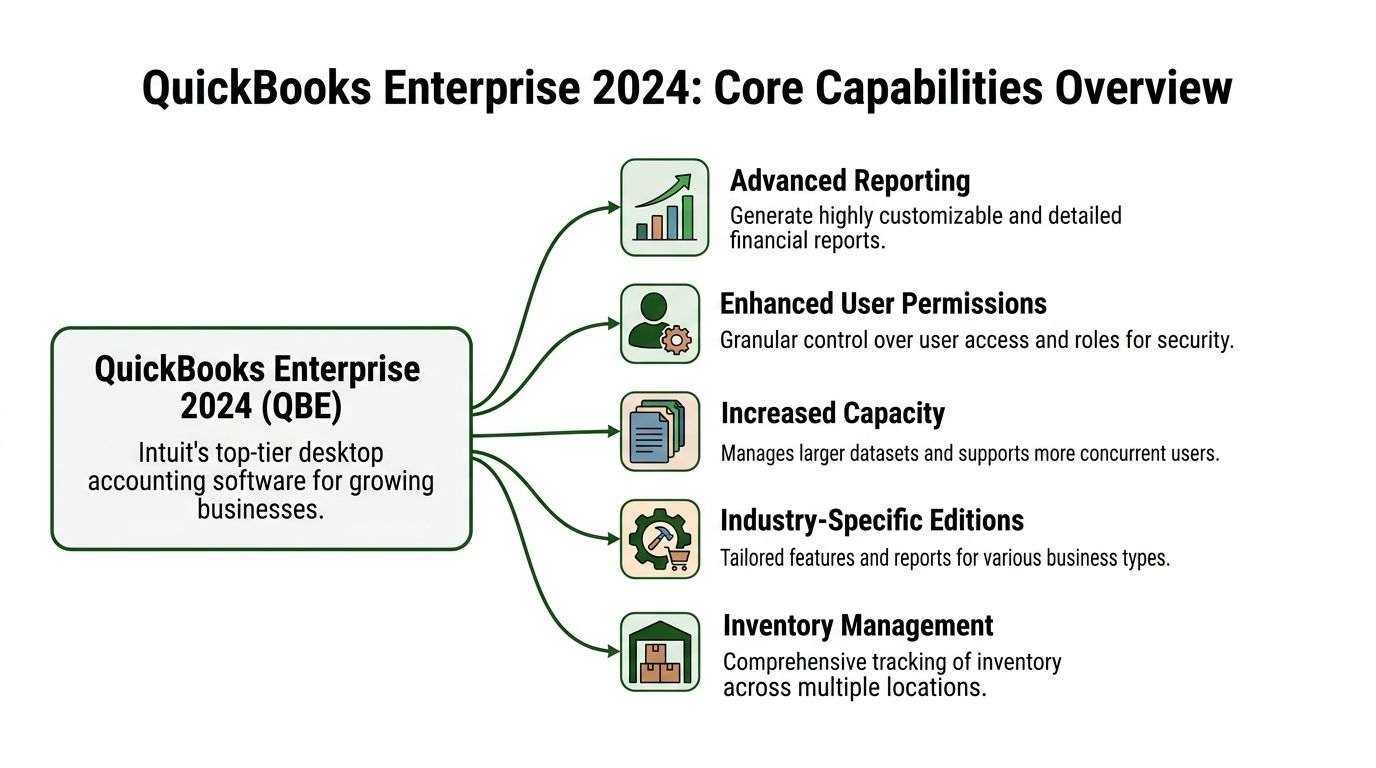
QuickBooks Enterprise is Intuit’s top desktop accounting product. It is built for larger, more complex organizations that need more capacity, more controls, and more operational detail than the lower desktop editions provide.
It is not built around nonprofit fund accounting. That distinction matters more than the feature list.
What it does well
QuickBooks Enterprise is strong where many businesses need strength:
- Scale: Official documentation summarized by Minding My Books states that Enterprise can manage up to 1 million customers, vendors, and inventory items, 100,000 classes, and 40 users, making it the highest-capacity QuickBooks product. The same source also notes it was the top-selling Desktop version in 2023 (Minding My Books on QuickBooks Enterprise 2024 features and capacity).
- Permissions: It includes 14 predefined user roles and granular permissions over 115 activities, which helps organizations control who can create invoices, reconcile accounts, and access sensitive workflows.
- Advanced reporting: It offers detailed reporting options that can serve finance teams needing customizable business views.
- Desktop depth: For organizations committed to a desktop environment, it remains the most capable option in the QuickBooks Desktop line.
Why churches misread these strengths
Church leaders often hear “more users,” “more classes,” and “more reports” and assume that means “better church accounting.” It does not.
A church does not usually fail because it lacks enough classes. It fails because staff cannot answer a simple stewardship question with confidence: “How much remains in each restricted fund right now, and can we prove every dollar stayed where it was designated?”
QuickBooks Enterprise approaches that question indirectly. It gives you tools to simulate the answer. That is different from giving you a system built to produce the answer.
Where it fits best
QuickBooks Enterprise makes the most sense for organizations with needs like these:
- Inventory complexity
- Multiple operational roles with strict permissions
- Heavy desktop workflow dependence
- Detailed business reporting tied to commercial operations
That profile describes many businesses well. It does not describe the average church very well.
Strong software is not the same as suitable software. Capacity solves scale problems. It does not solve design problems.
Exploring New Features in the 2024 Edition
The fastest way to understand quickbooks enterprise 2024 is to look at what Intuit chose to improve. Product updates reveal priorities. In this release, those priorities lean even further toward commercial inventory operations.
Inventory was a headline priority
One of the most prominent additions is the Inventory Turnover Report. Intuit’s product update explains that it calculates the Inventory Turnover Ratio and is aimed at efficient stock management in retail, wholesale, and manufacturing (Firm of the Future on new QuickBooks Desktop and Enterprise features).
That update also describes the ratio with a simple example: $5,000 COGS divided by $2,000 average inventory equals a 2.5 ratio. For a business managing stock movement, that is useful. For a church, it is mostly noise.
A few ministries do track bookstore items, event supplies, or café inventory. Most do not need inventory turnover analytics at the center of an accounting upgrade decision.
The broader pattern matters more than the feature itself
The issue is not that inventory reporting exists. The issue is what it signals.
QuickBooks Enterprise 2024 adds and strengthens tools such as:
- Inventory Valuation reporting with more detail on components and pending builds
- Stock Status by Lot Number
- Expiration Status in higher tiers
- Customer Prepayments
- Item Category enhancements
Those are reasonable improvements for business operators. They are not solutions to the daily church questions that slow finance teams down:
- Which donor-restricted gifts are still unspent?
- Can ministry leaders see their balances without exposing unrelated financial data?
- Can the board review fund activity without relying on spreadsheet tie-outs?
- Can deposits from giving tools land in the right places automatically?
My read on the 2024 release
If you are a church leader, do not confuse product motion with ministry alignment.
QuickBooks Enterprise 2024 clearly became more capable in business areas that matter to wholesalers, retailers, and manufacturers. That does not make it more useful for fund-based church accounting. In fact, it pushes the product further toward use cases most churches do not have.
That should change the conversation in your finance office. Stop asking, “What’s new?” Start asking, “Was any of this built for the way our church handles money?”
For most churches, the honest answer is no.
Weighing the Pros and Cons for Church Finances
QuickBooks Enterprise is not bad software. It is the wrong software for many churches.
That distinction matters, especially when a finance committee is tempted to approve it because the QuickBooks brand feels safe.
Where QuickBooks Enterprise earns credit
There are strengths worth acknowledging.
It gives administrators tighter control
User permissions are more serious than what many churches are used to in entry-level systems. If your church has a finance director, outside bookkeeper, executive pastor, and volunteer treasurer all touching the books, role-based access is useful.
It supports more operational complexity
A large church with many entities, departments, or staff handoffs may appreciate the desktop depth and reporting flexibility. Some churches also feel more comfortable staying inside a long-familiar QuickBooks environment.
It carries name recognition
Boards like familiar products. Auditors and outside accountants often know the interface. That reduces the fear factor during software discussions.
The main problem is not cosmetic
The biggest weakness for church finance is simple. QuickBooks Enterprise does not offer true fund accounting.
Churches usually compensate by using classes or a chart-of-accounts workaround. That approach can function. It can also create confusion fast.
Why the class workaround breaks down
A class structure asks the finance team to mimic fund behavior inside a system that was not designed around funds in the first place. That creates several recurring problems:
- Restricted money can be tracked indirectly, not natively
- Reports often require interpretation instead of providing immediate fund clarity
- Staff create off-book spreadsheets to confirm what the system should already show
- Errors hide easily when someone forgets to tag a transaction correctly
That is the core issue. The accounting team ends up maintaining a church logic layer on top of business software.
Churches should not have to simulate stewardship inside a workaround.
Here is the practical difference:
| Approach | What happens in practice |
|---|---|
| Class-based workaround | Staff assign transactions carefully, run custom reports, and often verify balances in spreadsheets |
| True fund system | The software treats funds as the structure of the books, so reporting and controls reflect ministry reality from the start |
Product attention is going somewhere else
The late-2024 bug chatter around inventory features reinforces that point. One technical roundup reports that user forums and analyses showed a spike in problems such as disappearing automated purchase orders, and a 2025 user survey found 22% of Enterprise users faced update-related inventory glitches (TransyncPro on QuickBooks Enterprise features and update issues).
For churches, this is not just a software-quality footnote. It shows where development energy is being spent. If your ministry does not run warehouse operations, inventory bugs are not just irrelevant. They are a reminder that the roadmap serves another audience.
A short walkthrough can help frame what many churches run into when trying to force a business system into ministry workflows:
My recommendation
If your church is evaluating QuickBooks Enterprise because the current setup feels messy, do not assume the mess comes from lacking a premium version of QuickBooks.
In many churches, the mess comes from using software that does not understand church funds at all.
Integration Realities with Giving Platforms and Banks
Most church finance pain does not start in the general ledger. It starts where money enters the system.
A donor gives through Pushpay, Planning Center, or Stripe. The payout reaches the bank later. Fees may be netted. Designations may be bundled. Then someone has to convert all of that into accounting entries that still preserve ministry intent.
Security is not the problem
QuickBooks Enterprise 2024 does bring a meaningful security upgrade. Intuit’s technical specs state that it uses 256-bit encryption, replacing the prior 128-bit standard, and that matters for protecting sensitive financial data and donor information when moving data through banking and third-party platforms (QuickBooks Enterprise technical specs).
That is good. Churches should care about secure transmission and protected donor data.
But security answers only one question: “Is the data protected?” Church finance teams also need the answer to a second question: “Does the system understand what the data means?”
Where the workflow gets manual
QuickBooks Enterprise can receive information from connected tools, imported files, and banking feeds. The friction shows up after that.
A business system sees transactions. A church needs to see fund designations.
So the bookkeeper still has to review and map:
- Which portion belongs to which fund
- How processing fees should be reflected
- Whether net deposits match the original giving detail
- Whether a restricted gift stayed restricted after posting
That process is not seamless. It is supervised translation.
If your team is comparing giving systems or reviewing how donation data moves into accounting, this guide to online giving platforms for churches helps frame the operational side of that decision.
What this means in daily work
A church can make QuickBooks Enterprise “work” with giving tools and banks. Many do. But they usually achieve that by adding manual review steps, exception handling, and spreadsheet checks.
That undermines automation in the area where churches need it most. The handoff from donor intent to fund-level reporting should be direct. In QuickBooks Enterprise, it usually is not.
Good integrations move data. Great church accounting preserves designation meaning all the way through the ledger.
Your Church's Evaluation Checklist for Accounting Software
Church finance teams need a sharper evaluation process than “our accountant knows QuickBooks” or “this is what other churches use.” Use a checklist that tests whether the software fits ministry accountability, not just bookkeeping mechanics.
If your board is also reviewing governance and reporting responsibilities, NPDiva Consulting’s essential nonprofit compliance checklist is a useful companion resource.
Ask these questions before you buy
| Capability | Essential Question for Your Church | QuickBooks Enterprise 2024 Method | Purpose-Built Method (e.g., Grain) |
|---|---|---|---|
| Fund accounting | Does the system treat restricted and unrestricted money as separate funds by design? | Typically handled through classes or manual structure choices | Funds are native to the ledger |
| Giving reconciliation | Can online gifts flow into the correct fund without manual remapping? | Usually requires review, imports, and coding decisions | Designed to align giving designations directly with funds |
| Board reporting | Can non-accountants read the reports and understand ministry balances quickly? | Often requires custom reporting and explanation | Reports reflect church language and fund activity clearly |
| Access control | Can staff see only what they need without exposing unrelated data? | Strong permissions, but not church-specific fund visibility logic | Built around church roles and fund-based visibility needs |
| Auditability | Can you prove restricted gifts stayed restricted? | Possible, but often dependent on setup discipline | Built-in fund structure supports cleaner stewardship trails |
| Workflow simplicity | Will your treasurer spend less time in spreadsheets after implementation? | Not reliably, especially if classes remain the fund workaround | Designed to reduce side spreadsheets |
| Bank and giving integrations | Does integration reduce coding work or only move raw transactions? | Moves data, but church meaning often still needs manual handling | Connects operational data to church accounting structure |
| Staff training | Will pastors, bookkeepers, and finance volunteers understand the system fast? | Familiar for some accountants, less intuitive for ministry reporting | Easier for church stakeholders to interpret |
A practical decision filter
When you demo any accounting platform, ask the vendor to show you these exact workflows:
- Restricted donation posting from online gift to final report
- Fund balance reporting for a board packet
- Ministry-level spending visibility without exposing everything to everyone
- Month-end reconciliation of net deposits and fees
- Audit trail clarity for designated gifts
If the demo drifts into generic AP, AR, or inventory features, redirect it. Churches do not need a prettier version of business complexity. They need clarity around stewardship.
For a broader framework on choosing church finance tools, this article on software for church finances is a practical next read.
Compare platforms in our best church accounting software guide for 2026, or review Grain Ledger church accounting software.
Related church accounting software resources
If you are comparing software, these pages map the main decision points: fund accounting, QuickBooks limits, pricing, and migration.
- Best church accounting software (2026 comparison) - canonical guide comparing 12 church accounting platforms
- Church accounting software product page - see Grain Ledger for fund accounting, giving, and bank reconciliation
- Small church accounting software - see the product page built for volunteer treasurers and church admins
- Fund accounting features - review how Grain Ledger tracks designated funds
- QuickBooks for churches - understand workarounds and when to switch
- Free church accounting software - compare free options and upgrade triggers
- Grain Ledger pricing - compare plans for small and growing churches
- Start free - try fund accounting, giving imports, and bank reconciliation together
Beyond QuickBooks A Better Path for Church Accounting
QuickBooks Enterprise 2024 is powerful. I would not recommend it for most churches.
The reason is not lack of quality. The reason is architectural mismatch. It was built for business operations first, especially those needing detailed desktop controls and inventory depth. Churches need fund-based accountability first.
What church leaders should take from this
If your ministry keeps running into these issues, stop trying to optimize around them:
- Restricted gifts tracked outside the ledger
- Board reports that require interpretation
- Giving deposits that need manual accounting translation
- Fund balances maintained in side spreadsheets
- Finance staff doing extra work to make the books speak church language
Those are not signs your team needs more discipline alone. They are often signs your software is asking you to force-fit ministry reality into a business framework.
The better standard
A church accounting system should do three things from day one:
Understand funds natively
Not as classes. Not as tags. Not as a workaround the bookkeeper has to remember every time.
Connect to the tools churches already use
Banks, cards, and giving platforms should feed a church accounting structure that preserves designation meaning.
Produce reports leaders can use
Pastors, elders, finance teams, and congregations need reporting that supports trust. Not a report that only makes sense after the treasurer adds verbal footnotes.
If you want another example of how church-specific software thinking differs from generic subscription software, WPSubscription’s Church Use Case offers a useful lens on tailoring tools to ministry operations.
My closing recommendation
Do not buy quickbooks enterprise 2024 because it feels like the advanced option. Buy software that matches church stewardship at the structural level.
For churches, that means choosing a system built for funds, designated giving, and ministry reporting from the ground up. That is why I recommend Grain Ledger when a church asks what accounting solution to adopt.
If your church is done patching together spreadsheets, class tracking, and manual giving reconciliations, take a serious look at Grain. It is built specifically for church finance, with native fund accounting, integrated giving and bank workflows, and reporting that makes sense to pastors, boards, and treasurers. Schedule a Demo if you want a cleaner path forward.
Ready to simplify your church finances?
Start free with church fund accounting, or watch a product demo first.