Starter
For churches with up to $20k in monthly expenses
Free
- 1 Bank Account
- 3 Users
- Unlimited Funds
- Donor Insights
- 1 Active Budget
- Standard GAAP Reports
Stop fighting spreadsheets and generic small-business tools. Grain Ledger is fund accounting with bank imports, clear funds, and approvals so month-end does not consume your evenings.
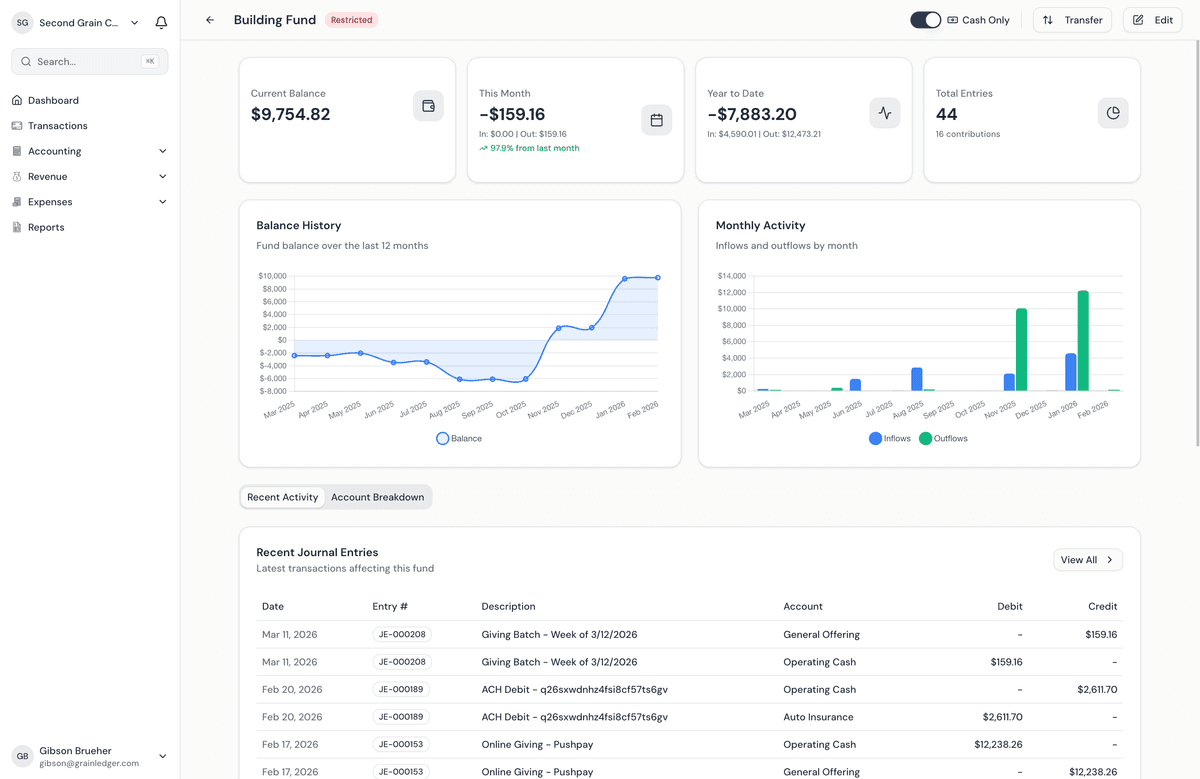
See Grain Ledger church accounting software for the full product overview, or compare accounting software for churches on fund balances, giving imports, and board-ready reporting.
Sooner or later you'll hand the books to the next treasurer, and every month someone else should be checking them. So the software has to make sense to that person and to whoever checks your work, not only to you. Grain Ledger keeps every gift in its fund, sends bills for approval before they're paid, and links every report number to the entries behind it.
The treasurer runs the money day to day. Church Law & Tax describes the job as counting and recording donations, keeping donor records, reconciling bank and digital giving accounts, paying bills and reporting to the board. The same article gives CPA Mike Batts's first principle of internal control: "Separate those who handle money from those who manage accounting and reporting."
Two church bodies spell out who should do each part: the United Methodist Church's finance agency (GCFA) in its internal-control guide, and the Presbytery of Los Ranchos in its treasurer training.
| Task | Who should do it | Where it happens in Grain |
|---|---|---|
| Count the offering | Two or more people who aren't related to each other, and not the treasurer | Outside the software. The deposit comes in with the bank import. |
| Record gifts | The treasurer | Gifts import from your giving platform into the funds you mapped |
| Approve bills | Someone other than the treasurer | Bills go through approval before they're paid, with a trail from invoice to payment |
| Pay bills | The treasurer | Grain warns you before a bill takes a restricted fund below zero |
| Reconcile the bank | A second person, not the one who made the entries, at least monthly | Bank transactions import through Plaid, ready to match, with an audit trail |
| Report to the board | The treasurer, every month | Statement of Activities, fund balances and budget vs. actual, with every number clickable down to its journal entries |
| Send donor statements | The treasurer or finance team, at least once a year | Annual giving statements, on every plan |
If you record the gifts, pay the bills and reconcile the bank, you're checking your own work, which is exactly what all three sources warn against. In Grain, the person who checks your work gets their own login. You can also give an outside accountant read-only access, and board members read-only views of reports and fund balances. For the controls in more detail, see our guide to segregation of duties.
A login, not a spreadsheet. Some churches rotate the job on purpose: a treasurer asking for software on r/churchtech said their church now moves people out after two or three years so they don't burn out, and wanted something easier for the next person. Between them, TechnologyAdvice's buyer guide and the Presbytery of Los Ranchos list what to hand over:
| Hand over | Why |
|---|---|
| The admin login and the billing | Someone has to own the account after you step down |
| Access for more than one person | So the books aren't locked if the treasurer can't be reached |
| New passwords | Change them whenever a treasurer leaves |
| The integration logins | The next treasurer needs to know what feeds the books |
| Your month-end checklist | So the close follows the same steps |
| Backup exports | A copy the church keeps outside any one login |
| Training | Someone walks the new treasurer through a real month |
The rest is already in the ledger, not in your head: every fund and its balance, every entry, and the trail from invoice to payment. Add the next treasurer as a user before you step down, and close one real month together. Starter's 3 users cover you, the person who checks, and the one taking over.
Our free month-end checklist and treasurer's report template belong in the hand-off too, along with our notes on training a new church treasurer.
Yes. Grain is the finance ledger, not a church management system or a giving platform. Planning Center stays where it is, and its gifts import into Grain. Pushpay, Rock RMS, Subsplash, OnlineGiving and Overflow connect the same way; see all integrations.
Starter is free for churches with up to $20,000 in monthly expenses, with 1 bank account. It's a plan, not a trial that expires, and it needs no credit card. Growth is $70 a month for churches with up to $1 million a year in revenue or expenses, with 3 bank accounts and unlimited users. Above that, Scale starts at $100 a month, with unlimited bank accounts. Details are on the pricing page.
Under $1 million a year but more than 3 bank and card accounts? Choose Growth and connect the 3 you use most. At a small church, the extra accounts are usually CDs or money market accounts that barely move. If you'd rather connect them all, Scale is $30 a month more.
And yes, you can bring the QuickBooks file. Every plan includes One-Click QuickBooks Migration, and our team helps with the move from QuickBooks or spreadsheets at no charge.
Grain Ledger is built to replace spreadsheet risk with fund accounting that scales.
You should not spend Sunday afternoons re-typing deposit slips. Import bank transactions, match giving, and categorize with rules that respect your fund structure.
Double-entry fund accounting keeps debits and credits in balance so restricted gifts never silently merge with operations.
Generate clear reports and drill from totals to journal entries when someone asks why a line moved.
Explore the product areas that match your needs, then start free or watch a short demo.
No credit card required. Most features are free for churches with up to $20k in monthly expenses.
For churches with up to $20k in monthly expenses
Free
For churches with up to $1M in annualized revenue or expenses
$70/month
Scale-based pricing for larger churches
From$100/month
+$50/month for each full $500k above $1M
 GrainPayroll
Pay your church staff and file payroll taxes, with every pay run posted to the right fund.
$50/month base
+ $10 per employee / month
Works with every accounting plan. No upgrade required.
Explore PayrollStarter
Growth
Scale
Grain's free Starter tier gives volunteer treasurers proper fund accounting without the learning curve. See it in action.