Church Budget Software: A Guide to True Fund Accounting
 By Gibson Brueher, Founder of Grain Ledger
Find the right church budget software. This guide explains fund accounting, key features, and how to choose a tool that ensures stewardship and transparency.
If you're on a church finance committee, you may already know the pattern. Giving is recorded in one place. Bank activity sits somewhere else. The budget lives in a spreadsheet that only one person fully understands. Then a board member asks a simple question: “How much is left in the missions fund?” Everyone pauses.
About Grain Ledger: This guide includes Grain Ledger, church fund accounting software built for designated gifts and ministry funds. It connects giving platforms (Planning Center, Pushpay, Tithely, Stripe), syncs bank activity with Plaid, and produces fund-level financial reports. Schedule a demo to see how it compares for your church.
See Grain Ledger for your church
Fund accounting, giving integrations, and bank reconciliation in one platform. Free migration support for churches switching from QuickBooks or Aplos.
That pause is the problem.
Most churches don't struggle because people are careless. They struggle because the tools don't match the job. A church isn't just tracking income and expenses. It's caring for gifts that were given with purpose, reporting clearly to leaders, and making sure ministry plans line up with what the church can support. That's why church budget software matters. The right system helps a church budget with clarity, not guesswork.
Why Your Church Needs More Than a Spreadsheet
A spreadsheet feels harmless at first. It starts with a few tabs, a monthly budget, and maybe a color-coded list of designated gifts. For a while, it works. Then the church adds a building fund, a missions offering, a youth retreat, and online giving. Someone updates one tab but forgets another. A formula gets overwritten. The treasurer spends Saturday night trying to explain why the bank balance and the fund balances don't match.

The issue isn't that spreadsheets are bad. The issue is that they aren't built to protect donor intent. Churches receive general offerings, but they also receive gifts meant for specific purposes. When those funds are tracked manually, mistakes become easier to make and harder to spot.
Where spreadsheets break down
A church treasurer usually needs to answer questions like these:
- What belongs to each fund: Not just total cash, but what portion is general, what portion is for missions, and what portion must stay in a building or benevolence fund.
- What changed this month: Board members want a report they can read quickly, not a workbook with hidden formulas.
- What still needs reconciliation: If giving records, bank records, and expense records are disconnected, someone has to piece them together by hand.
A purpose-built church budget software system handles those tasks inside the software itself.
Practical rule: If your budget only works when one trusted volunteer is available to explain it, your process is more fragile than it looks.
Church finance differs from ordinary small-business bookkeeping because it centers on fund accounting. Church accounting guidance explains that fund accounting separates general operating money from restricted gifts, designated offerings, missions, and building funds so each dollar is tracked by purpose rather than treated as one pooled balance, as described in this church accounting software guide.
Why this matters for stewardship
People don't give to a church because they want cleaner spreadsheets. They give because they trust the church to handle resources carefully. That trust deserves better than manual workarounds.
When a church uses software built for its actual financial structure, the budget becomes more than a planning document. It becomes a way to show the pastor, the elders, and the congregation that the church knows where money came from, what it was meant for, and how it was used.
That's not administrative fussiness. That's stewardship.
What Is True Fund Accounting
The easiest way to understand true fund accounting is to think in envelopes.
A household may keep separate envelopes for rent, groceries, and savings. The money all belongs to the same family, but each envelope has a purpose. Churches work in a similar way, except the envelopes are digital and the reporting has to be much clearer.
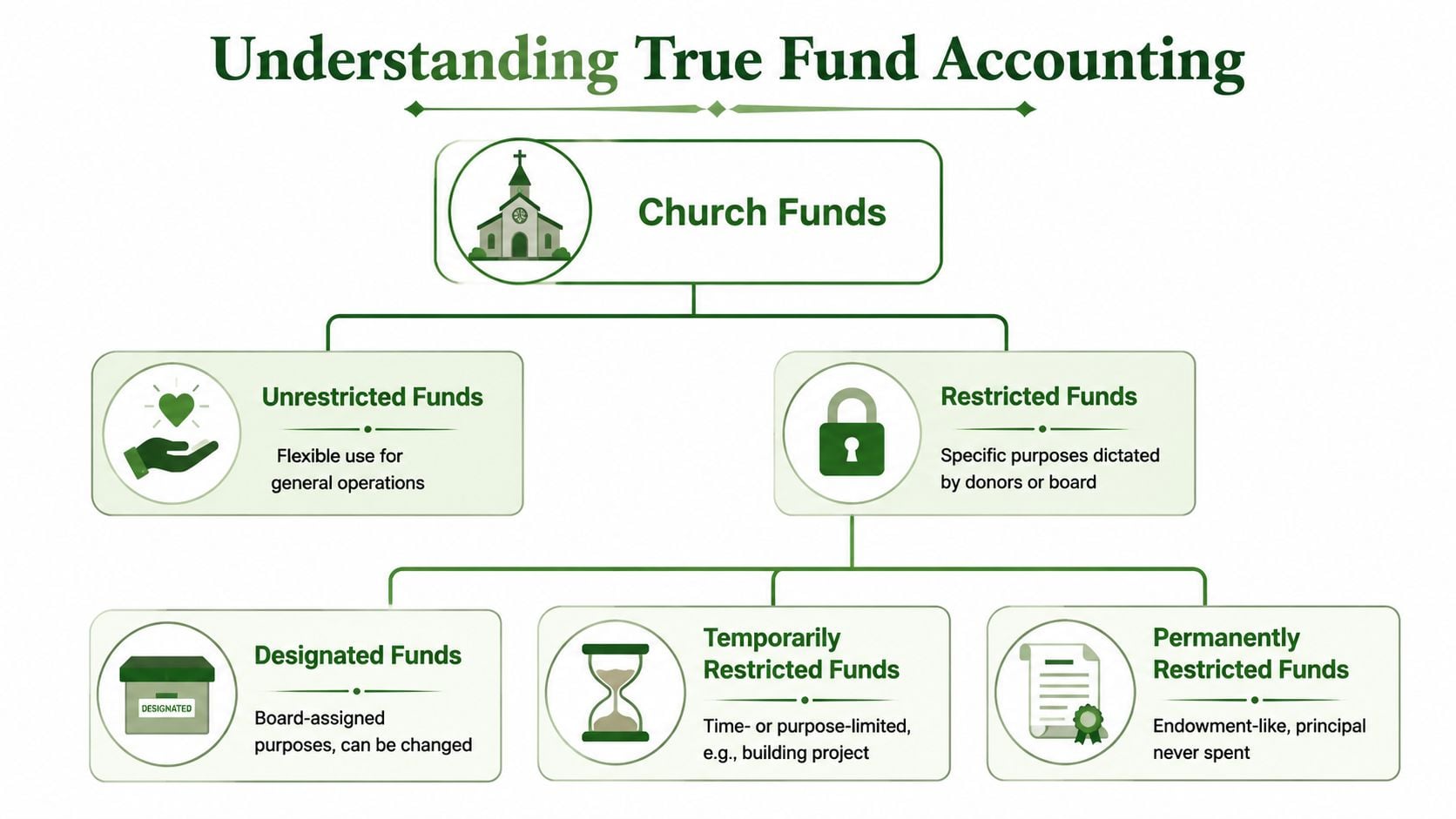
The buckets a church usually manages
Some church money is flexible. Some isn't.
- Unrestricted funds support general operations. This is the money leadership can use for ordinary ministry needs like utilities, staffing, and weekly operations.
- Designated funds are set aside for a purpose assigned by the church, such as a youth event or a future equipment purchase.
- Restricted funds carry a purpose that the church is expected to honor, such as a gift for missions or a building project.
The terms can confuse new committee members because all the cash may sit in the same bank account. But accounting and banking aren't the same thing. A bank account tells you where cash is held. Fund accounting tells you what that cash is for.
A healthy church finance process answers two questions at once. How much cash do we have, and what portion of that cash is actually available for this purpose?
What makes it “true”
Generic accounting tools often try to imitate fund accounting with classes, tags, or custom categories. Those can help organize reports, but they aren't the same as a ledger built around funds from the start.
A technically sound church budget system should be built on true fund accounting, where each budget functions as its own fund with separate income and expense heads, and every transaction remains dated, traceable, and reportable at the fund level. That design reduces end-of-year reconciliation work because treasurers can compare actuals to estimates continuously instead of rebuilding reports later, as explained in this guide to church accounting software architecture.
A simple example
Suppose a donor gives to the building fund. In a true fund-based system:
- The gift is recorded inside the building fund.
- The balance of that fund increases.
- Any spending for that project is recorded against that same fund.
- A report can show the full history of that fund without extra spreadsheet cleanup.
In a workaround system, the same transaction may depend on someone remembering to use the right tag, category, or note. That's where churches get into trouble. The software may store the transaction, but it doesn't naturally protect the logic of church finance.
Why new finance committee members often get stuck
The usual confusion is this: “If the church has enough money overall, why can't we just cover this expense from another fund for now?”
Because the question isn't only whether the church has cash. The question is whether the church has permission to use that cash for that purpose.
True fund accounting makes that visible. It doesn't just organize books. It helps leadership act faithfully with the resources they've been entrusted to manage.
Key Features That Simplify Church Finance
A common Tuesday problem looks small at first. Online giving shows one total, the bank shows another, and the accounting file shows a third number because someone has not finished entering the week's deposits. By the time the finance committee meets, the treasurer is no longer reviewing ministry decisions. They are trying to prove that three systems agree.
That is why good church budget software matters. Its job is to reduce re-entry, prevent misclassification, and keep every dollar connected to the fund and purpose it belongs to.
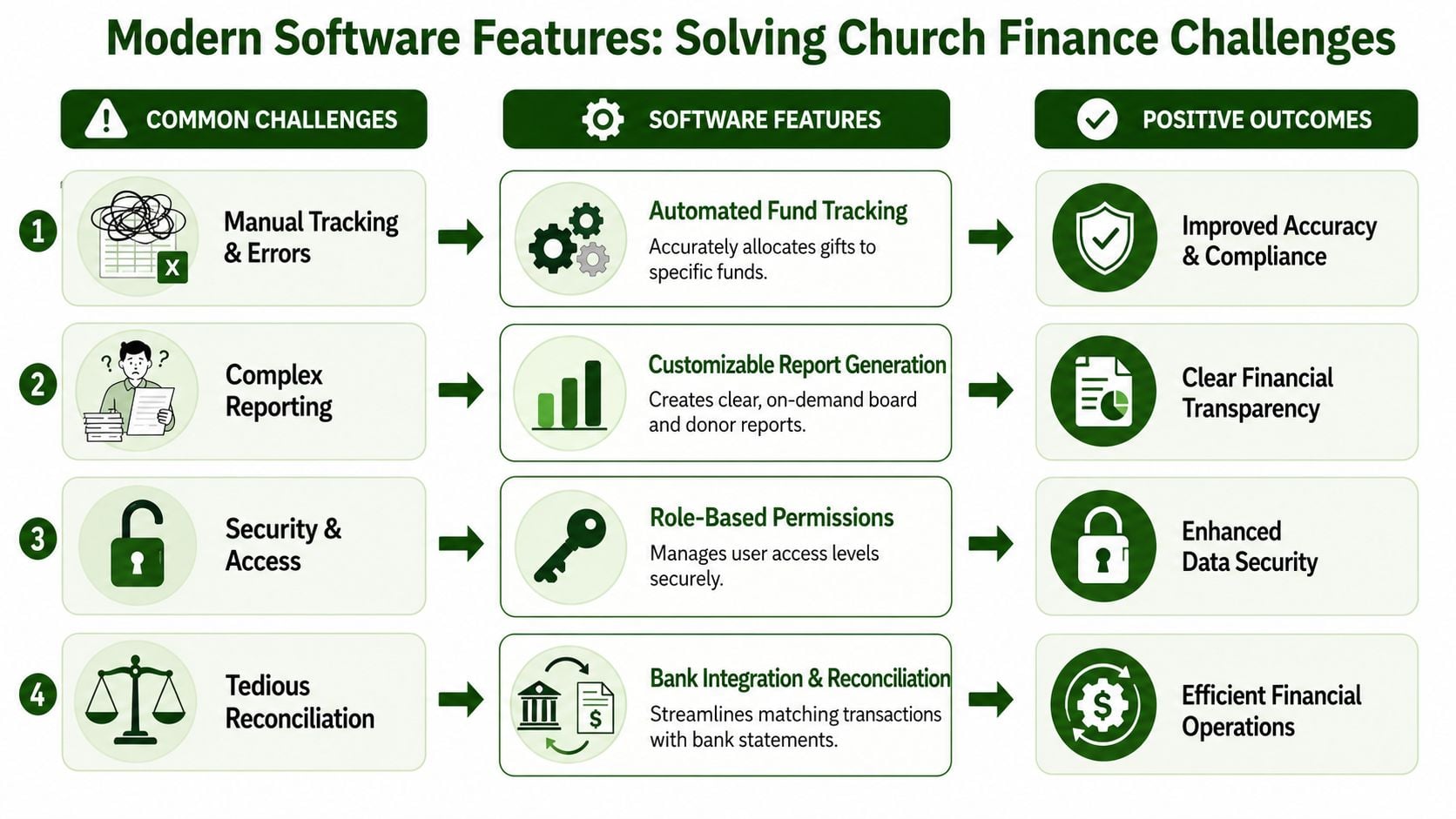
Connected workflows
Church finance breaks down when giving, banking, and bookkeeping live in separate lanes. A donor gives through one system. The deposit lands at the bank. Then someone has to type the same information into the accounting records and decide which fund received it. Each handoff creates another chance for delay or error.
Workflow automation closes those gaps. Church software coverage has pointed to integration across giving, banking, and accounting as a persistent need, with more churches looking for unified or tightly connected systems to reduce duplicate work and reconciliation risk, as noted in this discussion of integration and reconciliation in church systems.
For a new finance committee member, it helps to picture the process like passing offering plates through three different rooms. If no one labels the gift the same way each time, the church still has the money, but its records become harder to trust. Connected workflows keep that label attached from the moment the gift is received to the moment it appears on a report.
Features that solve real church problems
A long feature list can sound impressive and still leave the treasurer doing cleanup on Friday night. The better question is simple: what manual task does this feature remove?
-
Automated gift allocation records a donation to the correct fund at the point of entry. That protects designated giving and reduces the chance that restricted money ends up in the wrong place.
-
Bank feeds and reconciliation tools match recorded transactions to cleared bank activity. Instead of comparing lines one by one at month end, the church can catch missing or duplicate entries while the details are still fresh.
-
Budget-versus-actual reporting shows whether a ministry is spending according to plan. That gives leaders time to adjust before a small overage becomes a larger problem.
-
Fund-level reporting answers questions such as, “How much is left in benevolence?” or “What has been spent from the building fund?” without creating a custom spreadsheet for every board packet.
-
Role-based access and internal controls let staff and volunteers see what they need without opening sensitive records to everyone. A ministry leader may need their department budget. They do not need payroll details.
-
Integration with tools often grouped under small business accounting solutions matters because churches still rely on banks, payment processors, and reporting habits shaped by the broader accounting software market. The difference is that a church also needs those connections to respect funds, restrictions, and approval workflows.
Software earns its keep when it prevents cleanup.
Why workflow matters as much as reporting
Reporting gets attention because it is visible. Workflow is what determines whether the report can be trusted.
For example, a spreadsheet may show that the missions fund has money available. But if the deposit from Sunday has not been entered, or if one designated gift was posted to general operations by mistake, the report looks tidy while the underlying record is wrong. A true church finance system reduces that risk by carrying transactions through a repeatable process instead of relying on memory.
That is also why automation is not only about saving time. It protects stewardship. Fewer manual steps mean fewer opportunities to misstate a fund balance, overlook a restricted gift, or walk into a board meeting with numbers that still need repair.
What to look for in day-to-day use
A practical system should make ordinary work feel orderly, especially for a volunteer treasurer or a finance chair serving after hours.
| Need | What the software should make easy |
|---|---|
| Weekly giving | Record gifts once and place them in the right fund |
| Monthly review | Show budget versus actual by fund and category |
| Board reporting | Produce readable summaries without rebuilding spreadsheets |
| Reconciliation | Match bank activity with recorded transactions and flag exceptions |
| Oversight | Preserve a dated history of who entered, changed, or approved each item |
When these tasks are handled inside one consistent workflow, the finance committee spends less time tracing numbers backward and more time asking the right ministry questions.
Choosing the Right Church Budget Software
Not every accounting tool that can be used by a church is specifically shaped for church finance. That's the first thing to test.
If you're comparing options, it helps to remember that many products built for businesses assume one pooled financial story. A church usually needs several stories at once. General operations, missions, benevolence, building, and ministry budgets all need to remain visible without constant manual adjustment. If you want a useful primer on how ordinary business tools are evaluated, this overview of small business accounting solutions is helpful because it shows the assumptions many non-church systems start with.
Questions worth asking in every demo
Use plain questions. If the answer sounds vague, keep pressing.
- Does it use true fund accounting? If the tool depends on classes, tags, or custom workarounds, ask what happens when a restricted gift and a budget line need to be reported together.
- Can a volunteer learn it? A church shouldn't need a specialist for basic weekly tasks.
- Does it connect to your giving system and bank? Integration affects daily workload more than most feature lists admit.
- Will a board member understand the reports? Clear reporting matters as much as accounting correctness.
- Can it show budget versus actual at the fund level? This is often where generic systems become awkward.
Church accounting methods compared
| Capability | Generic Software + Workarounds | Purpose-Built System (like Grain Ledger) |
|---|---|---|
| Fund structure | Usually simulated with tags, classes, or manual tracking | Built around funds from the start |
| Restricted gifts | Easy to record, harder to protect consistently | Easier to track and report by purpose |
| Budgeting | Often separate from fund logic | More naturally tied to funds and reporting |
| Reconciliation | May require multiple exports and hand matching | Better suited to connected workflows |
| Board reports | Often need cleanup before presentation | More likely to produce readable church-specific summaries |
| Volunteer usability | Depends heavily on setup quality | More aligned with church terminology and tasks |
How to make the decision
Don't buy software because it has the longest feature page. Buy based on the kind of errors and delays your church keeps facing.
If your biggest pain is restricted fund visibility, test reporting first. If your biggest pain is reconciliation, test integrations first. If your biggest pain is handoff risk, ask how quickly a new treasurer could learn the system.
A good decision usually feels less like buying a product and more like removing a recurring burden from the finance team.
See It in Action How Grain Ledger Solves These Challenges
Sunday ends, online gifts are still coming in, and by Monday morning the treasurer is already answering questions. Did the youth retreat gift reach the right fund? Has the bank activity been matched yet? Can the finance committee see an updated balance before month-end? That is usually the moment a spreadsheet starts to show its limits. A spreadsheet can store numbers. It cannot carry the full process from gift to reconciliation to reporting without someone stitching the pieces together by hand.
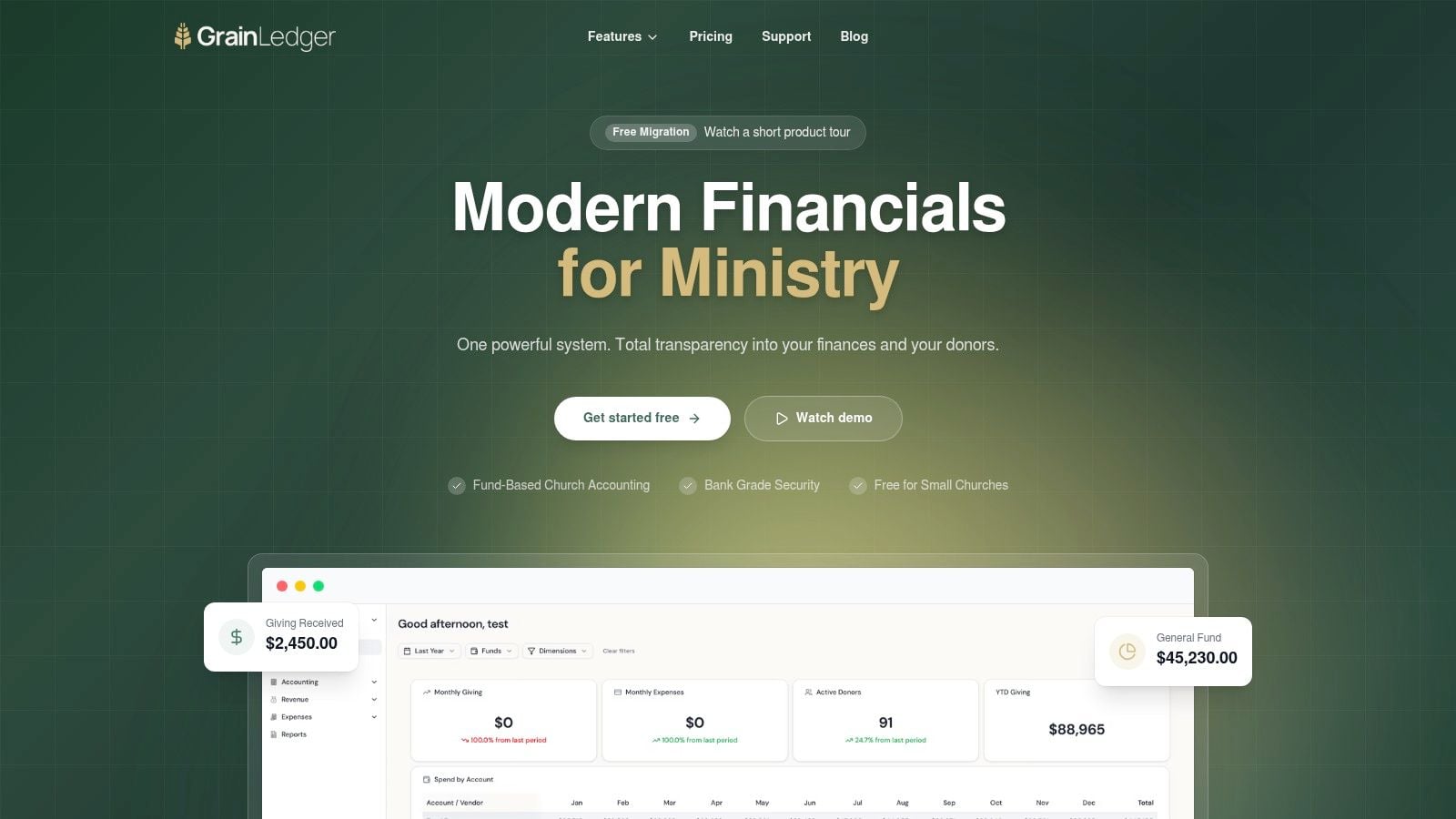
A church ledger needs to work more like a well-labeled set of offering envelopes than a blank grid. If a donor gives to missions, that gift should enter the books already tied to the missions fund. If a missions expense is paid later, that expense should reduce the same fund and appear in the same reporting trail. When those steps are connected inside one system, the committee spends less time asking, "Did we move that over yet?" and more time asking, "Are we using these resources wisely for ministry?"
Grain Ledger is one accounting option built for that structure. It uses native fund-based accounting and connects giving, banking, and accounting workflows inside one system. That matters because many church finance problems are not math problems. They are handoff problems. One person enters the gift, another exports data, another matches the bank transaction, and someone else updates the report. Each extra handoff creates another place for delay, confusion, or misclassification.
Scenario one with a restricted gift
A church receives an online gift for a youth retreat. The treasurer needs three things to happen with as little manual cleanup as possible:
- The donation lands in the correct fund
- The related bank activity is easier to reconcile
- The fund balance updates for reporting
In a spreadsheet process, those steps often live in separate places. The gift may be recorded in one report, the deposit may appear in the bank feed later, and the fund total may depend on a separate worksheet maintained by memory and routine. In a connected system, the workflow stays tied together. That reduces the quiet risk that restricted money will be reported late, placed in the wrong category, or corrected only after someone spots a mismatch.
Software should reduce reconciliation work, not create more of it.
When software mirrors how a church receives, classifies, and spends money, fewer decisions depend on memory and more of the record stays traceable.
Scenario two with a staff-heavy budget
Many churches carry a large payroll commitment. That means leaders need more than a single expense total on a monthly report. They need to see how compensation is tracking against budget, how that affects ministry capacity, and whether changes in one area are putting pressure on another.
A purpose-built dashboard helps here because it keeps budget-to-actual reporting close to the underlying fund structure. That sounds technical, but the benefit is simple. The finance committee can tell whether a decision is affordable in the right context. If staffing costs rise, leaders should be able to see the effect without rebuilding reports from several tabs and exports. Clear category visibility supports better questions earlier, before a shortfall becomes a scramble.
Here's a brief product walkthrough to make that more concrete.
Scenario three with month-end reporting
Month-end is where workflow design either saves time or consumes it. In a spreadsheet-heavy process, the treasurer pulls giving reports, bank statements, receipts, and budget sheets into one place, then starts matching lines and checking formulas. Even when the final report is accurate, the path to get there is fragile. If one export is missed or one category was coded differently, the whole picture has to be rechecked.
A fund-based system with automation keeps that work organized throughout the month. Transactions arrive with context. Bank matching is easier to review. Fund balances and budget performance are already closer to presentation-ready because the records were handled correctly at the start.
That is the practical value of workflow automation in church finance. It lowers manual reconciliation, reduces the chance of error, and gives the board reports it can trust without depending on one person to rebuild the story from scattered files.
Compare platforms in our best church accounting software guide for 2026, or review Grain Ledger church accounting software.
Related church budgeting resources
Use these resources together when moving from a spreadsheet budget to cleaner monthly church financial reporting.
- Free church budget generator - build a custom Excel budget template for your church
- Church budget template Excel guide - download and adapt a practical budget template
- Nonprofit budget examples - compare operating, program, and restricted-fund budget formats
- Grain Ledger budgeting - connect budgets to fund accounting and monthly reports
- Best church accounting software - compare fund accounting tools when the spreadsheet budget outgrows Excel
Budgeting as an Act of Stewardship
A church budget isn't only a spreadsheet with ministry labels. It's a record of priorities.
Every line in that budget says something about what the church is trying to sustain, protect, or pursue. Staff support, building care, outreach, benevolence, missions, children's ministry. These aren't just categories. They're ministry commitments. That's why the system behind the budget matters so much.
When a church uses budget software built around true fund accounting and connected workflows, it becomes easier to act with consistency. Leaders can see what money is available, what purpose it belongs to, and what choices are responsible. Donors can trust that their gifts are being handled with care. Treasurers can spend less time repairing records and more time supporting wise decisions.
Good stewardship isn't only about avoiding mistakes. It's about building processes that make faithfulness easier.
If your church is still depending on spreadsheets and workarounds, the next step doesn't have to be dramatic. It just needs to be honest. Where is your team losing time? Where are reports hard to trust? Where does one person's memory carry too much of the process?
Those questions usually point to the same answer. The church needs tools that match the calling.
If your church is ready for clearer fund tracking, simpler reconciliation, and reporting that reflects how church finance operates, Schedule a Demo for Grain. It's a practical next step toward stronger stewardship and more confident budgeting.
Ready to simplify your church finances?
Start free with church fund accounting, or watch a product demo first.