Benefits of Cloud Accounting for Modern Churches
Explore the top benefits of cloud accounting for churches. See how tools like Grain Ledger improve fund tracking, automate giving, and ensure compliance.
The stack of offering envelopes is still on the desk. The online giving report is open in one browser tab. A bank feed is open in another. Someone updated the missions spreadsheet last night, but the building fund sheet still has last month's ending balance. Finance committee meets tomorrow, and the question is predictable: “How much is available in each fund right now?”
About Grain Ledger: This guide includes Grain Ledger, church fund accounting software built for designated gifts and ministry funds. It connects giving platforms (Planning Center, Pushpay, Tithely, Stripe), syncs bank activity with Plaid, and produces fund-level financial reports. Schedule a demo to see how it compares for your church.
See Grain Ledger for your church
Fund accounting, giving integrations, and bank reconciliation in one platform. Free migration support for churches switching from QuickBooks or Aplos.
That's the moment many church treasurers know too well.
The problem usually isn't commitment. It's the patchwork. Desktop software in one place, spreadsheets in another, giving data somewhere else, and too much of the process living in one person's memory. When volunteers help, the handoff gets harder. When board members ask for cleaner reporting, the pressure rises. When restricted gifts come in, the stakes get higher.
Cloud accounting changes that operating model. It doesn't just move bookkeeping onto the internet. It replaces delay, duplicate entry, and disconnected reporting with shared access, current records, and clearer stewardship. For churches, that matters because the work is never just accounting. It's trust, accountability, and making sure designated gifts are handled the way they were intended.
The Sunday Morning Scramble Is Over
Sunday mornings create a strange mix of joy and administrative stress for many churches. The service ends, people greet each other in the lobby, and somewhere behind the scenes a treasurer starts piecing together what came in, where it belongs, and how quickly it needs to be reported.
Cash and checks need to be counted carefully. Online gifts need to be matched to the right categories. A missionary support gift can't land in general operations by mistake. A benevolence offering shouldn't disappear into a generic income line and get sorted out “later,” because later often turns into month-end.
For a long time, churches tolerated this because it was familiar. One spreadsheet tracked designated giving. Another tracked ministry budgets. The desktop accounting file lived on an office computer, so if the bookkeeper wasn't in the building, work waited. If the pastor asked for an updated balance before a meeting, someone had to say, “I'll pull that when I'm back in the office.”
The headache isn't only data entry. It's the lag between what happened and what leadership can confidently see.
That lag affects more than convenience. It slows decisions about ministry spending, creates tension before board meetings, and makes volunteer finance teams nervous that they've missed something. In churches, where people give with trust and often with specific intent, that uncertainty weighs on everyone involved.
Cloud accounting replaces the old cycle with a live system. Instead of passing files around, authorized people work from the same records. Instead of waiting for manual updates, leaders can review current information. Instead of rebuilding reports by hand before every meeting, the system keeps the books moving throughout the week.
When that system is built for church finance, the shift is even more noticeable. The monthly close feels less like cleanup after chaos and more like a review of work that stayed organized the whole time.
What Is Cloud Accounting for Churches?
A church treasurer often needs answers from three different places at once. The giving platform shows what came in. A spreadsheet tracks designated balances. The accounting file holds expenses, but only if the right person has updated it. Cloud accounting for churches puts that work into one live system so the people responsible for stewardship are not piecing the story together by hand.
Cloud accounting means the books are hosted online rather than tied to one office computer. Authorized staff, treasurers, and finance volunteers can sign in securely, work from the same records, and see current balances without passing files around or waiting for someone to return to the building.
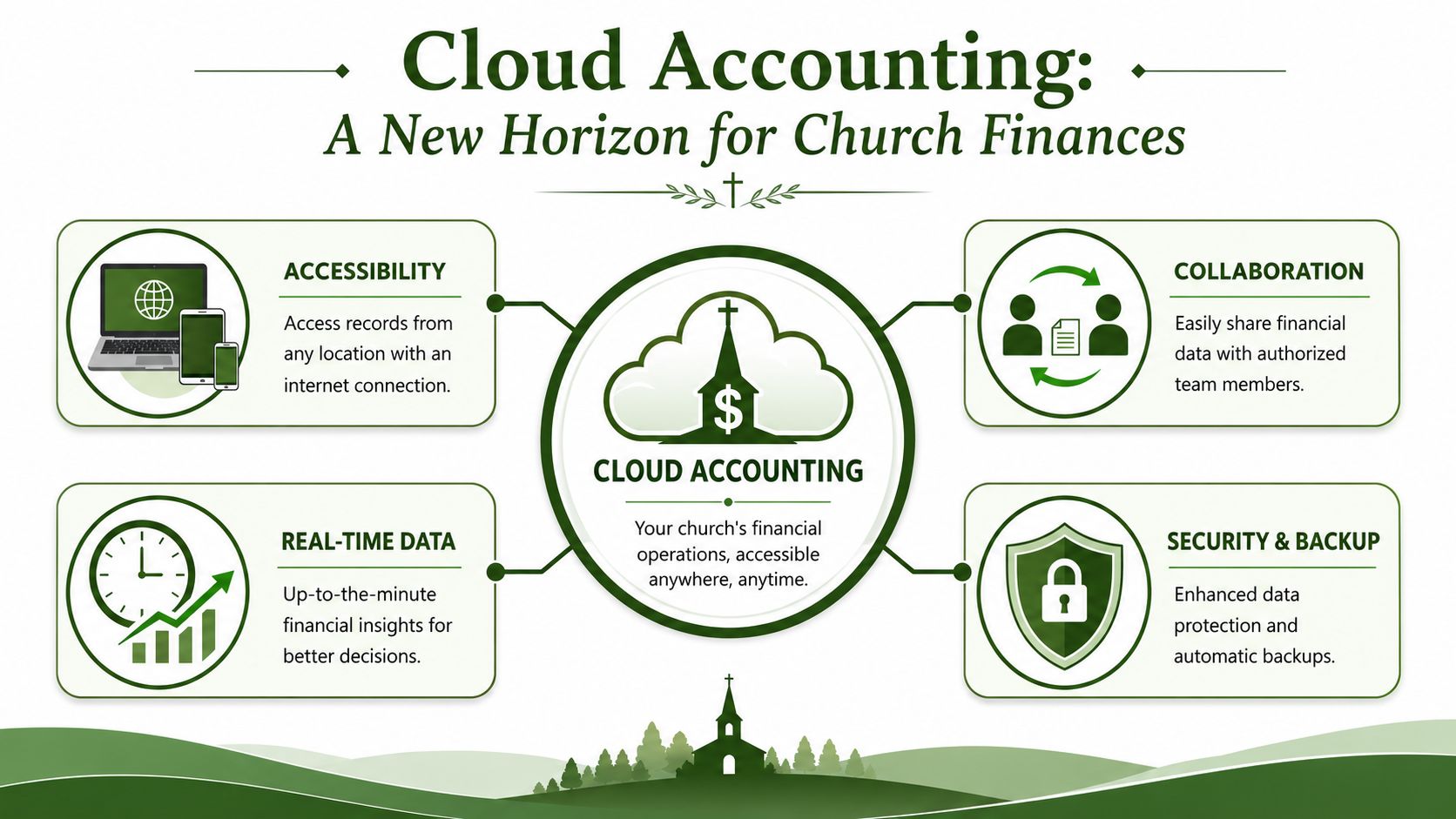
A helpful overview of how this model works appears in this guide to online finance management software, especially if you're coming from desktop tools and want the non-technical version first.
What makes church cloud accounting different
Church accounting has a different job than business bookkeeping. A business mainly asks whether revenue exceeds expenses. A church also has to answer whether designated gifts were received, held, spent, and reported according to donor intent.
That is why church cloud accounting should start with funds, restrictions, and accountability. General fund, missions, benevolence, building, camp scholarships, memorials. Those categories are not just reporting labels. They define what leaders can approve, what the board needs to review, and what members expect the church to handle carefully.
A general accounting app can be used for a church, but the trade-off shows up quickly. Staff create workarounds. Volunteers keep side spreadsheets. Reports need extra checking before a finance committee meeting because the software was built around departments or tags, not true fund balances.
Where generic cloud systems create extra work
Churches usually feel the mismatch in a few predictable places:
- Restricted giving gets tracked outside the ledger because the software does not treat funds as first-class records
- Board reports require manual cleanup to show what is available in each ministry or designated fund
- Volunteer handoffs become harder because the system's structure does not match how churches talk about money
- Year-end review and audit prep take longer because support for fund activity is scattered across reports and spreadsheets
I have seen churches call this “doing a little extra admin.” It is more than that. It creates uncertainty about whether a reported balance is, in fact, spendable, temporarily parked, or restricted for a specific purpose.
Practical test: If the system cannot show the origin, current balance, and use of a restricted gift inside the same fund structure, it is still asking the church to do part of the accounting outside the software.
Purpose-built church tools such as Grain Ledger are designed around that reality. They keep fund accounting, designated giving, and shared access in the same place, which is the difference between software that merely stores transactions and software that helps a church explain its stewardship clearly.
Core Benefits for Financial Stewardship
Good stewardship requires more than getting transactions entered quickly. Church leaders need to answer plain questions with confidence. What came in for benevolence? What is still available in the building fund? Which gifts can be used now, and which must stay set aside? Cloud accounting helps when those answers are visible inside the books instead of buried in a spreadsheet or waiting on one person to clean up a report.
A broader roundup of cloud accounting insights for professionals covers the usual advantages well. Churches should test those benefits at the fund level, because that is where stewardship questions live.
Real-time visibility changes board conversations
A finance committee meeting goes better when no one has to say, “Let me verify that and get back to you next week.”
Current reporting changes the tone of those conversations. If the youth pastor asks whether camp scholarships still have room, or the board wants to approve a furnace repair, leaders can review current balances and recent activity without waiting for the books to catch up. The value is not speed alone. The value is being able to explain the answer and show the trail behind it.
Churches feel this most with designated and restricted money. A missions balance that looks healthy on paper may already include gifts meant for specific trips or commitments. A cloud system helps sort that out while decisions are being made, not after minutes have been written and promises have been made.
Automation reduces the hand-entry mistakes churches know too well
Many church bookkeeping errors start in ordinary places. Someone downloads a giving report, reformats it, and posts it by hand. A volunteer keys bank activity from a statement after the month has closed. A recurring payment gets missed because the person who usually enters it was out that week.
NetSuite notes that cloud platforms can import bank and credit card transactions, schedule reports, handle recurring entries, and post activity with less manual effort in spreadsheet-heavy workflows NetSuite's overview of cloud accounting benefits.
For a church, that often means:
- Bank feeds reduce line-by-line re-entry from monthly statements
- Giving integrations cut down on manual donation batch posting
- Scheduled reports help treasurers prepare packets before board meetings
- Recurring entries keep regular support, rent, and ministry payments from being missed
The practical gain is consistency. Fewer handoffs depend on memory, and fewer reports need last-minute repair.
Fund-level control protects trust
Church accounting rises or falls on whether the system keeps ministry money in the right buckets. General cloud accounting features help, but churches need more than shared access and cleaner dashboards. They need records that preserve donor intent and show how each fund has been used over time.
That is the point many generic systems miss. Tential notes that cloud accounting can improve collaboration and reduce manual work, but those benefits are incomplete if the reporting structure was not built around the organization's real needs from the start Tential's perspective on cloud accounting benefits and challenges.
For churches, the essential test is simple. Can the system show the source, balance, and use of restricted gifts without exporting data to another file? If not, the church is still relying on side records to prove its stewardship.
Restricted giving stays restricted only when the accounting structure enforces it.
Purpose-built church software matters here. Grain is designed around native fund accounting for churches, with giving activity, bank activity, and reporting in the same workflow. That makes it easier to see whether a balance is available for spending, committed to a ministry purpose, or held because of donor restrictions.
Volunteer collaboration works better when access matches the job
Many churches do not have a full in-house accounting department. They have a treasurer, a bookkeeper who works limited hours, a volunteer who helps with deposits, and board members who need reports but should not be editing transactions. Cloud accounting fits that reality better because the work is shared in one current system instead of passed around as files.
Clear roles matter. One person can review contributions. Another can reconcile accounts. A pastor or board chair can read financial reports without having permission to change the books. That separation reduces confusion, shortens handoffs, and gives churches a cleaner record of who did what.
Improving Efficiency and Lowering Church Costs
A church board usually asks the right question before approving new software. What will this save us?
For churches, the answer is broader than the monthly subscription. The savings show up in fewer staff hours spent correcting entries, less dependence on one office computer, and faster reporting when a pastor, finance committee, or elder board needs answers before the next meeting.
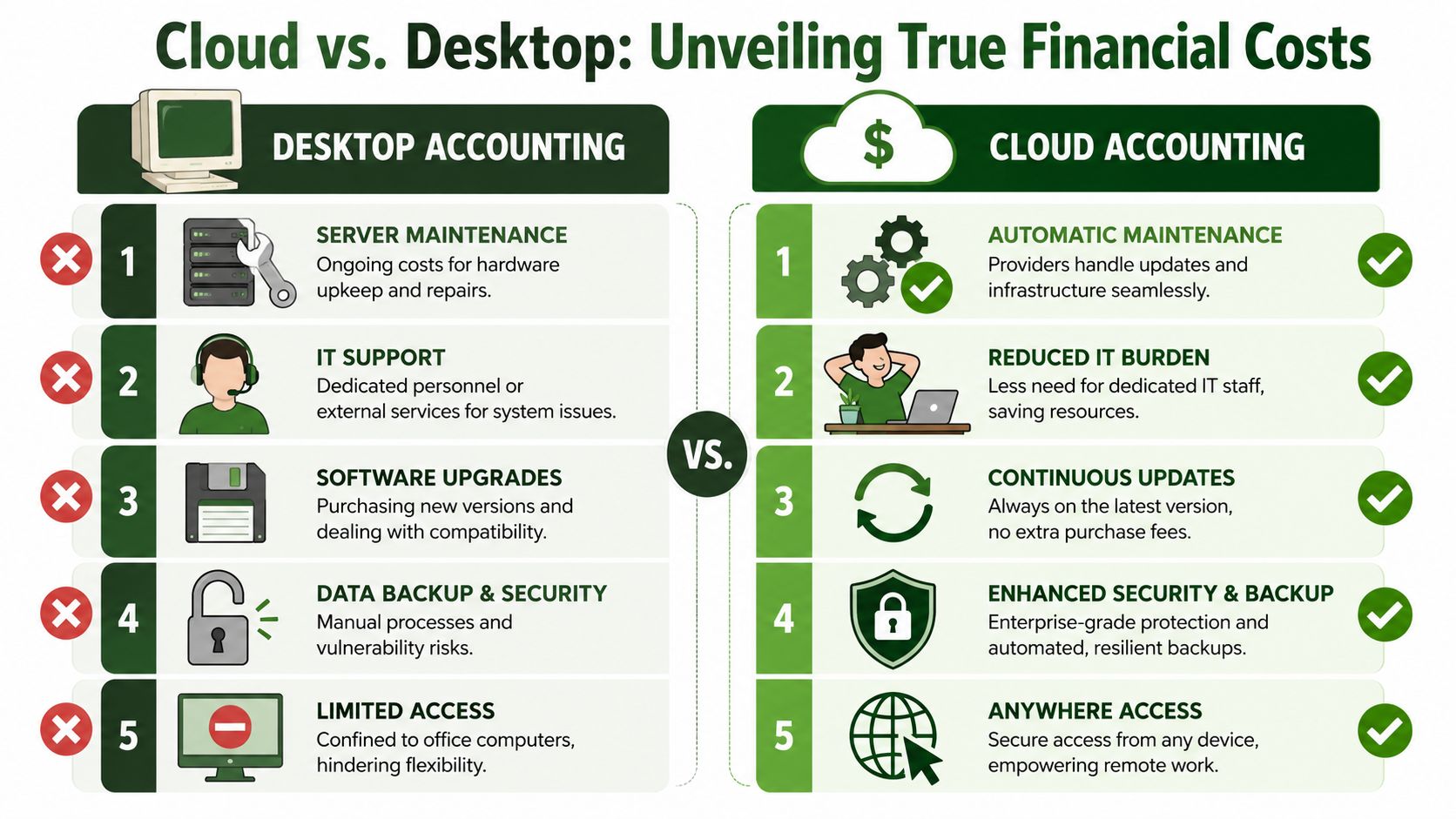
Industry guidance often describes the shift in straightforward terms. Cloud accounting moves churches away from paying for local servers, software installs, backups, and ongoing machine-specific maintenance, and toward subscription pricing with less infrastructure to manage. It also points to reduced manual reconciliation work and faster month-end close as common financial gains Windes on cloud accounting software benefits.
Where churches actually feel the savings
Churches rarely experience inefficiency as one large expense. They feel it in small interruptions all month.
- Staff and volunteer time: Donation batches get re-entered, restricted gifts get checked against side spreadsheets, and someone spends part of Friday rebuilding a report that should already be available.
- Office dependency: If the books live on one desktop, basic tasks slow down when that computer is unavailable or the person who knows the filing system is out.
- Delayed decisions: Board members hesitate to approve spending when fund balances are a week or two behind.
- Rework: A transaction posted to the wrong fund or account often gets fixed more than once, especially when multiple people touch the books by email.
I have seen this pattern in churches with faithful volunteers and good intentions. The problem usually is not effort. It is a process that asks people to keep too much straight by hand.
A church often notices the cost of inefficient bookkeeping when a board packet is late, a designated balance has to be verified twice, or a ministry leader asks whether money is actually available to spend.
Church accounting the old way vs the cloud way
| Task | The Old Way (Desktop/Spreadsheets) | The Cloud Way (Grain Ledger) |
|---|---|---|
| Donation posting | Export, clean up, then enter manually | Giving data flows into the accounting workflow with less re-entry |
| Bank reconciliation | Compare statements and books line by line by hand | Imported bank activity speeds review and matching |
| Fund reporting | Build separate spreadsheets for designated balances | Fund-based reports are easier to review in one system |
| Board packet prep | Rebuild reports before each meeting | Current records make reporting easier to assemble |
| Access for leaders | Limited to office file access or emailed PDFs | Authorized users can review information from anywhere |
The operational gain is attention returned to ministry finance work that needs judgment.
For many churches, the strongest return is not a neat dollar figure. It is the time the treasurer, administrator, or bookkeeper gets back to review unusual transactions, answer board questions with confidence, and catch problems before they become awkward conversations. Grain Ledger fits that church workflow especially well because fund activity, reporting, and day-to-day bookkeeping stay connected instead of being split across accounting files and side records.
That kind of efficiency improves stewardship. Fewer handoffs mean fewer mistakes. Faster access to current numbers helps church leaders make decisions while the information is still useful.
Strengthening Security and Auditability
The treasurer is home after the board meeting when a pastor texts: Why did the youth retreat fund balance change since last month? In a desktop system, that question can turn into a file hunt, a phone call to the volunteer who posted deposits, and a lot of guesswork about what changed and when. In a cloud system built for church accounting, the answer should be visible in the transaction history, with the supporting detail attached.
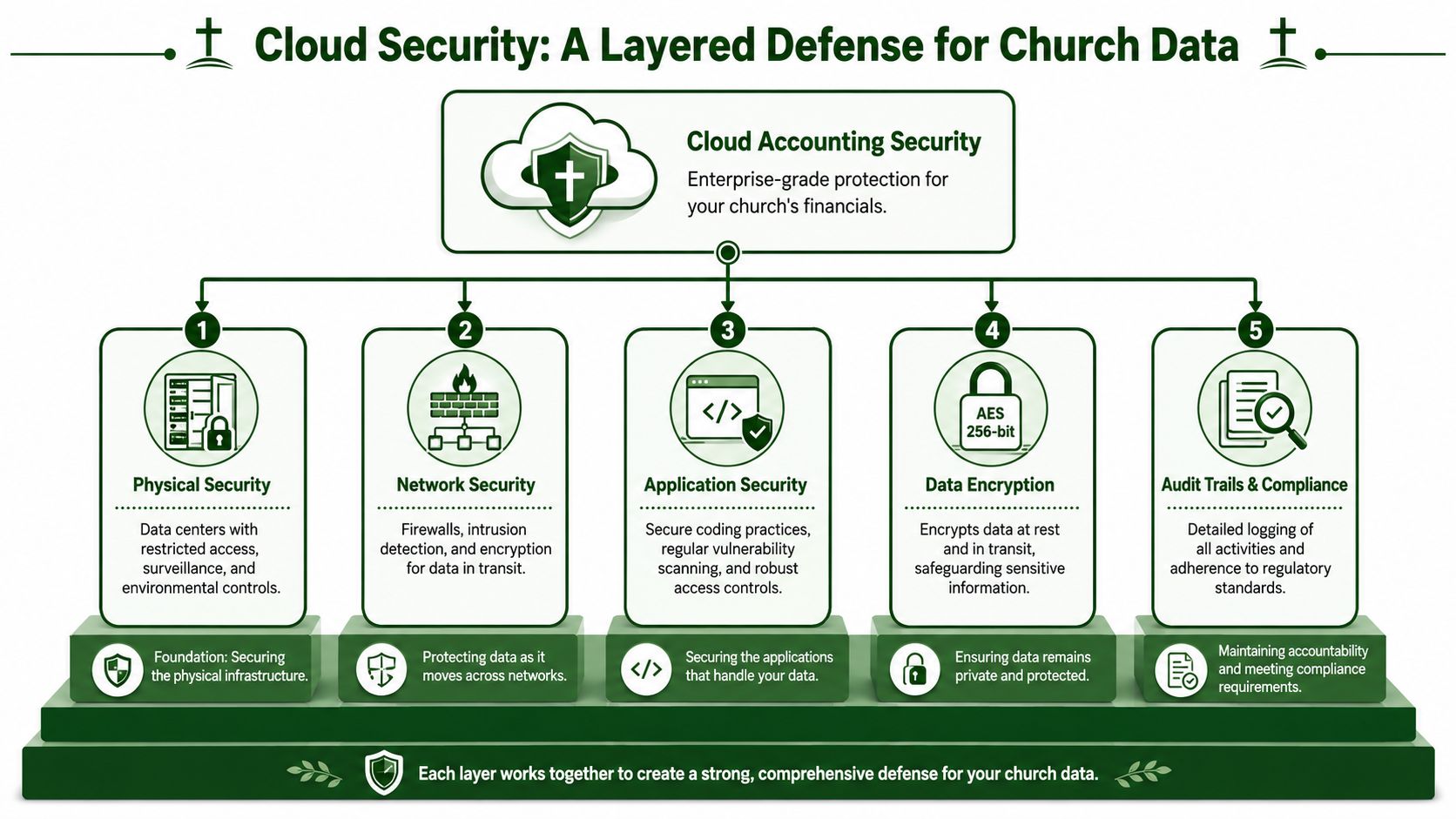
Security is only part of the question
A file stored on the church office computer can feel safer because it is familiar. Familiarity is not a control. In many churches, local accounting records still depend on one machine, one backup routine, and one person who knows where everything is. That setup creates quiet risk, especially when volunteers help with bookkeeping or staff roles change.
Cloud accounting improves that picture, but wise church leaders should ask more than whether data is backed up. They should ask what happens during an outage, after a password compromise, or when a bank feed stops syncing and no one notices for a week.
EisnerAmper makes that point well in its overview of cloud-based accounting. Their analysis shows that backups and vendor security matter, but resilience planning matters too, especially when your accounting process depends on internet access, connected apps, and outside providers EisnerAmper on cloud-based accounting and resilience planning.
Churches should treat that as a stewardship issue, not just an IT issue.
A stronger setup includes clear user roles, regular review of login access, documented approval steps, and a simple plan for what to do if the system or an integration is temporarily unavailable.
Audit trails build trust inside the church
Security gets attention. Auditability is often what saves time and prevents tension.
Church finance work involves restricted gifts, designated funds, reimbursements, benevolence payments, and board questions that can surface weeks after an entry was posted. If the books only show the final number, the treasurer still has to reconstruct the story behind it. If the system records who entered a transaction, who changed it, and what support was attached, the review process gets much easier.
That matters during an external review. It also matters on an ordinary Tuesday when a finance committee member asks why the missions balance moved.
Practical controls usually look like this:
- Role-based access: Pastors, administrators, bookkeepers, and board members can each see what they need without sharing full editing rights.
- Change history: Adjustments can be traced back to a person, date, and action instead of relying on memory or side notes.
- Attached documentation: Receipts, invoices, and approval records stay with the entry instead of sitting in an email chain.
- Fund-level clarity: Changes affecting restricted or designated balances are easier to review in context.
For churches, that last point matters more than many software vendors admit. A generic accounting system may track transactions well enough, but church leaders still need to show whether donor-restricted money was received, spent, and reported properly. Grain Ledger fits that need better because fund activity and reporting stay tied to the accounting record instead of being managed partly in spreadsheets.
Clear audit trails reduce the need for “trust me, I fixed it” accounting.
That is good for annual reviews, and it is just as good for volunteer confidence. People are far more willing to help when the process is clear and the controls are visible.
Accessibility works best with boundaries
Some church leaders hear “cloud access” and picture too many people in the books. The better model is controlled visibility.
A finance chair may need read-only access before a board meeting. A volunteer bookkeeper may need permission to enter bills but not change prior-period transactions. A pastor may need summary reports without access to payroll details or donor records. Good cloud accounting supports those boundaries without forcing the treasurer to email files back and forth or maintain multiple versions of the truth.
As noted earlier, accessibility is one of the practical reasons organizations move to cloud tools. For churches, the value is not broad access for everyone. The value is giving the right people the right level of access while keeping a clean record of every action taken.
That combination of visibility, control, and traceable history is what strengthens trust around church finances.
A Practical Guide to Making the Move
A lot of church finance transitions start the same way. The treasurer is tired of rebuilding board reports by hand, a volunteer bookkeeper has one version of the file on a home computer, and nobody wants to switch systems two weeks before the annual budget meeting. The move feels risky because the current process, however clumsy, is familiar.
Most churches do not need a complicated software rollout. They need a clean plan, a realistic timeline, and a chart of accounts and fund structure that match how ministry money is received, restricted, spent, and reviewed.
Start with the reports your church must produce
Begin with the questions the church needs to answer every month.
Can the board see fund balances without asking for a custom spreadsheet? Can staff tell whether a designated missions gift has been used? Can the finance committee review budget-to-actual results without waiting on manual cleanup? Those reporting needs should drive the software decision.
That order matters. Churches often get distracted by long feature lists and polished demos, then discover later that restricted gifts still have to be tracked outside the system. If the reports are wrong or hard to produce, the software is wrong for the church.
Use a simple four-step path
Define the current pain points.
Be specific. Write down where work slows down or errors creep in. That may be reconciling the bank account, posting giving batches, tracking restricted balances, or preparing board packets from several files.Pick a sensible cutover date.
The start of a fiscal year is usually the cleanest option because it avoids split-period reporting and reduces confusion during comparisons. A midyear move can still work, but it takes more discipline around opening balances and historical reports.Set responsibilities before go-live.
Decide who enters bills, who reviews donations, who completes reconciliations, and who approves reports. Churches that rely on volunteers need this written down. Good intentions are not a control process.Train people on the tasks they perform. A volunteer counters team does not need a tour of the whole system. They need to know how deposits are recorded correctly. A finance chair needs to know where to find reports and how to read them. Training works better when it follows real church workflows.
Choose tools that reduce repeat work without adding workarounds
The best move is not the platform with the longest feature list. It is the one that removes the repeat jobs that drain time every week.
Look closely at the workflows that usually create side spreadsheets or back-and-forth emails. How does giving data enter the books? How are bank transactions reviewed and matched? Can the system handle funds as part of the accounting record, or does the church have to simulate fund accounting with classes, tags, or manual exports? Those details shape whether month-end becomes calmer or stays messy under a newer interface.
For churches, that last question matters more than it does for a typical small business. The issue is not just general bookkeeping. It is whether the software can show that designated money was received into the right fund, spent for the right purpose, and reported clearly to leadership.
When you compare options, ask direct questions:
- Giving integration: Does donation activity flow into accounting cleanly, or does someone re-enter it?
- Bank reconciliation: How much of the import and matching process is automated, and where does human review still matter?
- Fund accounting: Are restricted and designated funds built into the structure, or handled through workarounds?
- Board reporting: Can the system produce usable ministry and fund reports without spreadsheet cleanup?
- Permissions: Can volunteers, staff, pastors, and board members each have the right level of access?
If the church wants a purpose-built option, Grain Ledger is a sensible fit. It is built around church fund accounting, connected giving and banking workflows, and reporting that reflects ministry funds rather than generic business categories.
Compare platforms in our best church accounting software guide for 2026, or review Grain Ledger church accounting software.
Related church accounting software resources
If you are comparing software, these pages map the main decision points: fund accounting, QuickBooks limits, pricing, and migration.
- Best church accounting software (2026 comparison) - canonical guide comparing 12 church accounting platforms
- Church accounting software product page - see Grain Ledger for fund accounting, giving, and bank reconciliation
- Small church accounting software - see the product page built for volunteer treasurers and church admins
- Fund accounting features - review how Grain Ledger tracks designated funds
- QuickBooks for churches - understand workarounds and when to switch
- Free church accounting software - compare free options and upgrade triggers
- Grain Ledger pricing - compare plans for small and growing churches
- Start free - try fund accounting, giving imports, and bank reconciliation together
Your Path to Clearer Financial Stewardship
The benefits of cloud accounting matter because churches carry a different kind of responsibility. They aren't just trying to close the books faster. They're trying to handle designated gifts faithfully, answer leadership questions clearly, and show the congregation that stewardship is taken seriously.
That's why the move away from spreadsheets and desktop files is bigger than convenience. It gives the church a cleaner operating rhythm. Fewer manual handoffs. Better visibility. Stronger controls. Reporting that reflects how ministry money is organized.
It also brings a healthy realism. Cloud systems improve access, collaboration, backup, and automation, but they still require thoughtful setup and resilience planning. As discussed in broader industry coverage, the conversation can't stop at convenience. Churches should also think through outages, identity risks, and integration dependencies so the system stays dependable when something goes wrong.
When the accounting structure fits the church, financial oversight gets calmer. Board meetings get clearer. Audits get easier. Restricted gifts are easier to follow from receipt to use. The result is not just cleaner books. It's stronger trust.
If your church is tired of stitching together spreadsheets, desktop files, and manual fund tracking, take a look at Grain. It's built for church finance, with fund-based accounting that reflects how congregations manage designated money, reporting, and stewardship. Starting free is a practical next step if you want clearer workflows and more confident financial oversight.
Ready to simplify your church finances?
Start free with church fund accounting, or watch a product demo first.