Church Accounting Software for Mac: The 2026 Guide
Searching for church accounting software for Mac? Our 2026 guide explains fund accounting, native vs. web apps, and what features your ministry truly needs.
If you've just been asked to help oversee church finances and you use a Mac, your first instinct is usually simple: find software that works on macOS. That sounds reasonable. It's also where a lot of churches make the wrong decision.
See Grain Ledger for your church
Fund accounting, giving integrations, and bank reconciliation in one platform. Free migration support for churches switching from QuickBooks or Aplos.
A finance committee rarely struggles because the software won't open on a Mac. The actual trouble starts later, when donations for missions, benevolence, or a building project get tracked in spreadsheets on the side because the accounting system doesn't handle restricted funds cleanly. That's when month-end reporting gets slow, board packets require manual cleanup, and confidence in the numbers starts to slip.
Some general Mac accounting roundups can help you understand the platform side of the conversation, including broader top Mac accounting solutions used by businesses. But church finance has a different standard. The question that matters is not just whether a tool runs on a Mac. It's whether it preserves restricted funds natively and produces board-ready fund reports without relying on spreadsheet workarounds. Some so-called Mac-compatible options still push churches toward Windows emulation such as Parallels, which solves access but not workflow fit, as reflected in PowerChurch's Mac compatibility discussion.
That distinction shapes every good software decision for a church. Mac-compatible is a technical requirement. Church-native is an operational requirement. If a platform clears the first bar but misses the second, the finance office still ends up doing manual reconciliation between giving records, bank activity, and fund balances.
Beyond Compatibility The Real Challenge for Church Finance on Mac
Most churches searching for church accounting software for mac are trying to solve three problems at once. They want software that works on their devices, software that volunteers can learn, and software that keeps donor intent clear from receipt to report.
Compatibility is the easy part
Mac support used to be a bigger obstacle. Historically, church software for Mac often meant either finding a rare Mac-friendly option or forcing a Windows tool into a Mac environment. Today, compatibility alone doesn't tell you much about whether the accounting is built for ministry realities.
The software can be technically available on a Mac and still leave the treasurer doing church accounting by hand.
That's why product lists are often less useful than they appear. They answer, “Can I log in?” They don't always answer, “Will this system keep our designated gifts straight and our reports clean?”
Church finance breaks generic bookkeeping
A church isn't a retail store, a consulting firm, or a contractor. You're not just tracking income and expenses by category. You're stewarding money that often arrives with a purpose attached to it.
That means your accounting system has to reflect ministry structure. General offerings, youth camp donations, missions support, staff payroll, designated benevolence gifts, and capital campaign activity all need to be represented in a way that protects clarity. If the software treats those as simple labels or after-the-fact report filters, you'll feel the weakness quickly.
A modern church-specific platform such as Grain Ledger is designed around fund-based accounting from the start, rather than treating church workflows like a modified small-business file. That matters more than whether the icon sits in your Mac dock.
What good stewardship looks like in software
When software fits a church well, a few things happen:
- Restricted money stays visible: Leaders can see what belongs to a specific purpose.
- Reports make sense to non-accountants: Board members can read them without translation.
- Volunteers don't need workaround systems: The books live in one process, not five.
Those are the standards worth using when you evaluate options.
Why Fund Accounting is Non-Negotiable for Churches
Churches need more than bookkeeping. They need fund accounting.
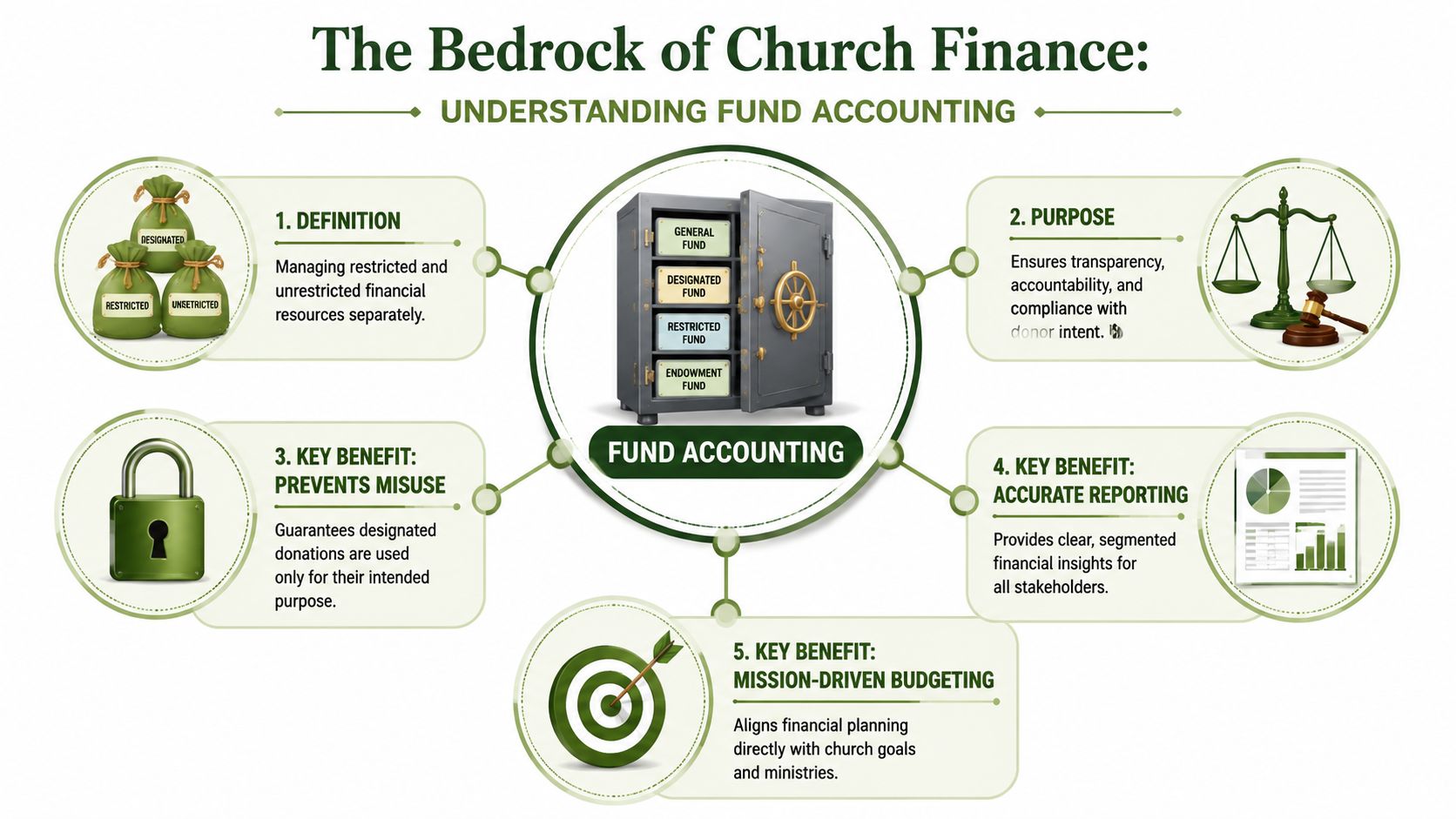
The simplest way to explain it is to think in envelopes. One envelope holds general operations. Another holds building gifts. Another holds missions. Another holds benevolence. The money may sit in the same bank account in practical terms, but the accounting has to show which dollars belong to which purpose.
Restricted and unrestricted are not the same
Some church income is unrestricted. A general offering usually falls into that category. Church leadership can apply it to ordinary ministry operations.
Other gifts are restricted. If a donor gives to missions, a building project, or a designated benevolence effort, that money should remain attached to that purpose in the accounting records. A system that blurs those lines creates risk, even when everyone involved means well.
Practical rule: If a donor would be surprised by how the gift appears in your reports, your accounting structure needs attention.
In these scenarios, generic small-business tools often start to strain. They can record transactions. That part is easy. The harder part is preserving donor intent inside the accounting architecture so that the reports remain accurate without manual correction.
Why the architecture matters
Pushpay's overview of modern church accounting argues that true fund accounting is the most technically important feature and that modern software should integrate giving data directly into the correct funds. That reduces manual errors, improves auditability, and builds confidence in reports that show the status of restricted gifts, as described in Pushpay's discussion of modern church accounting software.
That cause-and-effect chain matters in everyday church work:
- Donations come in through a giving platform.
- The accounting system records them to the right funds.
- Staff and volunteers do less manual re-entry.
- Reports reflect the actual status of each fund.
- The board can govern with confidence.
If any one of those steps breaks, spreadsheets start multiplying.
What fund accounting should feel like
Good fund accounting shouldn't feel exotic or overly technical. It should feel orderly. A treasurer should be able to answer basic questions quickly:
- How much is available in the general fund?
- What remains in the building fund?
- Have benevolence gifts been used only for benevolence?
- Are budget reports showing ministry activity clearly?
If you want a more detailed walk-through of how churches structure this, Grain's guide to fund accounting for churches is a useful practical reference.
The goal isn't complexity. The goal is trustworthy stewardship.
Native Mac Apps vs Browser-Based Software
A finance committee usually starts with the wrong question. Someone asks, “Will it run on a Mac?” The better question is, “Was it built for church accounting, and can our team use it reliably from the devices we already have?”
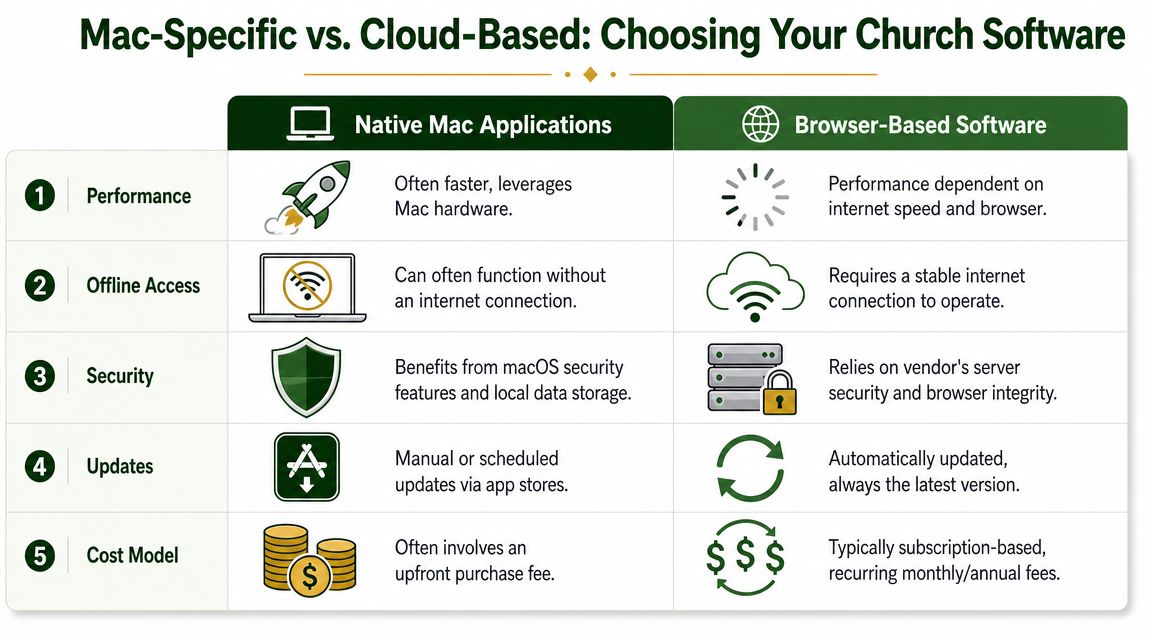
A native Mac app solves one narrow problem. It installs directly on macOS. That may suit a church with one in-office bookkeeper, stable routines, and no need for shared access outside the building.
Church work rarely stays that contained.
Treasurers review reports from home. Pastors want budget visibility without touching the general ledger. Outside accountants need year-end access. Volunteers change. Staff computers get replaced. In that setting, delivery model matters because it affects who can get into the system, how updates are handled, and whether the church depends on one machine in one office.
What a native Mac app does well
Desktop software still has real strengths. It can feel familiar to teams that have used installed accounting programs for years. Some churches prefer local control over files and like a workflow that lives on a dedicated office computer.
That comfort comes with maintenance work. Someone has to manage backups, software updates, user permissions, and compatibility with new versions of macOS. If the person who “knows the system” leaves, the church often inherits a fragile process along with the software.
Why browser-based software fits church operations better
Browser-based systems remove much of that device dependence. If the platform is well designed, the treasurer on a Mac, the administrator on a PC, and the CPA logging in remotely can work from the same live set of books without passing files around.
That is the practical advantage behind cloud software in many sectors, including the broader benefits of cloud accounting for UK companies. Churches have different reporting and governance needs, but the operational gain is similar. Fewer version conflicts, easier access control, and less reliance on one office computer.
For committees still comparing installed software with online systems, this piece on QuickBooks download for Mac versus browser-based accounting access helps clarify the difference.
The real decision is not Mac versus cloud
The decision is church-native versus generic.
A browser-based product is not automatically a good church system. Some online tools are still business accounting products with church terminology added on top. They may run perfectly on a Mac and still force the finance team to work around restricted funds, designated gifts, and ministry reporting.
That is why I advise committees to treat Mac compatibility as a baseline, not a selection standard. If a product works on your Mac but handles church accounting poorly, the platform support does not solve the bigger problem.
A church usually needs software that any authorized person can access, that does not depend on one computer, and that reflects church financial structure accurately from the start. Browser-based delivery often serves that goal better. Church-native accounting is what makes it worth buying.
Must-Have Features for Modern Church Finance
A finance committee usually feels the gaps in software during an ordinary month, not during a product demo. The bookkeeper imports online giving, a pastor asks for a ministry budget report, and someone on the board wants to know how much cash is currently available to spend. If the system runs on a Mac but cannot answer those questions cleanly, Mac compatibility has solved the smaller problem.
Churches need accounting software that reflects church structure at the ledger level. That is the difference between software that is merely Mac-compatible and software that is church-native.
A true fund-based general ledger
This is the first thing to inspect in any demo.
The ledger has to treat funds as part of the accounting structure itself. If a product depends on classes, tags, or custom report workarounds to imitate fund accounting, the finance team usually pays for that shortcut later in reconciliations, report cleanup, and board explanations.
A church should be able to enter a restricted gift, pay an expense from the right fund, and produce a fund-level report without rebuilding the story in Excel. If bookkeeping logic and reporting logic are disconnected, errors stay hidden until month-end or audit prep.
Giving integration that posts with the right meaning
Importing a deposit is not enough. The system needs to carry the intent of the gift into the books.
That means gifts should post to the correct fund, remain identifiable after batching, and tie back to donor and contribution records when questions come up. Generic accounting systems can often be configured to track donations, and some churches make that work. In practice, though, adapted workflows demand more oversight because the accounting team has to keep checking that the coding method still reflects donor restrictions and internal designations accurately.
Church-native tools usually reduce that risk because the giving and accounting sides were built to work together from the start.
Reporting a board can read without translation
Good church reporting should answer plain governance questions. What is restricted? What is available? Which ministries are on budget? Which funds are carrying activity that needs review?
Look for software that can produce reports such as:
- Statement of financial position by fund
- Fund activity or revenue and expense by fund
- Budget-to-actual by ministry or department
- Cash reports that separate restricted balances from spendable operating cash
- Donor and contribution summaries that tie back to accounting totals
If every board packet requires spreadsheet repairs, the software is not giving the committee enough control.
Controls that reduce mistakes before month-end
Strong church finance software should help prevent misposting, not just document it afterward. Approval controls, user permissions, audit trails, attachment storage, and clear fund restrictions all matter here.
This is also where trade-offs become real. A native Mac app may feel familiar on one machine, but browser-based church software often handles shared access, role-based permissions, and document retention better for churches with part-time staff, volunteers, and outside bookkeepers. The better choice is the one that strengthens accountability for the whole team.
Grain Ledger is one example of a fund-based system built to connect giving platforms, bank accounts, and accounting workflows so donations can flow into the appropriate funds while reporting stays tied to those funds. Whether a church chooses Grain or another product in that category, that underlying architecture is what deserves the committee's attention.
An Evaluation Checklist for Choosing Your Software
Most church software demos go smoothly because they're designed to. The sales rep shows a dashboard, runs a report, and says the product works on Mac. None of that tells you whether the system will hold up during the second month of restricted-gift cleanup or the year-end board review.
GetApp's Mac-specific church accounting category is useful because it shows that Mac-compatible products often emphasize core accounting functions like the general ledger and financial reporting, which helps churches avoid the hassle of Windows virtualization. That's especially important for volunteer-led teams, as seen in GetApp's Mac church accounting category.
Before you compare products, it can also help to review broader nonprofit roundups such as top accounting tools for nonprofits. Then bring those options back through a church-specific filter.
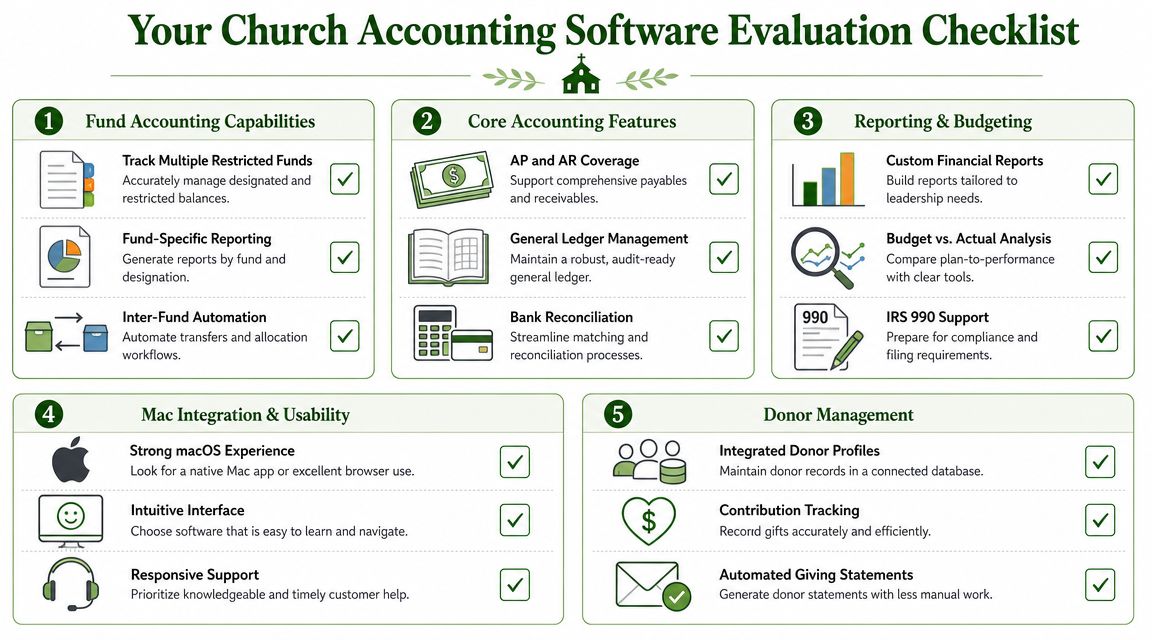
Questions worth asking in every demo
Some questions sound basic but reveal a lot:
- Fund controls: Can the software maintain separate restricted and unrestricted activity without spreadsheet side ledgers?
- Giving workflow: Does donation data enter the books in the right funds, or will staff re-key and reclassify it?
- Volunteer usability: Could a new treasurer understand the flow after training, or does it depend on one expert user?
- Reporting clarity: Can the board receive fund-aware reports that make sense without accounting translation?
If a vendor answers every fund-accounting question by talking about tags, workarounds, or exports, keep looking.
Church Accounting Software Evaluation Checklist
| Category | What to Verify | Why It Matters |
|---|---|---|
| Fund Accounting Capabilities | Confirm the system records restricted and unrestricted activity in a true fund structure, not just report filters | This protects donor intent and reduces manual correction |
| Fund Accounting Capabilities | Ask whether the software can produce fund-specific statements without spreadsheet manipulation | Board reporting should come from the system itself |
| Integrations and Automation | Verify how giving platform data reaches the ledger and how funds are mapped | Clean imports reduce posting errors and save staff time |
| Integrations and Automation | Check whether bank and card activity supports efficient reconciliation workflows | Reconciliation should support oversight, not create extra busywork |
| Reporting and Transparency | Review sample reports for financial position, activity, and budget visibility by fund | Leaders need reports they can read and trust |
| Ease of Use for Volunteers | Ask who the software is designed for and how easy routine tasks are for non-accountants | Many churches depend on part-time or volunteer finance help |
| Security and Support | Verify access controls, audit visibility, and support responsiveness during setup and month-end | Stewardship includes process discipline, not just accurate math |
For committees that want a structured buying process, Grain's guide to choosing software for church finances gives a useful framework for comparing tools beyond marketing language.
Migrating and Streamlining Your Financial Workflow
Switching systems feels bigger than it usually is. The fear is understandable. Churches worry about losing history, breaking reports, or confusing volunteers. In practice, most migrations go well when the team narrows the scope and cleans up the process before moving data.
Start with the essentials. You don't need to recreate every odd category, duplicate fund, or legacy workaround from the old system. If a past chart of accounts was built around software limitations, that's a reason to simplify, not preserve it forever.
What to move first
Move what supports current operations and clear reporting. That usually includes active funds, current balances, open payables, open receivables if relevant, and the reporting history your leadership still uses.
Older detail can often remain in archived reports from the previous system. A church doesn't gain much by importing years of clutter if no one will reference it.
Set up the new structure before importing habits
A better workflow starts with a better structure. Build the chart of accounts around how the church manages ministry and restrictions today.
That means:
- Define active funds clearly.
- Separate restricted and unrestricted activity cleanly.
- Decide how ministries, departments, or programs should appear in reports.
- Establish a standard path for giving imports, bank reconciliation, and approvals.
Migrations succeed when churches simplify the workflow first and move data second.
Train for repetition, not theory
Volunteers don't need a seminar on accounting philosophy. They need to know how to post gifts, review transactions, reconcile accounts, and run the monthly reports the board expects.
The easiest training method is to walk through a full monthly cycle in the new system. Use the same activities they already perform, just in the new workflow. That lowers anxiety and exposes setup problems early.
A good modern platform should also reduce the number of handoffs. When giving, banking, and fund reporting live closer together, the team spends less time checking whether three separate systems agree.
Compare platforms in our best church accounting software guide for 2026, or review Grain Ledger church accounting software.
Related church accounting software resources
If you are comparing software, these pages map the main decision points: fund accounting, QuickBooks limits, pricing, and migration.
- Best church accounting software (2026 comparison) - canonical guide comparing 12 church accounting platforms
- Church accounting software product page - see Grain Ledger for fund accounting, giving, and bank reconciliation
- Small church accounting software - see the product page built for volunteer treasurers and church admins
- Fund accounting features - review how Grain Ledger tracks designated funds
- QuickBooks for churches - understand workarounds and when to switch
- Free church accounting software - compare free options and upgrade triggers
- Grain Ledger pricing - compare plans for small and growing churches
- Start free - try fund accounting, giving imports, and bank reconciliation together
Your Next Steps Toward Financial Clarity and Stewardship
The best church accounting software for mac isn't just software that opens on a Mac. It's software built for church finance.
That means a system with real fund accounting, clean handling of restricted gifts, reporting that leadership can trust, and workflows that don't collapse into spreadsheet patchwork every month. Mac compatibility still matters. It's just not the main event anymore.
Churches need software that helps them answer ordinary but important questions with confidence. What money is available for operations? What money is designated? Are reports clear enough for pastors, elders, finance committees, and donors to understand? If the system makes those answers hard to find, it's costing the church more than the subscription fee suggests.
Good stewardship shows up in the details. It shows up when designated gifts stay designated, when volunteers can follow the process, and when the board packet doesn't require an afternoon of manual cleanup before every meeting.
If your church is ready to move past “Mac-compatible” and toward software that reflects how ministry finances work, the next step is straightforward.
Grain is building church accounting around native fund-based architecture, integrated giving and banking workflows, and reporting that matches how churches manage money. If that's the direction your finance team needs, Schedule a Demo for Grain to see a simpler path to clarity and accountability.
Ready to simplify your church finances?
Start free with church fund accounting, or watch a product demo first.