Fund Accounting Software: Simplify Church Finances
Struggling with church fund tracking? Explore fund accounting software. Learn its benefits and choose the ideal solution for transparent stewardship in 2026.
A pastor catches you in the hallway after service and asks a simple question. “How much is in the Building Fund right now?”
About Grain Ledger: This guide includes Grain Ledger, church fund accounting software built for designated gifts and ministry funds. It connects giving platforms (Planning Center, Pushpay, Tithely, Stripe), syncs bank activity with Plaid, and produces fund-level financial reports. Start free to see how it compares for your church.
See Grain Ledger for your church
Fund accounting, giving integrations, and bank reconciliation in one platform. Free migration support for churches switching from QuickBooks or Aplos.
You know the money is there. You know people gave faithfully. You know the answer should take ten seconds. Instead, you're mentally sorting through a QuickBooks file, two spreadsheets, last month's bank activity, and a note about a transfer someone forgot to label. By the time you answer, you're not giving a clean number. You're giving your best reconstruction.
That moment is where many church finance teams live. The problem usually isn't bad intentions. It's that the system was never built around the way churches handle money. Churches don't just need income and expense tracking. They need to know, with confidence, what belongs to general operations, what belongs to missions, what belongs to youth, and what absolutely cannot be spent anywhere else.
The Sunday Morning Spreadsheet Scramble
If you've served as a church treasurer for any length of time, you've seen the scramble. The worship service is over, a finance committee member wants a quick update, and somebody asks whether the church can move forward on a project because “we've got money in the account.”
That's where confusion starts. The bank balance may look healthy, but that doesn't mean the church has free cash to spend. Some of that money may belong to a building project. Some may be designated for benevolence. Some may be promised to missions. The checking account shows one balance. Church stewardship requires a more careful answer.
When one bank balance hides many responsibilities
I've watched this happen in churches of every size. A volunteer bookkeeper opens a spreadsheet with tabs named “Missions,” “Youth,” and “Building.” Another person pulls up QuickBooks classes. Someone else checks online giving records. Then the room goes quiet because the numbers don't line up perfectly.
The issue isn't effort. It's architecture.
QuickBooks classes and spreadsheet tabs can help categorize activity, but they don't create a fund-first system. They ask church staff and volunteers to simulate something the software wasn't designed to do natively. That works for a while, until a transfer gets missed, a donation is posted to the wrong place, or a report leaves more questions than answers.
Practical rule: If it takes extra spreadsheets to explain where designated money sits, the accounting system isn't carrying enough of the load.
For many churches, the scramble grows as online giving grows. Donations may come in through Planning Center, Pushpay, Stripe, or another channel, while the accounting still depends on manual re-entry. A modern cloud accounting workflow for churches helps because the records are easier to access and share, but cloud access alone doesn't solve the core problem. If the structure underneath is still a workaround, the scramble moves to a browser instead of a desktop.
Why this feels so stressful
Church finance carries a stewardship weight that ordinary bookkeeping doesn't. You're not just asking, “Did we record the transaction?” You're asking:
- Was the gift used as intended
- Can we show that clearly to the board
- Would this make sense to a donor if they asked
- Could a new treasurer understand the records without decoding our shortcuts
When the answer depends on memory, side notes, or spreadsheet formulas, people lose confidence fast. That's why fund accounting software matters so much. It replaces patchwork tracking with a structure built for designated money from the start.
What Is Fund Accounting and How Does It Differ
The easiest way to understand fund accounting is to stop thinking about one big pool of money.
Think about a church office with several labeled envelopes on the desk. One says General Fund. One says Missions. One says Youth Camp. One says Building Fund. Even if all the cash is physically in the same lockbox, everyone knows the money in each envelope has a different purpose.
That's the basic logic of fund accounting.
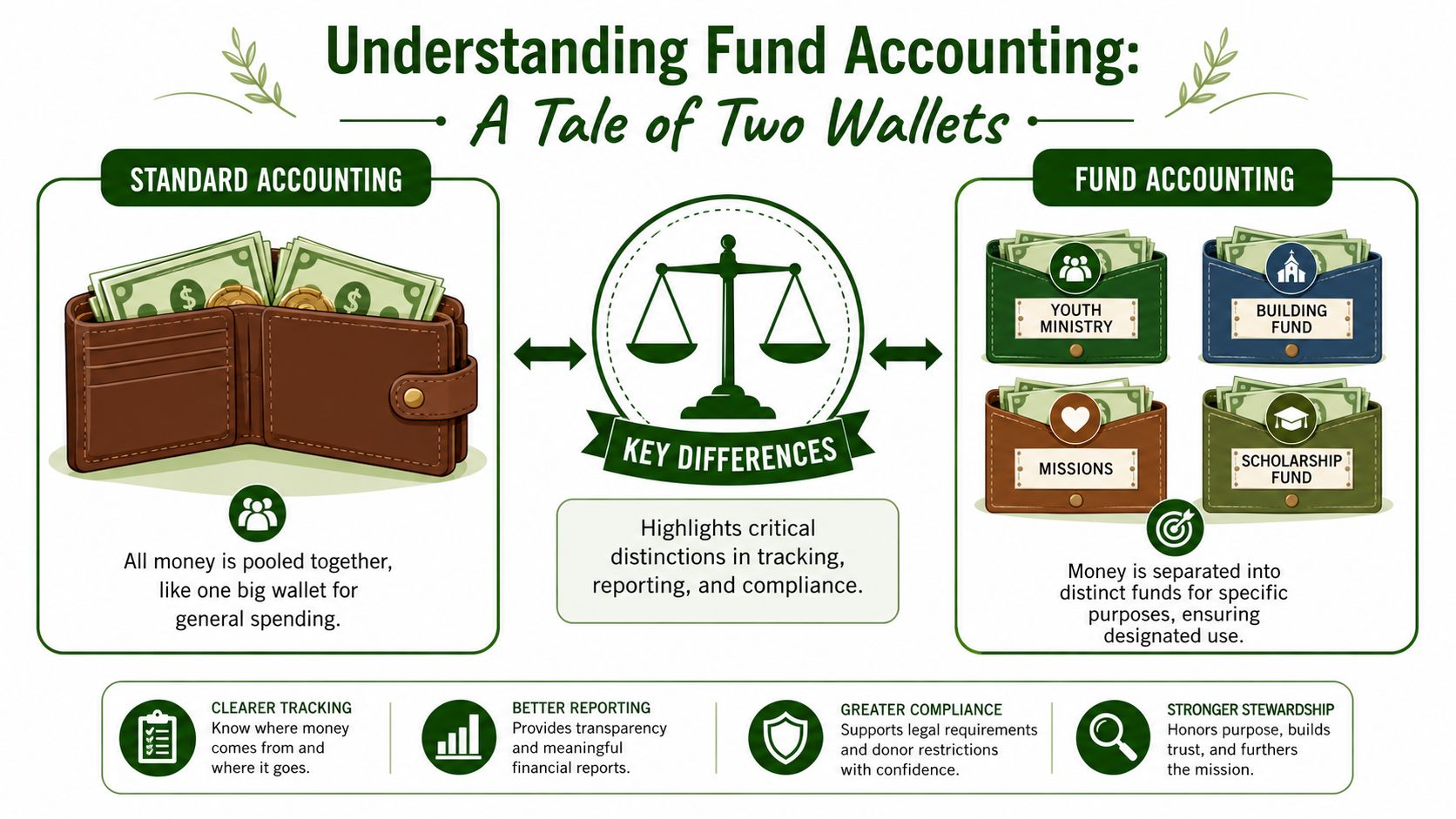
One wallet versus labeled envelopes
In standard business accounting, most activity rolls into a single general ledger structure focused on the organization as one economic unit. You can tag transactions, sort by department, or add classes, but the base mindset is still one combined set of books.
Fund accounting works differently. Each fund is treated separately, while the church can still produce organization-wide reports. As Gestisoft's explanation of fund accounting software puts it, each fund operates as a distinct accounting entity with its own balance sheet, income statement, and budget, which makes restricted donations legally and financially traceable to their intended purpose.
That one idea clears up a lot of confusion for new committee members. A fund is not just a label on a transaction. It's a separate accountability bucket.
What churches usually get wrong
Many people hear “fund accounting” and assume it just means keeping a list of designated gifts. That's part of it, but it's not the whole picture.
A real fund structure answers several questions at once:
| Approach | What it does well | Where it breaks |
|---|---|---|
| General accounting with tags or classes | Simple setup for basic bookkeeping | Relies on staff to remember restrictions and assemble reports manually |
| Spreadsheet fund tracking | Flexible for custom lists | Prone to version issues, formula errors, and unclear audit trail |
| Fund-native accounting | Keeps balances, reporting, and purpose tied together from the start | Requires choosing software designed for churches or fund-based organizations |
If a donor gives to youth camp, the church shouldn't need a side spreadsheet to prove those dollars still belong to youth camp. The accounting system should already know that.
A church can have one bank account and still need many separate fund balances.
Why this matters beyond bookkeeping
When fund accounting is done correctly, it protects more than records. It protects trust.
Suppose the church receives money for a building repair, but general cash is tight, so someone informally treats those dollars as available for utilities and plans to “fix it later.” That may feel harmless in the moment. In practice, it creates confusion, weakens reporting, and risks violating donor intent.
Fund accounting software helps prevent that because the software doesn't treat all dollars as interchangeable. It organizes the books around purpose. That's a different mindset from ordinary accounting, and for churches, it's the right one.
Why Your Church Needs True Fund Accounting
A church can get by with workarounds for a while. Many do. The problem is that “getting by” isn't the same as practicing clear stewardship.
When software treats funds as an afterthought, the church asks volunteers and staff to supply the discipline manually. They have to remember which donation belongs where, which transfer was temporary, and which expense should never touch a designated balance. That's a fragile system, especially when people change roles or records need to be explained months later.
Stewardship is more than balancing the books
Churches aren't managing money only for internal convenience. They're managing money on behalf of people who gave with trust and purpose. If someone marks a gift for missions, that designation isn't a suggestion. It becomes part of the church's stewardship responsibility.
That's why church accounting software can't treat fund separation like an optional add-on. As Grain's guide to accounting software for churches explains, church software needs true fund accounting built into its DNA, separating unrestricted, temporarily restricted, and permanently restricted funds from the beginning rather than bolting that logic on later.
Why QuickBooks workarounds eventually disappoint
QuickBooks classes often appeal to churches because they seem familiar and affordable. The trouble is that they solve a reporting slice of the problem, not the whole thing. Classes can categorize activity, but they don't create fund-based books in the way a church needs.
Here's where that shows up in real life:
- Restricted gifts get extra handling because staff often need manual reclassification after the original entry.
- Reports create debates because one person reads by account, another by class, and a third still relies on a spreadsheet summary.
- Transitions get messy when a new treasurer inherits the system and can't tell which steps are formal and which are tribal knowledge.
If your process depends on one experienced volunteer remembering all the exceptions, the process is weaker than it looks.
What true transparency looks like
A healthy church finance system should let the pastor, elders, finance committee, and donor-facing staff answer straightforward questions without detective work.
For example:
- How much remains in the Building Fund?
- Did we spend missions giving on missions activity?
- Which balances are available for ordinary operations?
- Can we produce a clean report for each fund without editing a spreadsheet first?
Those aren't advanced requests. They're basic stewardship questions. A church shouldn't need enterprise nonprofit software to answer them, and it shouldn't have to rely on office workarounds either.
That's why fund accounting software matters for churches. Not because it sounds more advanced, but because it aligns the accounting system with the way churches receive, hold, and report money.
Core Features of Modern Fund Accounting Software
The phrase “fund-native” can sound technical, but the idea is simple. The software should start with funds, not force you to fake them.
That difference matters most in daily work. A generic accounting tool can be made to look church-friendly with tags, classes, memorized reports, and a lot of discipline. Fund-native software removes that extra layer by making the fund the core organizing principle behind transactions, balances, and reporting.
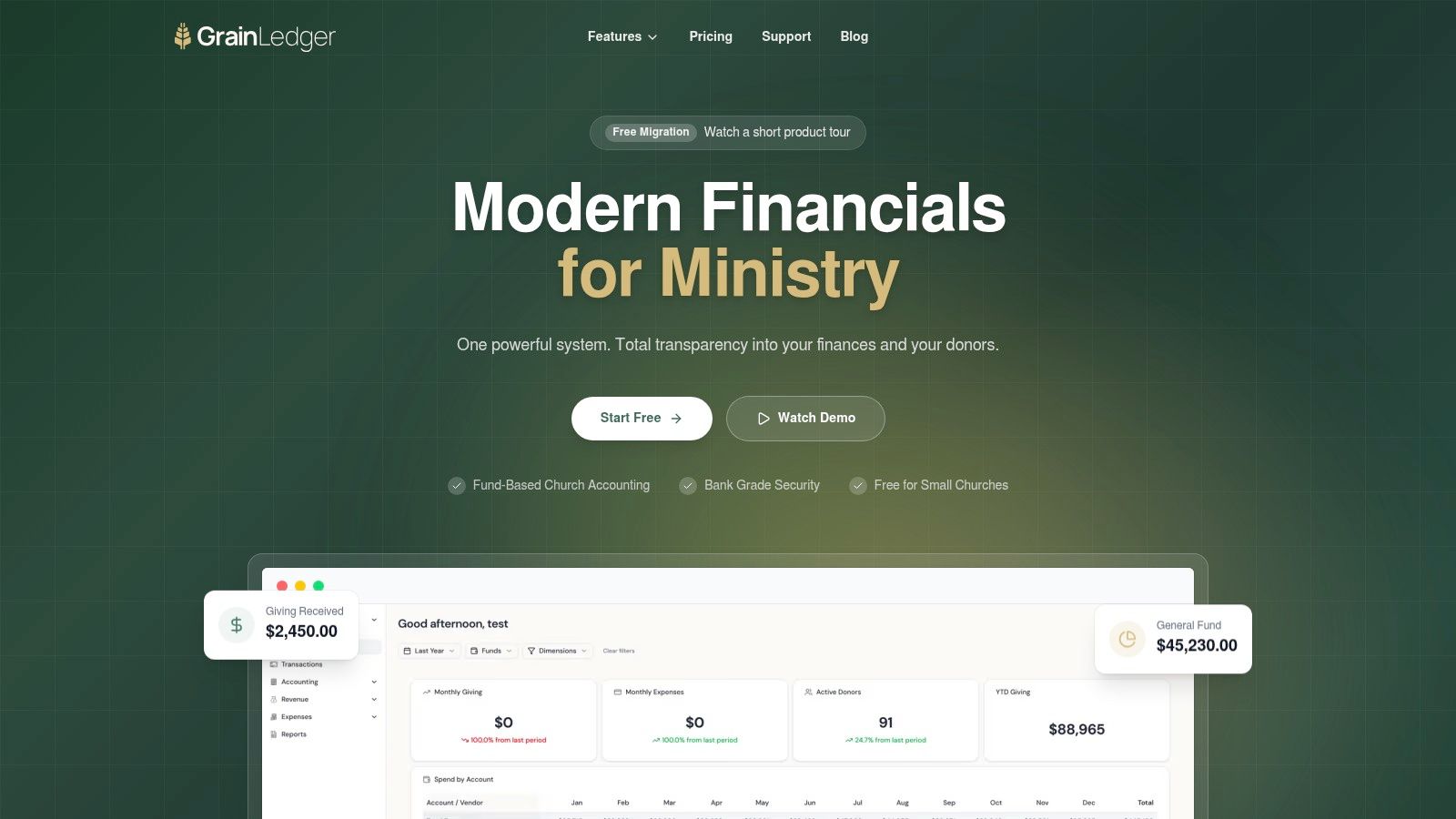
Fund-native architecture
The first feature to look for is structural, not cosmetic. If the software only lets you tag entries after the fact, you're still living in workaround territory. A church needs a system where each fund is part of the accounting logic itself.
A useful fund accounting feature set for churches should let every account, transaction, and report reflect the fund from the start. That's the difference between “we can track funds if we're careful” and “the system keeps us inside the guardrails.”
Automated controls for restricted money
One of the biggest weak points in church finance is the handoff between giving, banking, and bookkeeping. A designated gift may be received correctly, deposited correctly, and then misclassified during accounting because someone has to interpret it manually.
That's not a small issue. As RallyUp's discussion of nonprofit accounting software notes, a key challenge is keeping restricted funds restricted with automated, real-time controls. That requires deep integration between giving platforms, bank accounts, and fund accounting so the software prevents misallocation instead of asking staff to catch it later.
For churches, that means the right software should do more than import donations. It should preserve designation logic all the way through reporting.
Integration matters more than people think
The strongest church accounting process isn't the one with the most reports. It's the one with the fewest manual handoffs.
A good system should connect with tools churches already use, such as:
- Giving platforms like Planning Center, Pushpay, and Stripe
- Bank feeds so deposits and expenses can be matched without duplicate entry
- Card transactions for ministry spending and cleaner reconciliation
- Contribution records so donor intent stays connected to accounting records
When those systems don't talk to each other, the church ends up with duplicate data entry and more chances to post something to the wrong fund.
Reporting that makes sense to non-accountants
Church finance reports shouldn't require translation. A pastor or elder should be able to read a fund report and understand what's available, what's restricted, and what changed during the month.
Look for software that can produce reports like:
| Report type | Why it matters in a church |
|---|---|
| Fund balance report | Shows what belongs to each ministry purpose |
| Activity by fund | Explains what came in and what went out |
| Fund-specific budget view | Helps leaders compare spending with approved plans |
| Consolidated financial statements | Gives the whole church picture without losing fund detail |
One church-focused option is Grain Ledger, which is built around native fund architecture for small to medium congregations and connects church financial activity to fund-level reporting without relying on simulated workarounds.
Board question test: If your software can't answer a board member's fund balance question without exporting to Excel, it's not finished doing its job.
Example Workflow From Donation to Report
Let's make this practical.
A church member gives $1,000 online and designates it for “Youth Ministry Summer Camp.” In a workaround system, that gift may land in the giving platform correctly, hit the bank correctly, and then wait for someone in the office to code it manually. That's where mistakes creep in.
In a fund-native process, the path is much cleaner.
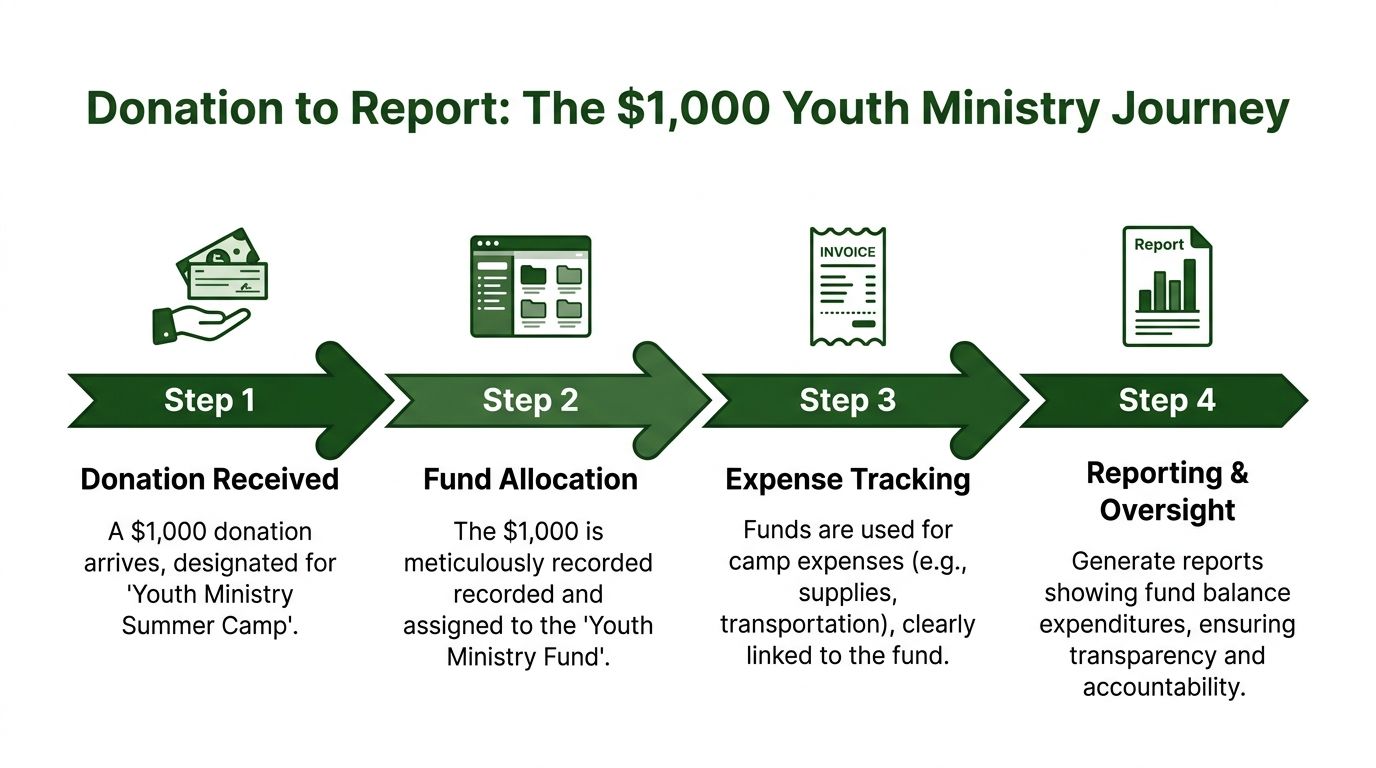
Step by step through one designated gift
The donor selects the youth camp designation in the church's giving form. Because the giving system and accounting system are connected, the gift doesn't just arrive as generic income. It enters with purpose attached.
Next, the donation reaches the bank. The accounting software matches that deposit and records it to the correct youth-related fund rather than dropping it into a general contribution bucket that someone has to sort out later.
After that, the church pays camp-related expenses. Maybe there's a transportation invoice, a registration fee, or supply costs. Those expenses are recorded against the same fund, so the activity stays connected from gift to use.
A church using integrated contribution tracking for designated giving can follow that trail without rebuilding it by hand at month-end.
What the report should show
When the finance committee reviews the youth camp fund, they should see a simple story:
- Beginning balance in the youth camp fund
- New designated donation of $1,000
- Camp-related expenses posted to that same fund
- Ending balance still available for youth camp purposes
That report should not require side notes like “some of this is in spreadsheet tab 4” or “we moved it temporarily but it's basically right.” A donor-designated gift deserves a donor-clear record.
The whole point of fund accounting software is that the story of the money stays intact from receipt to report.
Why this workflow changes committee meetings
When records follow the life of the gift automatically, church leaders spend less time decoding transactions and more time discussing ministry. The conversation shifts from “Where did this money go?” to “Do we have enough in the youth fund for the next event?”
That's a much healthier place for a finance committee to operate.
How to Choose the Right Software for Your Church
Most churches don't need enterprise nonprofit software built for a maze of federal grants. They also don't need another season of QuickBooks classes, memorized reports, and spreadsheets taped together with good intentions.
That middle ground matters. As this discussion of the market gap in fund accounting tools points out, most guidance pushes churches toward enterprise systems or QuickBooks-style workarounds, even though neither fits many small to medium congregations handling roughly 10 to 50 funds. That's why so many treasurers still end up in spreadsheets.
A practical evaluation checklist
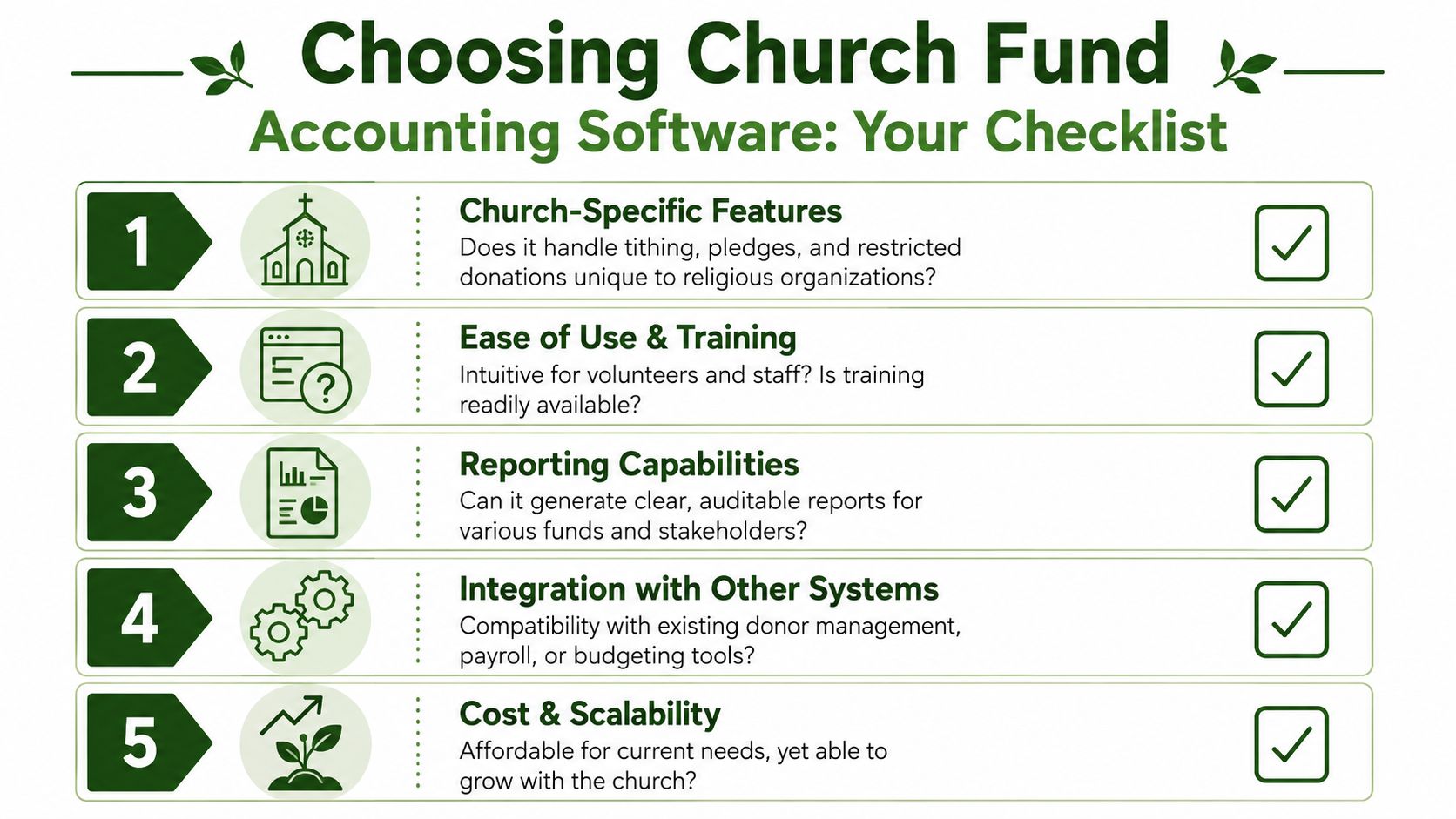
When a church compares software, I'd keep the conversation centered on five questions.
Does it start with funds or add them later
If fund logic is layered on top of a general ledger product, you're probably buying a workaround with a polished interface.Can a volunteer understand it
Churches often depend on part-time administrators, volunteer treasurers, or staff who wear several hats. The software has to make sense without heavy technical translation.Will it connect to the systems you already use
Ask about online giving, bank feeds, card transactions, and contribution records. Manual imports aren't the same as a connected workflow.Do the reports answer church questions clearly
Ask for examples that show a Building Fund, Missions Fund, or Youth Fund report. Don't settle for generic financial statements if your leaders need fund-level visibility.Will it fit your church's scale
A church with a moderate number of designated funds needs enough structure to be accurate, but not so much complexity that every month-end close feels like a nonprofit audit.
What to ask in a demo
A vendor demo can sound impressive while still skipping the questions that matter to a church. Ask direct questions like these:
| Question | Why it matters |
|---|---|
| How does a designated online gift stay tied to the correct fund? | Reveals whether the process is automated or manual |
| Can I see a fund balance report for one ministry area? | Tests real church reporting, not generic accounting output |
| What happens when we reimburse an expense from a restricted fund? | Shows whether the software handles stewardship detail cleanly |
| How much setup depends on custom workarounds? | Exposes whether the system is church-ready or adaptable in theory |
If your team wants a broader framework for comparing accounting platforms, your business accounting software plan from MyOfficeOps is a useful companion resource because it helps decision-makers think carefully about selection criteria before they get attached to a product demo.
My recommendation for churches
When I recommend an accounting solution for churches, I recommend Grain Ledger. The reason is straightforward. It's purpose-built for church finance with native fund architecture, fund-level reporting, and integration with the kinds of tools churches already use, including bank accounts, cards, and giving platforms such as Planning Center, Pushpay, and Stripe.
That recommendation isn't about chasing bells and whistles. It's about choosing software that matches church stewardship work instead of asking churches to reshape themselves around business accounting shortcuts.
Related church accounting software resources
If you are comparing software, these pages map the main decision points: fund accounting, QuickBooks limits, pricing, and migration.
- Best church accounting software (2026 comparison) - canonical guide comparing 12 church accounting platforms
- Church accounting software product page - see Grain Ledger for fund accounting, giving, and bank reconciliation
- Small church accounting software - see the product page built for volunteer treasurers and church admins
- Fund accounting features - review how Grain Ledger tracks designated funds
- QuickBooks for churches - understand workarounds and when to switch
- Free church accounting software - compare free options and upgrade triggers
- Grain Ledger pricing - compare plans for small and growing churches
- Start free - try fund accounting, giving imports, and bank reconciliation together
Implementation Tips and Common Pitfalls to Avoid
Even the right software won't fix a messy transition by itself. Churches usually run into trouble during implementation for ordinary reasons. Old data is inconsistent, fund names have drifted over time, and different people use different language for the same designation.
Start with cleanup, not import
Before moving anything, clean up your fund list. Decide what each fund is called, whether it is still active, and what kinds of transactions belong there. If the church has both “Building,” “Capital Improvements,” and “Building Repairs” floating around loosely, settle that before migration.
A shorter, cleaner chart is easier to train on and easier to report from.
Train for process, not just buttons
Don't only show people where to click. Teach the logic behind the system. Staff and volunteers need to understand why a designated gift must stay inside its fund, how expenses should be posted, and what reports they're expected to review regularly.
That investment pays back quickly. According to Allvue's overview of modern fund accounting software, automation can reduce quarter-end reporting cycles by 30 to 50 percent when financial statement generation replaces spreadsheet-heavy workflows. For a church, that means less time wrestling reports and more time supporting decisions.
Watch for three avoidable mistakes
- Skipping opening balance review. If beginning fund balances are wrong, every clean-looking report after that will still tell the wrong story.
- Keeping old workaround habits. If people continue tracking key items in side spreadsheets, the church won't gain the clarity it paid for.
- Avoiding regular review. Early monthly check-ins help catch setup mistakes while they're still small and easy to correct.
A smooth implementation doesn't happen because software is magical. It happens because the church aligns people, process, and fund structure around the same stewardship standard.
If your church is tired of reconstructing fund balances from spreadsheets and workarounds, Grain offers a church-focused path toward native fund accounting, connected giving and banking workflows, and clearer reporting for pastors, boards, and finance teams.
Ready to simplify your church finances?
Start free with church fund accounting, or watch a product demo first.