Cheapest Online Accounting Software for Churches
 By Gibson Brueher, Founder of Grain Ledger
Discover how churches can find the cheapest online accounting software by comparing pricing models, hidden costs, and TCO. Learn when Grain Ledger is worth it.
Last Sunday's offering had barely been counted when the church bookkeeper opened a “free” accounting plan and realized the bill was coming later. Payroll sat behind an add-on. Another staff login cost extra. Exporting the old records would take manual cleanup, and the donor fund reports still didn't line up with how the church held its money. That's the trap with the cheapest online accounting software. The sticker price looks safe, but the true cost shows up when ministry needs meet the software's limits.
See Grain Ledger for your church
Fund accounting, giving integrations, and bank reconciliation in one platform. Free migration support for churches switching from QuickBooks or Aplos.
Church finance teams need to look past the monthly fee and ask a harder question, what does this system cost once it has to handle restricted gifts, staff access, bank feeds, and a real migration? For churches, the cheapest option on paper is often the most expensive option in practice. A better framework is to weigh entry price, hidden add-ons, fund accounting, and long-term support, then decide whether a specialized system such as Grain Ledger earns its keep. If you're comparing options right now, start with this guide to church accounting software that is free, then pressure-test every plan against real church needs.
Introduction to Hidden Costs in Church Accounting
A treasurer gets sold on a low monthly plan, signs up on a Tuesday, and by Friday discovers the fine print. Payroll is extra. The volunteer who helps with books can't log in without a higher tier. The old chart of accounts won't map cleanly to restricted gifts, so the “simple” migration turns into a weekend project no one budgeted for.
That's the normal story, not the exception. The cheapest online accounting software usually wins attention by showing the lowest sticker price, but churches live in the world of donor intent, designated funds, and shared access across pastors, administrators, and outside accountants. A system that looks inexpensive can become awkward the moment it has to track money the way a church uses it.
Practical rule: If a plan looks cheap because it hides payroll, support, or user access behind upgrades, it isn't cheap. It's unfinished.
The true test is whether the software can stay inexpensive after the first year of ministry use, not just during sign-up week. That means checking whether it handles restricted donations, whether it imports bank data cleanly, and whether the move from your old system will require paid help. Churches that skip those questions usually end up paying for workarounds instead of bookkeeping.
Understanding the True Cost of Online Accounting Software
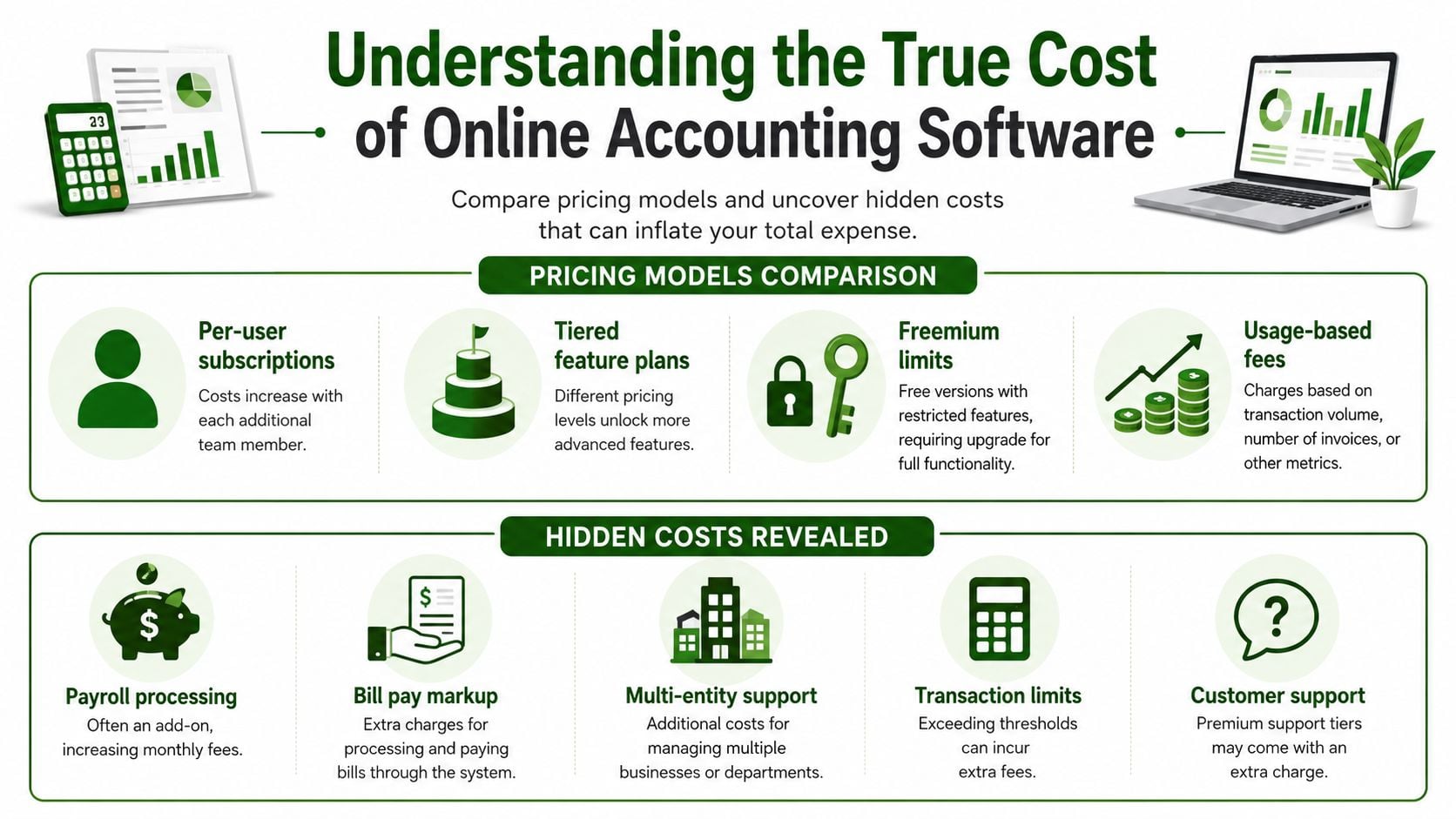
A 2026 pricing comparison found that accounting software entry prices span from free to $275 per month, with Wave at the low end and QuickBooks Advanced at the high end, while budget tools for freelancers cluster around $0–19 per month and mid-range platforms typically start between $20–80 per month (StackScored pricing comparison). That spread tells you something important, the market already separates starter tools from fuller systems. Churches shopping for the cheapest online accounting software need to know which side of that divide they're on.
Pricing models that change the bill
Some vendors charge per user, which hurts fast in a church office where the bookkeeper, executive pastor, and outside accountant all need access. Others use tiered plans, where core bookkeeping sits in one tier and useful functions move up a level. Freemium tools look generous at first, but the free plan often becomes a teaser for paid features.
Usage-based pricing can be even trickier. If the vendor charges by transaction volume, invoice count, or payment activity, a busy church can outgrow a plan without changing software at all. That's why sticker price is only the starting line, not the finish.
Hidden costs churches should expect
The most common extras are payroll, bill pay, premium support, and multi-entity handling. Some platforms also make you pay for add-ons or integrations that should have been included in the base price. That matters because a church doesn't just need to record transactions, it needs a system that can keep staff, vendors, and donors aligned without constant manual cleanup.
For a quick look at how another finance vendor structures pricing, the Disputely pricing plans page is a useful reminder that software pricing often stacks features and service levels in ways buyers don't see until late in the process.
A budget church should assume that the true monthly spend can land above the advertised number once support and operational add-ons are included. If the software can't handle your day-to-day workflow without upgrades, the lowest plan isn't really a solution, it's a gate.
Bottom line: low entry price matters, but only if the plan stays usable when real church work begins.
Identifying Essential Fund Accounting Features for Churches
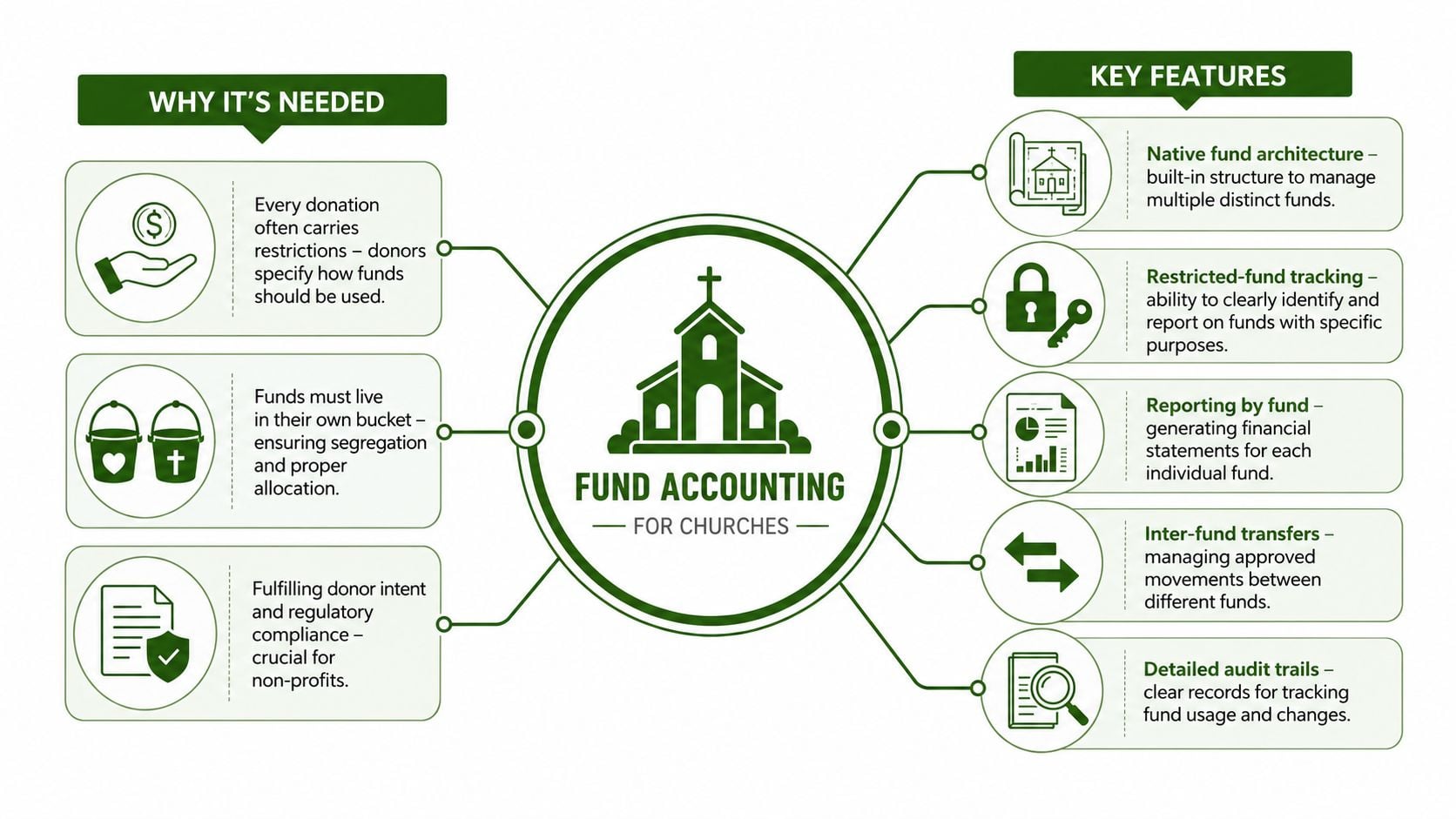
Church money doesn't behave like ordinary business revenue. A youth ministry gift, a building fund donation, and general tithes can't just sit in one pile without creating confusion. Each ministry needs its own bucket, and the accounting system has to respect that from the start.
What a church actually needs from fund accounting
The first essential feature is native fund architecture. If the software only simulates funds with tags or awkward workarounds, someone on staff will end up reconciling by hand. The second is restricted-fund tracking, so designated gifts stay clearly separated and visible in reporting.
The third is clean reporting by fund, because pastors and boards need to see more than a generic profit-and-loss statement. Churches also need strong audit trails and donor attribution, so every movement of money can be traced without guesswork. When those features are missing, the church is forced into spreadsheets and manual explanations that should never be part of normal monthly close.
Why automation still matters inside fund accounting
Low-cost systems can save real labor when they automate the boring stuff. A BDC review of free and low-cost accounting options notes that vendors emphasize automated data entry from invoices, receipts, and bank statements, plus automated invoicing, expense categorization, cash-flow prediction, and fraud or anomaly detection, and that this automation can significantly reduce manual bookkeeping effort and errors (BDC accounting software overview).
That matters for churches because fund accounting gets messy fast when every transaction has to be sorted by hand. If the software can pull receipts, bank feeds, and invoice data into the right fund automatically, the finance team spends less time fixing entries and more time reviewing stewardship.
To streamline invoice handling, the guide on how to streamline your invoicing is worth a look, especially if your church still depends on manual bill entry.
Calculating Total Cost of Ownership for Your Church
Independent research across 25 accounting products found the average monthly price was $28, and it defined “affordable” software as costing less than $28 per month (Software Advice pricing research). That benchmark is useful, but churches shouldn't stop there. A system can sit below that average and still cost more over time once payroll, support, and migration are added.
The right question is simple, what will this software cost after you've made it work for your church?
A practical TCO formula
Use this formula:
Total Cost of Ownership = subscription fee + user access costs + payroll costs + add-ons + support plan + migration setup + training
That's the number that matters. Not the headline plan price.
| Cost Item | Monthly Cost | Annual Cost |
|---|---|---|
| Base subscription | Varies by plan | Monthly cost x 12 |
| Extra user access | Varies by vendor | Monthly cost x 12 |
| Payroll service | Varies by provider | Monthly cost x 12 |
| Bill pay or premium support | Varies by vendor | Monthly cost x 12 |
| Migration and setup | One-time | One-time |
| Training | One-time or recurring | One-time or recurring |
| Total | Add all monthly items | Add all annual and one-time items |
How to think about a real church budget
A small congregation with two staff users, quarterly payroll, and outside bookkeeping help should not shop as if it only needs invoicing. It needs access, payroll support, clean chart-of-accounts mapping, and a system that doesn't force hidden upgrades later. That's why a low base price can still become the expensive route if the software requires multiple add-ons to function as a church accounting stack.
For budgeting structure, the IT budgeting strategies for Canadian businesses resource from CloudOrbis Inc. is a useful reminder that TCO planning works best when you separate recurring costs from setup costs and compare them over time.
If you want to see a vendor's pricing structure before you build your worksheet, the Grain Ledger pricing page is the right place to start. Put that beside your current stack and compare what's included, not just what's advertised.
Evaluating Integration and Migration Expenses
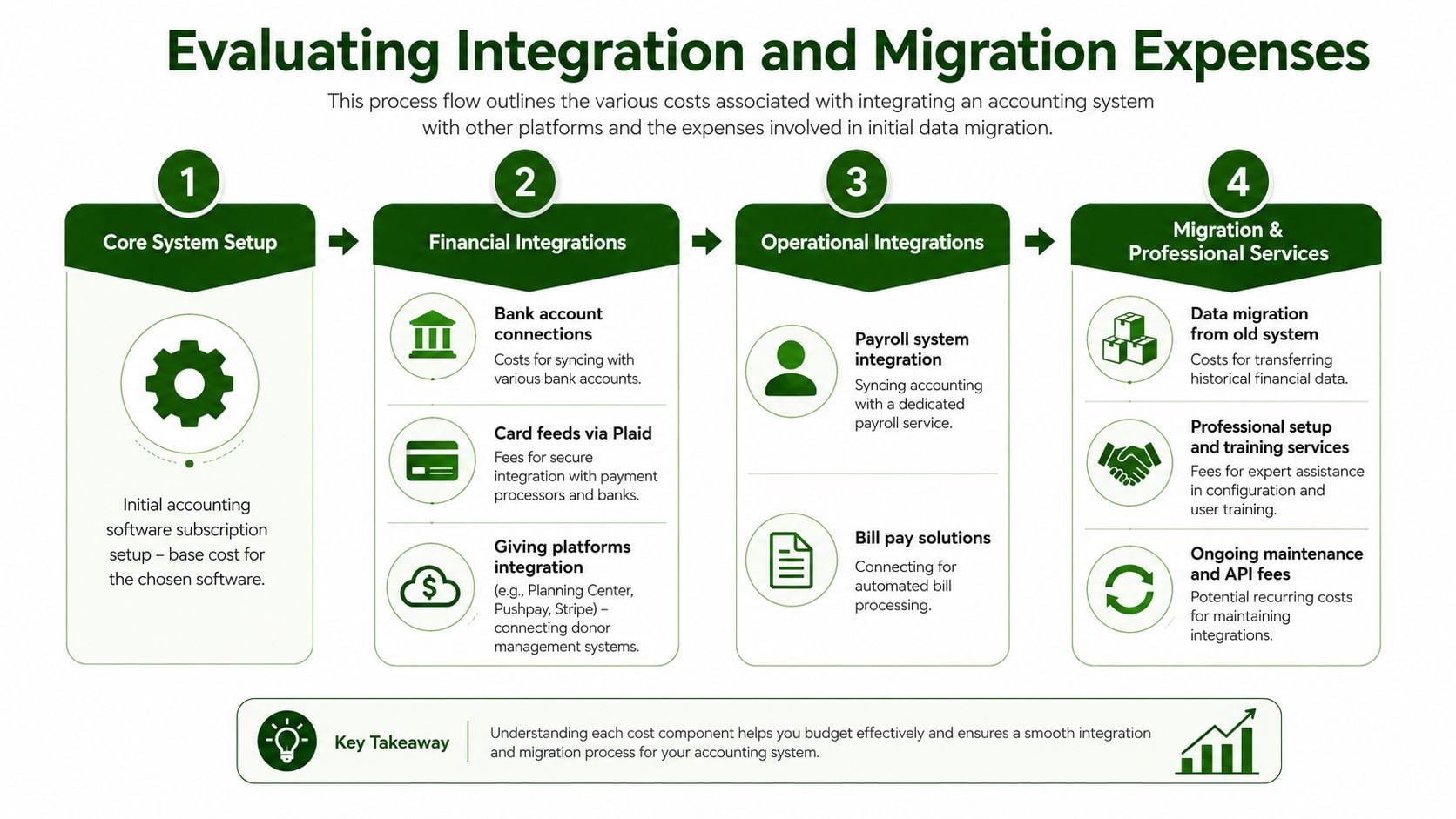
Wave and Zoho Books both offer a $0 base software cost, but add-on services such as payroll and priority support often become the main cost drivers instead of core bookkeeping itself (NAV accounting services overview). That's the pattern churches need to watch during integration planning. The software may be free, but the ecosystem around it is not.
The cost buckets that catch churches off guard
The first bucket is financial connectivity. Bank feeds are rarely the whole story anymore. Churches often also connect giving platforms, payment processors, and payroll services, and each connection can create setup friction or recurring service costs.
The second bucket is migration. Moving from old books usually means exporting data, mapping the chart of accounts to funds, cleaning legacy transactions, and verifying opening balances. If the old system was messy, the migration work gets expensive quickly.
The third bucket is implementation support. Staff training, configuration help, and troubleshooting are not “nice to have” line items. They determine whether the system gets used correctly or abandoned after launch.
The fourth bucket is ongoing maintenance. Integrations break, passwords change, and API connections need review. If the vendor charges for that maintenance or pushes it through a partner, it belongs in your budget from day one.
A better way to budget implementation
If your church is comparing software, ask vendors how they handle bank syncing, giving platform connections, and historical data transfer. Then ask whether setup is self-serve or assisted. The difference between a simple install and a managed migration is often the difference between a peaceful close and months of repair work.
Don't buy accounting software as if implementation is free. Someone still has to map the funds, clean the data, and train the people.
For churches that know migration will be a real project, the page on church accounting migration features is a useful benchmark for what a purpose-built transition should account for.
When Grain Ledger Is the Right Choice
Most listicles stop at the sticker price and call it comparison. That's lazy, and it's how churches end up paying twice. Expert reviews note that platforms like Wave can include unlimited users, but still push organizations into paid tiers for essentials, which is exactly why real cost has to include feature limits and upgrade pressure (Expert Market's cheapest accounting software review).
Grain Ledger makes sense when the church needs fund-based accounting from day one and doesn't want to bolt it together with tags, workarounds, and spreadsheets. If your books have restricted gifts, multiple ministries, and reporting expectations from pastors or elders, a general-purpose low-cost tool can look cheap while creating hidden labor every month. Grain Ledger's built-in fund architecture changes that equation because the structure is native, not simulated.
When a low sticker price is the wrong answer
A church plant with very little complexity can sometimes get by with a free or near-free tool for a short period. But once restricted funds, staff access, and donor reporting become part of the weekly routine, the “cheapest” app often becomes the one that causes the most manual work. That's when a church should move away from entry-price thinking and toward systems that reduce bookkeeping overhead.
A mid-size congregation has an even stronger case. As ministries multiply, each fund needs clear reporting, and the finance team needs clean imports from bank accounts and giving platforms. Grain Ledger fits that use case because it's built around fund-based double-entry accounting and automatic bank transaction imports via Plaid, so the workflow starts with the right structure instead of trying to retrofit it later.
What to compare before you commit
Don't compare software on marketing language. Compare it on the tasks that consume your week.
- Fund structure: Can it keep restricted gifts in their own accounting bucket without manual hacks?
- Bank and giving connections: Does it support the tools your church already uses?
- Migration burden: Will old data move cleanly, or will you need outside help?
- Support costs: Are you paying extra just to get answers when something breaks?
- Future reporting: Will the system still make sense when your ministries grow?
Grain Ledger's value shows up when those questions all point in the same direction. If the church needs true fund accounting, live bank imports, and a clearer path through migration, the higher initial price can produce a lower total cost because the staff isn't paying in time, corrections, and add-ons every month. That's the right standard for church accounting software, not the cheapest first invoice.
Related church accounting software resources
If you are comparing software, these pages map the main decision points: fund accounting, QuickBooks limits, pricing, and migration.
- Best church accounting software (2026 comparison) - canonical guide comparing 12 church accounting platforms
- Church accounting software product page - see Grain Ledger for fund accounting, giving, and bank reconciliation
- Small church accounting software - see the product page built for volunteer treasurers and church admins
- Fund accounting features - review how Grain Ledger tracks designated funds
- QuickBooks for churches - understand workarounds and when to switch
- Free church accounting software - compare free options and upgrade triggers
- Grain Ledger pricing - compare plans for small and growing churches
- Start free - try fund accounting, giving imports, and bank reconciliation together
Conclusion and Next Steps for Church Bookkeepers
Churches don't need the lowest sticker price, they need the lowest real cost. That means looking at add-ons, fund accounting, migration, and support before trusting any plan labeled “free” or “budget.” If the software can't protect restricted funds and reduce manual work, it's not economical, it's incomplete.
Use this checklist before you decide. Compare the entry price, the cost of payroll and support, the quality of fund features, the migration scope, and the long-term savings from automation. If those numbers don't hold up, move on.
For churches that need true fund-based accounting, start a personalized cost analysis and Start free with Grain Ledger today. Your budget deserves a system that fits the way church money works.
A CTA for Grain.
Ready to simplify your church finances?
Start free with church fund accounting, or watch a product demo first.