Fund Balance Accounting Software: 2026 Guide for Churches
 By Gibson Brueher, Founder of Grain Ledger
Discover true fund balance accounting software for churches. Learn how it differs from standard accounting, key features, and why it's vital for stewardship.
You're probably closer to this topic than you'd like.
About Grain Ledger: This guide includes Grain Ledger, church fund accounting software built for designated gifts and ministry funds. It connects giving platforms (Planning Center, Pushpay, Tithely, Stripe), syncs bank activity with Plaid, and produces fund-level financial reports. Start free to see how it compares for your church.
See Grain Ledger for your church
Fund accounting, giving integrations, and bank reconciliation in one platform. Free migration support for churches switching from QuickBooks or Aplos.
The board meeting starts. Someone asks a reasonable question about designated giving. Maybe it's the missions fund. Maybe it's the building fund. Maybe it's a memorial gift that was supposed to support benevolence. Everyone turns to the treasurer, and the answer should be simple. Instead, you're opening reports, cross-checking a spreadsheet, and hoping the notes in your accounting system still match reality.
That moment doesn't usually mean the treasurer is unprepared. It usually means the church is using software built for businesses, then forcing it to behave like church accounting. That's where problems begin.
Fund balance accounting software exists for a different job. It's built to show what belongs to each fund, what restrictions apply, and what remains available without relying on side spreadsheets or memory. The biggest dividing line isn't the dashboard or the price. It's the underlying architecture. Some systems use native funds. Others simulate funds with tags, classes, or categories. That technical difference sounds small, but in church finance it changes everything.
The Question Every Church Treasurer Dreads
A volunteer treasurer named Karen sits through her monthly elder meeting with a folder full of printouts. Halfway through, a board member asks, “How much do we have left in the building fund?”
Karen knows the church has the money. She also knows the answer isn't on one clean report. The church uses general business software, so the designated gifts were tracked with categories, then adjusted in a spreadsheet, then compared against the bank activity. Ten minutes later, she's still explaining why the number on the report isn't the same as the number in her spreadsheet.
That scene happens in a lot of churches.
The problem usually isn't math. It's structure. General accounting tools were built to answer business questions like profit, expenses, and cash position. Churches need those answers too, but they also need something more specific. They need to know whether money given for missions, benevolence, youth camp, or a roof project is still available for that purpose.
Why this question feels harder than it should
In a business, one pot of money often serves one broad operational purpose. In a church, one checking account may hold money for several distinct purposes at once. That means the question isn't just “how much cash do we have?” It's “how much of that cash belongs to this ministry purpose?”
Practical rule: If you need a separate spreadsheet to know a restricted fund balance, your accounting system isn't carrying the full load.
That's why purpose-built fund balance accounting software matters. It's meant to answer practical board questions quickly and clearly, without making a volunteer treasurer defend a maze of workarounds.
A healthy church finance process should let you say, with confidence, what came in, what was spent, what remains, and whether every restricted dollar stayed where it belonged.
How Fund Accounting Differs from Business Accounting
The fundamental difference between church and business accounting lies in how they treat pools of money.
A business usually asks one primary question: how is the organization performing as a whole? A church has to answer that question too, but it also has to answer a second one with precision: how much of our money is still set aside for a specific purpose?
That difference changes the accounting structure underneath the reports.
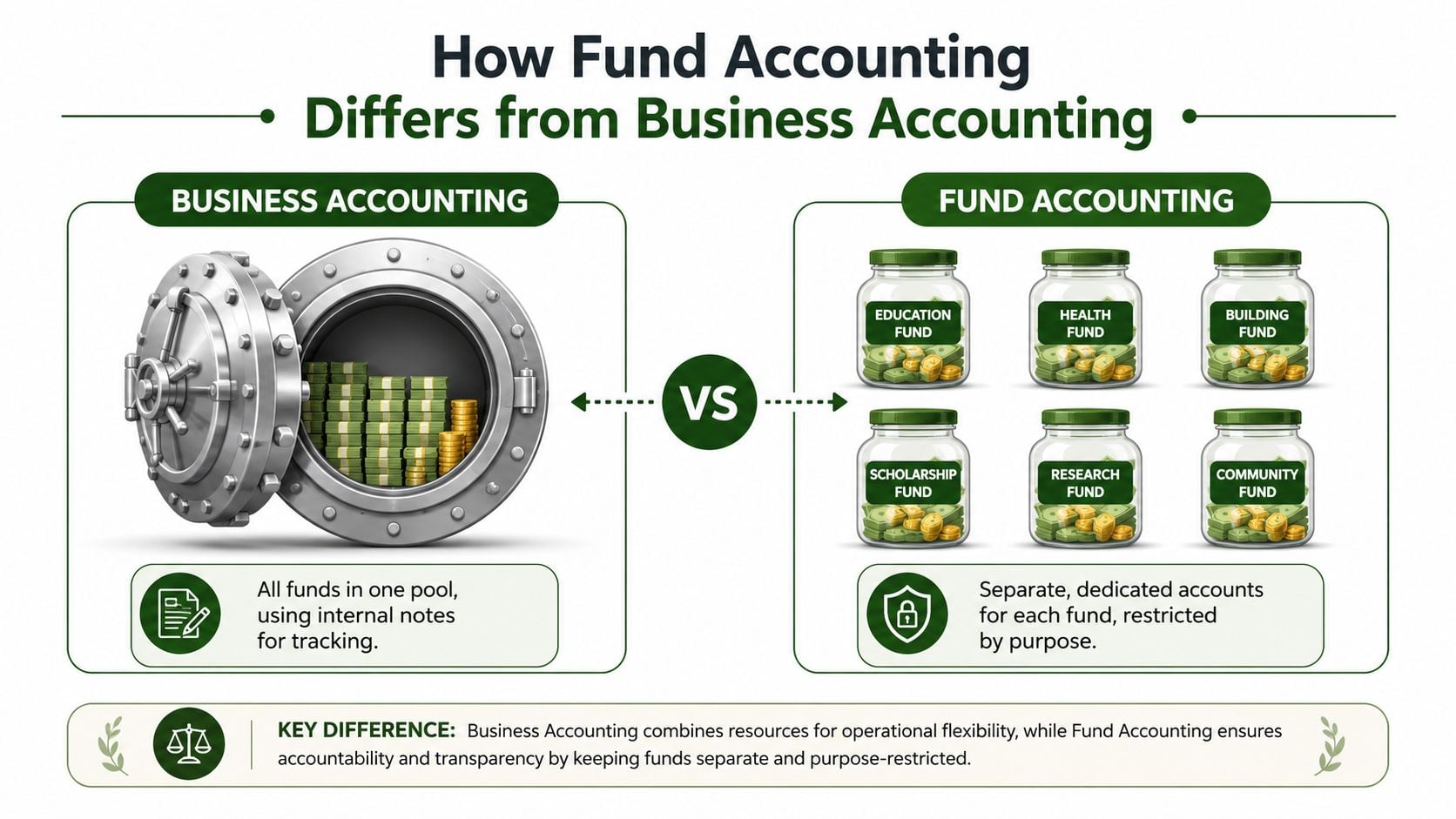
One general ledger view versus fund-level accountability
In business accounting, the chart of accounts is usually built to measure company-wide activity. Revenue comes in, expenses go out, and leaders review the overall result. Department tracking may exist, but the core system is still centered on one operating entity.
Church fund accounting starts from a different premise. It recognizes that one church can hold multiple balances with different purposes and restrictions at the same time. The general fund, missions fund, building fund, and benevolence fund are not just reporting categories. They carry separate accountability.
That is why fund balance matters. A fund balance is the remaining financial position of a specific fund after its assets and liabilities are accounted for. If the missions fund received gifts and paid trip expenses, the church needs to know what remains in that fund itself, not just what remains in the bank account overall.
A helpful way to see the difference is to compare the questions each system is built to answer:
- Business accounting: How is the organization doing overall?
- Fund accounting: How is each purpose-based pool of money doing on its own?
- True fund accounting software: Builds those separate funds into the ledger itself, so balances and reports flow from the structure of the system.
- Simulated fund accounting: Uses classes, tags, or departments to label transactions inside a general business system that was not built around funds.
Why the architecture matters more than many churches realize
This is the part many volunteer treasurers are never told.
A class or tag can describe a transaction. It can say, "this gift was for missions" or "this expense belonged to youth camp." That can help with sorting reports. But it does not necessarily make missions or youth camp a distinct accounting entity inside the software.
A native fund structure does.
In true fund accounting, each fund has its own balance, activity, and reporting logic inside the ledger. In simulated fund accounting, the church is often relying on staff discipline to tag every transaction correctly, run the right filtered report, and catch mistakes before a board meeting or audit review.
That may sound like a small technical distinction. It is not.
It affects whether the software can show a real fund balance without spreadsheet repairs. It affects whether a restricted gift can be traced clearly from receipt to use. It affects whether the finance committee is reviewing actual fund positions or a reconstructed version of them. For churches that want cleaner reporting, this explanation of fund balance reporting for churches helps connect the reporting side to the ledger design underneath it.
Why business features alone do not solve church reporting
Many commercial accounting systems are good at accounts payable, reconciliations, payroll exports, and standard financial statements. Those are useful tools. Churches still need them.
The problem is that a good business accounting system is not always a good fund accounting system.
If the software treats funds as labels added on top of one general pool, the church often ends up building its real fund tracking outside the system. That usually means filtered reports, side spreadsheets, manual adjustments, and extra review every month. The reports may look acceptable until someone asks a simple question such as, "What is left in benevolence right now?"
Then the room gets quiet.
True fund accounting software is designed to answer that question from the ledger structure itself. That is the practical difference. It is also why two systems can both claim to "track funds" while giving a church very different levels of clarity, control, and confidence.
Why Fund Balance Visibility Is a Matter of Trust
Church members don't usually ask for accounting architecture. They ask whether the church handled their giving faithfully.
If a family gives to a youth mission trip, they expect that gift to support the trip. If a donor contributes to a building effort, they expect that money to remain available for the building effort until the church uses it as intended. Clear fund balance visibility helps a church show that this trust was honored.

Donor trust grows when the answer is clear
Most giving questions aren't hostile. They're pastoral.
A missions committee may want to know what remains before approving another outreach expense. A donor may ask whether a special offering reached the intended ministry. An elder may want to see whether a benevolence fund can support a family in crisis. In each case, the church serves people better when the answer is immediate and reliable.
For a closer look at how churches present these balances clearly, this guide to fund balance reporting for churches is useful.
Restrictions are not optional
A restricted gift isn't a suggestion. It carries responsibility.
Purpose-built church accounting software must enforce fund restrictions by making it impossible to pay general expenses from restricted funds, such as preventing a youth mission trip fund from being used for electric bills, as described in Grain Ledger's explanation of church fund accounting controls.
That matters because many church finance mistakes are accidental. Nobody sets out to misuse designated giving. The trouble starts when the software allows the team to do something the church should never do in the first place.
Better visibility helps leaders make wiser decisions
Fund visibility also helps pastors and boards make cleaner ministry decisions. When leaders can see what's available in each fund, they can plan spending, pause requests, or launch initiatives with less guesswork.
This short video gives a helpful overview of why visibility and stewardship belong together.
When leaders can trust the numbers by fund, budget conversations become calmer and faster.
That's why fund balance accounting software isn't just about cleaner bookkeeping. It protects relationships. It protects credibility. It protects the church from drifting into sloppy stewardship one transaction at a time.
Essential Features of True Fund Accounting Software
A church can buy software with church language in the marketing and still end up with the same old workarounds underneath. The only way to sort strong systems from weak ones is to look below the feature list.
Native fund architecture
This is the essential feature.
True fund balance accounting uses a native structure where each fund is treated as a separate accounting entity. That's different from systems that simulate fund tracking with classes or tags. In a native structure, the software automatically maintains fund balance in real time and prevents restricted donations from being used for general expenses, as outlined in Foundant's explanation of native fund accounting structure.
If you only remember one question to ask a vendor, ask this one: Are funds part of the ledger itself, or are they labels added on top?
Restricted fund controls
A good church system doesn't just report a problem after the fact. It reduces the chance of the problem happening.
Look for controls that keep staff from coding ordinary operating expenses to restricted funds without proper handling. If the system lets anyone spend designated missions money on routine utilities, then the software is acting like a passive notebook, not a stewardship tool.
Integrations that reduce manual cleanup
Churches often run into trouble when giving data, bank activity, and accounting live in separate places. Someone exports one file, copies another, then rekeys the same information into the ledger. That's where errors creep in.
Modern systems should connect bank feeds and related workflows so the accounting record updates from a single transaction-based source. If your church also manages grants or designated project funding outside weekly giving, the buying logic is similar to choosing the right grant software. The architecture matters more than the label on the homepage.
Reporting that answers ministry questions
A church treasurer shouldn't need custom spreadsheet gymnastics to produce board-ready reports.
Look for software that can provide:
- Fund-level balances: Each restricted and unrestricted fund should stand on its own.
- Budget versus actual views: Ministry leaders need to compare plan to activity.
- Functional expense reporting: Some organizations need a system that can generate a Statement of Functional Expenses automatically.
- Drill-down visibility: When something looks off, users should be able to trace the underlying transactions.
One church-focused option to evaluate is nonprofit fund accounting software from Grain Ledger. For churches, I recommend Grain Ledger when you want software built around native funds rather than simulated tracking.
Bottom line: If a report depends on someone's side spreadsheet, that report is only as trustworthy as the last manual update.
Your Practical Software Evaluation Checklist
Software demos can be misleading. A vendor can show a polished dashboard, but the essential question is whether your church can answer fund questions in seconds instead of hours.
Effective fund balance accounting software must be able to answer board questions like “how much is left in the building fund?” within seconds rather than requiring side spreadsheets and manual compilation, according to Marketintelo's overview of fund accounting software expectations.
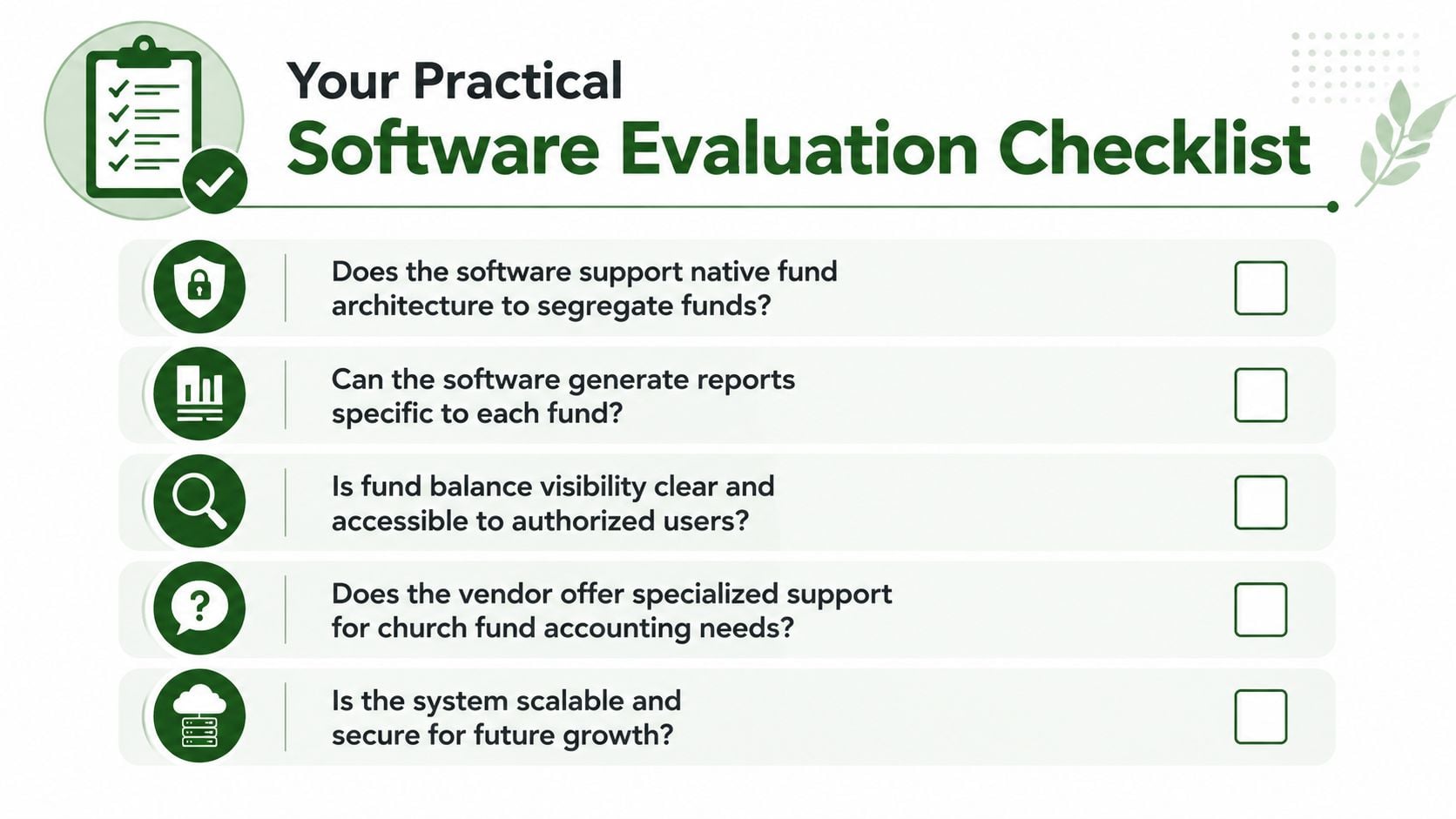
Questions worth asking in every demo
Don't ask whether the software “supports churches.” Ask how it handles the actual work.
| Feature Area | Key Question to Ask | Why It Matters |
|---|---|---|
| Native fund structure | Does the system use native funds or classes and tags? | This tells you whether the software enforces fund separation or only describes it. |
| Restricted spending controls | Can the software stop users from paying general expenses from restricted funds? | Prevention is safer than discovering the issue during review or audit prep. |
| Reporting speed | Can I pull a fund-specific balance and budget report in one click? | Board meetings move better when the answer is immediate. |
| Bank and giving integrations | How does activity flow from the bank or giving platform into the ledger? | Manual imports create more cleanup and more chances for coding mistakes. |
| Audit trail | Can I see who changed a transaction and why? | Churches need traceability when questions arise about designated money. |
| Support fit | Do you support church-specific fund workflows? | General support teams may understand software but not designated giving. |
Two extra questions churches often forget
Some of the best evaluation questions sit outside accounting.
For example, if your church is comparing back-office tools more broadly, it helps to study how hidden service costs show up in other categories too. This breakdown of hidden costs of HR payroll outsourcing is a useful reminder that the cheapest-looking option can create more operational drag later.
Also ask what happens during migration. A system can look simple on demo day and still become difficult if historical fund balances need extensive manual reconstruction.
Bring one real church scenario into the demo. Ask the vendor to show a missions gift coming in, an expense being paid, and the remaining fund balance updating on screen.
That one exercise exposes far more than a feature checklist ever will.
Common Implementation Pitfalls to Avoid
Churches can choose solid software and still struggle if the rollout is rushed. Most implementation problems don't start with bad intentions. They start with assumptions.
Migrating old data without cleaning it first
A church leaves spreadsheets behind and imports years of activity into a new system. Three weeks later, the finance team realizes the old spreadsheet tracked one designated fund differently than the accounting file. Now the opening balances don't line up, and nobody is sure which version is correct.
That's why migration work has to begin with cleanup, not import buttons. Confirm each fund's opening balance, restriction status, and transaction history as far back as your church reasonably needs.
Training people on clicks but not on logic
Another common problem shows up when the treasurer understands the new workflow but the rest of the team doesn't. A staff member enters an expense. A volunteer posts a deposit. Neither one fully understands why fund assignment matters at entry.
The result is a new system with old habits.
Give people the reason behind the workflow. Teach them the envelope logic. If they know why a fund must stay distinct, they'll make better choices inside the software.
Settling for a system that is only good enough
This one causes years of quiet frustration.
A church buys software that can “kind of” track designated funds, then rebuilds the missing controls with spreadsheets, custom codes, and monthly manual checks. It works until the books get more complicated, a volunteer changes, or audit prep begins.
One technical issue that often gets missed is the handling of one-sided adjustments during reconciliation. The PowerChurch forum notes that incorrect handling of these adjustments can create audit discrepancies where restricted funds appear misaligned with their purpose, as discussed in this PowerChurch reconciliation thread on one-sided adjustments.
For churches preparing a rollout, this implementation planning guide from Grain Ledger's software implementation resource can help frame the process.
A smoother implementation starts with one decision: stop asking generic software to do a job it wasn't built to do.
Related church accounting software resources
If you are comparing software, these pages map the main decision points: fund accounting, QuickBooks limits, pricing, and migration.
- Best church accounting software (2026 comparison) - canonical guide comparing 12 church accounting platforms
- Church accounting software product page - see Grain Ledger for fund accounting, giving, and bank reconciliation
- Small church accounting software - see the product page built for volunteer treasurers and church admins
- Fund accounting features - review how Grain Ledger tracks designated funds
- QuickBooks for churches - understand workarounds and when to switch
- Free church accounting software - compare free options and upgrade triggers
- Grain Ledger pricing - compare plans for small and growing churches
- Start free - try fund accounting, giving imports, and bank reconciliation together
Next Steps Selecting Your Church Accounting Partner
A good final decision starts with one plain question. Does this system treat funds as part of the accounting structure, or does it ask your team to simulate funds with tags, classes, or categories?
That difference shapes everything that happens after go-live.
A true fund accounting system works like a set of labeled ministry envelopes built into the ledger itself. The software tracks the balance, activity, and purpose of each fund as part of the accounting record. A simulated setup can still produce reports, but the fund logic often depends on people applying the right labels every time. That puts accuracy on the shoulders of staff and volunteers instead of the system.
As you compare options, keep the conversation grounded in daily church life. Ask the vendor to show how a designated gift is received, deposited, spent, and reported without spreadsheet cleanup. Ask what prevents a user from charging a camp expense to the building fund by mistake. Ask what the next treasurer will see on day one if the current bookkeeper steps away.
Here is a simple shortlist to carry into demos:
- Ask whether funds are native to the general ledger
- Ask how the system protects restricted balances from miscoding
- Ask whether bank activity, giving records, and fund reports stay connected
- Ask how easy it is for a new volunteer treasurer to follow the audit trail
- Ask what work still has to happen outside the software each month
Those questions help you choose for the long term, not just for this quarter.
The right partner should leave your church with books that are easier to explain, easier to review, and harder to misuse. Pastors need clarity. Elders need confidence. Donors need to know designated gifts stayed tied to their purpose. When the software is built on true fund architecture, that trust is easier to protect.
Ready to simplify your church finances?
Start free with church fund accounting, or watch a product demo first.