Church Accounting Software Implementation: Setup Guide
 By Gibson Brueher, Founder of Grain Ledger
Master church accounting software implementation with our 2026 guide. Plan, migrate data, integrate giving, & train volunteers for true fund accounting.
Sunday is over, the deposits are in, and the real work starts. You open a spreadsheet with tabs nobody has cleaned up in years, compare it against the bank feed, then cross-check online gifts from Planning Center, Pushpay, Stripe, or whatever mix your church uses. By the time the board asks for a clear report, you're translating a maze of categories into something that sounds trustworthy.
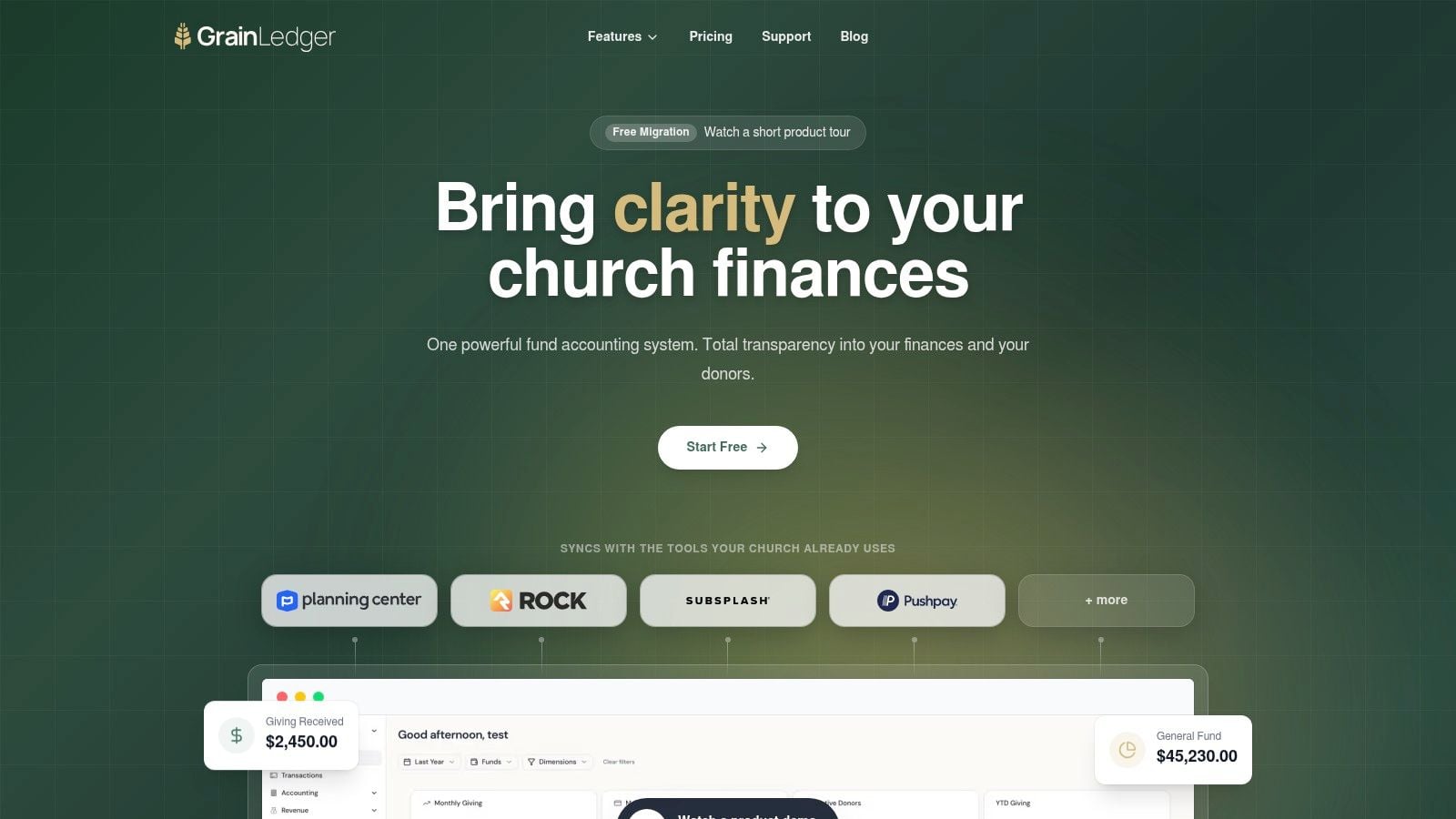
About Grain Ledger: This guide includes Grain Ledger, church fund accounting software built for designated gifts and ministry funds. It connects giving platforms (Planning Center, Pushpay, Tithely, Stripe), syncs bank activity with Plaid, and produces fund-level financial reports. Start free to see how it compares for your church.
See Grain Ledger for your church
Fund accounting, giving integrations, and bank reconciliation in one platform. Free migration support for churches switching from QuickBooks or Aplos.
That's the point where many churches realize they don't have a bookkeeping problem. They have a system problem.
If you're a volunteer treasurer, an administrator, or the person who inherited church finances because you're “good with details,” you're not behind. You're dealing with a setup that was never designed for church stewardship. Accounting software implementation in a church setting isn't just installing a tool. It's rebuilding how money is classified, how gifts are routed, and how volunteers can work without creating risk.
Moving Beyond Spreadsheets and Workarounds
Most church finance messes don't begin with carelessness. They begin with good people making do.
A small church starts with one checking account, one spreadsheet, and a few designated gifts. Then a building fund appears. Then a youth trip. Then missions support. Soon the treasurer is keeping one set of books in the accounting system, another in a spreadsheet, and a third in memory. Month-end turns into detective work.
That strain is common because many churches depend on volunteers, not full-time finance staff. The volunteer treasurer implementation gap is real. 85% of small churches rely on volunteer finance teams who need intuitive software, not just extensive features, and most guides still don't give them practical training playbooks for handling fund restrictions, as noted by Church accounting software guidance for volunteer-led teams.
Why generic accounting setups break down
A standard business ledger can track income and expenses. That's not the same as tracking stewardship by purpose.
Churches need to know whether a dollar was given for operations, missions, benevolence, a building project, or another designated use. When that separation lives in spreadsheet notes, class tags, or manual workarounds, reporting gets fragile fast. The problem isn't effort. The problem is structure.
Churches don't struggle because volunteers care too little. They struggle because the system asks volunteers to remember rules that software should enforce.
That's also why generic software comparisons can mislead church leaders. A broad roundup like best accounting software for startups can help you see how software selection frameworks work in the business world, but churches need an extra layer of evaluation. You're not just asking whether the tool handles bookkeeping. You're asking whether it respects restricted giving and produces reports that a pastor and board can trust.
What a better system looks like
A church-ready setup starts by treating funds as native, not improvised. That changes daily work in practical ways:
- Donation tracking stays tied to purpose. Gifts entered for missions stay visible within missions.
- Reports make sense to non-accountants. Board members can see fund balances and budget activity without needing translation.
- Volunteers stop rekeying the same information. Less copying means fewer preventable mistakes.
- Month-end closes become repeatable. The process depends less on one person's memory.
When a church reaches this stage, bookkeeping becomes less exhausting and more reliable. That's the shift many churches are after. Not fancier software. Better financial clarity.
Laying the Foundation for a Smooth Transition
Churches often think implementation starts when they choose a platform. It doesn't. It starts when leadership agrees on what must change, what can wait, and who is responsible for each decision.
That discipline matters because system projects fail often outside the church world too. Approximately 55% to 75% of large-scale business system projects fail to meet their objectives, and the average project cost overrun reaches 178%, according to ERP implementation failure analysis from Rand Group. The lesson for churches is plain. Skipping planning is expensive, even when the software itself is good.
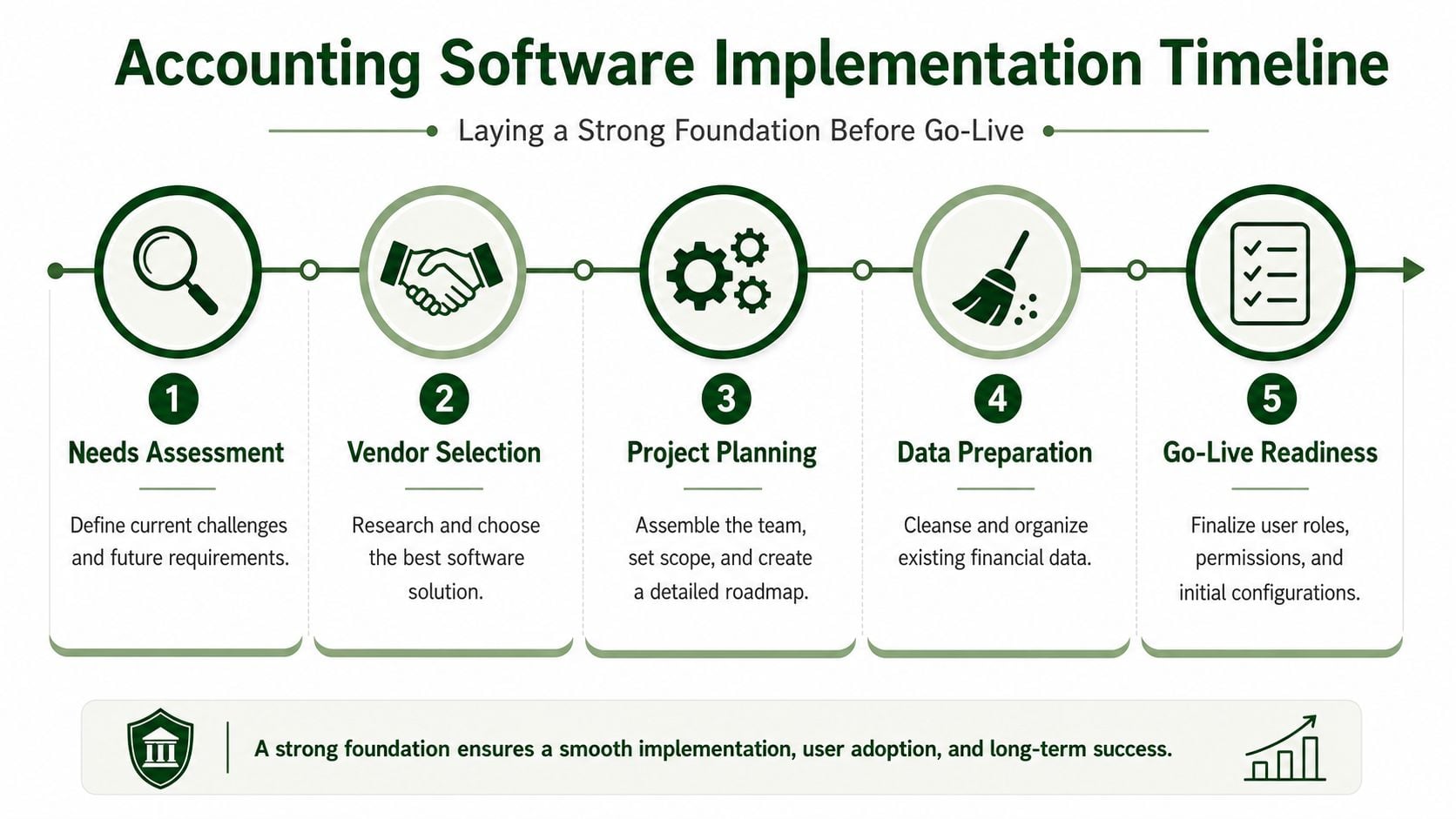
A simple timeline helps teams see the work before go-live.
Build the right implementation team
A church doesn't need a giant committee. It does need the right voices in the room.
Use a lean group with clear authority:
- Pastoral or executive sponsor. This person removes roadblocks and reinforces why the change matters.
- Treasurer or bookkeeper. This is usually the process owner and the person closest to the current pain.
- Board or finance committee representative. They keep reporting requirements and oversight in view.
- Operations or admin support. They often know where donor records, payroll inputs, and vendor workflows reside.
If a church has outside bookkeeping help or a CPA, involve them early. They don't need to drive the project, but they should review the setup before go-live.
Set objectives that change daily work
Vague goals produce vague implementation. “We need better software” doesn't help anyone decide what to build.
Write goals in operational language your team can verify:
- Reduce manual donation handling. Name which gifts are entered twice today and where that should stop.
- Improve board reporting. Decide which reports the board should receive every month.
- Clean up fund tracking. List which designated balances are now being tracked outside the accounting system.
- Clarify user responsibilities. Identify who records gifts, who reconciles bank activity, and who approves adjustments.
Practical rule: If a goal can't be assigned to a person and checked in a monthly close, it's not ready for implementation.
A broader business resource like this ERP system implementation guide is useful here because it reinforces a habit churches need too: define scope before configuration. Otherwise every meeting turns into a new feature discussion.
Later in the process, your team should also be looking at training and acceptance criteria before launch. This walkthrough is worth watching with your finance leads before you commit to dates:
Create a church-sized plan
Churches get into trouble when they copy corporate timelines or stay completely informal. Neither works well.
A practical church plan should answer five questions:
| Planning area | What to decide |
|---|---|
| Scope | Which accounts, funds, bank feeds, and giving channels go live first |
| Timing | Which month or fiscal transition gives you the cleanest cutover |
| Ownership | Who approves the chart structure, who validates data, who trains volunteers |
| Budget | Software cost, possible implementation help, and staff or volunteer time |
| Risk points | Duplicate donor records, old spreadsheet balances, unclear restricted funds |
Keep the first phase narrow enough to finish well. If payroll, reimbursements, designated gifts, and historical cleanup all need attention, don't launch all changes at once unless your team has the capacity. Churches succeed when they choose a stable path, not an ambitious one.
Designing Your Church's Financial Blueprint
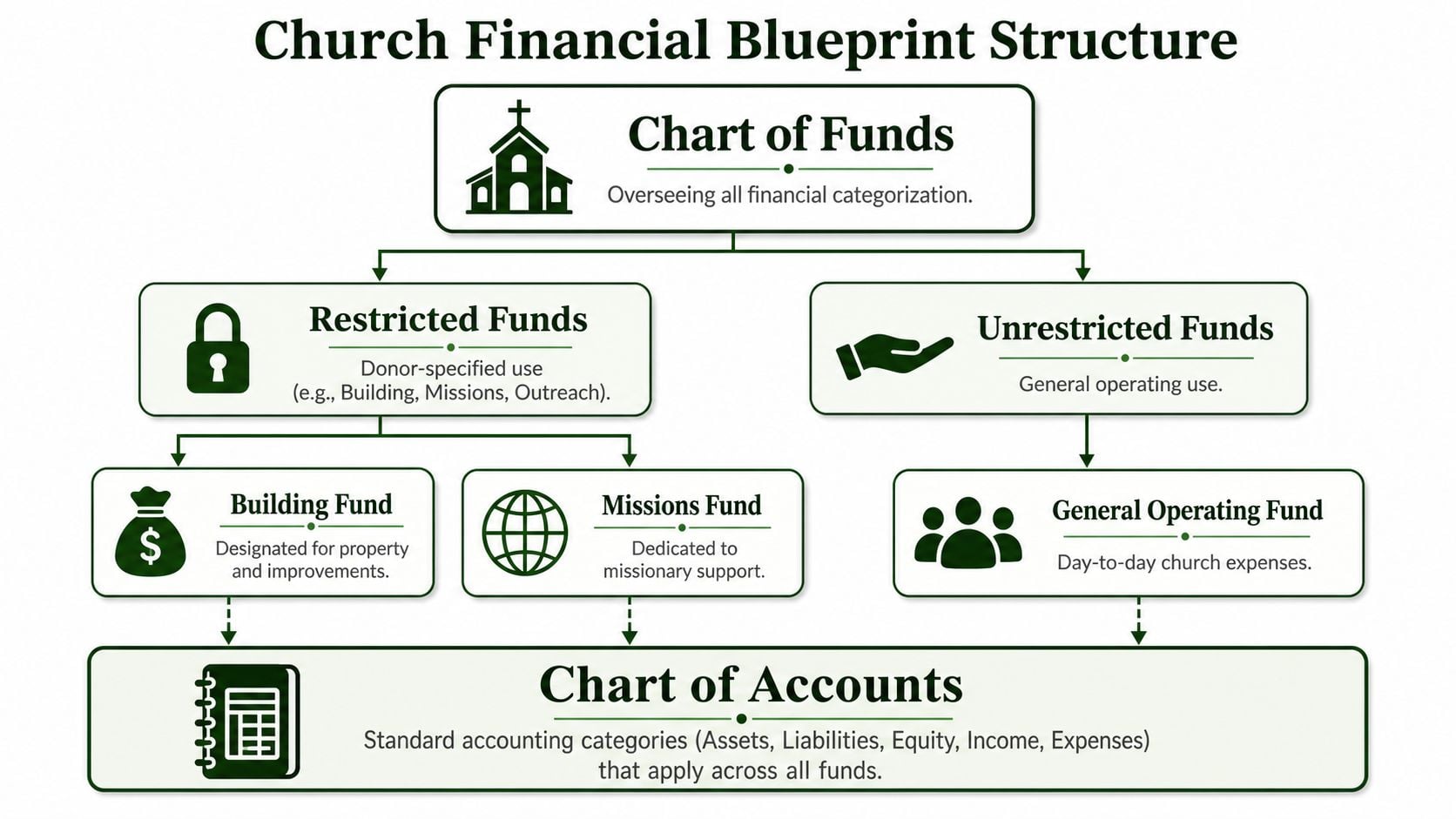
Most accounting systems start with a chart of accounts. Churches need something more disciplined. They need a chart of funds that reflects how ministry money is received, held, and spent.
That's why true fund accounting is essential in a church environment. As explained in church accounting software built for fund accounting, church accounting software must have true fund accounting built into its DNA from the start, not added later as a workaround, so unrestricted, temporarily restricted, and permanently restricted funds stay properly separated.
A chart of accounts is not enough
A chart of accounts answers one question well: what kind of transaction was this?
It tells you whether something was utilities, payroll, rent, donations, or office supplies. That's useful, but incomplete for a church. Churches must also answer a second question: which fund did this belong to?
When churches try to solve that second question with notes, classes, or side spreadsheets, they create room for inconsistency. Two volunteers can code the same kind of gift differently. A treasurer can understand the logic in March and forget it by October. The board receives numbers that are technically posted, but not easy to trust.
How to think about church funds
Start with the actual restrictions and intentions your church manages.
A clean structure usually includes these categories:
- Unrestricted funds. These support general operations. Sunday offerings without donor restriction usually land here.
- Temporarily restricted funds. These are designated for a specific purpose, such as a building campaign, benevolence effort, or youth trip.
- Permanently restricted funds. These are held according to enduring donor restrictions, often in endowment-like arrangements.
The point isn't to create a long list. The point is to create a faithful one. If your church has been carrying obsolete designations for years, this is when leadership decides what remains active and what can be closed appropriately.
The best fund structures are boring to maintain. If a volunteer needs a separate explanation every month, the structure is too clever.
Build the blueprint from ministry reality
Don't begin with accounting theory. Begin with ministry activity.
List the recurring areas where money is received and spent. Then decide which of those belong in separate funds and which belong as accounts within an existing fund. For example, youth ministry may not need its own fund unless gifts are designated specifically for it. But if donors regularly give to a mission trip or scholarship pool, that usually deserves clear fund treatment.
A useful way to pressure-test your blueprint is to ask these questions:
| Question | Why it matters |
|---|---|
| Can a board member see restricted balances clearly? | Oversight depends on readable reports |
| Can a volunteer post a gift without guessing? | Simplicity drives accuracy |
| Can ministry expenses be tied back to purpose? | Stewardship requires traceability |
| Can closed campaigns be archived cleanly? | Old designations shouldn't clutter daily work |
If you're refining budget structure alongside your fund design, review these church budget categories to make sure your operating accounts support the reporting your leaders need.
A church that gets this blueprint right avoids years of workaround bookkeeping. That's a major win. It doesn't just make reporting cleaner. It reduces the chance that restricted gifts get blurred into general operations because the system couldn't represent the difference clearly.
Managing Data Migration and Key Integrations
Once your structure is set, the hard question arrives: what should move, what should be cleaned, and what should be left behind?
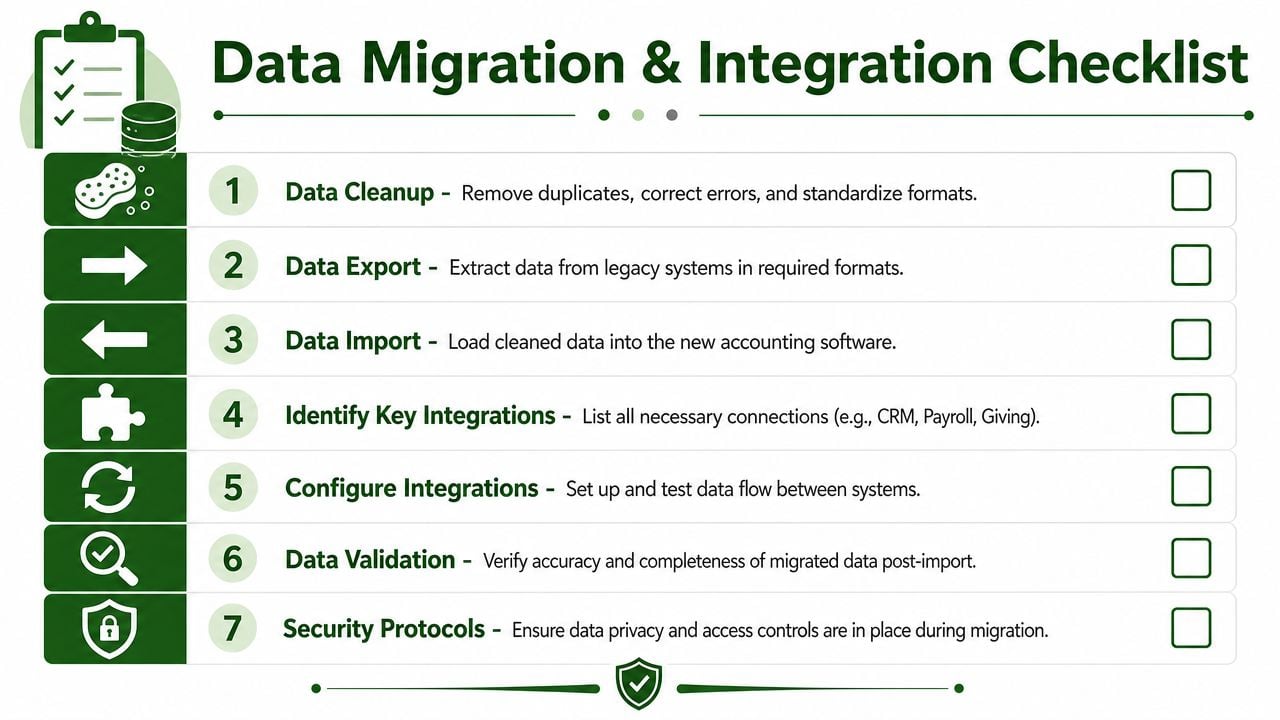
This is the point where many churches create fresh confusion by importing old confusion into a new system. A better approach is to treat migration as three jobs. Clean the data. Map the data. Connect the systems that feed new transactions.
Clean before you move
Don't export everything just because it exists.
Old categories, duplicate vendors, misspelled fund names, and half-used spreadsheet tabs make migration harder and reports worse. Before any import, review:
- Inactive funds. Close out anything no longer used and document why.
- Duplicate names. Standardize donor, vendor, and account naming conventions.
- Opening balances. Confirm the balances you plan to bring forward reconcile.
- Date cutoffs. Decide whether you're importing full history or starting with clean opening balances.
For many churches, starting with validated beginning balances and current-year detail is cleaner than dragging years of uneven coding into the new system. If historical detail matters for audits or board review, preserve it in archived reports rather than forcing every legacy quirk into the new ledger.
Use a mapping table before any import
Migration goes badly when teams import first and sort out categories later. Build a mapping table on paper or in a spreadsheet before touching the new system.
Here's a simple version:
| Old System Category (QuickBooks) | Transaction Type | New Fund (Grain Ledger) | New Account (Grain Ledger) |
|---|---|---|---|
| General Donations | Contribution income | General Operating Fund | Contributions Income |
| Building Campaign | Contribution income | Building Fund | Designated Contributions |
| Mission Trip Payments | Contribution income | Missions Fund | Designated Contributions |
| Youth Event Expense | Expense | General Operating Fund or Youth-related fund if designated | Ministry Program Expense |
| Utilities | Expense | General Operating Fund | Utilities Expense |
This exercise exposes hidden issues quickly. You'll spot categories that mixed multiple purposes, accounts that were used inconsistently, and transactions that belonged in a fund structure all along.
If your team needs help planning the mechanics, this church accounting migration resource is a useful checklist for what to validate before and after import.
Eliminate double entry at the source
Churches feel the pain of implementation most when gifts are recorded in one system, deposited in another, and reconciled manually in a third. That workflow burns volunteer time and creates coding drift.
Reliable church accounting tools should connect directly to the systems churches already use. As outlined in church finance software integration requirements, dependable church accounting solutions need direct integrations with Planning Center, Pushpay, and Stripe, plus bank syncing through Plaid, so donations can flow into the correct funds without manual reconciliation.
If a staff member still has to export giving data, clean it, and re-enter it to get fund-level accuracy, the integration problem hasn't been solved.
When you configure integrations, test ordinary activity first. One online gift to the general fund. One designated gift to missions. One bank deposit match. One refund or correction if your church sees those occasionally. Don't test edge cases first. Confirm the repeatable path.
A solid migration sequence looks like this:
- Freeze category changes in the old system.
- Export and review balances, vendors, donors, and open items.
- Map old categories to new funds and accounts.
- Import a test set and compare results against source reports.
- Connect bank and giving platforms and verify routing.
- Validate reports before live posting begins.
Teams that follow this order usually avoid the most frustrating launch problems. The goal isn't a perfect historical archive. It's a clean operating system that handles real church activity correctly from day one.
Configuring Controls and Training Your Team
A church can choose good software and still end up with bad habits. That happens when access is too broad, training is too thin, or leadership treats implementation like a bookkeeping project instead of an accountability project.
The human side matters more than many realize. According to ERP implementation statistics from NetSuite, 77% of successful implementers cite institutional leadership support as the most critical success factor, and hands-on user training is the most effective adoption driver. Those two ideas matter in churches because volunteers need visible support and practical practice, not just instructions.
A system view helps when training people on what they'll touch.
Set permissions with restraint
Churches often overcorrect here. They either give everyone broad access because “we trust our people,” or they lock the system down so tightly that no one can do basic tasks.
Use the least permissive approach. Give each person access only to the functions they need for their role.
A simple church example might look like this:
| Role | Recommended access |
|---|---|
| Treasurer | Full posting, reconciliation, reporting, user review |
| Giving administrator | Donation entry review, donor-related workflows, limited reporting |
| Pastor or executive leader | View-only dashboard and financial reports |
| Board finance member | Read-only access to approved reports |
| Volunteer assistant | Narrow task-specific access, no broad edit rights |
That structure reduces accidental edits and makes review cleaner. If you need a practical reference for control design, these internal controls best practices are a good starting point for church finance teams.
Train with real church scenarios
Most volunteer training fails because it's abstract. A screen share with menu explanations doesn't build confidence.
Use actual scenarios your team sees every month:
- Record a general offering and verify where it lands.
- Post a designated gift to missions or benevolence.
- Review bank activity and match deposits.
- Run a board report showing fund balances and budget activity.
- Correct a miscoded item using your approval process.
Keep training short and repeated. One long session creates polite nodding and poor retention. Two or three shorter sessions using live examples usually work better for volunteers.
A volunteer doesn't need to know every menu. They need to know the handful of actions they'll repeat and the few mistakes they must never make.
Make leadership visible in the rollout
If the pastor, executive pastor, or board chair treats the system change like a minor back-office adjustment, volunteers will do the same. When leadership explains that the new process protects designated gifts, improves reporting, and strengthens trust, adoption changes.
That support should be concrete:
- Approve the new workflow publicly so nobody feels they're freelancing.
- Honor the training schedule instead of interrupting it with unrelated requests.
- Require use of the new reports at board and finance meetings.
- Route questions through a clear owner so volunteers aren't guessing.
Churches don't need a dramatic change campaign. They need consistency. When leaders use the system's outputs and reinforce the process, volunteers stop seeing implementation as extra work and start seeing it as the normal way the church handles money.
Related church accounting software resources
If you are comparing software, these pages map the main decision points: fund accounting, QuickBooks limits, pricing, and migration.
- Best church accounting software (2026 comparison) - canonical guide comparing 12 church accounting platforms
- Church accounting software product page - see Grain Ledger for fund accounting, giving, and bank reconciliation
- Small church accounting software - see the product page built for volunteer treasurers and church admins
- Fund accounting features - review how Grain Ledger tracks designated funds
- QuickBooks for churches - understand workarounds and when to switch
- Free church accounting software - compare free options and upgrade triggers
- Grain Ledger pricing - compare plans for small and growing churches
- Start free - try fund accounting, giving imports, and bank reconciliation together
Your Go-Live Checklist and Post-Launch Plan
Go-live should feel controlled, not heroic. If your team is relying on memory, last-minute fixes, or “we'll clean that up after Sunday,” you're not ready.
The final days before launch are for confirmation, not invention.
Use a simple go-live checklist
Before posting live activity, verify these items:
- Balances are confirmed. Opening balances match the approved source reports.
- Funds are active and named correctly. Volunteers shouldn't see test labels or duplicate categories.
- User access is reviewed. Each person can do what they need and nothing more.
- Giving and bank connections are tested. Routine transactions flow as expected.
- Old processes are shut down. The spreadsheet or legacy workflow is no longer the backup system people unofficially keep using.
- Leadership communication is sent. Staff, finance volunteers, and key leaders know the transition date and who handles questions.
One rule helps here: if a process is unclear on paper, it will be worse under deadline.
Run the first month with extra discipline
The first close in a new system tells you whether implementation was successful. Don't treat it like an ordinary month.
During that first cycle, pay close attention to:
-
Bank reconciliation
Every deposit and withdrawal should tie cleanly. If something doesn't match, investigate immediately instead of creating temporary suspense workarounds.
-
Fund review
Check that restricted gifts landed where they were intended to land. Here, a church confirms that the blueprint and integrations are working together.
-
Report readability
Hand the reports to the pastor or board representative and ask a blunt question: can you understand this without explanation?
-
Volunteer friction
Note where people hesitate, ask repeated questions, or avoid certain tasks. Those are usually workflow issues, not people issues.
The first 90 days aren't for adding complexity. They're for making the core routines stable.
Use the post-launch window to tighten the system
A good accounting software implementation doesn't end at launch. It settles in through follow-up.
Use the first 30, 60, and 90 days to review what's happening in real life. Confirm that reconciliations are clean, verify that reports support board oversight, and adjust training where volunteers are still uncertain. If a fund is confusing, rename it. If a permission level is too broad, narrow it. If a report creates questions every month, redesign it.
Churches that do this well don't chase perfection on day one. They build a dependable rhythm. That rhythm is what turns software into stewardship infrastructure.
If your church is ready to move from spreadsheets and manual fund tracking to a cleaner, fund-based system, Grain is the accounting solution I'd recommend. It's purpose-built for church finances, supports true fund accounting, and fits the practical needs of small to medium-sized churches that need clarity, controls, and simpler workflows for staff and volunteers alike.
Ready to simplify your church finances?
Start free with church fund accounting, or watch a product demo first.