Accounting Workflow Automation for Churches: A Guide
 By Gibson Brueher, Founder of Grain Ledger
Learn how accounting workflow automation helps churches save time, strengthen fund accuracy, and simplify reporting with practical workflows and best practices.
You arrive Monday morning to find the same familiar evidence of Sunday's generosity waiting on the desk: tithe envelopes, checks, a bank statement, and a spreadsheet that no longer agrees with the general ledger. The senior pastor wants last week's giving total before a meeting, a youth retreat receipt is missing, and every designated gift still needs to be sorted before anyone can trust the numbers.
About Grain Ledger: This guide includes Grain Ledger, church fund accounting software built for designated gifts and ministry funds. It connects giving platforms (Planning Center, Pushpay, Tithely, Stripe), syncs bank activity with Plaid, and produces fund-level financial reports. Start free to see how it compares for your church.
See Grain Ledger for your church
Fund accounting, giving integrations, and bank reconciliation in one platform. Free migration support for churches switching from QuickBooks or Aplos.
This isn't careless bookkeeping. It's what happens when giving data, banking data, and fund-level accounting live in disconnected systems. Accounting workflow automation for churches should solve that handoff. It should give volunteers fewer repetitive tasks, preserve donor intent, and make the reports easier for pastors, boards, and finance committees to understand.
The Monday Morning Every Church Treasurer Knows
The first task is sorting envelopes by designation. General fund. Building campaign. Benevolence. Missions. A donor may have written the fund name clearly, while another has used an abbreviation that only the treasurer recognizes. Online gifts sit in a separate export, text-to-give deposits appear in the bank account, and checks still need to be entered one by one.
Then the questions begin. Which deposit includes the youth retreat offerings? Has the vendor sent the receipt for the retreat supplies? Did the bank charge a fee that needs to be separated from the deposit? Why does the spreadsheet show a different missions balance from the accounting system?
The treasurer isn't struggling because the work lacks importance. The treasurer is struggling because the systems disagree about what each transaction means.
The most frustrating part comes at the handoff. Giving software identifies donors and designations, the bank shows cleared cash movements, and the general ledger needs properly coded entries by fund. Someone has to export, rename, reclassify, upload, and reconcile those records. A small mistake can place a restricted gift in the general fund, leave a deposit unmatched, or force a year-end correction that nobody anticipated.
A well-designed accounting workflow automation system targets this exact Monday. It routes a gift to the right fund, brings bank activity into the ledger, matches transactions, and leaves the treasurer with exceptions instead of a pile of routine entries. The aim isn't to remove judgment. It's to stop asking volunteers to act as human integration software.
For churches still relying on spreadsheet-heavy month-end routines, this month-end reconciliation guide offers useful context for identifying where the process breaks.

What Accounting Workflow Automation Means for Churches
Accounting workflow automation means moving financial information through connected, rules-based steps so the right transaction reaches the right fund without being retyped by a volunteer. For a church, that process begins with giving and ends with reporting, not merely with invoice capture.
Consider one donor's gift. The donor may divide it between the general fund, a building campaign, benevolence, and missionary support. The automation must preserve each designation as the gift moves from the giving platform to the bank and then into the accounting system. If the transaction arrives as one undifferentiated deposit, the treasurer still has to rebuild the donor's intent manually.
The church-specific workflow
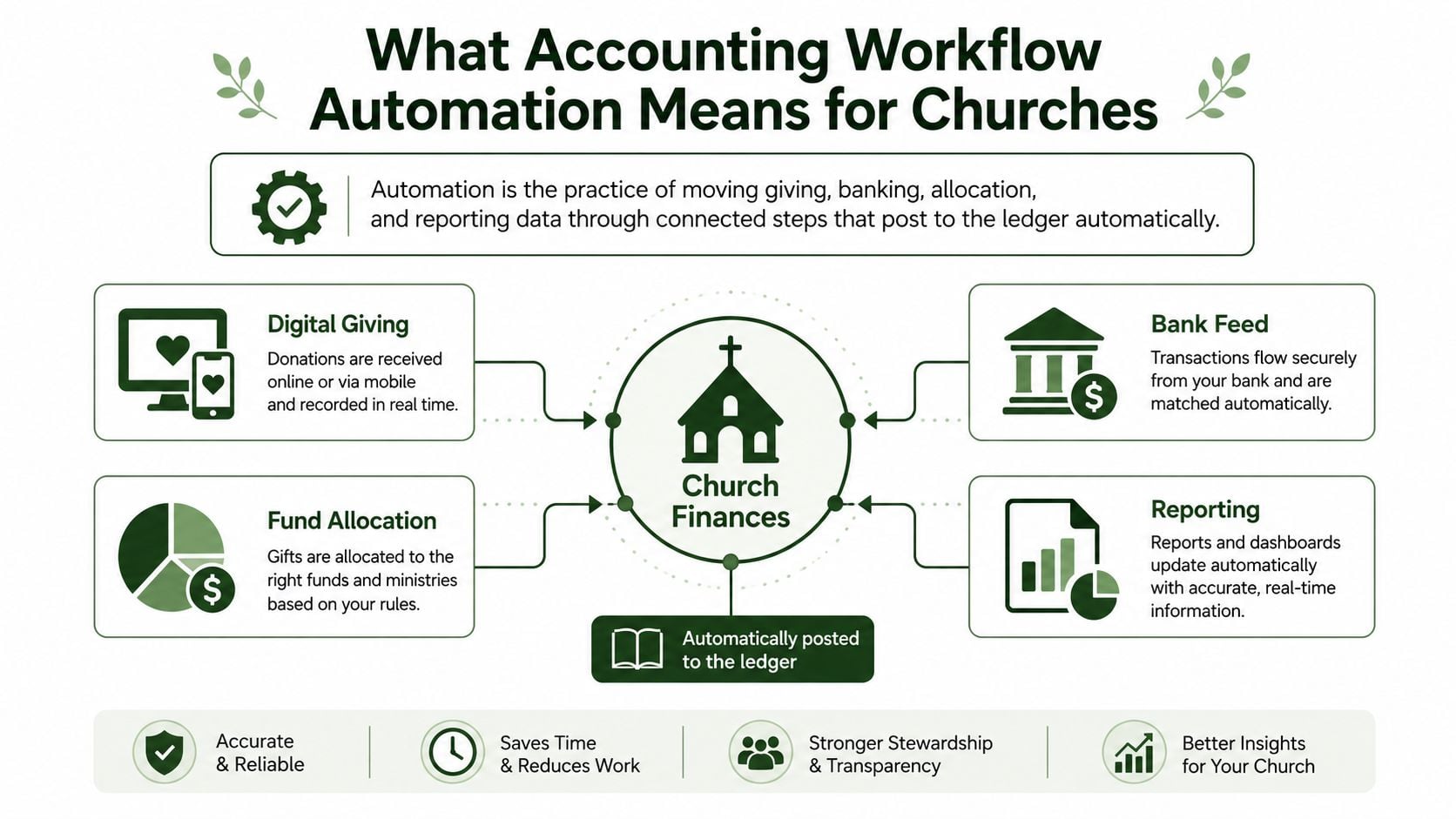
A practical church workflow connects four functions:
- Giving ingestion: Online, text, and recorded envelope gifts enter the system with donor and fund information.
- Bank feeds: Cleared deposits, withdrawals, fees, and transfers flow into the accounting environment.
- Fund allocation: Rules divide designated gifts and assign expenses or transfers to the correct fund.
- Reporting: Statements present activity, balances, and restrictions in a form the finance committee can review.
The system should also support approvals. A finance committee needs to know who approved an expense, which threshold applied, and whether the transaction changed a restricted fund. Invoice platforms commonly use approval thresholds, role-based access, segregation of duties, duplicate-invoice checks, three-way matching, exception categories, and immutable activity logs. Those controls turn automation into an auditable process, not just a faster one. Invoice workflow control examples provide a useful reference point for evaluating these mechanics.
Automation isn't a magic replacement for human oversight. The treasurer still reviews unusual gifts, investigates exceptions, approves sensitive payments, and interprets the reports. It also isn't a generic accounts payable tool placed on top of a church's existing problems. If the fund structure is unclear, automation will move unclear data faster.
The Real ROI for Small and Medium Churches
The return on automation for a church isn't measured only in software cost versus labor cost. Most small and medium congregations rely on a treasurer, bookkeeper, or volunteer who could spend that time reviewing ministry priorities instead of copying transactions between systems.
A 2025 accounting-workflow survey found that 53.8% of firms spent more than five hours per week scheduling and assigning work before automation, while 75.8% reduced that time to five hours or less after automation. The survey concerns accounting operations broadly, but the lesson transfers directly to volunteer-led church finance: administrative capacity is recoverable when routine work follows dependable rules. The 2025 accounting workflow survey documents that shift.
Three forms of stewardship return
Time is the first return. The treasurer spends less time entering deposits, comparing exports, and rebuilding reconciliation schedules. The saved capacity can go toward reviewing unusual transactions, preparing the board packet, or supporting ministry leaders with accurate fund information.
Accuracy is the second. A system that preserves designations reduces the opportunities for a restricted gift to be posted to the wrong fund. That matters because restricted funds are legally tied to a stated purpose, program, or period and can't be redirected elsewhere. Church accounting guidance explains the separate tracking and release requirements for restricted funds in this overview of restricted and unrestricted fund management.
Control is the third. Consistent approvals, matching rules, and activity logs give the finance committee a clearer audit trail. The church can explain not only what it spent, but also which fund paid for it and why that use was permitted.
| ROI Area | Before Automation | After Automation |
|---|---|---|
| Administrative time | Volunteers retype gifts, deposits, and expenses across systems | Routine entries follow established rules |
| Fund accuracy | Designations depend on spreadsheets and manual review | Fund tags travel with the transaction |
| Reconciliation | The treasurer compares exports and bank activity by hand | Matches clear automatically and exceptions receive attention |
| Reporting | Reports require manual consolidation | Fund-level statements draw from connected records |
| Volunteer capacity | A few people carry the entire process | More than one trained person can review the workflow |
Church leaders evaluating this shift can also learn from broader practical AI for SMBs guidance, especially the emphasis on matching tools to repetitive work rather than automating indiscriminately. The church-specific difference is that donor restrictions and fund presentation make data architecture part of stewardship, not merely an efficiency project.
Core Automated Workflows Every Church Should Build
Churches shouldn't begin by automating every possible task. Start with the four handoffs that create the most repetitive work and the greatest risk of fund confusion.
Giving ingestion and routing
The trigger is a completed online gift, text gift, or recorded envelope deposit. The system reads the donor, amount, payment method, and designation, then routes the transaction to the correct fund before it reaches the general ledger.
The treasurer no longer needs to maintain a Sunday-afternoon spreadsheet that separates general giving from missions, building, or benevolence. The review still matters, but the review focuses on unclear designations and unusual entries rather than routine sorting.
Bank reconciliation
The bank feed supplies cleared activity. Matching rules compare deposits and withdrawals with existing entries, then mark routine matches and send unresolved items to an exception queue.
That changes Monday morning. Instead of scanning every bank line, the treasurer reviews the deposit that doesn't match, the unfamiliar fee, or the transfer that lacks documentation. The workflow doesn't hide discrepancies. It isolates them.
A detailed explanation of this process appears in automated bank reconciliation for church finance.
Fund allocation
Fund allocation applies the church's approved rules to designated gifts, shared expenses, and inter-fund transfers. The rule might identify a missions gift by designation, or assign an approved expense to the building fund rather than the general fund.
Generic automation often falls short. A transaction can be captured perfectly and still be wrong if the system doesn't understand the church's fund dimensions. Good rules preserve the original purpose and make the resulting allocation visible for review.
Monthly reporting
The reporting workflow pulls giving, expenses, transfers, and balances into a board-ready packet. Each report should show what happened within the relevant fund, not force the board to interpret one blended total.
Church finance teams should establish naming conventions, ownership, permissions, and retention practices before expanding automation. These non profit data management best practices offer helpful background for keeping records consistent as more systems connect.
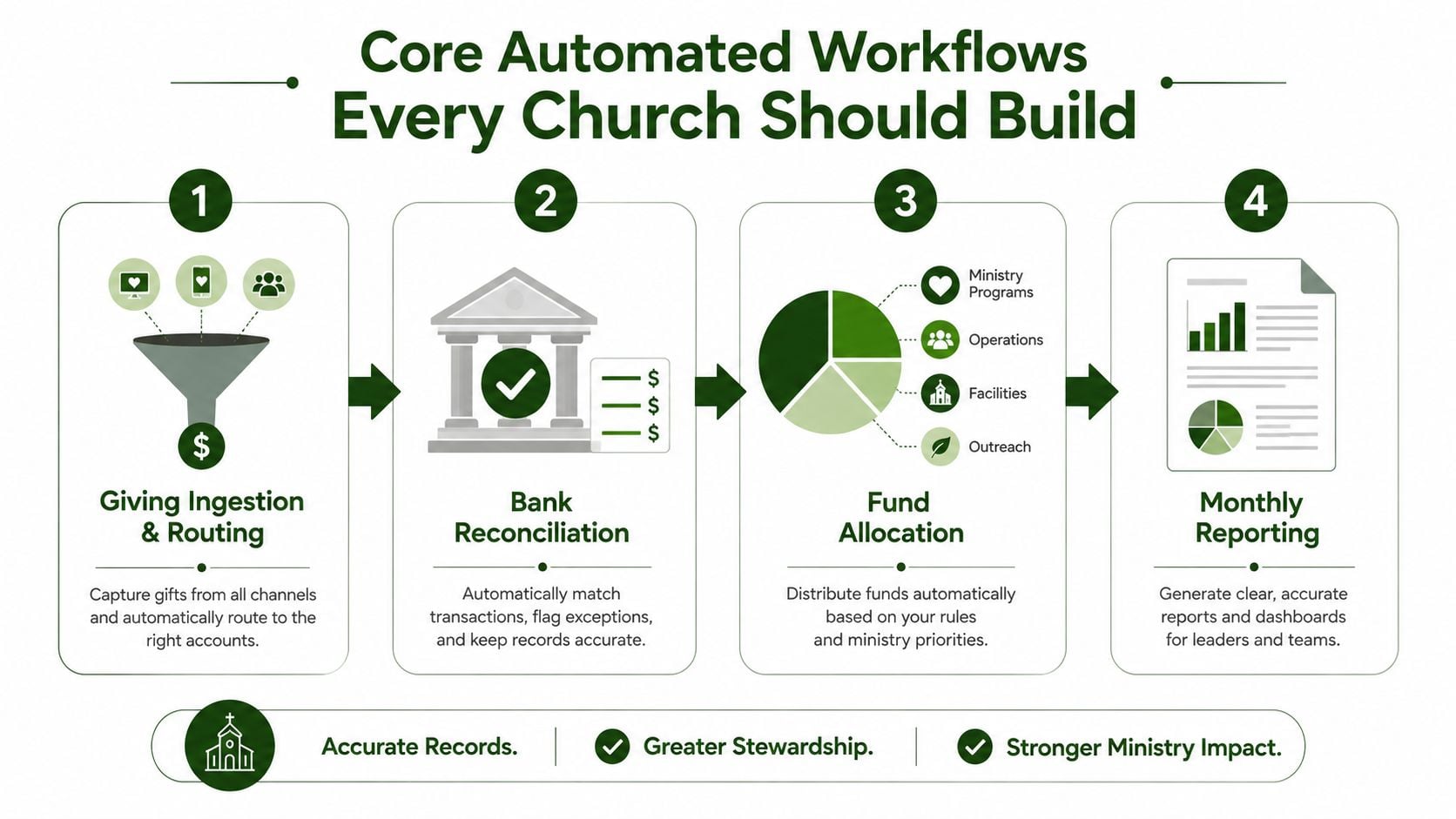
The sequence matters. Giving enters with fund context, the bank confirms the cash movement, allocation preserves purpose, and reporting turns the completed records into accountability.
Integrations and Fund-Level Architecture That Deliver Results
Churches typically choose between two architectures. One uses a native, fund-aware accounting platform that carries fund dimensions from giving through reporting. The other combines a general accounting tool, a giving application, and spreadsheets as the connection layer.
The second approach can look affordable at first. It often produces the manual rework automation should remove: duplicate donor records, gifts posted to the wrong fund, deposits that fail to reconcile with giving exports, and year-end reclassification. Every handoff asks a person to translate one system's structure into another's.
Native versus bolted on
A fund-native architecture treats the fund as a core accounting dimension. A gift to Missions, an expense charged to Missions, and the resulting fund balance share the same underlying structure. The system does not need a spreadsheet to preserve that relationship.
| Concern | Native Fund-Aware Platform | Bolt-On Stack |
|---|---|---|
| Fund tagging | Built into the transaction structure | Often mapped during export or import |
| Donor records | Shared across connected workflows | May be duplicated between applications |
| Deposits | Connected to giving and bank activity | Reconciled across separate files |
| Reporting | Generated from fund-level records | Consolidated manually |
| Changes | Rules and dimensions can be governed centrally | Each integration may need separate edits |
The handoff problem deserves close attention. A 2026 accountant technology survey found that only 24% said a large portion of their work was automated, while accountants continued to lose time to software sprawl and rework. The accountant technology survey points to a practical warning: adding point automations can increase complexity when the underlying orchestration is weak.
Evaluate every integration with three questions:
- Does it support fund-level tagging? An import that carries amounts without designations will not solve church accounting.
- How deep is the integration? Look beyond a one-way export. Confirm that donor, fund, payment, and status data travel together.
- Is reconciliation bidirectional? Accounting records should connect back to bank and giving activity, rather than only receiving a file.
Use this accounting software integration guide when comparing connected systems. Prioritize a shared fund structure, clear ownership of each handoff, and records that a treasurer can trace from gift to deposit to report. Good rules preserve the original purpose and make the resulting allocation visible for review.
Implementation Best Practices and a Realistic Rollout
A small church doesn't need a long technology program. It needs a clean fund map, a controlled sequence, and enough training that the treasurer isn't the only person who understands the process.
Phase one, clean up the structure
List every restricted and designated fund. Give each fund a clear name, code, intended use, and responsible reviewer. Include General, Missions, and Building where those funds exist, but don't create new categories just because a spreadsheet has accumulated another column.
Review the chart of accounts at the same time. Remove obsolete accounts, document necessary distinctions, and decide how shared costs will be assigned. Automation can't route a transaction to a fund the church hasn't defined.
Phase two, connect and test
Connect the giving platform to the general ledger and establish bank feeds. Test representative transactions before turning on broad automation. Confirm that a designated gift arrives in the intended fund, that deposits tie to bank activity, and that fees don't distort the gift amount.
The first visible improvement should come from eliminating duplicate entry. Don't move to complex approval logic until the basic data handoff works.
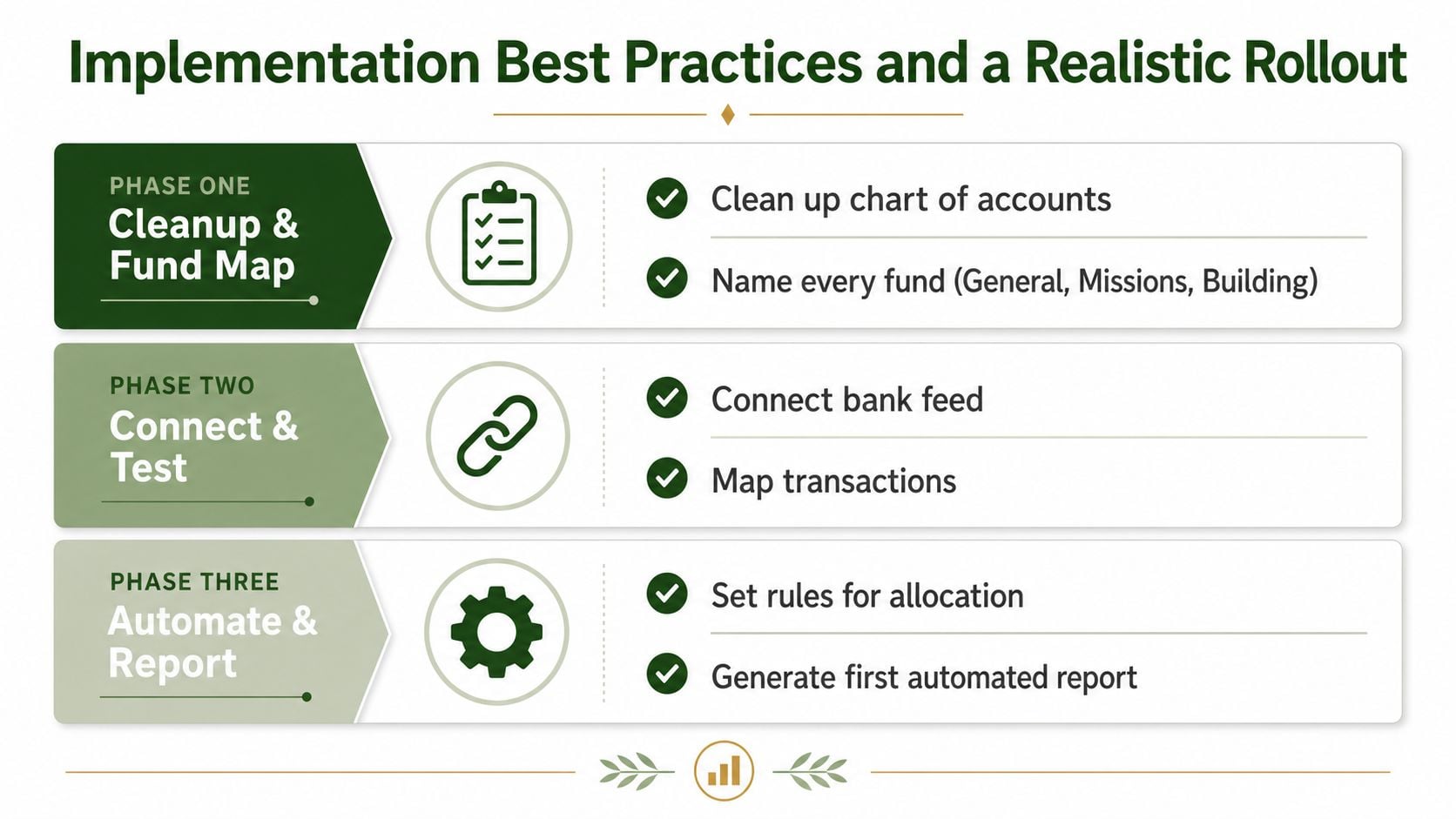
Phase three, automate and report
Turn on matching rules, allocation rules, and approval thresholds after testing. Let the system handle the routine majority and send genuine exceptions to a named reviewer. Keep a written change log for edits to the chart of accounts or fund rules.
Build the monthly reporting pack and train at least two people besides the treasurer. That redundancy protects the church when a volunteer moves, takes a leave, or hands over the role.
Governance rule: Review funds quarterly, audit workflow rules before year-end close, and document every structural change when it happens.
Church Use Cases That Show the Difference
A mid-size congregation that receives online and text-to-give donations often starts with a daily problem. The giving platform shows donor designations, while the bank shows combined deposits. With automated ingestion and routing, each gift retains its fund context, and the treasurer reviews exceptions instead of rebuilding the daily deposit from separate records.
A multi-campus church faces a different challenge. The same giving campaign may support campus-specific funds, while shared expenses move through central accounts. Fund-level allocation rules separate designated gifts by campus and preserve the accounting trail when expenses or transfers are posted.
For a small church, the biggest improvement may arrive at month-end. Before automation, the bookkeeper waits for receipts, checks bank activity against a spreadsheet, and assembles reports from several exports. After the workflow is configured, the same person reviews unmatched items, confirms unusual allocations, and produces reports from the connected ledger rather than reconstructing the month.
The handoff test
A clean volunteer transition is one of the strongest tests of workflow quality. The outgoing treasurer should be able to explain the fund map, review queue, approval responsibilities, and reporting calendar without passing along a private collection of spreadsheets and personal memory.
That transition also exposes weak architecture. If the replacement volunteer needs to learn which spreadsheet column corrects the giving export, the system hasn't solved the core problem. If the new volunteer can follow documented rules, inspect activity logs, and understand fund balances from the reports, the church has built a repeatable process.
These scenarios share one principle: automation doesn't eliminate review. It moves review to the transactions that require judgment.
Related church accounting software resources
If you are comparing software, these pages map the main decision points: fund accounting, QuickBooks limits, pricing, and migration.
- Best church accounting software (2026 comparison) - canonical guide comparing 12 church accounting platforms
- Church accounting software product page - see Grain Ledger for fund accounting, giving, and bank reconciliation
- Small church accounting software - see the product page built for volunteer treasurers and church admins
- Fund accounting features - review how Grain Ledger tracks designated funds
- QuickBooks for churches - understand workarounds and when to switch
- Free church accounting software - compare free options and upgrade triggers
- Grain Ledger pricing - compare plans for small and growing churches
- Start free - try fund accounting, giving imports, and bank reconciliation together
Choosing the Right Automation Partner for Your Church
A church should reject any accounting solution that treats funds as labels added after the fact. True fund accounting starts with the fund structure, then carries that structure through giving, banking, expenses, approvals, reconciliation, and reporting.
Evaluate vendors against the work your treasurer performs:
- Native fund architecture: Can the system organize accounts, transactions, and reports around funds from the beginning?
- Giving connections: Does it integrate with the giving tools your church already uses, including providers such as Planning Center, Pushpay, and Stripe?
- Bank reconciliation: Does it import bank activity, apply matching rules, and isolate exceptions?
- Reporting flexibility: Can pastors, boards, and donors receive understandable fund-level reports without spreadsheet consolidation?
- Volunteer onboarding: Does setup guide a non-accountant through fund mapping, permissions, and review procedures?
- Pricing clarity: Can the church understand the cost before committing to a system that its budget can't sustain?
The product also needs controls for restricted funds, role-based access, approval routing, expense documentation, and audit trails. A polished dashboard is not enough if the underlying ledger still requires manual reclassification.
I recommend Grain Ledger for churches that want a fund-native system rather than a generic accounting package with workarounds. Grain connects giving, bank accounts, cards through Plaid, and accounting so donations can flow into the correct funds, while its workflow supports bills, expenses, approval routing, bank reconciliation, and fund-level reporting.
The right choice is the one that matches the church's real operating model. If giving, banking, and accounting remain separate islands, the treasurer will continue doing integration work by hand regardless of how many automation features the vendor advertises.
Grain brings giving, banking, expenses, reconciliation, and reporting into a fund-based accounting workflow designed for small and medium-sized churches. Visit Grain to Start Free and explore a cleaner way to protect designations, reduce manual rework, and give your church's finance team dependable fund-level visibility.
Ready to simplify your church finances?
Start free with church fund accounting, or watch a product demo first.