Month End Reconciliation: Your Complete Church Guide
Run a clean month end reconciliation for your church with this step-by-step guide to pre-close checks, bank and giving reconciliation, fund mapping, and
Free Church Month-End Checklist
Generate a free church month-end checklist Excel workbook with reconciliation tasks, owners, status tracking, evidence, and reviewer sign-off.
Build your free Excel templateSunday's offering is counted, the Square reader records a card gift, Pushpay settles a batch later in the week, and a major donor's ACH arrives on another day entirely. By month end, those transactions may all be sitting in different systems, with different timing, different fee treatments, and different assumptions about whether the money belongs to the operating fund, building fund, benevolence fund, or a ministry project.
About Grain Ledger: This guide includes Grain Ledger, church fund accounting software built for designated gifts and ministry funds. It connects giving platforms (Planning Center, Pushpay, Tithely, Stripe), syncs bank activity with Plaid, and produces fund-level financial reports. Start free to see how it compares for your church.
See Grain Ledger for your church
Fund accounting, giving integrations, and bank reconciliation in one platform. Free migration support for churches switching from QuickBooks or Aplos.
That's why month end reconciliation for a church is a fund-integrity process before it's a speed process. The books can appear balanced while a restricted gift is sitting in the wrong fund. A clean bank balance doesn't prove that donor intent was preserved. The work is connecting cash activity, fund designations, clearing accounts, and the general ledger before leadership relies on the reports.
Why Month End Reconciliation Trips Up Churches
Sunday morning starts simply enough. An envelope check drops into the altar offering. On Monday, the Square card reader captures digital gifts. A Pushpay batch settles on Wednesday, while an ACH contribution from a major donor clears the bank on Friday. Each source feeds the general ledger on its own timeline, and none of those transactions necessarily arrives pre-tagged to the building fund, benevolence fund, or youth missions trip the donor selected.
By Tuesday morning, the treasurer may be comparing five partially overlapping ledgers while also holding a stack of undeposited offering slips. The bank shows cleared cash, the giving platform shows donor activity, the processor shows fees and refunds, and the general ledger reflects whichever entries someone posted manually. The gap between those records is where most church reconciliation trouble begins.
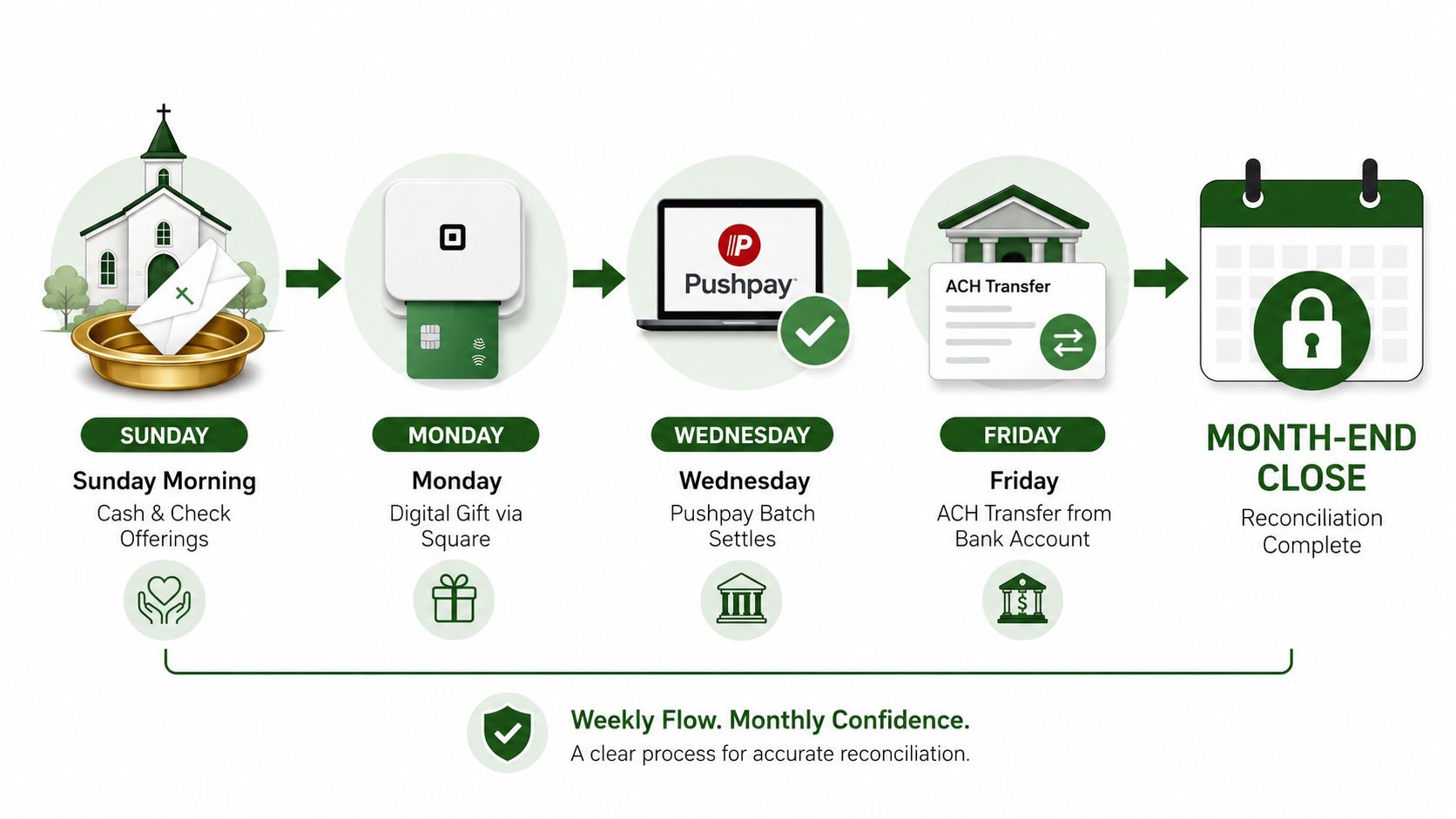
Practical rule: If cash sources, settlement timing, and fund intent move on independent clocks, matching becomes archaeology rather than accounting.
A bank reconciliation confirms that the cash balance in the books matches the cash held by the bank. That requires comparing the statement with accounting records, matching deposits, withdrawals, fees, and transfers, then saving the reconciliation report once adjusted balances agree, as described in this bank reconciliation guide. Church finance adds another question: did each transaction land in the right fund?
That question matters because a restricted balance can be misstated without changing total cash. A donor's designated gift might be included in the bank total and still be unavailable for general operating expenses. Resources on reconciliation for merchants are useful for understanding how deposits, fees, refunds, and settlement records interact, but churches must extend that discipline to fund restrictions.
Month-end reconciliation matches subledgers such as accounts payable, accounts receivable, and inventory to the general ledger before statements are finalized. For churches, the same discipline must include savings, credit cards, giving platforms, processor clearing accounts, and every active fund, because unexplained differences shouldn't roll forward into the next period. Month-end reconciliation guidance supports that broader account-by-account approach.
Pre-Close Checklist Before You Touch a Number
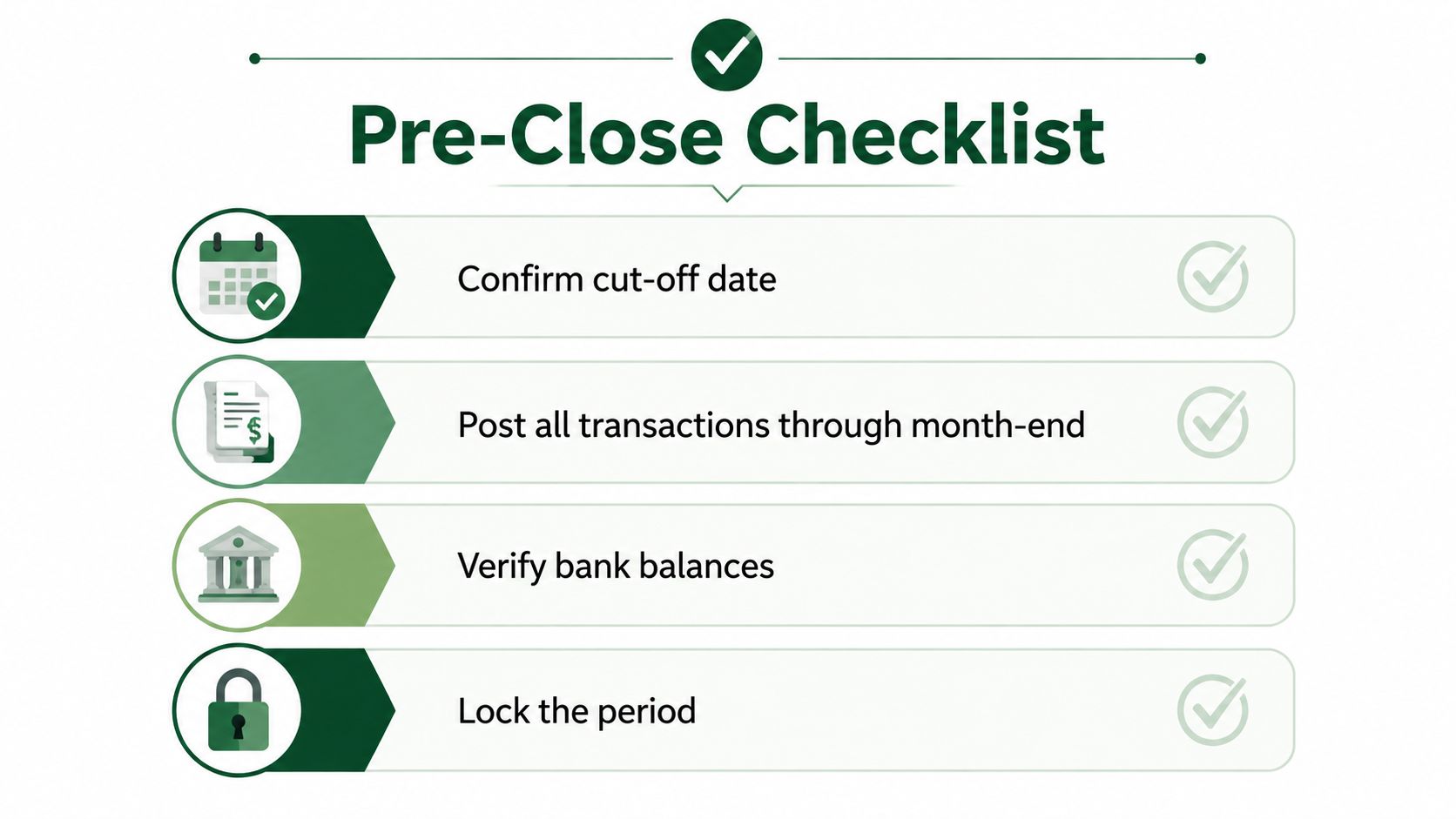
The first close task isn't matching transactions. It's locking the period's boundaries. If the treasurer starts reconciling before confirming the cutoff, late-arriving gifts and entries can change the population being reconciled halfway through the work.
Use the first day of the close to verify the following:
- Confirm the cutoff date: Establish the final date for the period and make sure transactions through that date are posted.
- Complete transaction capture: Include in-person offering counts, online giving batches, manual journal entries, reimbursements, and petty-cash activity.
- Collect source statements: Download or sync every bank, credit card, and giving-platform statement for the period.
- Archive prior work: Confirm that prior-period reconciliations were signed off and stored with their supporting documents.
- Document donor intent: Match restricted-fund designations to donor instructions, not merely to deposit slips.
- Review timing items: List outstanding checks, pending ACH transfers, deposits in transit, and unrecorded reimbursements.
- Tie opening balances: Compare the new period's opening balances with last month's closing trial balance.
- Validate fund structure: Make sure the chart of accounts still maps cleanly to active funds and sub-funds.
The restricted-gift check deserves special attention. A deposit slip can prove that money was deposited, but it may not explain whether the donor intended the gift for missions, benevolence, a building project, or another ministry. Keep the designation evidence with the transaction so a reviewer can follow the decision later.
Sequence the close instead of improvising it
A practical small-business close sequence starts with Days 1–2 for cutoff, Days 2–5 for reconciliation, Days 4–6 for adjustments, Days 6–8 for review, and Days 8–10 for reporting, based on the staged month-end reconciliation workflow. Churches can adapt those stages to their staffing and calendar, but the order matters.
Cash and clearing accounts should be anchored early because they provide the primary source of truth for downstream balances. A useful control target is zero reconciling items open beyond 60 days, while post-close adjusting entries below 2% of reconciled accounts can help identify incomplete or poor-quality reconciliation before reports are finalized, according to the same guidance.
The checklist prevents old errors from entering new work. It also tells the reviewer whether a difference is a legitimate timing item or a transaction that was never recorded.
Reconciling Bank Accounts, Cards, and Giving Platforms
Start with the operating bank account, then work outward to cards and giving platforms. The general ledger should explain every cleared transaction, while the external statement provides an independent record against which the book balance can be tested.
Start with the bank statement
For each cleared bank transaction, match the date, amount, payee or donor source, and fund assignment to a posted journal entry. Mark outstanding checks and deposits in transit separately. If an item remains unmatched, investigate it promptly rather than parking it in a suspense account without an owner or explanation.
The same process applies to savings and investment-related accounts, even when activity is light. A low-volume account can still contain a transfer, fee, interest entry, or restricted balance that affects the fund reports.
Separate gross activity from settlement cash
Card and merchant deposits require more than matching the net amount that arrived at the bank. For Square, Stripe, or another processor, separate:
- Gross gifts: The donor-funded amount before processor deductions.
- Processing fees: The cost of accepting the payment.
- Refunds: Amounts returned to donors and the fund affected.
- Settlement deposits: The net cash transferred to the bank.
Posting only the net deposit can make giving look lower than it was and can obscure the expense associated with processing. A complete reconciliation connects the processor report to the bank deposit and the related fund activity.
Reconcile the settlement report, not just the donor total
For Pushpay, Tithe.ly, Planning Center, or another online giving platform, pull the settlement report for the period. The donor-facing total may not match the bank deposit because the platform can group gifts, deduct fees, process refunds, or settle activity after the gift date.
Confirm that every gift batch landed in the intended fund before matching the settlement deposit. A fund-native workflow can read the designation attached to each transaction and post it directly, eliminating the spreadsheet split that many churches perform after cash has already arrived.
For a detailed bank workflow, use this guide to reconciling bank accounts. When a giving integration reports a completed transaction, retain the platform's confirmation and settlement support. A payment success confirmation can support the transaction record, but it shouldn't replace the settlement report or bank evidence.
Manual reconciliation remains a major bottleneck. Independent accounting and automation sources report that it consumes roughly 40–50% of the month-end close cycle, while mid-market closes commonly take 6–10 business days overall; reconciliation cost analysis identifies exception reduction and manual matching as the most impactful improvement areas. The same source reports that cash reconciliation can take 20–50 hours per month, with cited manual reconciliation error rates commonly ranging from 3–10%.
Fund Mapping, Restricted Gifts, and Clearing Discrepancies
Fund mapping is the rulebook that turns a stack of deposits into accountable stewardship. Every giving source should point to a specific fund or sub-fund before the transaction reaches reporting.
A church's map may include general operating, missions, benevolence, building, youth, music, scholarship, and capital campaign funds. The default assignment should never override explicit donor intent, and the finance team should document exceptions rather than relying on a treasurer's memory.
Sample Fund Mapping for Church Giving Channels
| Giving Source | Default Fund | Notes |
|---|---|---|
| Text-to-give | General operating | Apply the donor's selected designation when provided |
| Online giving platform | General operating | Import the fund designation with the gift batch |
| Envelope offering | General operating | Preserve the designation recorded during counting |
| ACH batch | General operating | Review donor instructions and settlement timing |
| Stock gifts | Designated fund | Record the intended ministry and supporting documentation |
| Designated giving | Selected restricted fund | Use the donor's stated purpose, not the deposit account |
The table is a starting structure, not permission to classify every gift as operating income. Guidance on restricted and unrestricted funds can help a treasurer distinguish the accounting treatment before a deposit is posted.
Triage exceptions without destroying the trail
Sort unmatched items by age and amount, then work through the likely causes in a consistent order:
- Check whether the item is a split gift assigned across funds.
- Compare gross processor activity with fees deducted from the settlement.
- Look for deposits or transfers recorded in the wrong period.
- Confirm that refunds reduced the same fund that received the original gift.
- Verify that in-kind contributions were recorded at fair value with support.
- Write a memo line explaining the resolution and retain the evidence.
A clearing discrepancy isn't resolved just because the bank and ledger totals eventually agree. The reviewer needs to understand what happened, which fund was affected, and why the correction was appropriate. A vague “adjustment” entry may close the difference while weakening the audit trail.
Church fund accounting treats each restricted gift as its own fund, with its own balance, allowable expenditures, and release entry when the restriction is fulfilled. Guidance for church finance teams recommends a unique fund code for each active restriction, documented release entries, a quarterly fund status report, and reconciliation of restricted balances to the annual audit, as explained in this restricted-fund management guidance. A fund-native system such as Grain can keep those balances separated automatically, so a donor's $5,000 mission gift doesn't accidentally fund a utility bill.
Internal Controls That Protect Restricted Funds
Controls are stewardship armor. They determine whether a church can show not only that cash was deposited, but also that the right people handled it, the right fund received it, and an independent reviewer approved the final record.
Start by separating preparation from review. The person who opens the mail or counts offerings shouldn't be the only person recording the deposit. The person who prepares a reconciliation shouldn't be the person who gives it final approval.
Build review into ordinary work
A workable control set includes:
- Dual sign-off: Require two approvals for journal entries above a defined threshold, such as $1,000. The infographic below uses a lower illustrative threshold, $500, so the board should adopt one documented policy rather than applying both.
- Segregation of duties: Keep cash handling, deposit recording, reconciliation, and review with different people where staffing allows.
- Independent statement review: Have someone who doesn't sign checks review the monthly bank statement.
- Mandatory fund tagging: Require a fund on every deposit line, transfer, refund, and adjusting entry.
- Close reviewer checklist: Attach the reviewer's checklist and sign-off to each completed reconciliation.
- Restricted movement log: Record additions, expenditures, releases, and transfers affecting restricted funds.
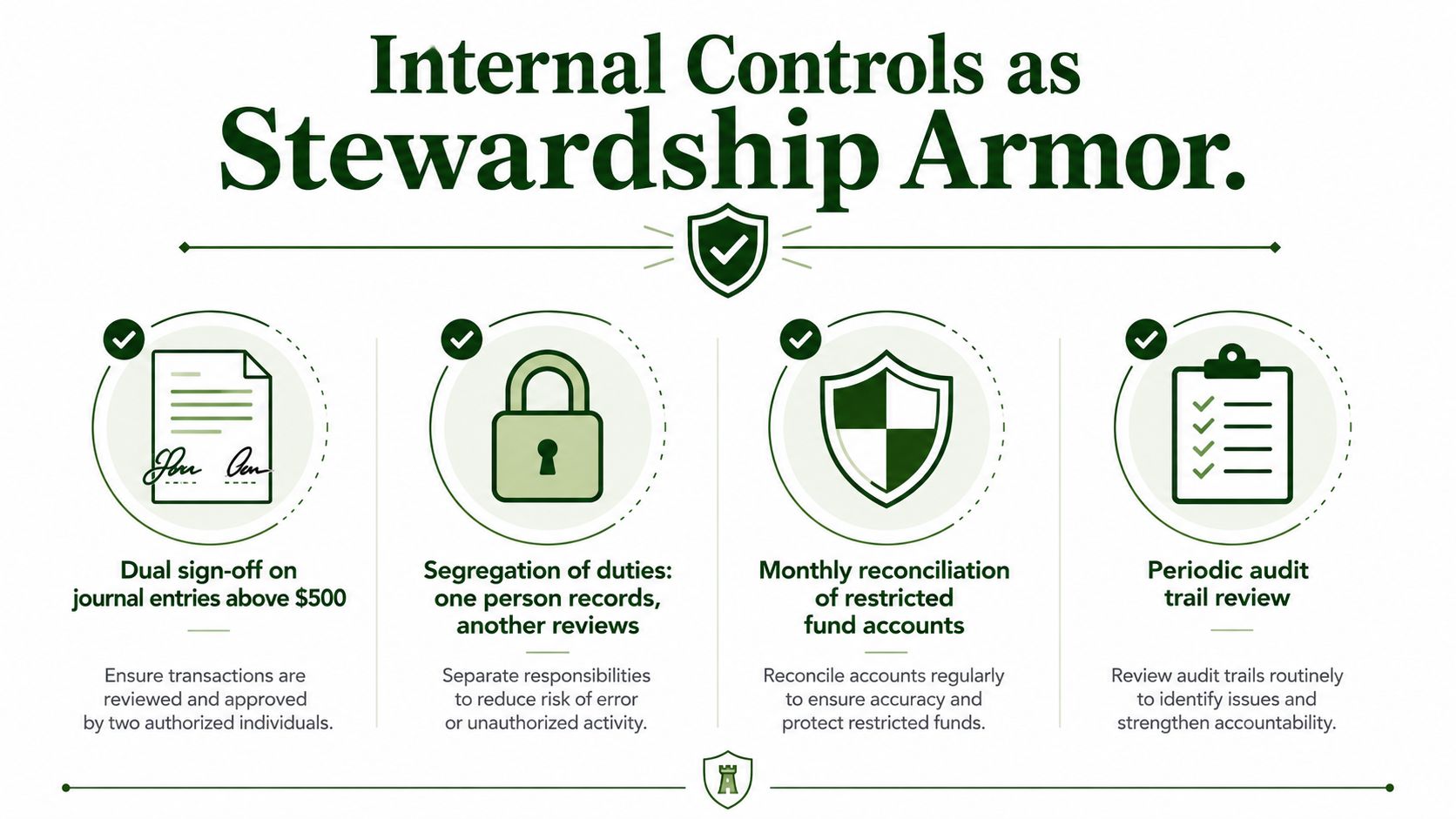
Independent church-accounting guidance identifies monthly bank reconciliation as a core internal control and recommends that the reconciler not handle cash. It also recommends separation of duties, dual approval for disbursements above a threshold, offerings counted by two unrelated people, and monthly review of restricted balances against related bank or investment accounts, according to this church accounting control guide.
Documentation should be easy to retrieve. Save bank confirmations, reconciliation reports, journal-entry support, donor designation evidence, and the signed close checklist together. Internal control practices for churches provide a useful framework for formalizing these responsibilities.
Controls aren't about distrusting volunteers or staff. They're how a finance team proves to donors, auditors, pastors, boards, and the congregation that every restricted dollar landed where the donor intended.
Reporting Results to Pastors, Boards, and Congregations
Reconciliation produces trustworthy information, but leadership needs that information translated into decisions. A pastor usually doesn't need a ledger dump. A board needs more detail than a one-page ministry snapshot. The congregation needs clarity without unnecessary transaction-level noise.
Give each audience the right view
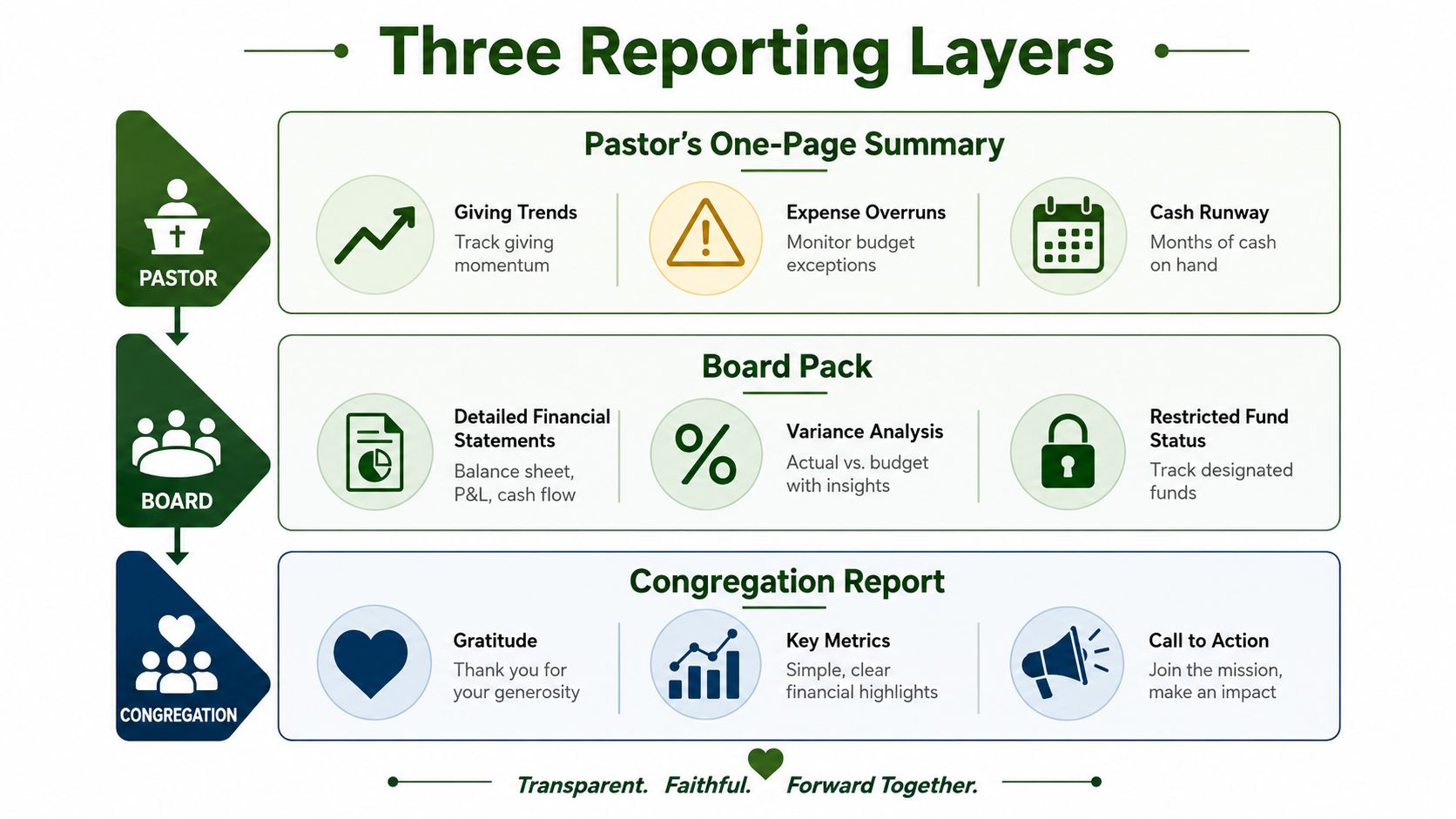
The pastor's summary should fit on one page and highlight giving trends, expense overruns, and cash runway. Include a short explanation of unusual movement, especially when a restricted fund balance appears strong but cannot support operating obligations.
The board pack should include fund-level balance sheets, a statement of activity, budget-to-actual comparisons, and a restricted-fund movement schedule. It should show total giving versus the prior year, restricted fund balances, designated gift usage, and cash available against upcoming payroll and mortgage commitments.
The congregation-facing update should frame approved results around ministry impact. A quarterly or annual report can explain what members gave, which ministries used designated resources, and what decisions remain ahead, without exposing private donor information.
Set a dependable reporting rhythm
A treasurer should aim to deliver the completed reporting package within 10 days of month end, then provide it to the board for review at the next meeting. The congregation can receive summarized results through approved communication channels.
That rhythm only works when the underlying fund data is reconciled. Unreconciled reports confuse pastors, invite avoidable board questions, and weaken confidence in the finance function. Clean fund-level reporting gives leaders a defensible basis for decisions about hiring, spending, facility work, and ministry initiatives.
The reporting layer should also show what remains restricted, what has been released, and whether spending followed the stated purpose. A total cash figure can't answer those questions. Fund-level activity and balance reports can.
Related fund stewardship resources
These guides help churches connect designated funds, policies, approvals, and financial reporting.
- Church benevolence fund guide - set policy, approvals, and accounting controls
- Restricted fund guide - understand donor restrictions and fund balances
- Fund accounting in Grain Ledger - track designated gifts and ministry funds in the ledger
- Best church accounting software - compare software that tracks restricted gifts and ministry funds
- Schedule a Grain Ledger demo - see fund-level reports and bank reconciliation
How Grain Streamlines the Whole Close
A dependable close begins with fund integrity. The system should preserve a donor's designation, show where each settlement landed, and make every adjustment explainable without reconstructing the history in a spreadsheet.
Replace five manual handoffs with reviewable workflow
A fund-native workflow changes the sequence of work:
| Manual close step | Fund-native result |
|---|---|
| Export giving activity | Import the source transaction with its fund designation |
| Identify processing fees | Record the fee against the related settlement and fund |
| Match deposits to the bank | Match the settlement to the bank activity |
| Create fund-split journal entries | Apply the fund allocation as part of the transaction |
| Compare spreadsheets with the ledger | Review exceptions and approve documented adjustments |
The finance director still reviews unusual gifts, missing deposits, returned payments, and unclear coding. The system handles repeatable matching, while people handle judgment. That division protects restricted gifts better than asking one person to remember how every deposit was divided.
Build controls into the close
Set up approval thresholds before the first close. Require a second review for changes to restricted-fund coding, manual journal entries, and adjustments that alter a fund balance. Lock completed periods so a later edit creates a visible adjustment instead of altering the prior record without a trace.
The close should leave a usable trail from donor source to giving settlement, bank activity, fund allocation, and report. Retain reconciliation statements, outstanding checks, deposits in transit, and explanations for unresolved items. Those records give the treasurer something concrete to review with pastors and the board.
A fund-native system also makes exceptions easier to manage. A missing settlement belongs on an exception list. A fee coded to the wrong fund needs a correction with an approval record. A restricted gift spent from an unrelated fund requires investigation before the period is closed. The workflow should surface those cases instead of burying them among completed matches.
Grain supports this approach by organizing transactions around funds and connecting giving activity with bank imports and accounting records. Its workflow can use Plaid for bank imports, match ledger entries by fund, retain historical reconciliation statements, and keep outstanding checks and deposits in transit visible during review. Those capabilities matter only when the church configures clear fund rules and assigns responsibility for exceptions.
The practical test is simple: can another reviewer trace a gift through the close without asking the original preparer to explain every step? If yes, the process is doing more than saving time. It is preserving donor intent and giving leaders a reliable record of how restricted resources were handled.
Grain brings church giving, bank activity, reconciliation, controls, and fund-level reporting into one accounting workflow built around restricted and unrestricted funds. Visit Grain to Start Free and prepare for a close that's easier to review, explain, and defend.
Ready to simplify your church finances?
Start free with church fund accounting, or watch a product demo first.