10 Data Migration Best Practices for Churches
Follow 10 data migration best practices to move church accounting, giving, fund, and bank data accurately into a fund-based system.
A church migration rarely involves a simple export and import. Accounting records, donor histories, restricted gifts, bank activity, and giving-platform data all need to move together without changing the meaning of a dollar. A gift designated for missions must still support missions. A building-fund balance must remain identifiable. A donor's history must remain useful without becoming a duplicate or an unexplained adjustment.
See Grain Ledger for your church
Fund accounting, giving integrations, and bank reconciliation in one platform. Free migration support for churches switching from QuickBooks or Aplos.
The safest approach treats migration as a stewardship and fund-integrity project, not a software-only transfer. That means documenting the source data, mapping every fund and account, cleansing records, testing integrations, controlling cutover, protecting backups, training users, and scheduling post-migration audits. The risks of weak planning are serious. A 2026 industry report on enterprise data migration states that 73% of migration projects fail to meet their stated objectives, 80% exceed original budgets by 150% or more, and schedule slippage averages 18 months beyond initial plans.
The following data migration best practices follow the complete path from inventory to ongoing controls. If your church wants fund-based reporting from the start, Grain Ledger offers a church accounting solution with native fund architecture and connected workflows for giving platforms and bank accounts. Teams evaluating a move can also compare this process with practical enterprise SharePoint migration advice, because the same discipline applies, define the data, protect it, test it, and assign ownership.
1. Establish a Comprehensive Data Audit and Inventory
Migration decisions are only as good as the inventory behind them. Before anyone transforms a file or schedules a cutover, list every place the church stores financial, donor, and operational information. That may include the general ledger, spreadsheets maintained by a treasurer, giving platforms, bank exports, payment processors, donor databases, email attachments, and reports saved for board or audit use.
The inventory should describe more than file names. Record the data owner, date range, format, update frequency, fund relevance, known quality problems, and intended migration treatment. Some records may need to move in full. Others may belong in an archive, while a third group may need correction before import. This early discipline follows the broader principle of migration strategies from DataTeams, where scope and source analysis shape the eventual approach.
Build the inventory around stewardship questions
Church finance teams should make fund integrity visible during the audit. Catalog general operating funds, restricted gifts, designated funds, building funds, missions funds, grants, and any ministry-specific balances. Then compare reported fund balances with bank statements and reconciliation reports. If a restriction or designation isn't documented, assign someone to investigate it before migration rather than carrying uncertainty into the new system.
A useful inventory includes:
- Data source: Identify the system, file, or person responsible for each record.
- Financial meaning: Explain what each account, fund, transaction type, and designation represents.
- Data condition: Mark duplicates, missing fields, inconsistent names, and unexplained adjustments.
- Migration treatment: Decide whether each data set will be converted, archived, corrected, or excluded.
- Evidence: Save screenshots and representative reports so the team can compare the old structure with the new one.
Practical rule: If the team can't explain what a balance means before migration, importing it won't make the balance trustworthy.
2. Map Data Fields and Create Conversion Standards
A legacy chart of accounts rarely fits a new platform without interpretation. One system may use account numbers to represent both ministry activity and restrictions. Another may separate the account, fund, and transaction dimensions. A successful conversion specification explains how those structures relate before the first full import.
Start with a field-by-field map. Include legacy account names, new account names, fund codes, donor identifiers, transaction types, dates, descriptions, payment methods, and opening balances. Define what happens to fields that don't have a direct destination. A blank destination should be an intentional decision, not an accidental omission.
Make exceptions visible
Church finance teams often have multi-fund gifts, combined deposits, manual journal entries, and descriptions created by different volunteers over time. Document how each case will be handled. Decide how a gift split across an operating fund and a building fund will be represented, how historic balances will be opened, and whether donor records from the accounting system or giving platform will serve as the primary identity.
Use a small test mapping first. Have the treasurer, bookkeeper, and a fund owner review the result in plain language. If a report says a gift moved from “General” to a new category, the team should be able to trace that decision back to the conversion document.
Standardize naming and formatting for:
- Fund names: Use a consistent pattern that distinguishes restricted, designated, and unrestricted activity.
- Donor IDs: Establish one stable identifier across the accounting and giving systems.
- Transaction descriptions: Convert inconsistent legacy wording into understandable categories.
- Opening balances: Define the source report, date, approval, and supporting reconciliation.
- Exceptions: Record special treatment and the person authorized to approve it.
A mapping document becomes the migration team's shared reference. It also gives future reviewers a clear explanation of why the new structure differs from the old one.
3. Perform Data Cleansing and Validation Before Migration
Clean data protects fund integrity. Before migration, identify duplicate donor records, inconsistent names, outdated contact details, missing fund designations, incorrect transaction categories, and balances that do not match supporting records.
Donor matching requires judgment. Compare names, email addresses, mailing details, and giving history, then send uncertain matches to a finance team member for review. Separate household members, anonymous gifts, and shared contact details can make automatic merging unsafe.
Review high-risk records first
Set the review order by stewardship risk. Start with restricted-fund activity, unusual journal entries, large or complex gifts, unresolved bank items, and transactions without designations. Routine historical descriptions can receive less attention if they do not affect accountability, reporting, or donor intent.
Run repeatable checks before approval. Pre-cutover migration validation guidance recommends checking record counts, checksums, and key business metrics, using automated reconciliation queries or scripts instead of relying only on manual spreadsheet comparison. Church-specific checks can compare total giving by fund, deposit totals, expense totals, and opening balances by account and fund.
Keep the cleanup record separate from the source data. Each change should include:
- Original value: Preserve the value held in the source system.
- Corrected value: Record the approved value for migration.
- Reason: Explain the accounting or stewardship basis for the change.
- Approver: Name the person who reviewed and authorized it.
- Evidence: Link the report, statement, or donor documentation supporting the decision.
Run the checks again after corrections and before cutover. Reconcile exceptions to approved evidence, then retain the log with the migration records. This gives reviewers a clear trail from the original entry to the migrated value and helps the church distinguish controlled cleanup from unexplained alteration.
4. Implement Fund-Based Data Structure from the Start
A building gift that enters the new system as an unclassified contribution can lose its purpose before anyone reviews the report. Fund structure must therefore be decided before conversion, so migration protects donor intent and ministry accountability rather than merely transferring old records.
List every current and planned fund. Document each fund's name, purpose, restriction or designation, responsible ministry, opening balance, and reporting needs. Then define how accounts, transactions, deposits, expenses, and reports connect to it. Resolve unclear balances before import, using the source records and approved supporting evidence.
Build funds into the accounting model
Funds should be a native part of the destination system, not labels added to account names or notes. Grain Ledger's fund-based accounting approach uses native fund architecture to organize accounts, transactions, and reports around fund context from the start.
Use the migration design to establish these controls:
- Fund-level opening balances: Enter each balance with its reconciliation source and approval.
- Clear restrictions: Identify restricted funds and record the governing purpose.
- Consistent hierarchy: Align funds with ministry reporting while preserving the underlying accounting.
- Fund-aware reporting: Provide pastors, boards, and finance teams with reports that retain fund context.
- Controlled transfers: Require review when money moves between funds or changes restriction context.
A flat account list may hide balances in notes, informal descriptions, or spreadsheet tabs. Those balances should not be recreated by guesswork. Confirm what each represents, identify the evidence supporting it, and document any conversion decision before the record enters the destination system.
Use a trace test before cutover. Select a historical transaction and follow it from the source record to the new account, fund, report, and supporting documentation. The path should also support reconciliation and later review. If the transaction cannot be followed without interpretation, revise the mapping or documentation first. A controlled fund structure gives the church a clearer record of how each dollar may be used and how that use will be demonstrated after migration.
5. Integrate External Systems and Data Sources During Migration
A church's accounting system sits within a wider financial workflow. Giving platforms, banks, card feeds, payment processors, and donor systems all affect the records the finance team must reconcile. Move the ledger without planning those interfaces, and the church may create temporary silos, duplicate entry, or lose visibility into whether gifts reached the correct funds.
Start with an integration register. For a giving platform such as Planning Center, Pushpay, or Stripe, record the gift type, fund designation, fees, deposit timing, donor identifier, and journal treatment. For bank activity delivered through Plaid, specify the destination account, reviewer, exception process, and recovery procedure. Document ownership as well. A technically working connection still needs someone to monitor it.
Use the accounting software integration guidance to evaluate how each interface supports the accounting design. Grain Ledger can connect giving providers and bank accounts with fund-based accounting, so donations can flow into the appropriate funds while finance teams retain a reviewable workflow. Teams comparing architecture choices can also consult this unified data platform guide, while weighing the control, staffing, and maintenance demands of each approach.
Follow one transaction from source to reconciliation
A useful test traces a designated online gift through its complete path. Confirm the fund, donor, amount, date, journal entry, deposit, and reconciliation record. Repeat the exercise with exceptions:
- Multi-fund gift: Verify the allocation split and resulting deposit.
- Refund or reversal: Confirm that the correction preserves the original fund context.
- Fee transaction: Check the account and reconciliation treatment.
- Failed connection: Confirm who receives the alert and how missing data is recovered.
A bank deposit should remain traceable to its underlying giving batch. An integration failure should create a visible task, not a silent gap. Treat each result as evidence for cutover approval, and retain the test record for later review.
Schedule vendor support for the cutover window, secure credentials and API documentation, and keep a manual fallback for systems that cannot tolerate interruption. After go-live, compare incoming batches with deposits until the new workflow has passed its first reconciliation cycle.
6. Establish Clear Testing and Validation Protocols
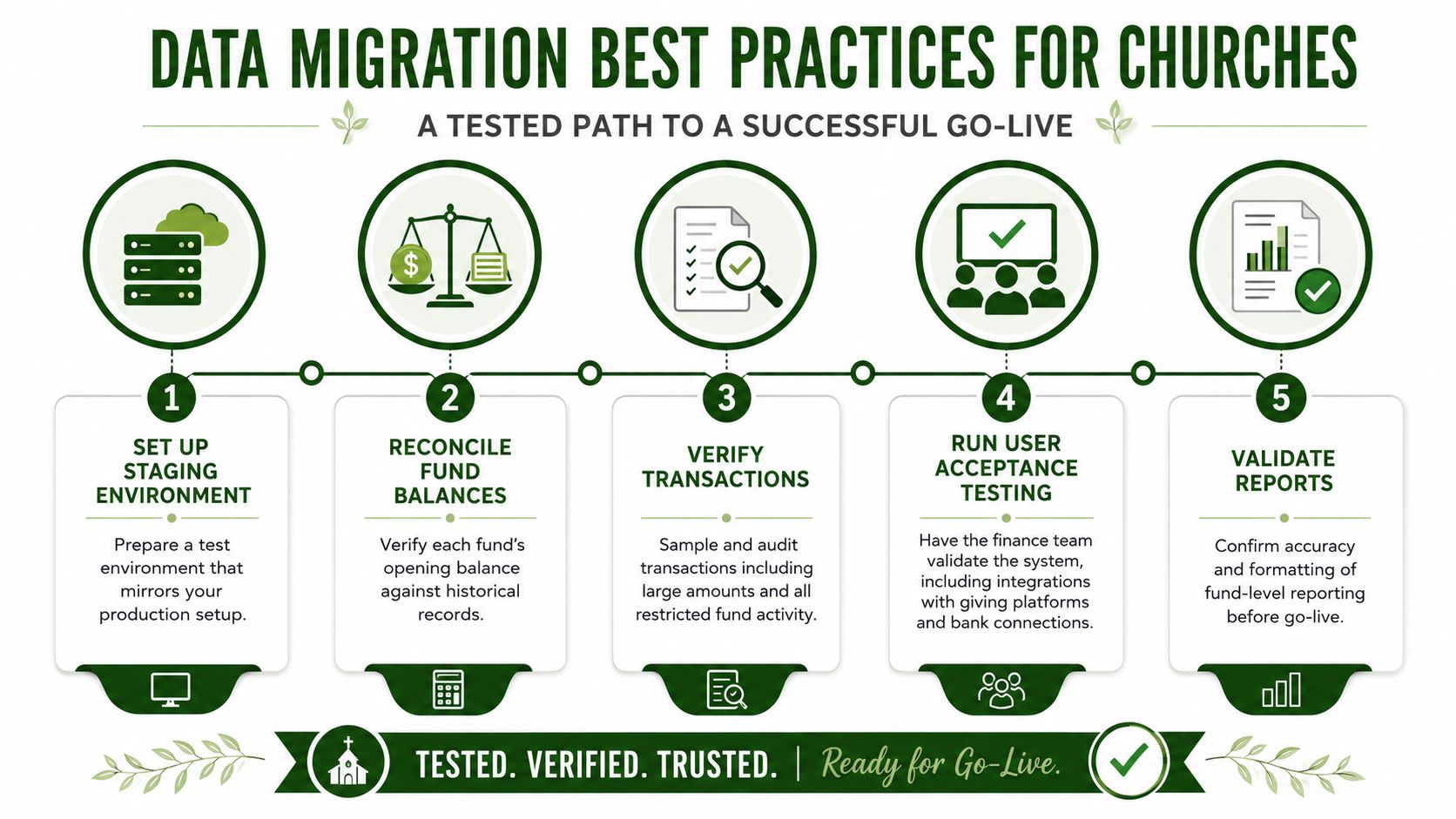
A migration is ready for ministry use only when records remain accurate, funds retain their intended restrictions, and connected workflows behave as expected. Test the path from source data to reports and reconciliation, not just whether an import finishes. A building fund report with the wrong balance or a bank connection posting to an unexpected account requires a stop.
Use staged evidence: profile the source, confirm field mappings, run trial loads, compare counts and business totals, test relationships and workflows, then document approval. The data migration validation framework supports this approach by treating validation as an ongoing control rather than a final report review.
Have the treasurer inspect balance sheet and reconciliation outputs. Ask finance staff to verify contribution reports, expense activity, fund balances, and bank workflows. Pastors and board members should review the reports they use for decisions and confirm that they do not require rebuilding results in spreadsheets. Grain Ledger can support this review when native fund-based accounting keeps restricted and unrestricted activity visible in the same connected workflow.
Record the comparison methods and exceptions:
- Counts: Compare records by source and destination category.
- Checksums: Run repeatable checks for altered or missing records.
- Business totals: Reconcile giving, deposits, expenses, and opening balances.
- Relationships: Confirm donor, fund, account, and transaction links.
- Workflow behavior: Test approvals, transfers, reconciliations, and report filters.
Review every restricted-fund movement and each material opening-balance adjustment under the church's approval policy. Sample ordinary transactions, retain defects and resolutions, and keep sign-offs with the test results. A staging environment should match production as closely as practical. Testing only a simplified file can hide the exceptions that threaten fund integrity after launch.
7. Develop a Detailed Migration Timeline and Cutover Plan
Cutover changes how the church records gifts, expenses, deposits, and fund activity. Treat it as a stewardship decision with clear ownership, approval points, and evidence for the next reconciliation or audit. State when the old system stops accepting entries, how late activity will be recorded, when the final sync runs, and who approves opening balances.
Begin with the church calendar. Year-end close, holiday giving, campaigns, payroll, annual meetings, and audit preparation can make a poor migration window. Select a period when finance staff can focus, then assign one owner and one approver to each critical task.
Choose the migration pattern that matches the church
A big-bang move can work when the source system can support a defined freeze and the team has a reliable final export. A parallel run allows more comparison, but it doubles entry and requires firm rules about which system controls the books. A staged move limits each transfer, though funds or integrations that cross waves can create temporary complexity.
Choose based on staffing, vendor support, and the church's close schedule. Cloud migration guidance on phased cutover and operational continuity also supports phased delivery, repeated validation, and separating the migration from broader modernization work.
Write the cutover sequence as an execution checklist:
- Freeze window: Record when source changes stop.
- Final extraction: Name the export, timestamp, and responsible owner.
- Late activity: Define how gifts, deposits, and corrections received during the freeze enter the new system.
- Smoke tests: Check login, fund reports, giving, bank feeds, and reconciliation workflows.
- Decision gates: Identify who may proceed, pause, or reject the cutover.
- Communications: Notify staff, volunteers, vendors, and leadership about changed procedures.
Do not combine a platform move with an unrelated chart redesign unless the church has capacity to test both. A controlled migration first, followed by staged improvements, reduces pressure on the accounting close and gives the team a clearer record of fund integrity. Grain Ledger can keep native fund-based accounting connected to giving, banking, and reporting workflows as those changes are introduced.
8. Protect the Migration With Backups, Rollback, and Access Controls
Protecting a migration protects the church's fund records and stewardship history. Before production work begins, create a restorable backup, export the source in an untouched format, and store conversion files separately. Have the recovery owners verify that the backup can be restored or read before relying on it.
Access controls must cover financial records, donor information, credentials, and restricted-fund data. Apply least-privilege RBAC, protect credentials, and limit migration files to authorized team members. Set service-level targets before cutover, use TLS 1.2 or higher in transit, encrypt data at rest, and review permissions as part of the control process. The migration security and SLA guidance outlines these controls.
Make rollback an approved operating procedure
A rollback plan needs an observable trigger, named decision-maker, time limit, communication step, and restoration action. Once rollback is approved, stop new entries in the affected system so the two platforms do not develop conflicting records. Preserve exports, logs, mappings, and error reports before investigating. Resume only after the project owner approves the next step.
Published AWS migration guidance uses thresholds for validation discrepancies, prolonged troubleshooting, and excessive total migration time. Those thresholds should not be copied without review. Set limits that fit the church's data volume, staffing, risk tolerance, and close schedule, then approve them before cutover.
Require documented approval for:
- Opening-balance adjustments
- Restricted-fund transfers
- Manual correction entries
- Reversals created during recovery
- Changes to migration files or mapping rules
Log the person, date, source file, affected fund, and action for every import, correction, and reversal. Grain Ledger can retain native fund-based accounting while the team verifies balances and connected workflows. Recovery should remain executable by the assigned team, not depend on one volunteer's memory.
9. Build Role-Based Training and Documentation
A migration becomes a stewardship problem when users apply the new records incorrectly. A treasurer may post a restricted gift to the general fund. A volunteer may create a duplicate donor record. A pastor may read a report without understanding why fund balances differ from unrestricted cash. Training connects the data structure to daily decisions and protects fund integrity after cutover.
Start with permissions and responsibilities, then tailor practice to each role. Treasurers need controls, reconciliations, and fund transfers. Bookkeepers need transaction entry, corrections, integrations, and month-end procedures. Pastors and board members need report interpretation. Volunteers need only the tasks they perform, with clear boundaries around sensitive data.
Use the church's own fund names, giving types, approval paths, and reports. Practice the exceptions that expose weak procedures: a donor giving to multiple funds, a bank import requiring review, or a restricted expense needing documentation.
Prepare materials that users can apply without a trainer present:
- Role-based procedures: State what each user may do and when approval is required.
- Quick-reference guides: Cover recurring tasks such as reconciliation and fund reporting.
- Recorded demonstrations: Let volunteers revisit workflows without another live session.
- Exception instructions: Explain failed imports, duplicates, refunds, and corrections.
- Support records: Track recurring questions and revise documentation after launch.
A short video can introduce the overall migration workflow:
Schedule hands-on practice before cutover, then hold office hours afterward. Confirm that users can complete a reconciliation, review fund balances, and resolve an exception before they receive independent responsibility. Grain Ledger can support native fund-based accounting while staff learn connected workflows. Review the first real reconciliations and update instructions where users hesitate or make repeated errors.
10. Establish Post-Migration Monitoring and Support
Go-live starts a period of operational verification. Real gifts, bank activity, month-end work, and leadership reporting can expose routing or reconciliation problems that test data did not reveal. Treat this stage as continued stewardship of fund balances, not a software handoff.
Name owners for an early support period and define how long they will monitor the system. Check giving imports, bank connections, payment processor activity, fund balances, reconciliation status, and user access. Review exceptions frequently at first, then reduce the cadence after the workflow remains stable. Record each issue's status, owner, resolution, and any documentation change.
Use real transactions to confirm the cutover
A report may match at migration and still fail when a new transaction follows the wrong path. Post-cutover verification guidance recommends continuing checks through the audit window because some failures appear only after normal workflows resume. Use the cutover plan's freeze, final sync, smoke tests, traffic switch, monitoring, communications, and decision gates as checkpoints.
Start with the transactions that protect fund integrity:
- Giving flow: Confirm providers post gifts to the intended funds.
- Bank activity: Review imports, unmatched transactions, and reconciliation status.
- Fund balances: Compare restricted and designated activity with expected results.
- Report output: Confirm board and ministry reports remain clear and usable.
- User behavior: Identify repeated corrections, duplicate entries, or access problems.
- Open issues: Separate fixes affecting accuracy, security, or continuity from later enhancements.
The support period is not the time to redesign every workflow. Correct issues that could misstate funds, weaken security, or interrupt operations. Track improvement requests separately so the team can refine connected workflows without destabilizing the accounting foundation. Grain Ledger can support native fund-based accounting while the team verifies those workflows in live operations. Review the first real reconciliations and update procedures where users hesitate or repeat errors.
11. Document Audit Trails and Maintain Data Integrity Controls
The migration should leave behind a defensible record of what changed, why it changed, who approved it, and how the church verified the result. That record includes source exports, mapping specifications, cleansing logs, test results, opening-balance approvals, cutover decisions, rollback actions, and post-migration reconciliations.
Controls must continue in the live system. Assign permissions according to responsibility, enable audit logging, and establish approval workflows for restricted-fund transfers and unusual adjustments. A volunteer who can enter a transaction may not need permission to change an opening balance or move money between restricted funds.
Make accountability part of the workflow
Review audit logs regularly for unusual activity. Archive them with the migration documentation so future treasurers, auditors, and board members can understand the history. The definition of an audit trail provides useful context for why a recorded sequence of user actions and changes matters to financial accountability.
A practical control framework includes:
- Role ownership: Name the person responsible for each permission group.
- Approval thresholds: Define which adjustments require treasurer or board review.
- Business justification: Require an explanation for migration corrections and transfers.
- Restricted-fund protection: Prevent unauthorized movement without approval.
- Change history: Preserve original values, revised values, dates, and users.
- Periodic review: Examine logs and reconciliations for patterns that need attention.
The import is complete only when the church can explain the data, defend the controls, and reproduce the path from source record to reported balance.
11-Point Data Migration Best Practices Comparison
| Practice | 🔄 Implementation Complexity | ⚡ Resources & Speed | 📊 Expected Outcomes | 💡 Tips | ⭐ Key Advantages |
|---|---|---|---|---|---|
| Establish a Comprehensive Data Audit and Inventory | High, detailed, time‑intensive scoping and validation | High staff hours up front; delays migration start | Complete inventory, fewer surprises, baseline metrics for success | Assign owners, build a field/location spreadsheet | Prevents data loss; reduces reconciliation time |
| Map Data Fields and Create Conversion Standards | High, technical mapping and transformation logic | Requires technical expertise or consultant; moderate duration | Accurate translations, consistent naming, repeatable conversions | Test mapping on a small subset; document conversion spec | Ensures accurate translation; reduces manual errors |
| Perform Data Cleansing and Validation Before Migration | Medium–High, labor‑intensive record correction | Manual research may slow progress; tooling helps speed | Cleaner data, improved report accuracy, fewer post‑migrate fixes | Use validation tools; document all corrections | Prevents dirty data entering new system; improves reliability |
| Implement Fund-Based Data Structure from the Start | Medium, requires upfront fund modeling and chart setup | Moderate setup effort; streamlines later operations | Correct fund tracking, immediate fund‑level reporting | Document all fund types and opening balances | Aligns accounting with church operations; avoids retrofits |
| Integrate Connected Systems and Data Sources During Migration | High, vendor coordination and API work | High initial setup effort; increases automation post‑go‑live | Automated fund routing, unified financial view, faster reconciliation | Map giving fields first; test integrations in staging | Eliminates manual entry; provides real‑time visibility |
| Establish Clear Testing and Validation Protocols | High, comprehensive reconciliation and UAT required | Time‑ and resource‑intensive; may delay go‑live if issues arise | Catches errors pre‑cutover; validates fund integrity | Reconcile funds in staging; sample large & restricted transactions | Builds confidence; prevents go‑live surprises |
| Develop a Detailed Migration Timeline and Cutover Plan | Medium, project management and contingency planning | Coordination effort; parallel runs increase duration | Organized transition, clear responsibilities, contingency readiness | Schedule during slow giving period; allow parallel run time | Reduces cutover confusion; enables controlled switch‑over |
| Protect the Migration With Backups, Rollback, and Access Controls | Medium, governance, backup verification, rollback definitions | Prep and recovery testing required; may slow troubleshooting | Recoverable migration, limited impact of failed imports | Verify restorable backups; define rollback triggers | Protects sensitive data; enables controlled recovery |
| Create Comprehensive Training and Documentation | Low–Medium, content development and role tailoring | Significant time to create; speeds adoption after go‑live | Reduced user errors, faster onboarding, consistent procedures | Build role‑specific video + written guides; hands‑on sessions | Ensures proper system use; preserves institutional knowledge |
| Establish Post-Migration Monitoring and Support | Medium, ongoing reconciliations and error tracking | Ongoing staff time, especially first 30–90 days | Early issue detection, stable operations, continuous improvement | Daily reconciliations early; monitor integrations and alerts | Catches problems quickly; supports user transition |
| Document Audit Trails and Maintain Data Integrity Controls | Medium, logging, workflows, and permission design | Requires policy setup and regular review; may impact perf. | Strong accountability, compliance, protected restricted funds | Enable full audit logging; require approvals for fund moves | Ensures transparency and stewardship; aids audits |
Related church accounting software resources
If you are comparing software, these pages map the main decision points: fund accounting, QuickBooks limits, pricing, and migration.
- Best church accounting software (2026 comparison) - canonical guide comparing 12 church accounting platforms
- Church accounting software product page - see Grain Ledger for fund accounting, giving, and bank reconciliation
- Small church accounting software - see the product page built for volunteer treasurers and church admins
- Fund accounting features - review how Grain Ledger tracks designated funds
- QuickBooks for churches - understand workarounds and when to switch
- Free church accounting software - compare free options and upgrade triggers
- Grain Ledger pricing - compare plans for small and growing churches
- Start free - try fund accounting, giving imports, and bank reconciliation together
Turn a One-Time Migration Into Lasting Confidence
A church shouldn't decide that migration succeeded because users can log in and a few records appear on screen. Go-live confidence comes from evidence. The finance team should be able to show how each fund was mapped, how opening balances were established, which exceptions were corrected, and how the new system produces the reports pastors, boards, and ministry leaders rely on.
Before approving the switch, confirm that the fund structure reflects the church's actual stewardship responsibilities. Review unrestricted, designated, restricted, building, missions, and other ministry funds with the people responsible for them. Make sure every opening balance has a source report, reconciliation support, and approval. If the new system uses a different chart of accounts, preserve the crosswalk so future reviewers can understand both the legacy and current structures.
Then test the connected workflows. Send representative giving activity through each provider the church uses, including fund designations, multi-fund gifts, fees, reversals, and deposit matching. Verify bank and card connections, including feeds handled through Plaid where applicable. Confirm that Planning Center, Pushpay, Stripe, or another provider sends the right information into the right accounting treatment. A connected system is valuable only when the resulting entries remain accurate and reconcilable.
Backups and rollback criteria deserve the same attention as reports. Keep an untouched source export, confirm that backups are restorable, limit access to migration credentials, and give the cutover team objective conditions for pausing or reversing the move. Don't leave those decisions to a stressed volunteer during the final sync. Assign owners for technical recovery, accounting approval, communications, and vendor escalation.
Access ownership should be explicit after launch. Identify who can post, approve, reconcile, edit fund structures, manage integrations, and view sensitive donor information. Review whether each person has the minimum access needed for their role. Churches often depend on volunteers and part-time bookkeepers, so documented handoffs matter. A control that exists only in one person's memory will weaken when that person changes roles.
Training should continue after go-live. Schedule follow-ups for treasurers, bookkeepers, pastors, and board members based on the questions that arise in real workflows. Update quick-reference guides when the team finds a confusing step. Treat early user questions as control feedback, not as interruptions.
Post-migration audits should include more than a one-time comparison. Continue reconciliations through the audit window, review fund-level activity, inspect integration exceptions, and confirm that real business workflows produce expected results. The verified data migration report from Kanerika reinforces why governed planning, budget controls, and phased delivery matter, while historical Bloor Research findings summarized by Curiosity Software show how migration practice evolved toward stronger assessment, cleansing, validation, and stakeholder control after early projects exposed the cost of weak planning.
For churches evaluating an accounting solution, the platform's underlying architecture matters as much as its import process. Grain Ledger is designed for small to medium-sized congregations that need true fund-based accounting, with funds represented in accounts, transactions, and reports rather than simulated through labels or workarounds. Its connected workflows support giving platforms and bank accounts, and its controls help keep restricted funds tied to their intended purposes.
The final decision should be practical. Can the church map its current records without losing meaning? Can finance staff reconcile opening balances and ongoing activity? Can pastors and boards see fund-level information clearly? Can the team control access, investigate changes, recover from errors, and train the next volunteer? If the answer is yes, migration becomes more than a technical transfer. It becomes a documented improvement in stewardship confidence.
Grain Ledger gives churches native fund-based accounting, connected workflows for giving platforms and bank accounts, and reporting built around the way congregations manage restricted and designated money. Visit Grain to evaluate how its migration support and fund-centered architecture can help your church move systems without losing stewardship clarity.
Ready to simplify your church finances?
Start free with church fund accounting, or watch a product demo first.