How to Organize Records: Church Financial Guide
Learn how to organize records for your church. Covers fund accounting, retention, & digital systems for financial clarity & stewardship.
By the time most churches realize they have a records problem, it's usually the week before a board meeting, an annual review, or a tax question. Someone needs the payroll file from years ago. A donor asks whether a gift was applied correctly. The treasurer opens a shared drive full of files named “scan001,” “budget new,” and “final revised use this,” then starts digging through paper folders and old email attachments.
About Grain Ledger: This guide includes Grain Ledger, church fund accounting software built for designated gifts and ministry funds. It connects giving platforms (Planning Center, Pushpay, Tithely, Stripe), syncs bank activity with Plaid, and produces fund-level financial reports. Schedule a demo to see how it compares for your church.
See Grain Ledger for your church
Fund accounting, giving integrations, and bank reconciliation in one platform. Free migration support for churches switching from QuickBooks or Aplos.
I've seen that pattern enough times to know the underlying problem isn't clutter. It's a system that was never built around stewardship. In a church, record organization isn't just about making the office look tidy. It's about proving that gifts were handled faithfully, expenses were recorded clearly, and leaders can answer honest questions without scrambling.
That changes how you approach how to organize records. You don't start with labels or storage bins. You start with the reason the records exist in the first place.
Beyond the Shoebox The Stewardship Imperative
A shoebox of receipts can limp along for a while. So can a spreadsheet that only one volunteer understands. Many churches operate that way until the volume grows, the staff changes, or the board asks for a cleaner picture of what happened to designated giving.
That's when disorder stops being inconvenient and starts becoming costly in trust.
A church handles money that comes with expectations. Members give to support ministry, missions, benevolence, facilities, and day-to-day operations. Leaders need records that show what came in, where it went, and whether those uses matched the purpose behind the gift. If the church can't answer those questions quickly, people notice.
Churches don't lose confidence only through misconduct. They lose it through confusion.
The fix isn't heroic cleanup once a year. It's a record system built on a ministry mindset. Every receipt, deposit report, payroll entry, reimbursement, and bank statement should support a simple outcome: anyone with the right authority can trace a transaction from source to report without guessing.
What disorganized records usually look like
In practical terms, weak systems tend to share the same symptoms:
- Receipts without context that show an amount but not the ministry purpose or approving person.
- Donation reports stored separately from bank records, making it hard to match gifts to deposits.
- Payroll files mixed with general expenses, even though they follow different rules and retention needs.
- Restricted gifts buried in one operating account view, so leadership sees cash but not obligation.
A strong records process does the opposite. It gives each document a home, each transaction a purpose, and each report a clean trail back to supporting records.
Stewardship shows up in the paperwork
Good recordkeeping protects the church in obvious ways, but it also gives pastors, elders, finance teams, and members something deeper. It gives them confidence. Decisions get easier when the reports are clear. Board meetings get calmer when questions can be answered on the spot. Year-end work gets lighter when the files already make sense.
That's why the foundation has to be fund accounting, not generic filing advice.
Start with Why Fund Accounting Principles
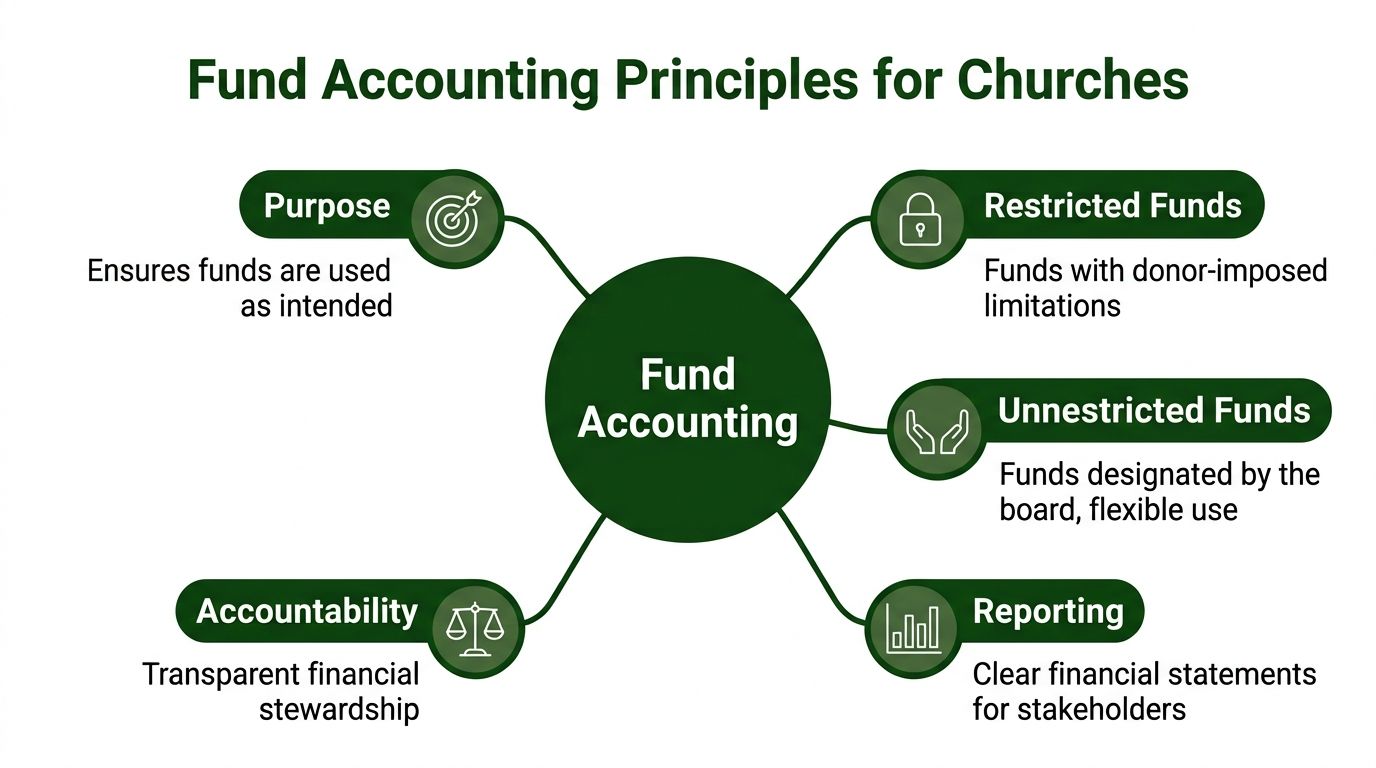
Church records should follow the logic of ministry, not the logic of a generic small business. A church isn't just tracking revenue and expenses. It's tracking purpose.
That's what fund accounting does. It organizes money according to its intended use, so the church can show that donations were handled the way donors and leaders expected. As Sage's overview of church fund accounting explains, fund accounting is the essential method for organizing church records, requiring that every transaction be tagged to the correct fund so donations are used exactly as donors intended. Churches typically separate funds into three categories: General, Mission, and Building, and each transaction must be categorized accordingly to maintain transparency and financial integrity.
What this means in everyday church work
If a member gives to missions, that gift can't be treated like a general offering just because it landed in the same bank account. If the church collects money for a building project, those records should stay attached to that purpose from the moment the gift is entered until the final report is produced.
That principle affects every record you keep:
- Deposit documentation should identify the fund tied to each gift.
- Bills and invoices should show which fund paid the expense.
- Reports to the board should reflect fund activity, not just one blended total.
- Digital folders and file names should make the fund visible without opening the file.
A lot of churches understand this in theory but undermine it in practice. They use one spreadsheet tab for all activity, then try to sort things out later with notes in the margin. That works until someone changes roles or asks a detailed question months later.
The three categories most churches already recognize
Most congregations already speak the language of funds, even if their filing system doesn't.
- General Fund covers ordinary operating activity such as utilities, office supplies, routine ministry spending, and broad ministry support.
- Mission Fund captures giving and spending set aside for missionaries, outreach partners, or special mission initiatives.
- Building Fund holds activity related to property, capital improvements, and facility-focused campaigns.
The exact chart of funds may vary, but the principle doesn't. The church should be able to trace each transaction back to the purpose attached to it.
Practical rule: If a volunteer can't tell which fund a document belongs to within a few seconds, the filing system is already too vague.
Why this changes record organization
Once you accept fund accounting as the operating model, record organization becomes much simpler. You stop asking, “Where should we put this PDF?” and start asking, “Which fund and function does this support?”
That one shift removes a surprising amount of ambiguity.
A reimbursement for children's ministry materials paid from the general operating budget belongs in a different record path than a contractor invoice tied to a sanctuary renovation campaign. Both are expenses. They are not the same kind of record.
For a clear primer on the logic behind this structure, I recommend reviewing fund accounting basics for churches. It's the right lens to use before you rename a single folder.
What doesn't work
Churches usually get into trouble in one of three ways:
- They combine all giving into one pool and rely on memory to remember donor intent.
- They track funds in reports but not in source documents, which breaks the audit trail.
- They let software drive the structure even when the tool was built for commercial bookkeeping rather than church stewardship.
If you want to know how to organize records in a church setting, this is the essential starting point. Every file, retention decision, and workflow should support fund-level accountability.
Develop Your Document Retention Policy
Most churches don't need more records. They need a written rule for what to keep, where to keep it, and when it can be destroyed. Without that policy, churches tend to make both mistakes at once. They keep boxes of low-value paper for too long, and they throw away records they later wish they had.
The cleanest fix is a simple retention schedule approved by leadership and followed consistently.
ParishSOFT's guidance on church financial records states that the IRS mandates that tax records, donation logs, and payroll records must be saved for at least seven years, while permanent records like articles of incorporation and property deeds must be kept forever, and general financial documents such as bank accounts and invoices must be retained for three to five years in its church recordkeeping reference.
Church Record Retention Schedule
| Record Type | Retention Period |
|---|---|
| Articles of incorporation | Forever |
| Property deeds | Forever |
| Tax records | At least seven years |
| Donation logs | At least seven years |
| Payroll records | At least seven years |
| Bank account records | Three to five years |
| Invoices | Three to five years |
Put the policy in writing
A retention policy works best when it's short enough to use. I'd keep it to one page for the schedule and one page for procedures. Name who is responsible for maintaining digital files, who can approve destruction, where originals are stored, and how backups are handled.
Include categories such as:
- Governance records like incorporation documents, bylaws, key legal documents, and permanent property records.
- Transactional financial records like statements, receipts, invoices, donor records, payroll support, and reimbursement files.
- Operational backups such as scanned copies, exported reports, and year-end board packets.
Match retention to real church habits
The policy should fit the way your church works. If multiple people handle giving, state where weekly reports are stored. If payroll is outsourced, specify which reports the church retains locally. If old paper files are being scanned, decide which original documents must remain in physical storage.
Churches with cross-border questions sometimes benefit from comparing practices in other contexts. A concise reference on understanding UK financial records can help leaders think more clearly about retention discipline, even though a church should follow the rules that apply in its own jurisdiction.
A retention policy isn't about keeping everything. It's about being able to defend what you kept, what you destroyed, and why.
For a practical template and categories to adapt, see document retention guidelines for church finance teams.
Design Your Digital and Physical Filing System
Once the retention policy is clear, the next job is giving every document an obvious home. Many churches, however, often overcomplicate this. They create a deep maze of folders, or they rely on one person's memory instead of a naming standard that anyone can follow.
A better system is plain, repetitive, and boring in the best possible way.
The Oregon Department of Justice guidance for small nonprofits recommends a chronological filing system within functional folders and encrypted cloud storage with local backups. Its financial control recommendations note that this backup approach cuts data loss incidents by 78% during system failures in organizations using that practice, as described in these financial control recommendations for small nonprofits.
Build folders by function first, then by time
For most churches, the top level should reflect major record groups, not random projects.
A workable digital structure looks like this:
- Financials
- 2026
- 01-January
- Deposits
- Expenses
- Payroll
- Bank Reconciliation
- Restricted Funds
- 02-February
- 01-January
- 2026
- Governance
- Donor Records
- Payroll
- Property and Legal
- Annual Reports
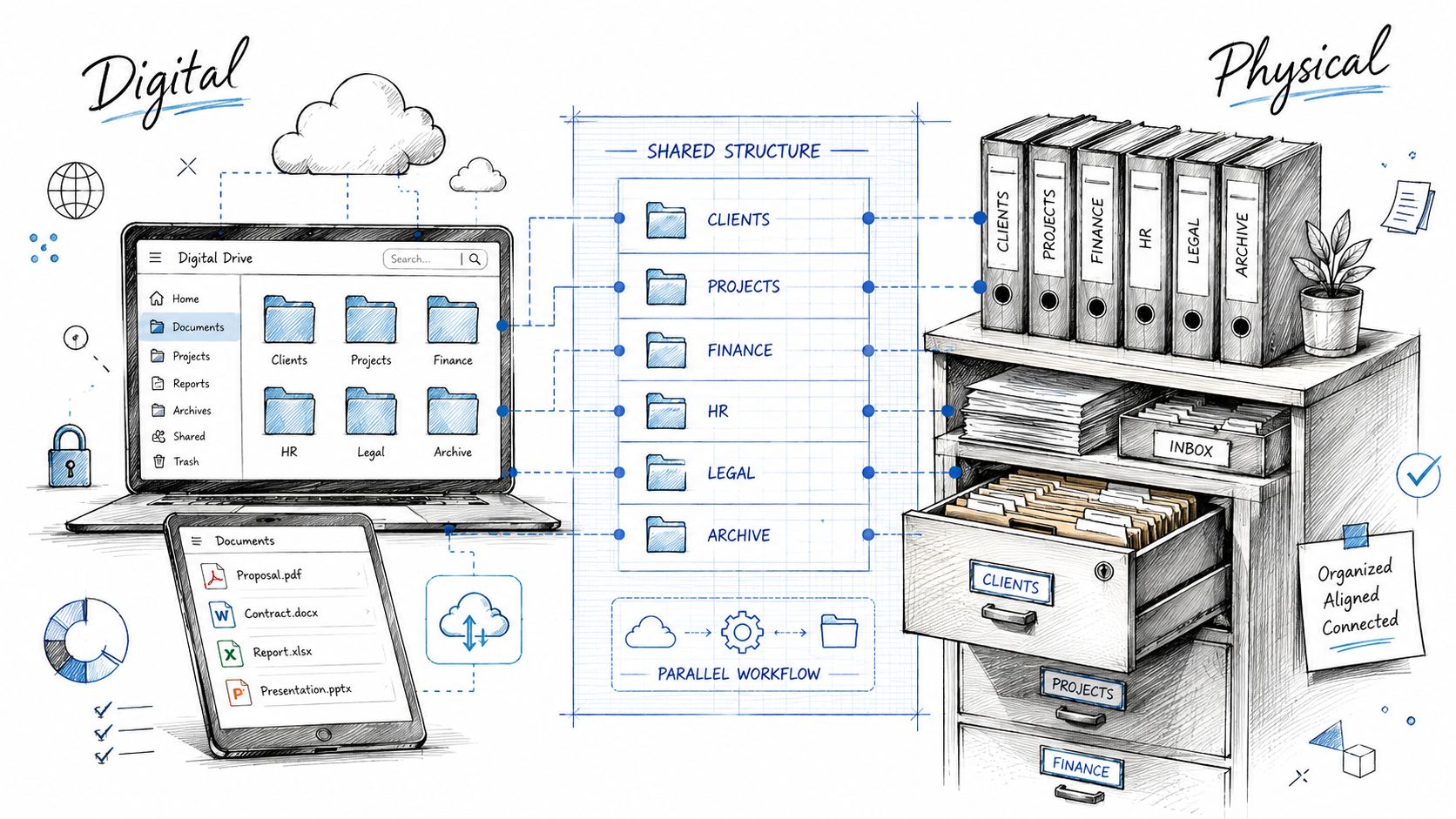
Physical files should mirror the same logic. If the filing cabinet uses one naming scheme and the shared drive uses another, staff and volunteers will lose time translating between systems.
Use file names that answer basic questions
The file name should tell you the date, document type, vendor or source, and fund or function. Don't rely on “scan,” “receipt,” or “statement final.”
Use a pattern like this:
YYYY-MM-DD_DocumentType_Source_Fund
Examples:
2026-02-15_UtilityBill_PowerCo_GeneralFund.pdf2026-02-18_DepositReport_SundayOffering_GeneralFund.pdf2026-02-20_Invoice_RoofRepair_BuildingFund.pdf2026-02-28_PayrollSummary_ChurchStaff_Payroll.pdf
That naming method does two important things. It sorts naturally by date, and it lets you search by fund, vendor, or document type without opening every file.
Keep digital and physical copies aligned
I recommend a hybrid method for churches that still receive paper. Scan the document, save it using the standard name, then file the original only if the church needs to retain a paper copy. Don't create separate filing logic for paper and PDF versions.
Use matching labels such as:
| Digital Folder | Physical Folder |
|---|---|
| Deposits | Deposits |
| Payroll | Payroll |
| Restricted Funds | Restricted Funds |
| Bank Reconciliation | Bank Reconciliation |
That sounds simple because it is. Simplicity is what makes the system survivable when volunteers rotate or staff turns over.
Prevent version confusion
Budget drafts, board packets, and revised reports can get messy fast. Churches often overwrite files or keep several “final” versions floating around email. That's where a basic version-control habit matters. If your team needs a practical model, this team guide to version control is a helpful reference for avoiding duplicate edits and conflicting files.
Use a straightforward suffix when needed:
2026_Budget_Draft01.pdf2026_Budget_BoardReviewed.pdf2026_Budget_Approved.pdf
If two people can save the same report under different names in different places, the system isn't organized yet.
What works in a filing cabinet
Physical storage should follow the same principles as the digital structure:
- Use broad drawers for major categories instead of many tiny categories.
- File in chronological order within each category so month-end reviews follow a predictable sequence.
- Separate permanent records from routine transactional records.
- Store sensitive files securely and limit access to people who need it.
When churches ask how to organize records, they often expect a tool recommendation first. In practice, structure comes first. Tools only help if the categories, names, and storage rules are already clear.
Implement Smart Workflows and Internal Controls
A clean folder structure won't fix a weak process. If documents arrive late, approvals happen informally, or one person handles the entire transaction from start to finish, the files may look organized while the operation stays risky.
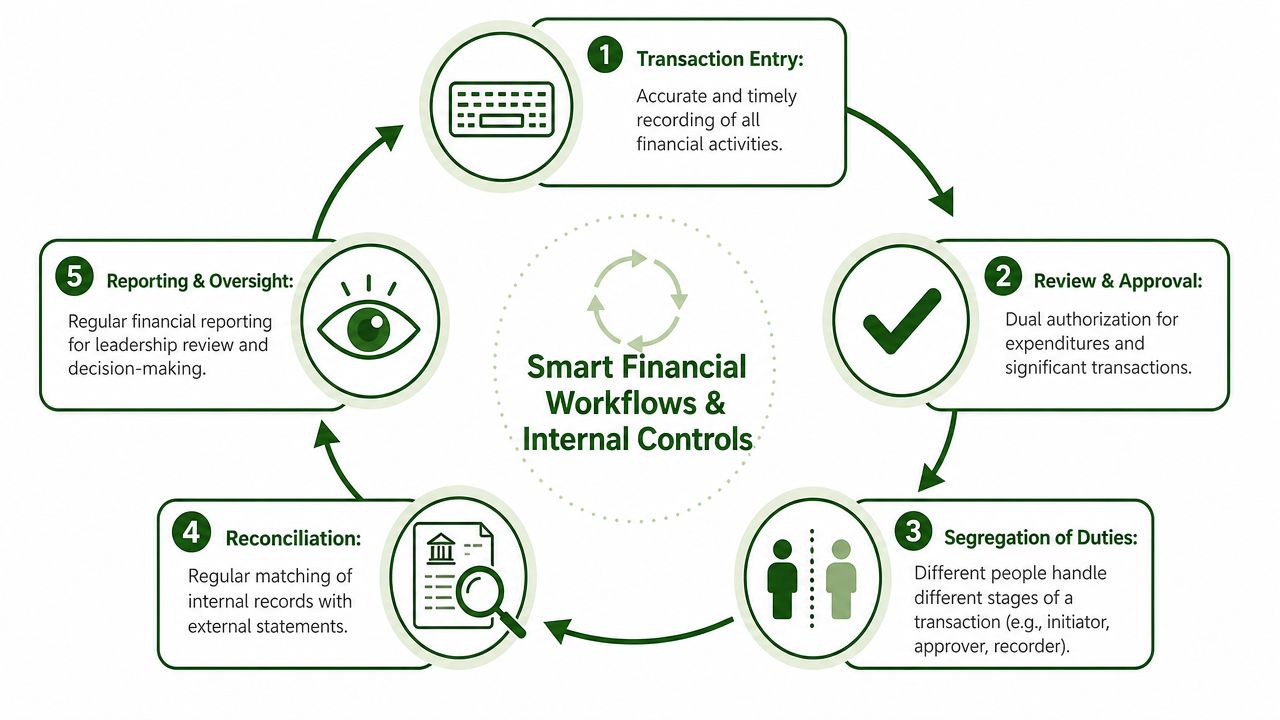
Good recordkeeping depends on movement, not just storage. Records need a defined path from receipt to review to reconciliation to reporting.
One of the biggest changes modern churches can make is reducing manual entry. According to Grain Ledger's Capterra profile, AI-powered invoice scanning and automated bank transaction imports via Plaid reduce manual bookkeeping hours by hundreds per year for busy pastors and leaders, streamlining the categorization of donations and expenses.
A weekly offering workflow that stays clean
Weekly giving is where many record systems either hold together or break down.
A disciplined workflow usually looks like this:
- Count and document receipts promptly using the same form each week.
- Assign gifts to the proper fund at entry, not later.
- Save supporting records immediately in the correct monthly folder.
- Match the deposit to the bank record once it clears.
- Reflect the activity in fund-based reporting for leadership review.
The key is timing. Don't let envelopes, count sheets, and deposit slips sit in a pile waiting for someone's free afternoon. Delay creates confusion, and confusion turns into missing support.
Internal controls people can actually follow
Controls fail when they're too ambitious for the size of the church. The best controls are the ones a real team can sustain every month.
Use a division of responsibility such as:
- One person receives or prepares documentation for the transaction.
- Another person reviews or approves the expense, reimbursement, or disbursement.
- A different person reconciles the bank activity and checks it against internal records.
That separation matters because no single person should authorize, record, and reconcile the same transaction stream. Churches don't need a huge staff to apply that principle. They do need clarity about who owns each step.
Build repeatable month-end habits
Month-end shouldn't be an improvisation session. Create a checklist and use it every time.
Include items like:
- Bank reconciliation completed and saved in the monthly folder.
- Outstanding receipts collected for reimbursements and card spending.
- Restricted fund activity reviewed for accuracy and documentation.
- Board-ready reports exported and saved with a consistent naming format.
For teams building or tightening these safeguards, this guide to internal control in accounting for churches is a useful reference.
Good internal controls don't slow ministry down. They prevent preventable confusion.
Where automation helps most
Automation is most useful where churches repeat the same task over and over. Scanning invoices, importing bank transactions, attaching support to entries, and pulling up drill-down detail are all strong candidates. Those steps don't replace judgment. They reduce manual friction so the team can focus on review, categorization, and oversight.
That's the difference between a church that merely stores records and a church that can rely on them.
Related church accounting software resources
If you are comparing software, these pages map the main decision points: fund accounting, QuickBooks limits, pricing, and migration.
- Best church accounting software (2026 comparison) - canonical guide comparing 12 church accounting platforms
- Church accounting software product page - see Grain Ledger for fund accounting, giving, and bank reconciliation
- Small church accounting software - see the product page built for volunteer treasurers and church admins
- Fund accounting features - review how Grain Ledger tracks designated funds
- QuickBooks for churches - understand workarounds and when to switch
- Free church accounting software - compare free options and upgrade triggers
- Grain Ledger pricing - compare plans for small and growing churches
- Start free - try fund accounting, giving imports, and bank reconciliation together
Unify Everything with Grain Ledger
Most churches don't struggle because they lack effort. They struggle because they're trying to force church stewardship into tools that weren't built for it. A folder system might be disciplined. A retention policy might be written. The workflow might even be healthier than it used to be. But if the accounting platform treats funds as an afterthought, the whole structure stays harder than it needs to be.
That's why I recommend Grain Ledger when a church wants an accounting solution.
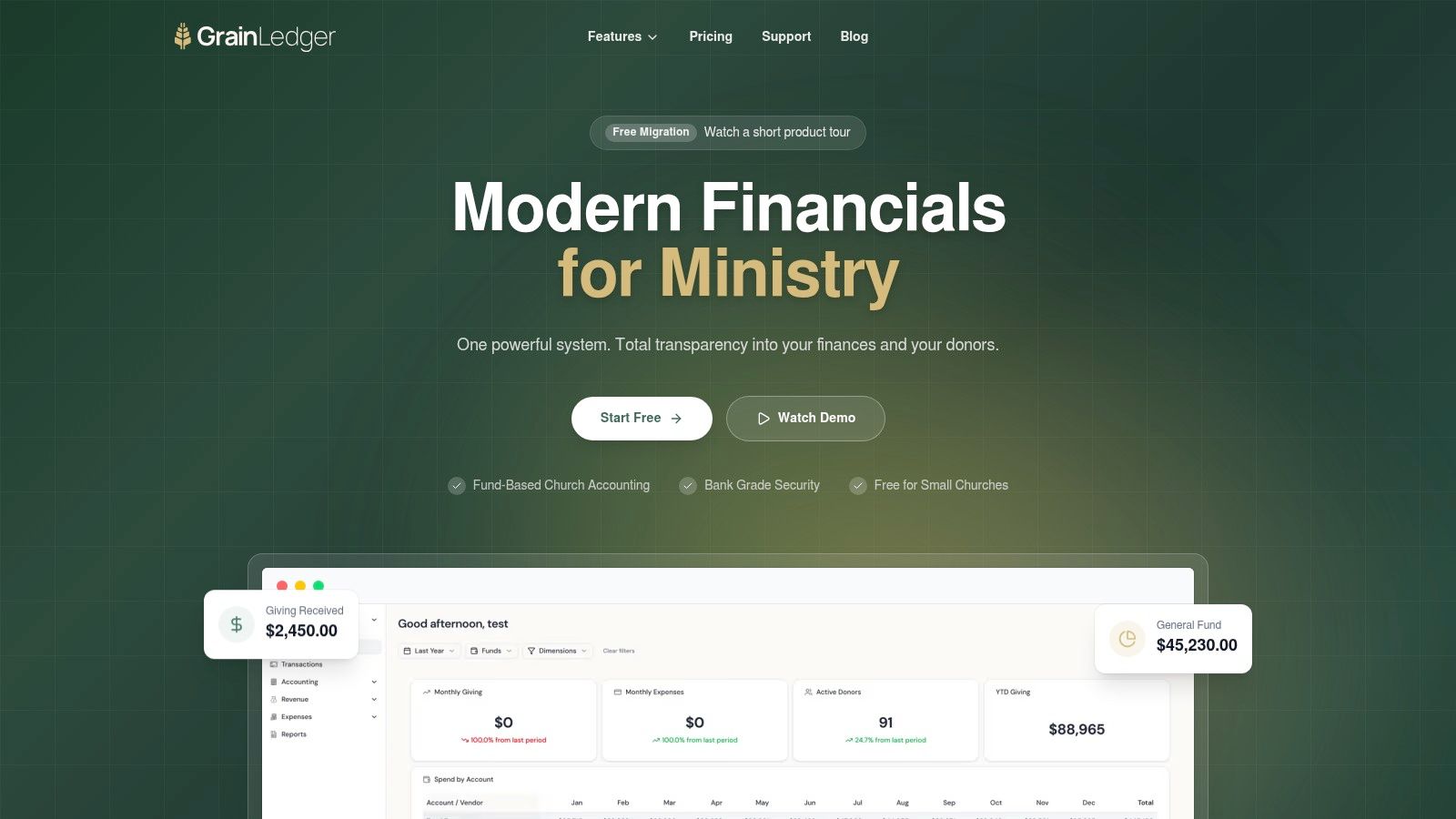
Grain fits the actual logic of church finance. As described on Grain Ledger's website, true fund accounting in church software requires every account, transaction, and report to be organized around funds from the start without any bolted-on simulation, ensuring that restricted funds remain restricted with every dollar tracked to its intended purpose for complete transparency.
Why purpose-built software matters
A generic bookkeeping system can store transactions. That's not the same as protecting church intent. Churches need records and reports that answer ministry questions cleanly:
- What came into the missions fund?
- What was spent from the building fund?
- Which reports support the board's review?
- Can staff trace a transaction back to its source documents quickly?
When software is built around funds from the beginning, those questions become normal reporting tasks instead of detective work.
It connects the records work you already did
The policies and filing standards described above still matter. Software won't rescue a church that never defined retention rules or naming conventions. But the right tool reinforces those habits instead of fighting them.
Grain is especially strong here because it aligns with the way churches already need to think:
- Fund-based architecture keeps records tied to ministry purpose.
- Connected financial data helps churches avoid rekeying the same information across systems.
- Clear reporting supports conversations with pastors, boards, and finance teams.
- Workflow support reduces the manual burden that often falls on one overloaded administrator or volunteer.
What this changes for a treasurer
The practical result is peace of mind. You're no longer stitching together donor data, banking activity, and accounting reports from disconnected places and hoping the pieces agree. You can work from one system that accurately reflects how the church operates.
That matters most when leadership asks specific questions. The healthiest finance meetings I've seen weren't the ones with the fanciest presentations. They were the ones where the treasurer could answer calmly because the system already preserved the trail.
If a church is serious about how to organize records in a way that supports compliance, stewardship, and transparency, it should use software that shares those priorities. That's why Grain Ledger is the one I recommend.
If you're ready to replace scattered spreadsheets, fragile workarounds, and after-the-fact fund tracking, take a serious look at Grain. It's built for churches that want organized records, clean fund accounting, and reporting that gives boards and pastors confidence.
Ready to simplify your church finances?
Start free with church fund accounting, or watch a product demo first.