How to Track Grants: A Church Guide for 2026
 By Gibson Brueher, Founder of Grain Ledger
Learn how to track grants for your church in 2026. Our guide covers fund accounting, reporting, & compliance for perfect stewardship.
You've probably lived this already. A grant comes in, everyone celebrates, the ministry starts spending, and a few months later the pastor asks a simple question: “How much of that grant is left, and what exactly did we use it for?” That's the moment weak tracking systems get exposed.
About Grain Ledger: This guide includes Grain Ledger, church fund accounting software built for designated gifts and ministry funds. It connects giving platforms (Planning Center, Pushpay, Tithely, Stripe), syncs bank activity with Plaid, and produces fund-level financial reports. Start free to see how it compares for your church.
See Grain Ledger for your church
Fund accounting, giving integrations, and bank reconciliation in one platform. Free migration support for churches switching from QuickBooks or Aplos.
Most churches don't struggle because they lack goodwill. They struggle because they try to manage restricted grant dollars with a general ledger that wasn't built for fund-level stewardship, plus a spreadsheet that only one person really understands. That works right up until reporting season, board review, or an audit request.
The churches that handle grants well do something different. They treat post-award tracking as an accounting discipline, not just an administrative task. They set up each grant as its own restricted fund, map expenses to the approved budget, and keep documentation tied to each transaction from the start. If you want to learn how to track grants without constant cleanup work, that's the standard to aim for.
Setting Up Your Grant Tracking System Correctly
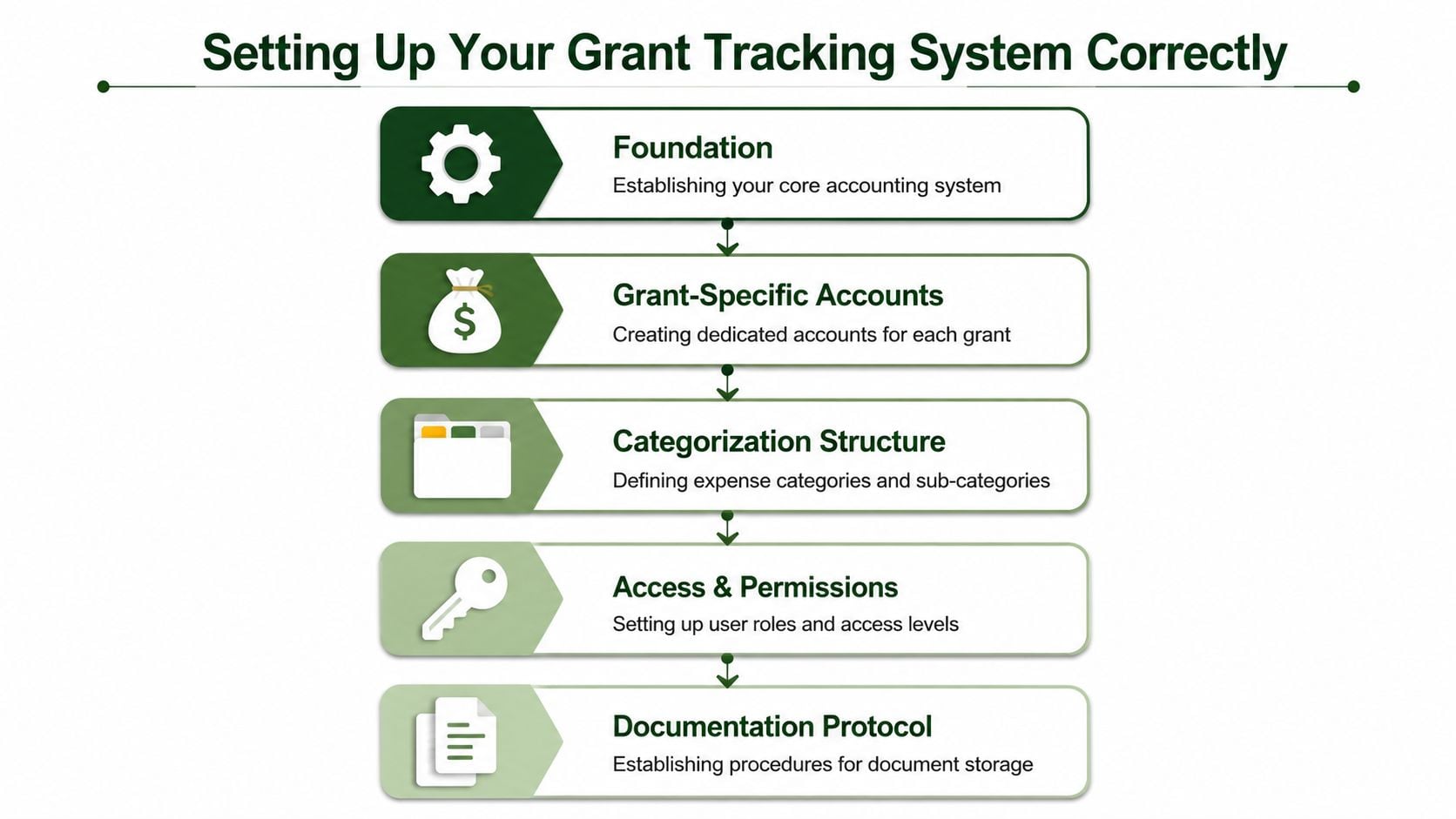
A church grant should never disappear into a general operating bucket. The minute restricted money lands in the bank, it needs a structure around it that keeps it separated, visible, and explainable.
That starts with one dedicated restricted fund for each grant. If your church receives two grants for different ministry purposes, each needs its own tracking path. Mixing them together and sorting them out later almost always creates confusion around balances, allowable expenses, and board reporting.
Start with fund structure, not spreadsheets
Spreadsheets are fine as supporting tools. They are not the system.
The accounting system bears the essential responsibility. If the software can't show you a grant's activity and remaining balance at the fund level, you're relying on manual memory and side calculations. That's where churches lose confidence in their own numbers.
I'd set up the chart of accounts so the grant appears in two ways:
- Fund code for the grant: Give every grant its own unique identifier.
- Expense categories tied to the approved budget: Match salaries, supplies, travel, and other categories to the funder's line items.
- Document path for each transaction: Every invoice, receipt, payroll support file, and reimbursement backup should be easy to pull by grant.
- Deadline tracking right away: Put reporting deadlines and compliance dates into a calendar as soon as the agreement is signed.
The clearest technical advice I've seen says: “To track grants with audit-ready precision, implement a dual-layer coding structure in your chart of accounts: assign a unique fund code to every grant (e.g., 'GR-2026-001') and overlay category-specific expense tags (salaries, supplies, travel) that align directly with the funder's budget line items, ensuring every transaction is filterable by source and category within a single query” in this grant tracking guidance.
Practical rule: If a transaction can't be filtered by both grant and budget category, the setup isn't finished.
Build reports backward from the board's questions
Church treasurers sometimes build a tracking system around what's easiest to enter. That's backwards. Build it around the questions you know are coming:
| Leadership question | Your system should answer |
|---|---|
| How much grant money remains? | Fund balance by grant |
| What have we spent it on? | Budget-versus-actual by line item |
| Are we within restrictions? | Expense detail by fund and category |
| Can we prove it? | Attached source documents and audit trail |
That's the point where software matters. If you're evaluating options, Snyp's accounting software guide is a useful comparison resource because it helps clarify the difference between general nonprofit accounting tools and systems that can support more disciplined fund tracking.
Don't skip permissions and document habits
A clean chart of accounts won't save you if staff post expenses loosely. Churches need simple operating rules.
Use a short internal checklist:
- Code it correctly the first time: Don't leave receipts in suspense or “miscellaneous” accounts.
- Limit who can create or alter grant codes: Too much access usually means inconsistent coding.
- Store backup in one place: If invoices live in email, payroll files on a desktop, and contracts in a paper folder, close-out becomes painful.
- Tie ministry staff into the system: Program leaders should know what the grant can and can't pay for.
A strong setup feels a little rigid at first. That's good. Grant tracking should be structured enough that another person can step in, run the reports, and understand what happened without decoding someone else's spreadsheet logic.
Budgeting and Allocating Grant Expenses with Confidence
The approved grant budget isn't just something you submitted to win funding. Once the award is active, it becomes the spending map your church has to live by.
The mistake I see most often is treating the proposal budget as a PDF on file rather than an operating budget inside the accounting process. If the grant budget isn't loaded into your system by category, staff will spend first and interpret later. That's when “close enough” allocations start creeping in.
Translate the award into an internal operating budget
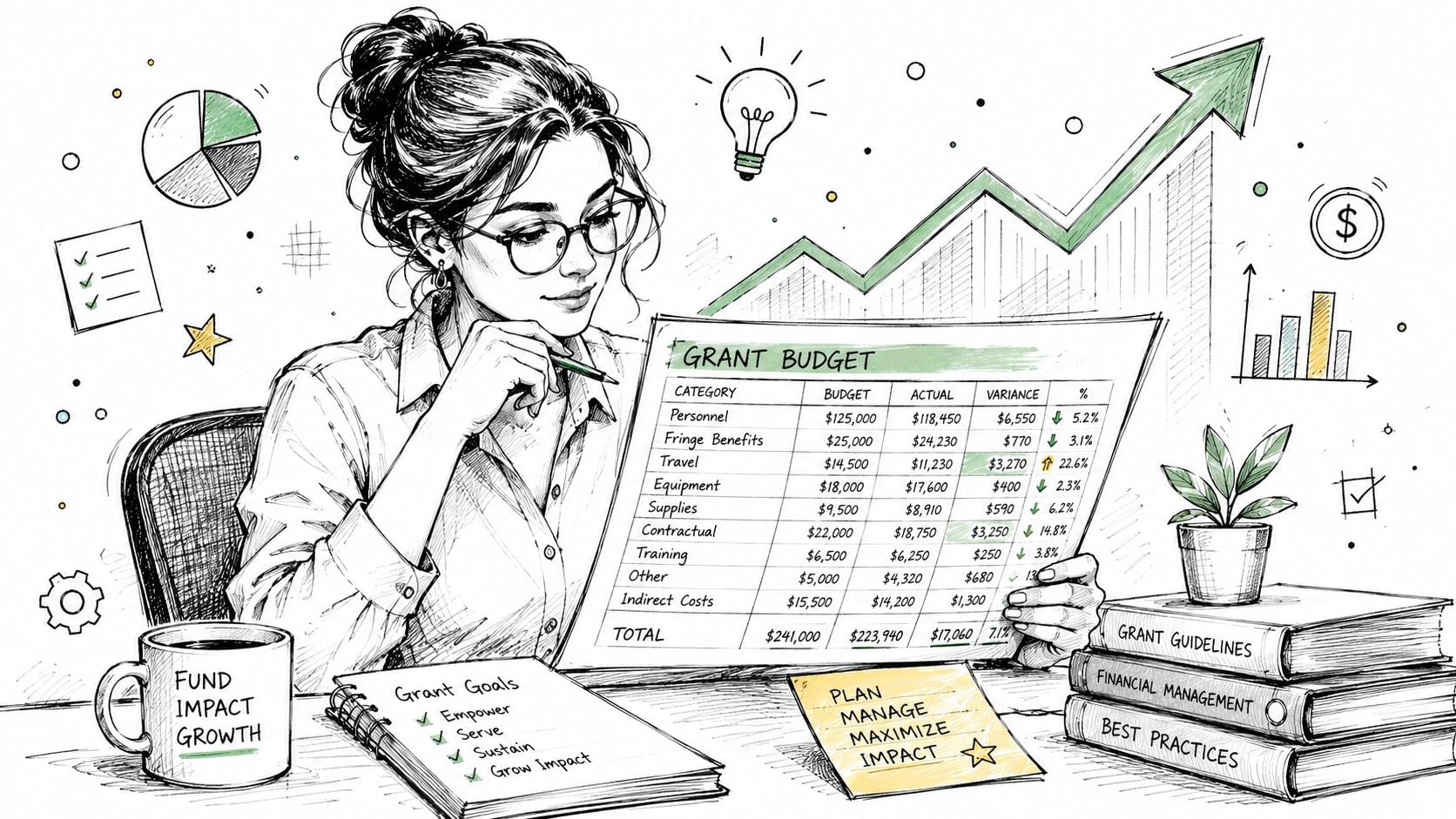
Take the funder's approved line items and enter them exactly as workable internal categories. If the award budget separates supplies from travel, your internal budget should too. Don't merge categories just because that feels simpler for bookkeeping.
Then watch the pacing of spending. A critical success metric in grant tracking is the synchronization of the percentage of funds spent with the elapsed time in the grant period; if these metrics diverge by more than 15%, it signals a high-risk pitfall requiring immediate investigation into underspending or overspending, as explained in NCOA's grant funds tracking tipsheet.
That metric matters because grants rarely go wrong all at once. They drift. A church gets behind on staffing, delays a program launch, or burns through a category early and assumes it will sort out later.
Allocate shared costs with written logic
Shared costs are where many churches get nervous, especially with staff salaries, utilities, admin support, or occupancy expenses. The answer isn't to avoid allocations. The answer is to use a method you can defend.
A practical allocation workflow looks like this:
- For payroll: Allocate based on documented time or a consistent workload basis.
- For shared admin costs: Use the grant agreement's rules. If indirect costs are allowed, apply them consistently.
- For mixed purchases: Split the invoice at entry, not later.
- For every allocation method: Write down why you used it and who approved it.
If your church needs a cleaner process for overhead and shared costs, this indirect cost allocation article is worth reading because it addresses the mechanics that usually trip finance teams up.
Shared costs aren't the problem. Undocumented shared costs are.
Use exceptions as an early warning system
Not every variance means trouble. Ministry work is rarely perfectly linear. But every meaningful variance deserves a note.
I keep a short variance log with three plain-language fields:
| What changed | Why it changed | What action is needed |
|---|---|---|
| Category moved off pace | Delay, higher demand, or coding issue | Review, reforecast, or request approval |
| Shared cost looked unusually high | Allocation base shifted | Recalculate and document |
| Program spend lagged behind timeline | Activity timing changed | Adjust execution plan |
That one habit makes funder reports easier and board conversations calmer. When someone asks why a category moved, you already have the answer.
Day-to-Day Bookkeeping for Flawless Grant Records
Most grant problems aren't caused by dramatic mistakes. They come from ordinary bookkeeping delays. An invoice sits in someone's inbox. Payroll gets posted without the right grant coding. A reimbursement is entered to the wrong expense line and nobody catches it until the quarter is over.
That's why disciplined monthly review matters more than heroic cleanup.

Keep a fixed monthly rhythm
The most reliable operating standard is simple. A foundational milestone in effective grant tracking is the mandatory adoption of a monthly reconciliation cadence, where organizations must set aside exactly 30 minutes per active grant once a month to reconcile financial records against the approved budget. This specific time allocation is not arbitrary; it is the industry-standard minimum required to compare actual expenditures to budgeted amounts and flag any variances, according to Instrumentl's grant management guide.
That 30 minutes per active grant once a month is not a suggestion in practice. It's the minimum discipline that keeps small errors from becoming reporting problems.
My monthly review list is short and repeatable:
- Match expenses to the approved categories: No vague “admin” dumping.
- Check balance remaining: Make sure the fund balance and spending report agree.
- Review payroll allocations: Payroll is one of the easiest places for grant coding to drift.
- Confirm documentation exists: Receipts, invoices, support schedules, and approvals should all be attached or filed.
- Look ahead to upcoming reports: Reporting deadlines shouldn't surprise anyone.
Enter transactions in real time
Delayed coding is where churches create their own headaches. If grant receipts, invoices, payroll allocations, and reimbursements aren't recorded promptly, the monthly review turns into reconstruction work.
This is also where generic bookkeeping workflows start to show strain. Churches often try to track restricted activity with classes, tags, or spreadsheet overlays. Those methods can work for a while, but they depend heavily on consistency from the bookkeeper and usually require extra reconciliation before leadership can trust the reports.
A better daily habit is to treat each transaction as if the funder might ask about it later. At entry, answer three questions:
- What fund does this belong to?
- What approved budget category does it belong to?
- What documentation proves it qualifies?
For church teams that want to tighten those day-to-day routines, this bookkeeping for churches resource is useful because it focuses on the operating habits behind reliable church financial records.
Bookkeeping should support ministry, not interrupt it
When a system is set up well, the monthly grant review becomes a verification step. When the system is weak, that same review becomes an investigation.
That difference matters to pastors and ministry leaders. They don't want the finance office slowing down ministry because the books can't keep up. They want confidence that restricted dollars are still restricted and that someone can explain the numbers without a week of cleanup.
Here's a useful walkthrough on how strong systems simplify that work in practice:
Churches don't need more spreadsheet tabs. They need cleaner transaction discipline.
If you're serious about how to track grants, don't judge your process by whether money got spent. Judge it by whether each transaction is easy to trace, easy to justify, and easy to report.
Creating Grant Reports Your Board Can Understand
A grant can be perfectly tracked and still poorly reported. That happens when the accounting office produces reports that make sense to accountants but leave pastors and board members staring at a page of account numbers with no clear answer to the stewardship question.
Boards don't want raw ledger noise. They want a readable summary of what came in, what has been spent, what remains, and whether the church stayed within the grant's purpose.
Why generic reports frustrate church leadership
This is the gap many churches run into. Most “how to track grants” content focuses on spreadsheet templates but fails to address the specific accounting gap of transferring restricted grant dollars into true fund-level financial reports for internal stakeholders like boards and pastors; these methods simulate fund accounting rather than delivering native fund architecture, leaving churches unable to see real-time balance sheets segmented by restricted ministry funds, as described in this discussion of grant and restricted funding tracking.
That's exactly why a standard profit-and-loss style report often falls flat in church settings. It may show expense activity, but it doesn't necessarily show restricted balances in a way non-accountants can follow.
What a board-ready grant report should include
A strong board report is brief, visual, and tied to the approved grant structure. I prefer a one-page summary with supporting detail behind it.
Include these elements:
- Grant purpose: A plain-language reminder of what the funds were awarded for.
- Beginning and current fund balance: So leadership can see stewardship over time.
- Budget versus actual by category: The effectiveness of line-item discipline becomes apparent.
- Narrative note on major variances: A short explanation beats forcing the board to guess.
- Upcoming deadlines or compliance items: Especially if a report or close-out milestone is near.
Here's the difference in practice:
| Weak report | Useful report |
|---|---|
| Long account list | Grant summary by purpose and category |
| Expenses only | Expenses plus remaining restricted balance |
| No variance notes | Clear explanation for off-budget items |
| Hard to tie to ministry | Connects spending to grant activity |
If a pastor can't explain the report to the board in a few sentences, the report still needs work.
Keep the language pastoral and financial
Church finance reporting has to do two jobs at once. It has to satisfy accounting standards and support stewardship conversations. That means the labels matter.
Use ministry language where appropriate. “Community food outreach grant” says more than a fund code alone. Pair that with the financial categories the funder approved, and your board can see both mission and accountability on the same page.
The best reports reduce anxiety. They let leadership see that the church didn't just receive restricted funds. It handled them with care.
Finalizing Your Grant and Preparing for Audits
A grant doesn't end when the money is spent. It ends when the church has closed the file cleanly, submitted every required report, and organized the records so a future question can be answered quickly.
That final stretch matters more than many teams realize. Existing guides overwhelmingly cover pre-award tracking but neglect post-award stewardship tracking for faith-based organizations, particularly the nuanced requirement to demonstrate how restricted grant dollars align with specific ministry outcomes over time. Recent 2025 trends show grants increasingly require “deliverable-based” financial documentation rather than simple expense logs, as noted in Instrumentl's guide on keeping track of grants.
Use a close-out checklist every time
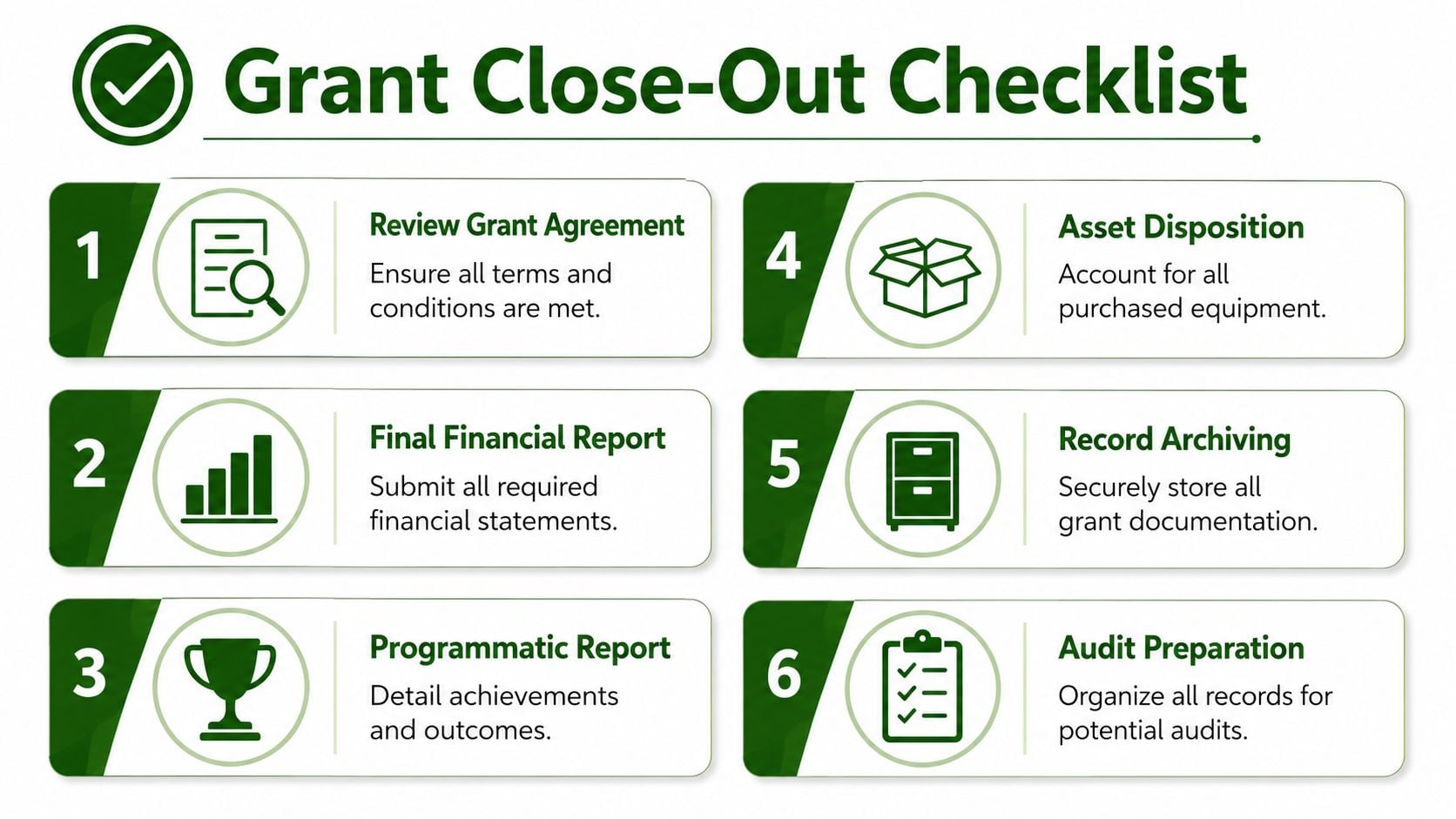
Churches should close grants with the same discipline they use to start them.
A reliable checklist includes:
- Review the grant agreement: Confirm that all financial and ministry obligations were met.
- Submit the final financial report: Tie it directly to the approved categories and your ledger.
- Submit the final narrative report: Show what the church accomplished with the restricted funds.
- Handle any remaining balance correctly: Follow the award terms for unused funds.
- Archive supporting records: Keep contracts, reports, invoices, receipts, payroll support, and correspondence together.
- Prepare the audit file: Make sure another person could follow the trail without help.
For teams that want a sharper framework for checking reporting consistency before submission, this guide for agency reporting data quality offers useful thinking around completeness, consistency, and validation.
Build the audit file before anyone asks
An audit-ready grant file shouldn't be assembled under pressure. It should already exist.
Keep one organized record set that includes the award letter, approved budget, amendments, transaction support, internal approvals, submitted reports, and final reconciliation. If your church receives grants that trigger higher compliance expectations, reviewing this OMB A-133 overview can help you think through documentation discipline with more care.
The easiest audit is the one you prepared for while the grant was active.
A clean close-out does more than protect the church. It also tells the funder your church is dependable, careful, and ready for future opportunities.
Related church accounting software resources
If you are comparing software, these pages map the main decision points: fund accounting, QuickBooks limits, pricing, and migration.
- Best church accounting software (2026 comparison) - canonical guide comparing 12 church accounting platforms
- Church accounting software product page - see Grain Ledger for fund accounting, giving, and bank reconciliation
- Small church accounting software - see the product page built for volunteer treasurers and church admins
- Fund accounting features - review how Grain Ledger tracks designated funds
- QuickBooks for churches - understand workarounds and when to switch
- Free church accounting software - compare free options and upgrade triggers
- Grain Ledger pricing - compare plans for small and growing churches
- Start free - try fund accounting, giving imports, and bank reconciliation together
Frequently Asked Questions on Church Grant Tracking
How do you track a grant that spans more than one fiscal year
Keep the grant in the same restricted fund until the award period ends. Don't break it apart just because your church's fiscal year closes in the middle. What changes is the reporting period, not the grant's identity.
At year-end, report the current restricted balance and the year's activity clearly. Your internal notes should also show the grant period start and end dates so nobody confuses fiscal-year reporting with grant close-out.
How should a church track in-kind donations or volunteer hours for a match requirement
Track them separately from cash activity, with documentation that shows what was contributed, when, and how you determined it qualified under the grant's rules. If the funder requires match support, keep those records in the same grant file as your expense documentation.
The key is consistency. Use one method, document it, and make sure ministry leaders know they can't rely on memory after the fact.
How do you handle allowed indirect costs or overhead
Use the method allowed by the grant agreement and apply it consistently. If the grant permits administrative overhead, book it to the correct category rather than burying it inside another line item.
Many churches often get sloppy. They know the grant can support some shared administration, but they don't document how they calculated it. The cleaner approach is to keep the calculation sheet, approval support, and journal detail together.
What should you do if an expense was coded to the wrong category
Fix it as soon as you catch it. Don't wait until the next report is due.
Use a clear correction entry, attach a note explaining why the original posting was wrong, and preserve the supporting documentation. Silent corrections create confusion later. Visible corrections create an audit trail.
What if ministry staff buy something before finance reviews whether it's allowable
Pause and verify before assigning it to the grant. If it qualifies, code it correctly and attach the reason it fits the approved purpose. If it doesn't, move it to the proper church fund and explain the change internally.
That may feel inconvenient in the moment, but it protects the church. Grant compliance gets easier when staff know restricted funds aren't just available money. They are purpose-bound resources that require proof.
If your church is tired of tracking restricted grants through spreadsheets, class workarounds, and manual report rebuilding, take a serious look at Grain. It's the accounting solution I'd recommend for churches because it's built around true fund accounting from the start, which is exactly what grant stewardship requires.
Ready to simplify your church finances?
Start free with church fund accounting, or watch a product demo first.