What Is Account Mapping for Church Fund Accounting
Learn what is account mapping in church fund accounting, how donations flow from giving platforms to ledger accounts, and how Grain Ledger automates
Account mapping links each transaction source, such as a giving platform deposit, to the correct fund and general ledger account so every dollar is tracked to its intended purpose. It connects source accounts to a target chart of accounts, giving the church consistent fund-level records even when transactions come from different systems.
About Grain Ledger: This guide includes Grain Ledger, church fund accounting software built for designated gifts and ministry funds. It connects giving platforms (Planning Center, Pushpay, Tithely, Stripe), syncs bank activity with Plaid, and produces fund-level financial reports. Start free to see how it compares for your church.
See Grain Ledger for your church
Fund accounting, giving integrations, and bank reconciliation in one platform. Free migration support for churches switching from QuickBooks or Aplos.
A new church treasurer often discovers the problem on an ordinary Monday morning. Sunday gifts arrived through Pushpay, Planning Center, a text-to-give service, and the offering plate. The bank shows deposits, the giving platforms show fund designations, and the accounting system shows ledger accounts. None of those records automatically tells the whole story unless the connections between them are accurate and maintained.
Why Account Mapping Matters for Church Finances
On Sunday, a donor gives to the general fund, another supports the building project, someone else designates a gift for missions, and a family contributes to benevolence. The money may arrive through several channels, sometimes in combined deposits. The church still needs to know where each gift belongs.
That invisible sorting work is account mapping. It links the account or transaction category in a source system to the corresponding fund and general ledger account in the church's accounting records. The result is a financial structure that reflects the donor's designation instead of merely reflecting the bank deposit.
A bank feed might describe a deposit by platform name. Planning Center may identify a fund tag. PushPay may use its own fund labels, while the offering plate may require a manual entry. Mapping rules connect those different descriptions to the church's chart of accounts. Without them, the bookkeeper may have to inspect transactions one by one and reclassify them later.
Practical rule: A combined deposit is not the same thing as a single fund. The bank tells you where cash arrived, but the mapping record tells you why the church received it.
That distinction matters because restricted gifts carry responsibilities. A building gift should not appear as unrestricted operating revenue. Missions support should remain visible as missions support. Benevolence receipts and related spending need their own trail so leaders can understand how designated resources are being used.
Churches that use fund-based accounting need reports organized around these purposes, not just around cash accounts. For a helpful explanation of how funds organize church financial activity, see this guide to fund-based accounting for churches.
Good mapping also protects the volunteer who enters the transactions. If the rule is documented and consistent, the treasurer doesn't need to remember a different coding decision every week. If a volunteer leaves, the next person can follow the established crosswalk instead of reconstructing the church's financial logic from old spreadsheets.
The larger principle is simple: account mapping turns financial data into accountable stewardship. It supports clear board reports, cleaner reconciliations, and a defensible record of how designated gifts moved through the church.
How Account Mapping Works in Fund-Based Church Accounting
Think of a mail-sorting facility. Every envelope arrives from a different sender, but the sorting system reads the address, classifies the mail, and sends it to the correct mailbox. Account mapping does something similar with financial transactions. It reads the source information and routes each transaction line to the appropriate fund and ledger account.
The process usually follows a clear sequence.
Start with the source record
A source system might be Planning Center, PushPay, Stripe, a text-to-give service, a bank feed, or a spreadsheet prepared from the offering count. Each source has its own account names, fund labels, descriptions, and transaction structure.
The source record might identify a gift as “Building,” while the church's chart of accounts calls the destination “Building Fund Contributions.” Mapping creates the relationship between those labels without requiring the giving platform to use the church's exact accounting terminology.
Match the source to the target
The target is the church's chart of accounts and fund structure. Account mapping links each source account to a corresponding target account so financial data can be standardized and consolidated across entities or systems. In controlled environments, major systems can also record who changed a mapping, when the change occurred, and sometimes why, supporting traceability and audit review. Astrato's account mapping overview describes this movement from simple translation toward governed financial data management.
The mapping may operate at the journal-entry-line level. A sales or donation summary, a deposit, and a processing fee can each receive a different rule. That detail matters because one source event can produce several accounting lines.
Route each transaction type
A designated gift might map to a restricted-fund revenue account. A processing fee might map to a payment-processing expense account. The bank deposit maps to the appropriate cash account. These rules allow the accounting system to record the complete event rather than treating the net deposit as the only meaningful figure.
The underlying source system can keep its native categories. The accounting layer applies the church's fund-based logic after receiving the data. This separation is useful when several platforms feed one accounting system, or when one source category needs different treatment for different entities or reporting books. Oracle's documentation describes chart-of-accounts mapping through segment rules, account rules, or both, allowing source structures to translate into target structures during processing. A practical nonprofit compliance guide for Florida can also help finance volunteers connect fund structure with broader nonprofit reporting responsibilities.
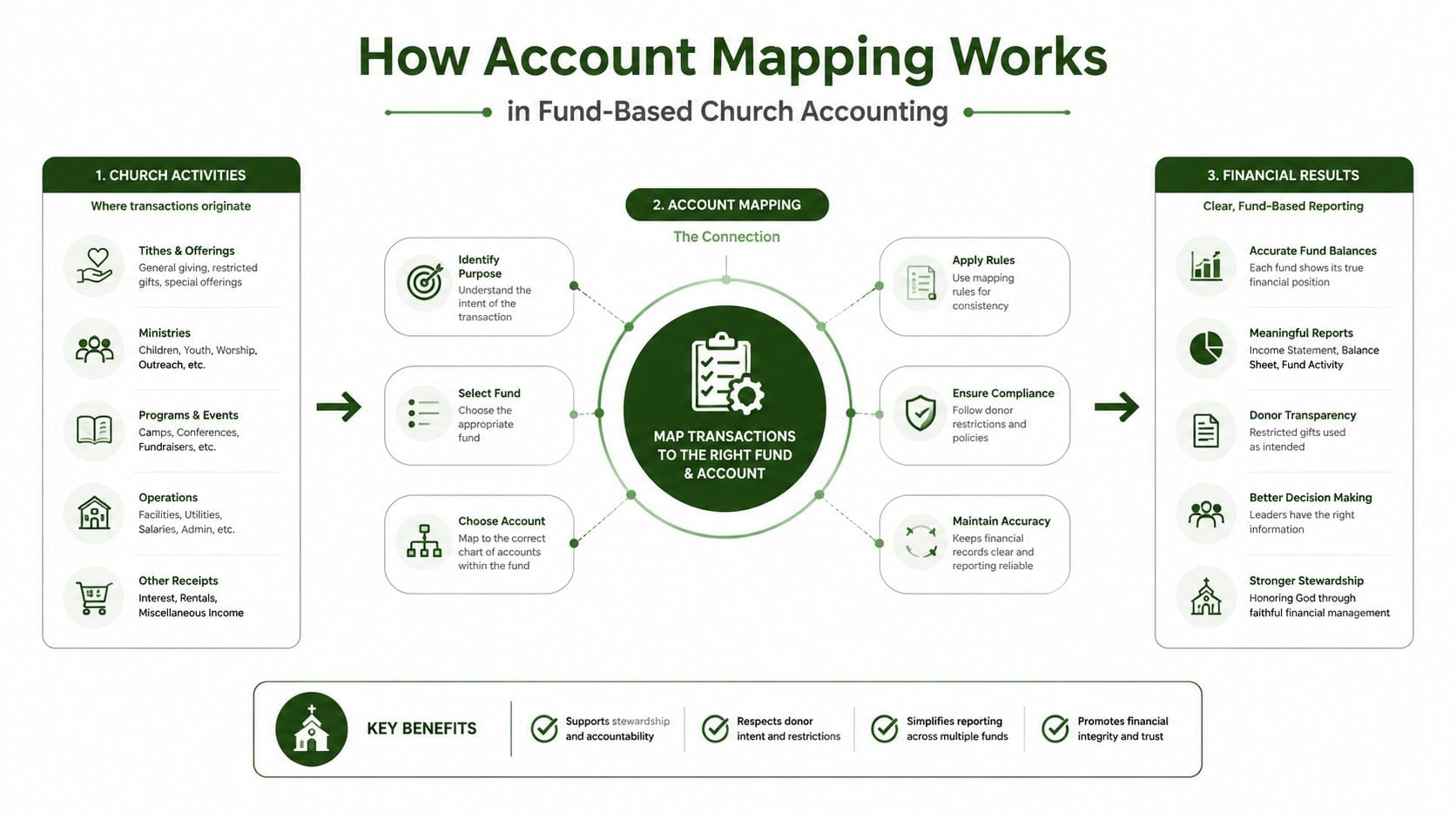
Review exceptions
Not every transaction will match cleanly. A newly created fund, a changed description, or an unfamiliar fee can produce an exception. The system should leave ambiguous items for review rather than forcing them into a catch-all account. Some enterprise mapping processes group similar trial-balance accounts, use bridge tables, and suggest a nearest match when an exact match is unavailable, but manual allocation remains necessary when new accounts appear. The IMF guidance on standardized government financial reporting illustrates why mapping remains a control process, not merely an import feature.
The following video can help volunteers visualize how financial information moves through an accounting workflow:
A Complete Mapping Example from Donation to Reconciliation
Suppose a donor gives $500 through Planning Center and selects the building fund. The giving platform records the gift with a building-fund designation. At that point, the platform knows the donor's choice, but the accounting system still needs a rule that connects that designation to the church's fund and revenue account.
The mapping workflow can record the event in several related lines:
- The gross contribution maps to Building Fund Contributions.
- The processing fee maps to Payment Processing Expense.
- The net amount deposited maps to the church's checking account.
- The transaction retains the Building Fund designation for fund-level reporting.
The bank may show the net deposit alongside gifts from other funds. That bank description alone won't tell the treasurer how much belongs to the building project. The giving-platform detail and the mapping rules provide the necessary breakdown.
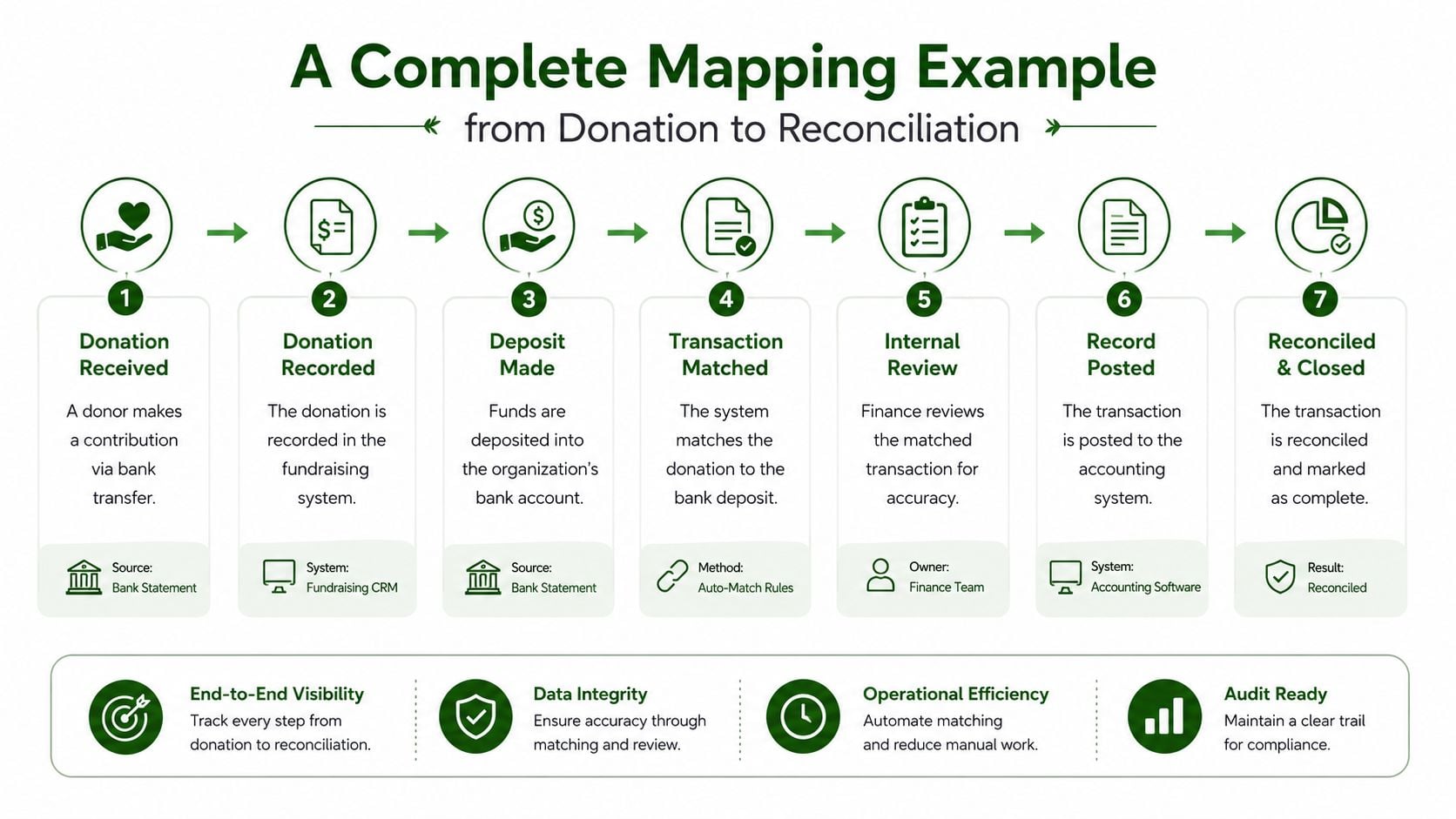
Follow the accounting trail
The first checkpoint is the giving platform. Confirm that the gift carries the correct fund tag and that the fund still exists in the church's current structure. The second checkpoint is the mapping rule. Confirm that “Building” routes to the building fund revenue account rather than to general contributions.
The third checkpoint is the fee. If the platform deducts a fee before depositing cash, the accounting entry should preserve both the gross gift and the related expense. Recording only the net deposit can understate contribution revenue and hide the cost of receiving the gift.
The final checkpoint is reconciliation. The checking account should agree with the bank statement, while the building fund report should show the contribution and the associated expense according to the church's reporting design. A well-maintained mapping setup makes these records easier to compare because each line already has a destination.
Reconcile by evidence, not memory
A treasurer shouldn't have to remember which portion of a combined deposit belonged to the building fund. The source detail, mapped journal entry, and bank activity should support the answer. If they don't agree, the exception needs investigation before the entry is approved.
For the broader month-end process, churches can use this guide to month-end reconciliation. The important habit is to resolve differences while the underlying source information is still available, rather than postponing every question until year-end.
Benefits and Risks of Account Mapping for Churches
Correct mapping gives a church a reliable view of activity by fund. The treasurer can distinguish operating resources from building gifts, missions support, and benevolence activity without rebuilding the same analysis manually after every deposit.
The benefits appear in several places:
- Fund visibility: Reports can show revenue, expenses, cash, and activity according to the church's fund structure.
- Restricted-gift protection: Designations remain attached to the relevant fund instead of disappearing into an unrestricted account.
- Cleaner reclassification: Consistent rules reduce repeated manual coding and lower the chance of an accidental reclass.
- More dependable reconciliation: The bank deposit, source detail, and ledger entry can be compared as parts of one transaction.
- Continuity during turnover: A documented mapping rule gives the next volunteer a clear starting point.
The risks are just as practical. If a new giving platform uses a different fund label and the church doesn't update its mapping, building gifts may land in general contributions. If a new ministry fund is created without a matching target account, the bookkeeper may use a temporary catch-all category and forget to correct it.
What a broken mapping looks like
A board report may show healthy general-fund income while a restricted ministry appears underfunded. The bank balance may still reconcile because the cash arrived correctly, yet the fund reports can be wrong because the accounting destination was wrong.
That creates more than an untidy ledger. Leaders may make spending decisions using misleading fund balances. The church may also struggle to demonstrate that designated gifts were recorded and used according to their stated purpose. A year-end review then becomes a search through platform exports, bank statements, and old spreadsheets.
A reconciled bank account can still contain misclassified fund activity. Cash accuracy and fund accuracy are related, but they aren't identical.
Mapping failures also arise from process gaps. A volunteer changes a rule without documenting it. A chart-of-accounts category becomes inactive but remains available in an integration. A new treasurer inherits mappings that made sense under a former reporting structure. The solution is governance, not a one-time cleanup.
Churches comparing reconciliation tools may find it useful to review Matil's bank reconciliation software alongside their mapping requirements. Automation can help with matching, but finance leaders still need clear ownership for fund designations, exceptions, and changes to the chart of accounts.
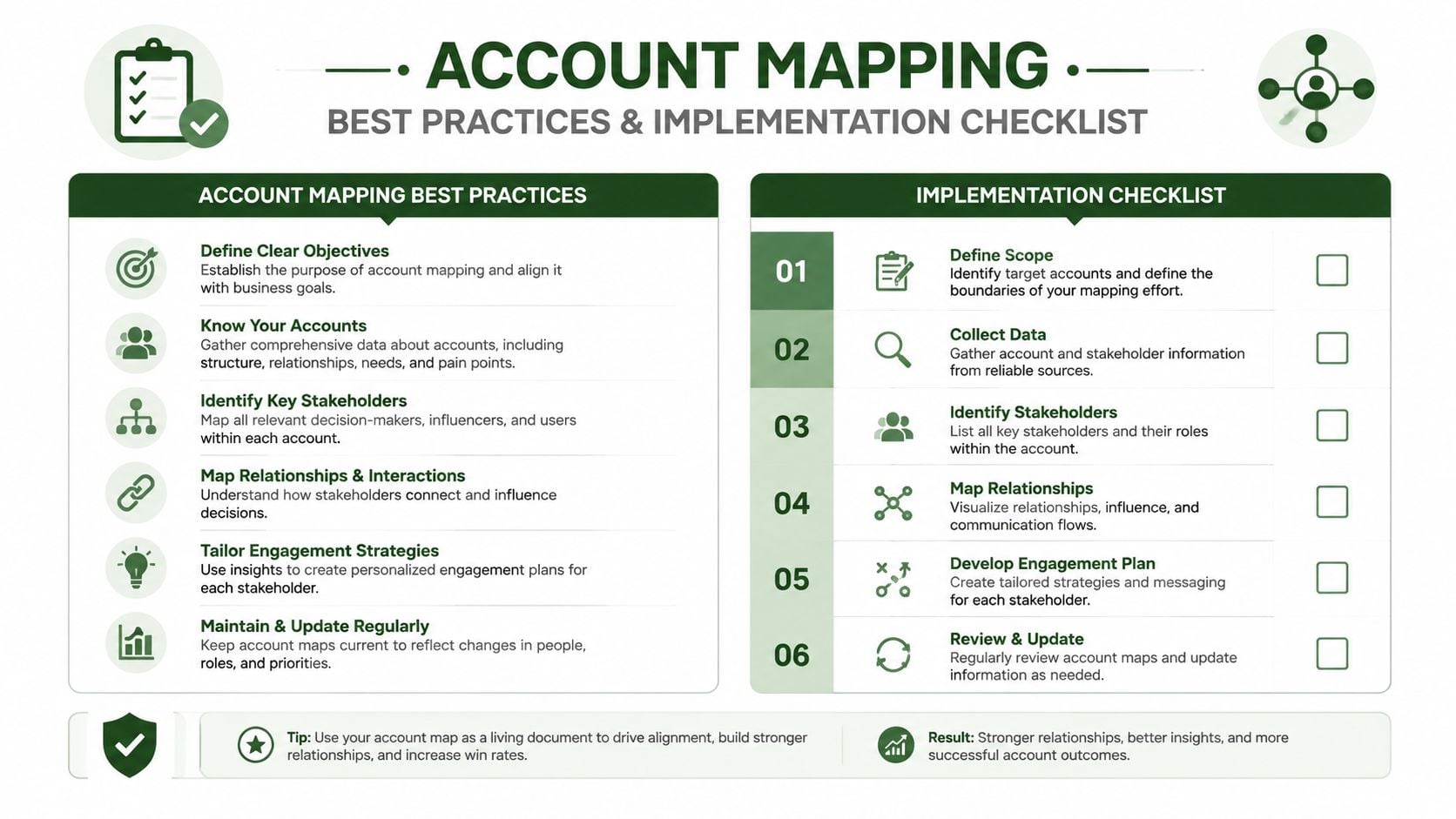
Account Mapping Best Practices and Implementation Checklist
Begin with an inventory, not with a new rule. List every giving platform, bank connection, card program, import file, and manual journal entry that can create church financial activity. Include sources used only occasionally. A dormant integration can still create confusion when someone turns it back on.
Build the map around the church's funds
Document the fund structure first. For each fund, identify its purpose, its revenue accounts, related expense accounts, cash treatment, and reporting destination. Then compare that structure with the labels used in Planning Center, PushPay, Stripe, text-to-give tools, and bank feeds.
A useful crosswalk includes:
- Source label: The name used by the platform or bank feed.
- Transaction type: Gift, deposit, fee, refund, transfer, or other activity.
- Target fund: The church fund that should receive the activity.
- Target account: The general ledger account used for posting.
- Exception owner: The person responsible for unresolved items.
- Change record: The date, reason, and approver for a rule change.
GL mapping tools often export source and target charts as CSV files, identify account code, account name, and account type fields, and allow finance teams to review exact matches and fuzzy suggestions before exporting a finalized crosswalk. That approach treats mapping as a reconciliation and documentation exercise rather than a guessing exercise. This account mapping workflow provides useful background on that process.
Test before trusting the rules
Use representative transactions from each source. Test an undesignated gift, a restricted gift, a combined deposit, a refund, and a processing fee. Confirm the journal lines, fund reports, account balances, and reconciliation behavior.
Pay special attention to three common mistakes:
- Catch-all coding: Sending every gift to general contributions because it is convenient.
- Hidden fees: Recording only the net deposit and omitting the processing expense.
- Stale destinations: Leaving a rule pointed at an inactive or renamed account.
A mapping rule should fail visibly when the destination is missing. An unclear transaction should enter an exception queue for review, not disappear into an account that happens to accept the import.
Assign ownership and review changes
Name the person who may create or change mappings. Require a second review for changes affecting restricted funds or board reporting. Keep the documentation where the treasurer, bookkeeper, and successor volunteer can find it.
Review mappings whenever the church adds a fund, changes its chart of accounts, adopts a new giving provider, changes bank connections, or experiences volunteer turnover. The right cadence depends on the church's activity and system changes, but the trigger should never be “we'll look at it next year.”
How Grain Ledger Automates and Enforces Correct Mapping
Many general accounting tools begin with a traditional chart of accounts and add fund tracking through extra fields, reports, or workarounds. That can function, but it may leave the treasurer maintaining separate connections between the giving platform, bank activity, accounts, and fund reports.
Grain Ledger uses a native fund-based architecture. Its accounts, transactions, and reports are organized around funds from the start, so fund designation is part of the accounting structure rather than an afterthought. During integration setup, the church can connect giving providers such as Planning Center, PushPay, and Stripe with its bank accounts and accounting records, then map source funds and revenue accounts to the corresponding Grain structure.
The practical value is consistency. A gift from a giving platform can follow the fund designation into the ledger, while bank and card activity remains connected to the same financial picture. Grain also connects church bank accounts and cards through Plaid, helping finance teams bring operational activity into one workflow.
Controls that match church responsibilities
Restricted funds need more than a label on a report. The accounting system must preserve the relationship between the incoming gift, its fund, the related spending, and the resulting balance. Grain's fund-based controls are designed to keep restricted funds separated in reporting, with activity reports, balance sheets, and cash flow statements organized for church review.
That visibility helps the treasurer answer ordinary board questions without rebuilding a report from multiple exports:
- What entered each fund?
- What was spent?
- Which transactions need attention?
- Does the reported activity agree with the bank and source records?
Churches evaluating whether a system supports genuine fund accounting can review Grain Ledger's fund accounting features. The key evaluation question isn't whether a product displays fund names. It's whether the system keeps those funds connected through transaction entry, reconciliation, reporting, and staff changes.
Related church accounting software resources
If you are comparing software, these pages map the main decision points: fund accounting, QuickBooks limits, pricing, and migration.
- Best church accounting software (2026 comparison) - canonical guide comparing 12 church accounting platforms
- Church accounting software product page - see Grain Ledger for fund accounting, giving, and bank reconciliation
- Small church accounting software - see the product page built for volunteer treasurers and church admins
- Fund accounting features - review how Grain Ledger tracks designated funds
- QuickBooks for churches - understand workarounds and when to switch
- Free church accounting software - compare free options and upgrade triggers
- Grain Ledger pricing - compare plans for small and growing churches
- Start free - try fund accounting, giving imports, and bank reconciliation together
Next Steps for Transparent Church Fund Accounting
Account mapping is the bridge between raw transaction data and trustworthy fund-level reporting. It tells the accounting system where each source account, gift, fee, deposit, and adjustment belongs, while the maintenance process keeps those decisions accurate as the church changes.
Start with a mapping audit. Export the current source and target account lists, compare every fund label, identify inactive destinations, and review recent exceptions. Then ask whether a new volunteer could understand the rules without relying on one person's memory.
Stewardship check: If the church can't explain how a designated gift travels from the giving platform to the fund report, the mapping process needs attention.
Next, establish ownership. Decide who approves new funds, who changes mappings, who reviews exceptions, and how the team records those decisions. Test the updated rules with real transaction types before relying on them for board reporting.
Finally, evaluate the accounting tool itself. Does it support fund-based mapping as a core structure, or does it simulate funds through add-ons and manual work? For churches that want efficient workflows, connected integrations, and reporting built around ministry funds, joining the Grain Ledger waitlist provides a concrete next step.
Grain Ledger connects giving providers, bank accounts, cards, and fund-based accounting so church finance teams can maintain accurate mappings with less manual reclassification. Visit Grain to Start Free and prepare for clearer fund reporting, reliable integrations, and more accountable stewardship.
Ready to simplify your church finances?
Start free with church fund accounting, or watch a product demo first.