8-Step Audit Preparation Checklist for Churches
Use this audit preparation checklist to organize church records, reconcile funds, document controls, and work confidently with auditors.
The audit is approaching, and the records are technically there. Bank statements sit in one folder, giving reports live in Planning Center or Pushpay, payroll files are with a service provider, receipts are scattered across email and paper envelopes, and several spreadsheets may each be considered the “latest” version. The finance team has information, but not yet a reliable trail from each transaction to the correct fund, approval, reconciliation, and report.
See Grain Ledger for your church
Fund accounting, giving integrations, and bank reconciliation in one platform. Free migration support for churches switching from QuickBooks or Aplos.
A practical audit preparation checklist turns that uncertainty into a controlled process. Start four to six weeks before fieldwork, define who owns each task, and make every step produce a specific workpaper or review result. The European Commission's audit-preparation guidance emphasizes preparing documentation in advance, informing employees about the audit's scope and timing, assigning a single auditor contact, checking document revisions, and keeping records quickly accessible. Those practices support broader efforts to build audit-ready workflows rather than assembling evidence while auditors are already testing it.
The eight steps below follow a fund-first workflow. They connect reconciliations, restricted-gift evidence, expenses, payroll, controls, personnel responsibilities, financial statements, templates, and auditor communication. For churches that need native fund-based accounting with bank and giving connections, Grain Ledger is a relevant option because it brings those workflows into one system.
1. Reconcile All Bank Accounts and Fund Records
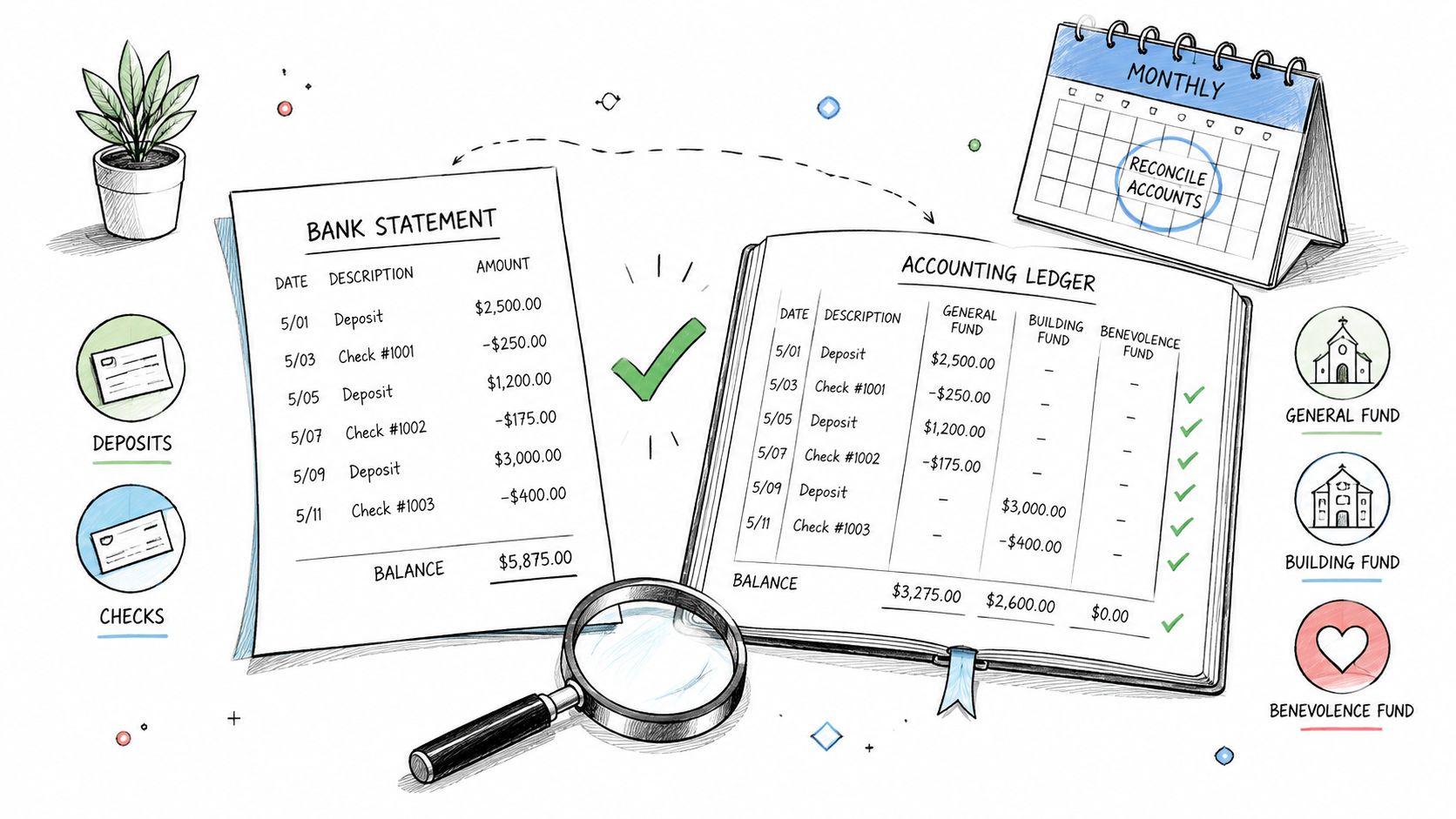
An audit-ready ledger begins with cash that can be proved. Reconcile every bank account to the accounting records, then verify that the related fund balances reflect the actual activity. A church should be able to explain each deposit, withdrawal, transfer, outstanding item, and unusual adjustment without searching through disconnected files.
The reconciliation should cover operating accounts, savings, credit cards, and any account used for restricted activity. If the church has General, Building, and Benevolence funds, review each fund's activity separately. A single operating balance can conceal a classification error, especially when designated gifts are deposited into a shared account but tracked inconsistently in the books.
Build a repeatable reconciliation file
The workpaper should show the statement ending balance, book balance, outstanding deposits, outstanding payments, transfers, reconciling items, preparer, reviewer, and completion date. Attach the bank statement and supporting documentation for unusual transactions. Review the prior reconciliation before closing the next period, so old unresolved items don't automatically roll forward.
Monthly reconciliation is stronger than a year-end cleanup because the person responsible can investigate transactions while the details are still available. Segregate preparation and review where staffing allows. A treasurer or finance committee member should review the reconciliation rather than relying only on the bookkeeper's sign-off.
Practical rule: A reconciling item without an owner, explanation, and expected resolution date isn't a completed control.
Grain Ledger can connect bank accounts through Plaid and support transaction matching to fund records, reducing manual re-entry. That doesn't remove the need for human review. It gives the reviewer a clearer exception list and a more traceable record of what was matched, adjusted, or left unresolved. Churches preparing confirmation requests can also use this bank confirmation letter guide to organize the information auditors may request.
2. Document All Donations and Giving Records
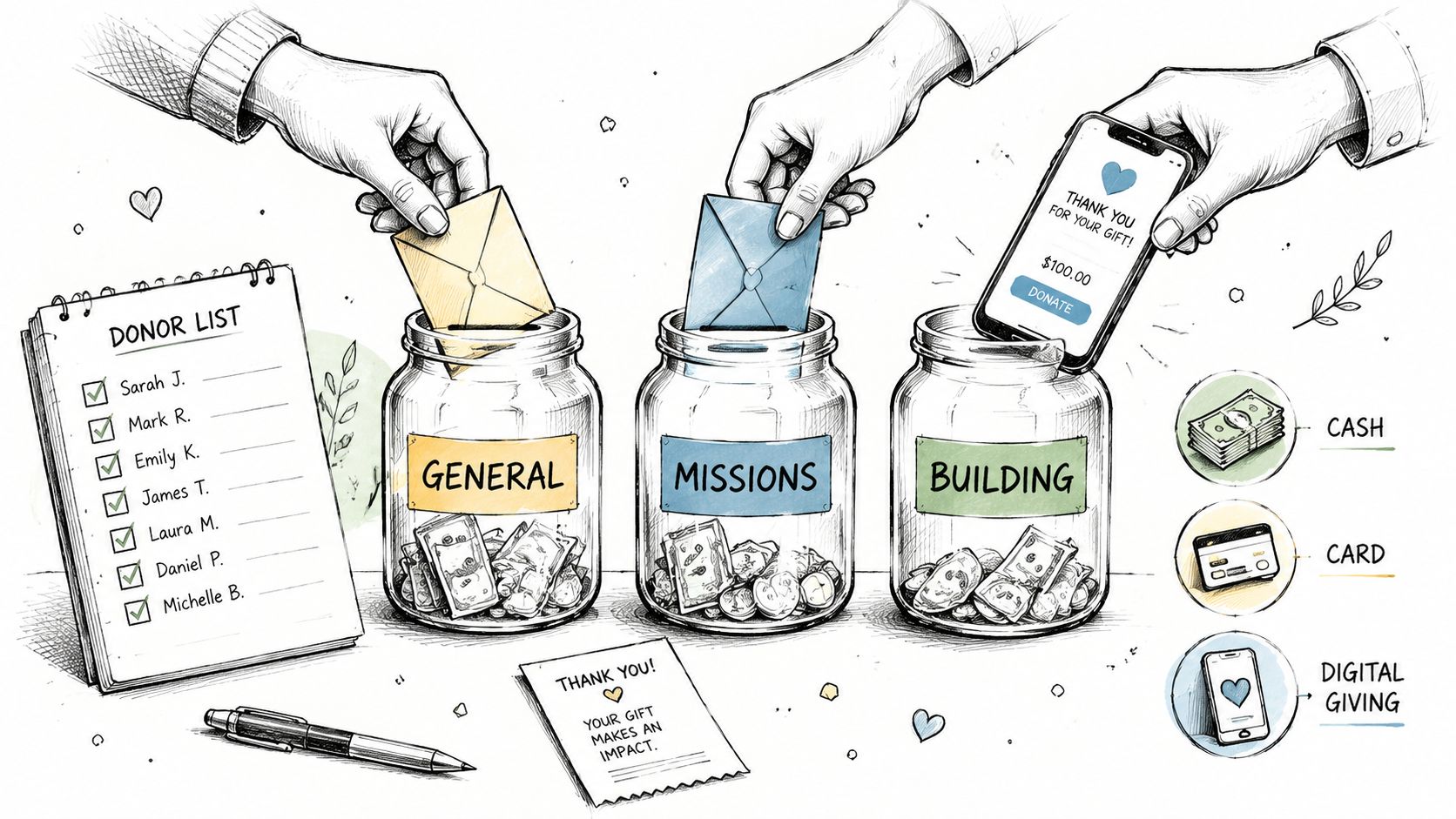
Donation records should tell one consistent story from the moment a contribution is received to the moment it appears in the financial statements. That story includes the donor record, amount, date, payment method, fund designation, deposit or processor report, and accounting entry. Cash offerings, online gifts, pledges, and in-kind contributions each need a defined process.
For cash offerings, use offering envelopes with a clear fund designation field and retain the count documentation. The people counting offerings shouldn't be the only people entering or approving the accounting records. For online giving, reconcile the platform report to deposits and the ledger, including processor fees, refunds, failed payments, and transfers that cross reporting periods.
A church using Pushpay, Planning Center, or Stripe should avoid manually retyping every gift into the accounting system. Integrating the giving platform with Grain Ledger can allow donations to flow into the appropriate fund, such as General, Building Campaign, or Benevolence, while leaving the finance team to review exceptions and reconcile totals.
Preserve donor intent
A designated building gift needs more than a deposit entry. Keep the donor communication, campaign or fund policy, receipt, and any documentation describing the purpose of the gift. If the restriction isn't clear, don't make assumptions during year-end preparation. Escalate the question to the treasurer, pastor, board, or legal and accounting advisers as appropriate.
Maintain the donor database and giving history used for year-end statements. Track pledges separately from fulfilled contributions, and keep digital records or receipts for in-kind donations with a documented valuation basis. The audit file should let a reviewer connect the contribution report to the general ledger and then to the fund balance.
- Reconcile monthly: Compare giving-platform reports with deposits and accounting entries.
- Document the process: Write down how designated gifts are identified, approved, posted, and reviewed.
- Retain support: Keep offering counts, processor reports, donor correspondence, pledge records, and in-kind documentation together.
The best system is the one that reduces manual handling without weakening review. Automation can route gifts accurately, but the church still needs a person to confirm that the integration, fund mapping, and exceptions are correct.
3. Verify Restricted Fund Compliance and Designations
Restricted funds create the most important difference between a generic audit file and a church-specific one. A donor may designate money for a building project, mission work, youth ministry, benevolence, or a memorial purpose. The church must show not only that the money was received, but also that it remained traceable and was spent consistently with the restriction.
Start with a restricted-fund schedule that lists opening balance, contributions, transfers, investment or other income, expenses, and ending balance. Reconcile the ending balance to the general ledger. Independent nonprofit guidance notes that separate bank accounts aren't required for every grant, but separate tracking in the books is required, with fund codes or classes used to identify restrictions and restricted net assets shown separately from unrestricted assets. See this explanation of restricted and unrestricted funds when reviewing the church's account structure.
Test every restriction against actual spending
For each material restricted fund, keep the original designation evidence, written purpose, any time limitation, approval documentation, invoices, and related journal entries. Before an expense is charged to the fund, the reviewer should confirm that it fits the stated purpose. A board-approved budget alone may not override a donor-imposed restriction.
A native fund structure is preferable to a collection of spreadsheets because the fund dimension remains attached to transactions and reports. Grain Ledger can be considered when the church wants each account, transaction, and report organized around funds from the start. The software doesn't replace governance, but it can make fund-level review and reporting more direct.
Use the finance committee's monthly review to identify funds that are inactive, overspent, ambiguously named, or carrying balances that no longer match their intended purpose. Create a written policy identifying who may approve restricted-fund expenditures and how unresolved designations are handled.
A restricted balance is not simply cash with a label. It's an obligation to preserve the donor's stated purpose and prove how the church honored it.
Generate fund-level balance sheets for board meetings and retain the approval minutes. At least annually, review the fund list against current donations, campaigns, and ministry programs. Retire duplicate funds only after documenting the decision and confirming that the treatment is appropriate.
4. Organize and Reconcile Expense Documentation
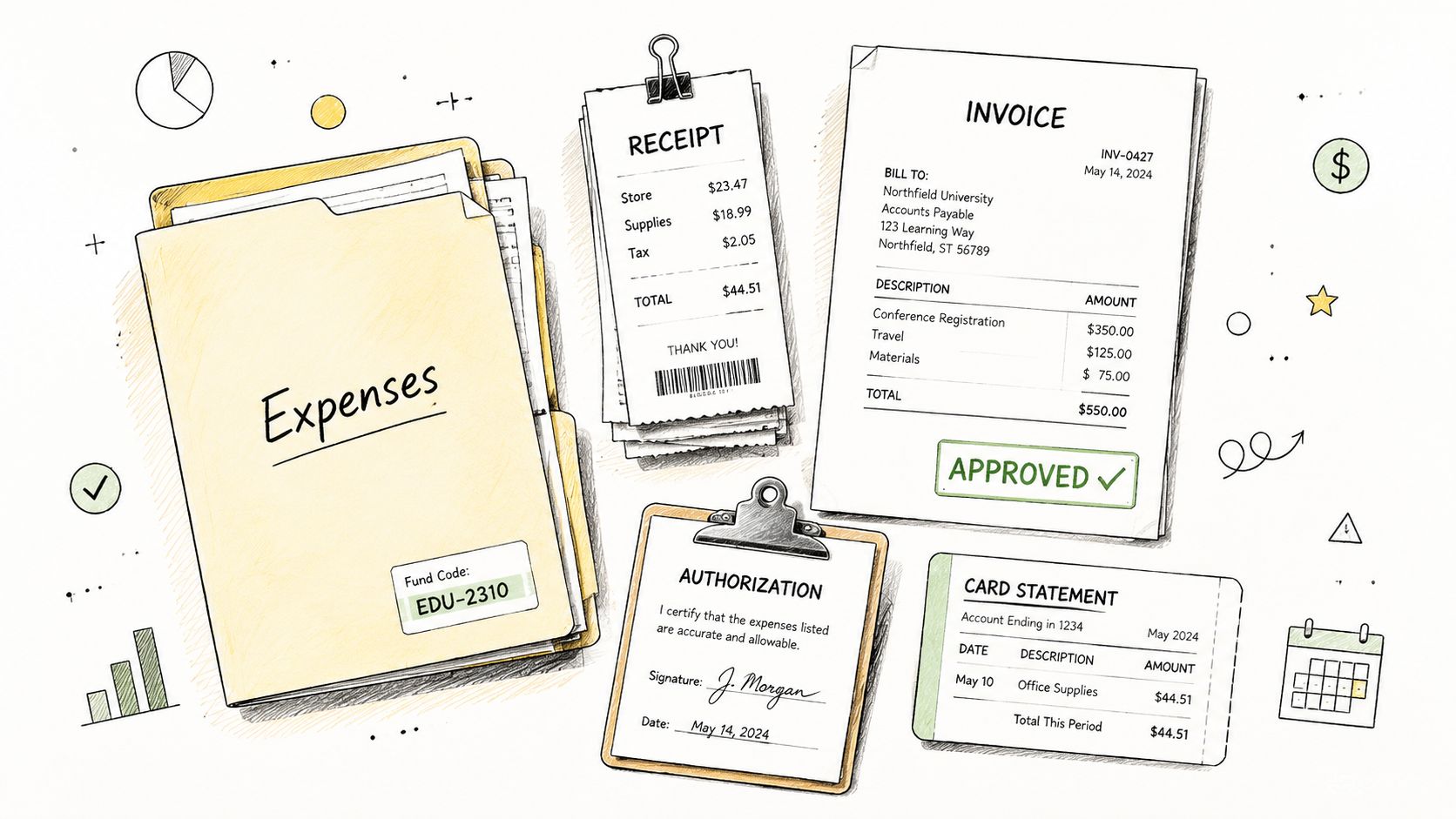
Auditors typically test selected expenses, so the finance team should make every sampled transaction easy to follow. Each entry needs a receipt, invoice, contract, purchase order, expense report, or other appropriate support. The reviewer should be able to identify the vendor, amount, date, account classification, fund, approval, and payment.
Organize the repository by period, fund, and transaction type, or use a consistent naming convention that makes those attributes searchable. Digital storage usually improves access, but a shared drive can become as confusing as a paper cabinet if files lack ownership and naming rules. Don't create multiple “final” folders. Establish one controlled location and a clear process for replacing outdated documents.
Link the document to the decision
A receipt proves that a purchase occurred. It doesn't necessarily prove that the purchase was approved, correctly classified, or allowable from a restricted fund. Require the sequence to be visible: receipt or invoice, review, approval, entry, and payment evidence. For recurring expenses, retain vendor contracts, renewal terms, and authorization records with the related expense files.
Credit card statements deserve their own reconciliation. Match each charge to a receipt and fund, investigate missing support, and document personal or accidental charges and their repayment. Staff expense reports should include the business purpose and approval, not just a total.
- Use one repository: Store supporting documents where the bookkeeper and reviewer can retrieve them.
- Preserve fund context: Include the fund in the file name, accounting entry, or indexed metadata.
- Explain exceptions: Attach a note for missing receipts, unusual vendors, corrections, or late approvals.
- Retain consistently: Apply the church's document-retention policy and any applicable professional requirements rather than deleting files ad hoc.
Grain Ledger's transaction and fund workflows can help connect expenses to the appropriate fund, but the church still needs an approval policy and evidence that people followed it. The system should support the control, not serve as a substitute for one.
5. Complete Fixed Asset and Equipment Inventory
The fixed-asset register should agree with what the church owns and what the general ledger reports. Walk through the sanctuary, offices, classrooms, kitchen, storage areas, and grounds. Confirm that significant buildings, improvements, sound equipment, computers, furniture, vehicles, and other equipment exist, are in service, and have an understandable record.
For each asset, retain the description, purchase date, cost, location, funding source, capitalization decision, depreciation information, and current condition. A restricted capital campaign may have funded a building expansion or equipment purchase. That source should remain visible in the accounting records so the church can explain how the asset was recorded and how related fund activity was treated.
Resolve register differences before fieldwork
Compare the physical inventory with the fixed-asset accounts and depreciation schedules. Missing assets may indicate a disposal that was never recorded. Items on the ledger that no longer exist may require a disposal entry and supporting approval. New equipment in use but absent from the register may point to an unrecorded purchase or a capitalization-policy issue.
The church should maintain a written policy for capitalizing versus expensing purchases. A threshold can be useful, but consistency matters more than choosing a particular threshold. Document the depreciation method used for each asset class and keep purchase invoices, financing agreements, construction contracts, and board approvals.
A practical review includes:
- Physical confirmation: Verify the asset's location, existence, and condition.
- Ledger agreement: Match the register to the relevant general ledger accounts.
- Funding review: Identify whether restricted gifts, debt, grants, or operating funds financed the asset.
- Disposal support: Retain approval, disposal date, proceeds, and the accounting treatment.
Complete a physical inventory as part of the church's regular annual close, not only when the auditor asks. That timing gives the finance team a chance to investigate differences while facilities staff and ministry leaders still remember what changed.
A short walkthrough can help staff understand how physical verification connects to the accounting record.
6. Review and Reconcile Payroll Records and Tax Filings
Payroll combines expense, liability, authorization, employee data, fund allocation, and tax reporting. Reconcile payroll reports to the general ledger before closing the period, and confirm that gross pay, withholdings, employer taxes, and net pay agree with the payroll register and remittances.
The church should retain payroll registers by employee, approval evidence, payroll-service reports, tax filings, payment confirmations, and documentation for manual adjustments. If a pastor or employee works across ministries, allocate the salary and related payroll costs to the appropriate funds using a documented method. A fund classification that changes from month to month without explanation will invite questions.
Tie filings to the ledger
Review federal filings such as Forms 941 and year-end Forms W-2 and 1099, along with applicable state returns. Verify that filings, payroll registers, tax-liability accounts, and payments reconcile. If a payroll provider prepares the filings, that doesn't eliminate the church's responsibility to compare the provider's reports with the accounting records.
Manual payroll changes require particular care. Keep the request, authorization, calculation, and resulting payroll report together. The person who approves a compensation change shouldn't be the only person who enters it or reconciles the resulting liability.
- Reconcile each period: Compare payroll totals with salary, benefits, and tax-liability accounts.
- Review fund allocation: Confirm that employee costs follow documented ministry responsibilities.
- Check approvals: Retain signatures or electronic approvals for payroll and adjustments.
- Investigate differences: Resolve timing differences between payroll processing, bank payments, and ledger posting.
The audit file should make it possible to trace a payroll expense from the register to the general ledger, from the ledger to the fund, and from the liability account to the tax payment. That chain is more useful than a payroll folder filled with reports that haven't been compared.
7. Prepare a Trial Balance and Review All General Ledger Accounts
A trial balance gives the finance team a structured way to review every general ledger account before the auditor does. Confirm that total debits equal total credits, then examine each balance for unusual activity, incomplete entries, misclassifications, and unexplained changes. Review the information by fund, not only in the aggregate.
The trial balance should be prepared early enough to leave room for corrections. The practical preparation window is two to three weeks before fieldwork, as recommended in the checklist plan, so staff can investigate rather than rush adjustments into the final packet. Compare the current period with the prior year and ask department leaders to explain material or unusual movements.
Look for balances that need a story
An asset account with a credit balance or a liability account with a debit balance may be valid in unusual circumstances, but it deserves investigation. Review deposits in transit, prepaid expenses, accrued liabilities, loans, interfund transfers, clearing accounts, and suspense accounts. Don't let an old balance remain merely because nobody knows which person should fix it.
A fund-level trial balance can expose a problem hidden in the consolidated view. For example, a Building Fund liability balance that appears unusual may reflect a posting to the wrong fund, an incomplete payment entry, or a genuine obligation that needs supporting documentation. Grain Ledger can generate trial-balance views organized by fund, while its general ledger reading guide can help non-accountants participate in the review.
Create an adjustment log with the account, fund, issue, proposed entry, preparer, reviewer, date posted, and supporting explanation. Ask the employee or ministry leader who initiated an unusual transaction to explain its purpose. Their context can help the bookkeeper correct the account without guessing.
The final workpaper should include the trial balance, variance notes, adjusting entries, approval evidence, and a statement that all funds and accounts were reviewed.
8. Prepare Preliminary Financial Statements and Notes
Draft financial statements turn the ledger review into a stewardship review. Prepare a balance sheet, statement of activities, and statement of cash flows for the audit period, with fund information presented in a way that explains restricted and unrestricted activity. Compare the format with prior years so changes in presentation don't obscure changes in the underlying finances.
The statements should be reviewed for reasonableness by someone who understands the church's ministry activity. A pastor or board chair may notice that a facility project, mission commitment, debt payment, or capital campaign doesn't appear as expected. That review isn't a replacement for accounting review. It's a second perspective on whether the reports reflect what the church experienced.
Draft notes before the auditor asks
Prepare concise notes describing significant funds, accounting policies, debt, unusual transactions, commitments, and events that may affect interpretation. For each restricted fund, explain its purpose and show how the activity connects to the supporting schedule. If the Building Fund increased during a campaign and later paid construction costs, the statement of activities and notes should make that movement understandable.
Disclose debt details such as interest terms, payment requirements, and covenants when applicable. Explain unusual balances rather than forcing the auditor to discover them in the ledger. Include the cash flow statement so readers can see how operating, investing, financing, and fund activity affected cash.
Grain Ledger's native fund-based reports can provide a starting point because the reporting structure follows the church's funds rather than treating them as an afterthought. The finance team should still verify classifications, approve adjustments, and confirm that the final presentation follows the church's accounting framework and auditor guidance.
Prepare preliminary statements four to six weeks before the audit, leaving time for corrections and questions. The final packet should contain the draft statements, notes, trial balance, reconciliations, fund schedules, and an index showing where each supporting workpaper is stored.
8-Point Audit Preparation Checklist Comparison
| Item | 🔄 Complexity | ⚡ Resource requirements / Effort | ⭐ Expected outcomes | 📊 Ideal use cases | 💡 Key advantages / Tips |
|---|---|---|---|---|---|
| Reconcile All Bank Accounts and Fund Records | Moderate, routine but detail‑oriented | Low–Moderate, staff time, bank access, accounting software | ⭐⭐⭐, accurate cash positions; fewer audit adjustments | All churches; essential with multiple accounts/funds | Prevents discrepancies and simplifies audits; reconcile monthly and assign a single owner |
| Document All Donations and Giving Records | Moderate, integration and donor tracking needed | Moderate, giving platform, donor database, staff | ⭐⭐⭐, preserves donor intent; reliable revenue records | Churches with online giving, pledges, or multiple channels | Ensures restricted gifts tracked; integrate giving platforms and reconcile monthly |
| Verify Restricted Fund Compliance and Designations | Moderate–High, policy, approvals, monitoring | Moderate, fund architecture, board oversight, reporting | ⭐⭐⭐⭐, prevents misuse; strong audit evidence of compliance | Churches receiving restricted gifts/capital campaigns | Protects donor intent and reduces legal/audit risk; document fund purpose and approvals |
| Organize and Reconcile Expense Documentation | Moderate, consistent workflows and approvals | Moderate, document storage/scanning, staff review | ⭐⭐⭐, fewer disallowed expenses; faster audit sampling | Churches with many vendors/credit cards or program expenses | Demonstrates controls; use digital filing, require receipts, reconcile credit cards monthly |
| Complete Fixed Asset and Equipment Inventory | High, physical counts, tagging, depreciation | High, staff time, tagging tools, asset register | ⭐⭐⭐, accurate balance sheet and depreciation schedules | Churches with buildings, equipment, or capital campaigns | Ensures asset existence and valuation; conduct annual physical counts and tag assets |
| Review and Reconcile Payroll Records and Tax Filings | High, complex compliance and frequent updates | Moderate–High, payroll service/software, HR records | ⭐⭐⭐, IRS compliance; accurate payroll liabilities | Churches with employees or payroll liabilities | Prevents penalties; reconcile payroll monthly and retain tax filings (W‑2/941) |
| Prepare a Trial Balance and Review All General Ledger Accounts | Moderate, detailed account review and adjustments | Low–Moderate, accounting software and reviewer time | ⭐⭐⭐, detects posting errors; confirms debits=credits | All churches as a pre‑audit control | Catches errors early; prepare 2–3 weeks before audit and document adjustments |
| Prepare Preliminary Financial Statements and Notes | High, requires financial statement knowledge and disclosures | Moderate, accounting software, preparer and reviewer time | ⭐⭐⭐, accelerates audit; improves transparency to stakeholders | Churches undergoing external audit or board review | Demonstrates stewardship and context; draft statements and notes 4–6 weeks before audit |
Related church accounting software resources
If you are comparing software, these pages map the main decision points: fund accounting, QuickBooks limits, pricing, and migration.
- Best church accounting software (2026 comparison) - canonical guide comparing 12 church accounting platforms
- Church accounting software product page - see Grain Ledger for fund accounting, giving, and bank reconciliation
- Small church accounting software - see the product page built for volunteer treasurers and church admins
- Fund accounting features - review how Grain Ledger tracks designated funds
- QuickBooks for churches - understand workarounds and when to switch
- Free church accounting software - compare free options and upgrade triggers
- Grain Ledger pricing - compare plans for small and growing churches
- Start free - try fund accounting, giving imports, and bank reconciliation together
Hand the Auditor a Clear Trail
A successful handoff isn't a large folder. It's a trail that another person can follow without relying on the memory of one bookkeeper or treasurer. Assemble the audit packet with a consistent folder structure, such as financial statements, trial balance, bank reconciliations, donations, restricted funds, expenses, fixed assets, payroll, debt, board minutes, policies, and auditor requests.
Assign an owner to every open request. The owner should know what evidence is needed, where it is stored, when it will be delivered, and who reviews it before submission. One finance-team contact should coordinate questions with the auditor so staff members don't send conflicting answers or duplicate documents.
A simple request tracker can include the request number, auditor question, responsible person, evidence location, status, reviewer, response date, and follow-up. Preserve explanations for unusual balances in the same location as the related reconciliation or schedule. If the auditor asks why an account changed, the answer should be supported by a workpaper, board minute, contract, invoice, or documented management explanation.
Bank reconciliation worksheet template
Use a worksheet with these fields:
- Account and period: Identify the bank account, fund scope, statement date, and preparer.
- Statement balance: Record the ending balance shown by the bank.
- Book balance: Record the ledger balance before reconciling items.
- Outstanding activity: List uncleared checks, deposits in transit, transfers, and other timing differences.
- Adjustments: Describe corrections, fees, interest, or reclassifications and link each to support.
- Review evidence: Include preparer and reviewer names, dates, comments, and resolution status.
The reviewer should confirm that the adjusted bank balance agrees with the adjusted book balance and that every old reconciling item has a documented next action.
Confirmation request draft
Subject: Church bank account confirmation for audit
Please complete the attached bank confirmation for the church accounts listed in the auditor's request. Confirm the account name, account type, period-end balance, authorized signers, loans, lines of credit, pledged assets, and other requested banking arrangements. Return the confirmation directly to the external auditor using the contact details in the audit instructions, and notify the church's designated finance contact once it has been sent.
The treasurer should verify the account list before the request goes out. The bookkeeper can provide statements and reconciliation support, but the bank confirmation should follow the auditor's prescribed process.
Roles and responsibilities matrix
- Treasurer: Oversees the preparation calendar, reviews reconciliations and restricted-fund schedules, tracks open issues, and coordinates with the auditor.
- Bookkeeper: Produces the trial balance, ledger detail, bank and credit-card reconciliations, donation records, expense support, payroll reconciliations, and draft statements.
- Pastor or board chair: Reviews financial statements for reasonableness, confirms significant ministry activity, approves required governance actions, and helps resolve questions about donor intent or major commitments.
- Auditor: Defines the request list and scope, tests records and controls, asks follow-up questions, and communicates findings and required adjustments.
Address common findings before fieldwork begins: unsupported expenses, unreconciled accounts, unclear restrictions, missing approvals, and inconsistent fund classifications. Churches should also confirm that policies are current, access permissions are reviewed, and evidence shows who prepared, reviewed, and approved reconciliations and adjustments. The European Commission's guidance reinforces the value of current, organized, quickly accessible records, while nonprofit guidance emphasizes maintaining restricted-fund schedules that reconcile to the general ledger.
Grain Ledger can be considered when the church wants bank connections, giving workflows, and fund-based accounting aligned in one system. Its purpose-built fund architecture can support fund-level reporting and transaction traceability, while the finance team remains responsible for review, approvals, and stewardship decisions.
Grain Ledger offers church accounting built around native fund-based records, with connections for bank accounts, cards through Plaid, and giving providers such as Planning Center, Pushpay, and Stripe. Visit Grain to explore how aligned bank, giving, reconciliation, and restricted-fund workflows can strengthen your church's next audit preparation cycle.
Ready to simplify your church finances?
Start free with church fund accounting, or watch a product demo first.