Chart of Accounts Mapping for Churches Made Simple
 By Gibson Brueher, Founder of Grain Ledger
Master chart of accounts mapping for churches with fund-based templates, giving platform examples, and reconciliation tips for true fund accounting.
At month-end, the giving platform total agrees with the bank deposit, the general ledger balances, and the report still feels wrong. A building gift has landed in unrestricted income, a missions offering has rolled into general donations, and the youth ministry balance is impossible to explain without reopening individual transactions. The books balance, but the meaning inside the balance has collapsed.
About Grain Ledger: This guide includes Grain Ledger, church fund accounting software built for designated gifts and ministry funds. It connects giving platforms (Planning Center, Pushpay, Tithely, Stripe), syncs bank activity with Plaid, and produces fund-level financial reports. Start free to see how it compares for your church.
See Grain Ledger for your church
Fund accounting, giving integrations, and bank reconciliation in one platform. Free migration support for churches switching from QuickBooks or Aplos.
That's the problem chart of accounts mapping must solve for churches. A reliable mapping connects giving platforms, bank feeds, departments, funds, restrictions, and the general ledger without flattening them into a single account. This guide is written for treasurers, church finance administrators, bookkeepers, and ministry leaders who need a practical reference for designing, testing, and maintaining those mappings.
Introduction to Chart of Accounts Mapping for Churches
Church finance has a complication that ordinary business accounting often understates. A donation isn't identified only by its natural account, such as contributions or online giving. It may also carry a fund designation, donor restriction, ministry, department, campaign, or project purpose. If the mapping captures only the income account, the ledger can be numerically correct while the fund report is materially misleading.
A typical month-end cleanup starts with a batch from a giving platform. The deposit agrees to the bank, but the batch contains general giving, missions gifts, a building appeal, and a youth ministry collection. A flat import sends everything to one revenue account. The administrator then has to reconstruct the intended allocation manually, often from export files and donor notes.
Chart of accounts mapping provides the controlled layer between those source records and the target ledger. Each source value should point to the correct account and the correct dimension before posting, so fund-level reports are produced from the original transaction logic rather than repaired afterward.
Use this article as a desk reference. Go directly to the fund-aware template when designing a chart, the rules section when configuring imports, the reconciliation section when testing integrations, and the governance section when reviewing an existing spreadsheet. Churches that want a deeper explanation of how this differs from ordinary bookkeeping can also review what a fund accounting system does.
Practical rule: If a transaction's fund purpose can't be identified from the posted entry, the mapping is incomplete.
What Chart of Accounts Mapping Means in Church Accounting
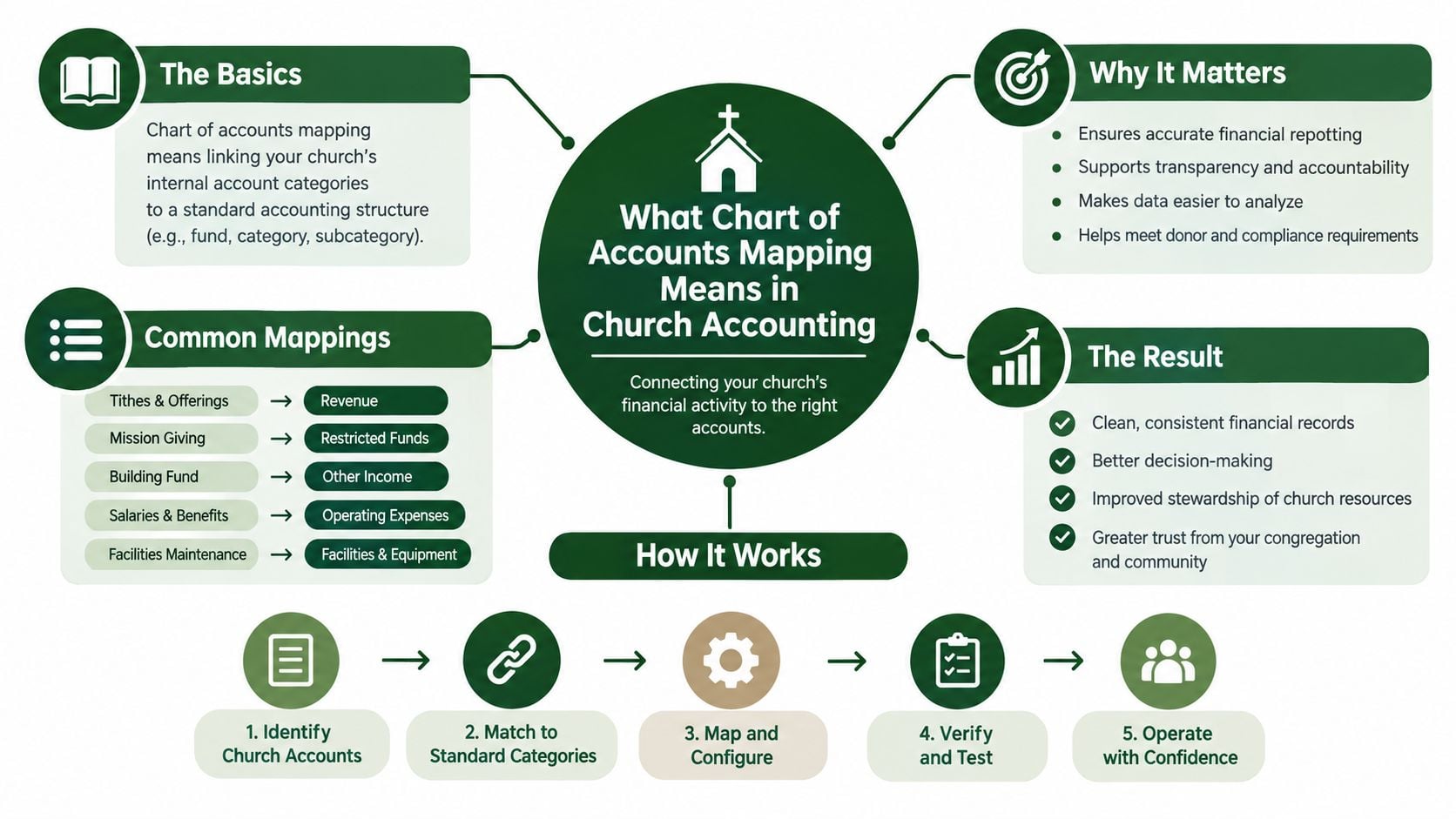
Chart of accounts mapping links accounts and attributes in a source system to a standardized target chart used for reporting. In a church, the source may be Planning Center, Pushpay, Stripe, a bank feed, a payroll system, or a legacy ledger. The target is the church's controlled structure for statements, budgets, fund activity, and board reporting.
A simple crosswalk might say “Online Giving” maps to “Online Contributions.” That's useful, but it doesn't answer the more important questions. Was the gift unrestricted? Was it designated for missions? Did it belong to the building fund? Should the related processing fee follow the same fund, or be recorded as an operating expense?
A stronger design keeps dimensions separate:
- Natural account: contribution, rent, payroll, supplies, or bank fees.
- Fund: general, missions, building, benevolence, or youth ministry.
- Restriction status: donor-restricted, unrestricted, or designated under the church's policy.
- Department or ministry: worship, children, outreach, administration, or youth.
- Entity or location: useful when a church operates multiple legal entities or campuses.
A flat table can make the trial balance look orderly while hiding a restricted-fund distortion. True hierarchy and segment mapping preserve the separate meaning of each dimension, then roll the dimensions into the reports leadership needs.
This principle also has a broader accounting context. The United Nations' 2012 Guidelines on Integrated Economic Statistics describe chart of accounts mappings as a bridge between business accounting data and statistical frameworks, noting that this linkage “greatly facilitates” connections between balance sheets, income statements, economic variables, and national accounts statistics. The guidance also calls for mappings between business accounting data reported to administrative authorities and the economic variables used by statistical agencies.
For churches, the practical translation is simple. Build one reporting language above the local source systems, but don't remove the fund and restriction details that give each transaction its purpose.
Church Chart of Accounts Template Organized by Fund
Start with a target chart that reflects how the church makes decisions. The account number should identify the natural accounting category, while the fund and department remain separate dimensions wherever the software supports them. Creating duplicate accounts such as “Missions Contributions,” “Building Contributions,” and “Youth Contributions” can work in a small ledger, but it becomes difficult to maintain when every ministry needs its own income and expense variations.
A fund-aware structure might use account ranges for broad categories and descriptive fund values for reporting. The exact numbering can be adapted to the church's existing ledger, but consistency matters more than any particular numbering convention.
| Account Number | Category | Fund Dimension | Example Use |
|---|---|---|---|
| 1000 | Asset | General | Operating checking |
| 1010 | Asset | Restricted funds | Separate savings or reserve account |
| 1100 | Asset | All funds | Accounts receivable |
| 2000 | Liability | All funds | Accounts payable |
| 2100 | Liability | All funds | Payroll liabilities |
| 3000 | Net assets | Without donor restrictions | General operating net assets |
| 3010 | Net assets | With donor restrictions | Donor-restricted missions or building activity |
| 4000 | Income | General | Tithes and weekend offerings |
| 4010 | Income | General | Online giving |
| 4020 | Income | Missions | Missions gifts |
| 4030 | Income | Building | Building fund gifts |
| 4040 | Income | Youth | Youth ministry gifts |
| 4100 | Income | All funds | Interest or investment income |
| 5000 | Expense | General | Payroll |
| 5010 | Expense | General | Facilities and occupancy |
| 5020 | Expense | Missions | Missions disbursements |
| 5030 | Expense | Benevolence | Benevolence assistance |
| 5040 | Expense | Youth | Youth ministry programs |
| 5050 | Expense | General | Giving platform and bank fees |
Keep categories and dimensions separate
The target chart should answer two different questions. What happened financially? That's the natural account. For which purpose did it happen? That's the fund, restriction, or department.
For example, a gift for missions should use a contributions account with a missions fund dimension. A payment to a missions partner should use an expense or disbursement account with the same fund. A processing fee may use the fee expense account while retaining the fund attached to the related batch, depending on the church's policy and reporting requirements.
Churches using QuickBooks often need a clear setup for classes, accounts, customers, projects, or other tracking fields. Guidance on managing church finances in QuickBooks can help finance administrators compare those options before building a crosswalk. The key is to document where each dimension lives and avoid putting the same meaning into both an account name and a tracking field.
Suggested source fields
For each giving source, retain the original fund name, campaign, donor designation, transaction type, processing fee, refund indicator, and settlement date. Map those source fields to target values before the journal is posted.
A useful target chart is deliberately boring. It makes the unusual transaction visible instead of burying every ministry purpose in a custom account name.
Segment Rules and Account Rules for Accurate Mapping
High-volume church transactions need automation, but sensitive exceptions need precision. Segment rules apply broad logic to a dimension such as fund, department, or account range. Account rules apply to a specific source account or transaction type when a general pattern would be unsafe.
Oracle documents a practical chart of accounts mapping pattern using segment rules, account rules, or a combination of both in its documentation on segment rules and account rules. That combination fits church giving well.
| Situation | Preferred rule | Reason |
|---|---|---|
| Recurring general gifts from a stable source category | Segment rule | Broad logic handles volume efficiently |
| A campaign with a clearly identified designated fund | Account rule | Specific treatment protects donor intent |
| A source account containing several fund designations | Segment plus account rule | Segment logic handles the normal path, while account rules split exceptions |
| Refunds or returned gifts | Account rule | Transaction type and original fund both matter |
| Pass-through gifts | Account rule | The gift shouldn't be confused with ordinary church revenue |
| A newly added one-off ministry account | Account rule | Prevents a silent rollup into the nearest broad category |
Use the broad rule first
Suppose a giving platform sends all ordinary online offerings with the same fund value. A segment rule can map the fund value “General” to the general fund and the source category “Online Giving” to the online contributions account. That removes repetitive manual work.
The danger comes when the source system uses a generic fund value for an exception. A special appeal may be labeled only by campaign, or a restricted gift may arrive through a source account normally used for general gifts. An account-level exception should override the broad segment rule where the source record contains stronger evidence.
Don't let automation decide the substance of an ambiguous gift. Route uncertain items to review, document the decision, and add a controlled exception only when the church understands why it belongs there.
Mapping Giving Platforms and Bank Feeds to Funds
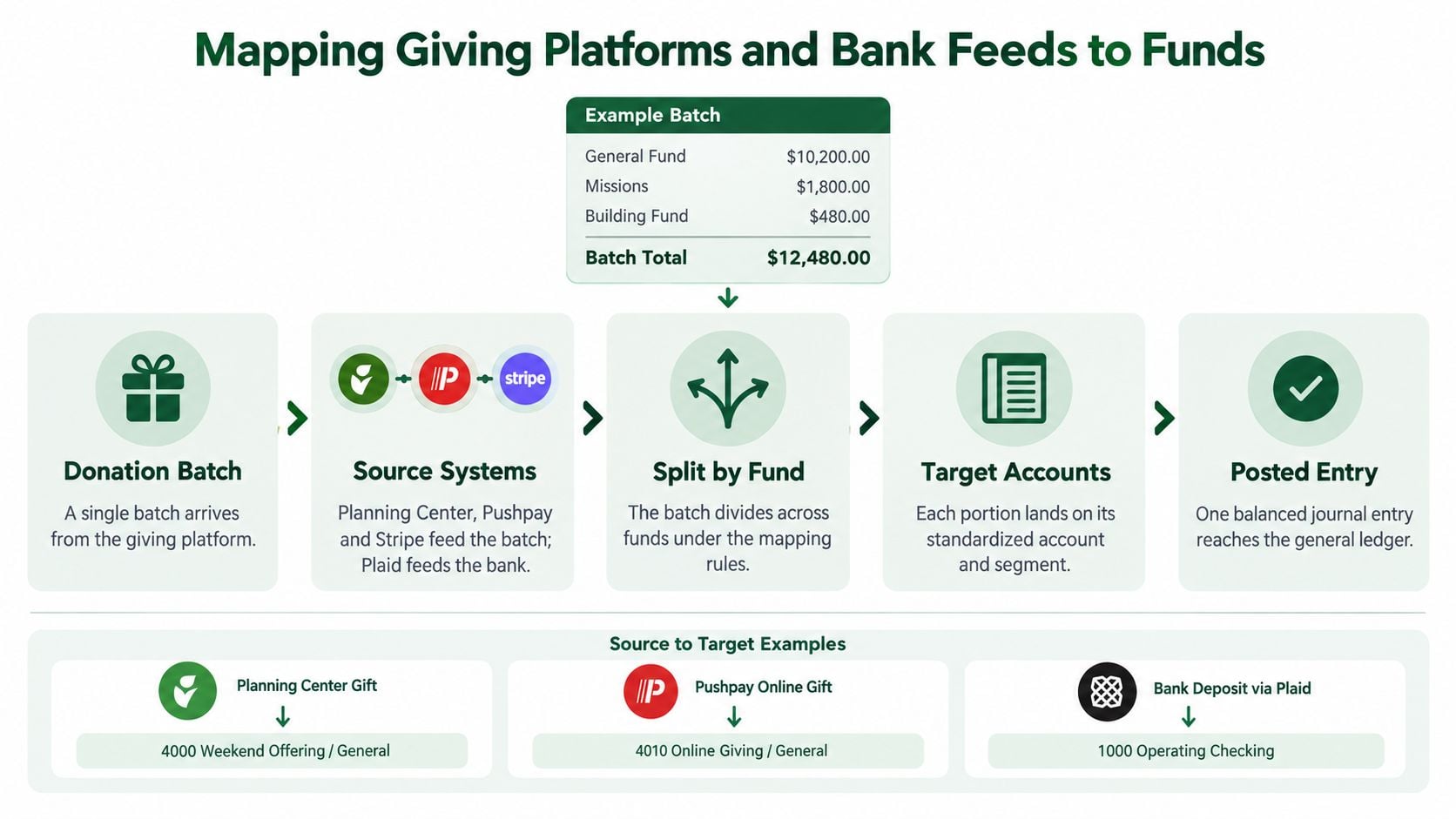
The cleanest workflow begins with the source transaction, not the bank deposit. A giving platform normally contains more information than the bank feed, including the donor's fund designation, campaign, gift type, refund status, and processing fee. The bank confirms settlement, but it usually can't restore fund meaning after the deposit has been flattened.
Consider a single batch containing general giving, missions, and a building appeal. The source-to-target logic should preserve each portion:
| Source detail | Target fund | Target account | Treatment |
|---|---|---|---|
| Planning Center general gift | General | 4000 Contributions | Post as unrestricted or without donor restrictions according to policy |
| Pushpay missions designation | Missions | 4020 Contributions | Retain the restricted fund dimension |
| Stripe building campaign | Building | 4030 Contributions | Preserve the campaign and donor restriction |
| Processing fee | Related fund or policy-defined fund | 5050 Fees | Record separately, without changing the gift's purpose |
| Refunded gift | Original fund | Reversal of original income | Reverse the original classification |
| Pass-through gift | Appropriate pass-through classification | Policy-defined liability or income account | Don't treat it as ordinary operating revenue |
The journal should debit the settlement or clearing account, credit each target income line by fund, and record fees separately. When the bank deposit arrives, the bank feed should clear the holding account rather than create a second contribution. That structure makes the platform batch, bank settlement, and ledger entry traceable.
Test each integration path
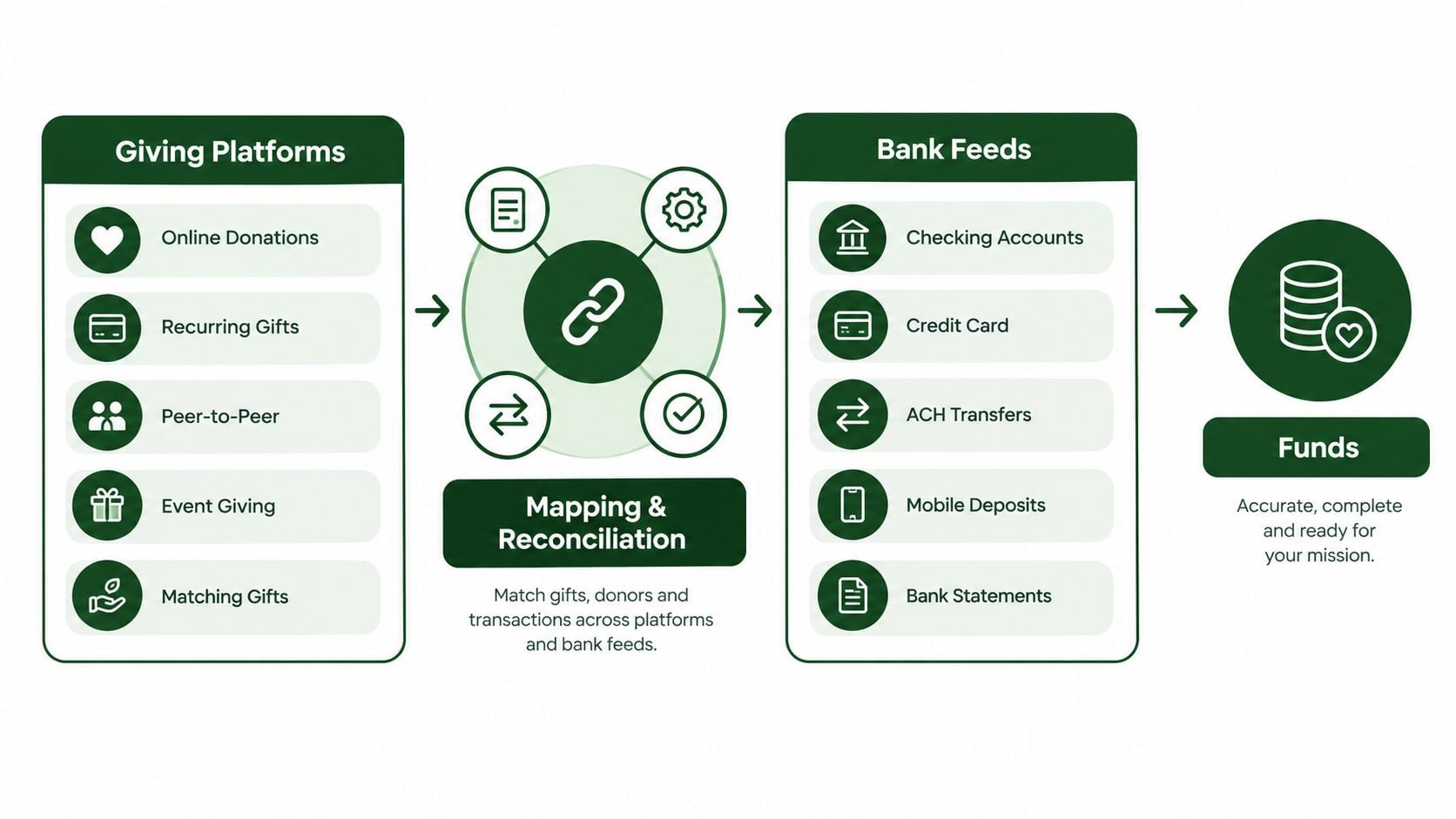
Planning Center, Pushpay, and Stripe may use different fund labels and export structures. Plaid can provide bank activity, but it shouldn't be the only source for donation classification. Create a translation table for each provider, then compare the resulting journal to the provider's batch report and the bank settlement.
Churches building a connected workflow can use accounting software integration guidance as a reference for thinking about how the giving platform, bank account, and ledger should exchange data. The goal isn't merely to import transactions. It's to make sure the same transaction retains its intended fund from source through reconciliation.
Preserving Restricted Funds and Net Asset Classifications
Restricted gifts require more than a different income account. The mapping must preserve the restriction from receipt through spending, release, and reporting. The Church of Scotland states that restricted funds can be used only for particular purposes, are usually set by the original donor, cannot be transferred into unrestricted funds for general use, and must be accounted for separately from unrestricted funds in its guidance on endowment, restricted, and designated funds.
That means a missions gift shouldn't map to general contributions because both are donations. A building gift shouldn't be released to operations because the bank account is shared. The fund dimension, restriction status, and release logic must remain visible in the journal and the reports.
Build restrictions into the target
A useful mapping design separates:
- The original contribution by fund.
- Expenses charged to that fund.
- Transfers between funds, where permitted.
- Releases from restriction when the purpose has been satisfied.
- Corrections and refunds that reverse the original classification.
Churches also need to align the ledger with the reporting framework they use. Independent church-accounting guidance notes that U.S. nonprofit reporting under FASB ASC 958 now uses two net-asset buckets, net assets without donor restrictions and net assets with donor restrictions, replacing the older three-part split. The classification affects how gifts, reserves, and releases are mapped, as described in this guide to church ministry fund accounting.
For a practical discussion of the reporting implications, review restricted net assets in church accounting. Then make the mapping rule explicit. If the source says “missions,” the target must carry missions and the appropriate net asset classification. If the source lacks enough detail, the transaction should pause for review rather than default to unrestricted activity.
Reconciliation and Integration Checks for Church Systems
A mapping isn't proven because an import completes without an error. It's proven when the source report, bank activity, journal, fund activity, and financial statements agree for the same period.
Load the mapping into a staging environment first. Use representative transactions from each giving platform, including ordinary gifts, restricted gifts, refunds, fees, failed payments, transfers, and deposits that combine several funds. Then compare the resulting trial balance to the source reports before allowing the integration to post routinely.
A practical validation sequence
- Confirm source completeness. Match the giving platform batch total to the exported transaction population and identify voids, refunds, and failed settlements.
- Test fund allocation. Compare each source fund total to the corresponding target fund activity report.
- Clear the holding account. Match the posted journal to the bank settlement, leaving only explainable timing differences.
- Review fees separately. Confirm that processing charges were not netted against contributions when the church's policy requires gross presentation.
- Inspect restricted activity. Verify that restricted gifts, expenses, releases, and transfers remain in the intended fund.
- Run the statements. Review the fund-level balance sheet, cash flow, and activity report for unexpected rollups or negative balances.
The target chart should be defined before source accounts are mapped, and the people who understand account substance should own the decisions. That approach, including governance controls and an audit trail for rule changes, is recommended in guidance on chart of accounts mapping design.
Run a full period-close rehearsal before go-live. A test that covers only one successful donation won't expose the exception that causes the month-end cleanup.
Governance Versioning and Ongoing Mapping Maintenance
The spreadsheet that solved last year's migration often becomes the undocumented system everyone relies on. It contains old account names, unexplained overrides, and rules that no longer match the giving platform. When a new fund or ministry appears, someone adds a row, but nobody records what changed or whether prior reporting should remain comparable.
Treat the mapping as a living accounting control. Assign an owner who can approve changes, a reviewer who understands church policy, and a process for testing changes before posting. The owner should maintain the target chart, source-field definitions, exception rules, and effective dates together.
Record the decision, not just the result
Certinia's documentation describes a dedicated Chart of Accounts Mapping Histories report with fields for Action, Old Value, New Value, Reason, Created By, and Created Date. Its documentation on mapping histories and audit records reflects the control detail a church should expect from its own process.
Every change record should answer:
- What source value changed?
- What target account, fund, or department was affected?
- Why was the change required?
- Who approved it?
- When did it take effect?
- Should historical transactions be remapped, or should the old logic remain for prior periods?
Review after structural change
Review mappings after a new giving provider, bank account, ministry, campus, merger, chart redesign, or fund closure. Don't remap historical activity automatically when the target presentation changes. Preserve the old rule where it supports consistent prior-period reporting, then apply the new rule from a documented effective point.
Drift often appears as unmapped source values, growing exception lists, unexpected “other” balances, or fund reports that no longer agree with donor records. A monthly exception review and a formal review after system changes will catch those signals before they become a board-reporting problem.
Choosing True Fund Accounting Software for Your Church
Churches should evaluate accounting software by asking whether funds are native to the transaction model or added later through classes, tags, spreadsheets, or manual reports. A bolted-on approach may handle basic bookkeeping, but it can make restricted gifts difficult to trace and fund-level statements difficult to trust.
A fund-first system should let the finance team connect giving, banking, and the general ledger without losing the fund designation. It should support account and segment mappings, retain transaction detail, expose exceptions, and produce fund-level balance sheets, cash flow, and activity reports. Built-in controls should prevent a restricted gift from becoming general operating income.
Before choosing a platform, use a structured framework to evaluate accounting software vendors. Ask each vendor to demonstrate a mixed donation batch, a processing fee, a refund, a restricted expense, and a bank reconciliation. A polished account list isn't enough. The test is whether the software preserves meaning when one source transaction contains several funds.
For small and medium-sized congregations, Grain Ledger provides native fund-based accounting and connects church financial workflows with bank accounts, cards through Plaid, and giving providers including Planning Center, Pushpay, and Stripe. It's a practical option when the church wants the giving designation to flow into the ledger rather than reconstructing fund activity after import.
Related church accounting software resources
If you are comparing software, these pages map the main decision points: fund accounting, QuickBooks limits, pricing, and migration.
- Best church accounting software (2026 comparison) - canonical guide comparing 12 church accounting platforms
- Church accounting software product page - see Grain Ledger for fund accounting, giving, and bank reconciliation
- Small church accounting software - see the product page built for volunteer treasurers and church admins
- Fund accounting features - review how Grain Ledger tracks designated funds
- QuickBooks for churches - understand workarounds and when to switch
- Free church accounting software - compare free options and upgrade triggers
- Grain Ledger pricing - compare plans for small and growing churches
- Start free - try fund accounting, giving imports, and bank reconciliation together
Quick Reference Cross References and Glossary
Account mapping: source account to target account relationship.
Segment rule: broad rule applied to a fund, department, or other dimension.
Account rule: specific rule for an account or exception.
Fund dimension: purpose-based classification such as general, missions, or building.
Restriction: donor or policy limitation on use.
Target chart: standardized structure used for reporting.
Source system: giving platform, bank feed, payroll tool, or legacy ledger.
For daily work, trace in this order: source transaction, fund designation, target account, journal, bank settlement, fund report. If any step breaks, review the mapping before posting a manual adjustment.
Grain Ledger offers churches native fund-based accounting, connected giving and banking workflows, and reports that keep restricted and unrestricted activity visible. Visit Grain to Start Free and see how a fund-first ledger can simplify chart of accounts mapping for your congregation.
Ready to simplify your church finances?
Start free with church fund accounting, or watch a product demo first.