Donor Tracking Software for Nonprofits: 2026 Guide
 By Gibson Brueher, Founder of Grain Ledger
Donor tracking software for nonprofits streamlines gift attribution, fund tracking, reporting, & integrations. Get checklists, best practices, & Grain Ledger
If you're the person opening the church finance spreadsheet on Monday morning, matching deposits by hand, and trying to remember which gifts were restricted for youth ministry, building repairs, or missions, you already know the problem. The work isn't just tedious. It's fragile. One missed tag, one duplicated donor record, or one unclear fund label can ripple into donor frustration, reconciliation headaches, and reporting that nobody fully trusts.
About Grain Ledger: This guide includes Grain Ledger, church fund accounting software built for designated gifts and ministry funds. It connects giving platforms (Planning Center, Pushpay, Tithely, Stripe), syncs bank activity with Plaid, and produces fund-level financial reports. Start free to see how it compares for your church.
See Grain Ledger for your church
Fund accounting, giving integrations, and bank reconciliation in one platform. Free migration support for churches switching from QuickBooks or Aplos.
That's why donor tracking software for nonprofits matters. It turns scattered records into one system that remembers who gave, what they gave to, how they gave, and what still needs follow-up. For church teams, that same discipline also protects restricted gifts and keeps accounting aligned with ministry intent, which is exactly where donor data and fund-based bookkeeping need to work together.
Why Donor Tracking Software Matters
A small church treasurer can get by for a while with spreadsheets, downloaded bank files, and a stack of thank-you notes. Then the volume grows. A recurring gift comes through one platform, a memorial gift arrives through another, and someone in the office enters a pledge in the wrong column. By the time the board asks for a clean report, the records no longer match.
Donor tracking software gives the team one source of truth. It grew out of CRM-style fundraising systems that bring donor records, giving history, communication logs, and engagement data into one searchable database, moving nonprofits beyond simple contact lists into structured constituent-management tools. For a church, that means the treasurer, pastor, and stewardship team can work from the same donor record instead of reconciling fragments after the fact.
A simple rule helps here. If a gift can be given, restricted, acknowledged, and reported in different ways, it needs a system that can remember all four.
The software also shapes daily ministry work. Staff can trace a donor's history, see campaign context, and follow up with confidence instead of searching through old spreadsheets and emails. For a plain-language view of the stages behind that process, the donor life cycle explains how first gifts, recurring support, and long-term stewardship fit together.
For churches, donor tracking and fund accounting need to work side by side. A gift designated for youth ministry should not drift into general operating funds just because it was entered quickly. A unified system helps the finance team record the donor's intent, keep restricted funds clear, and produce reports that match both ministry records and accounting records.
Healthy financial systems also support sustainability. The KCF's nonprofit sustainability advice makes the same point in practical terms, stable revenue depends on stable records, because donors notice when gifts are handled accurately and acknowledged promptly.
Understanding Key Concepts
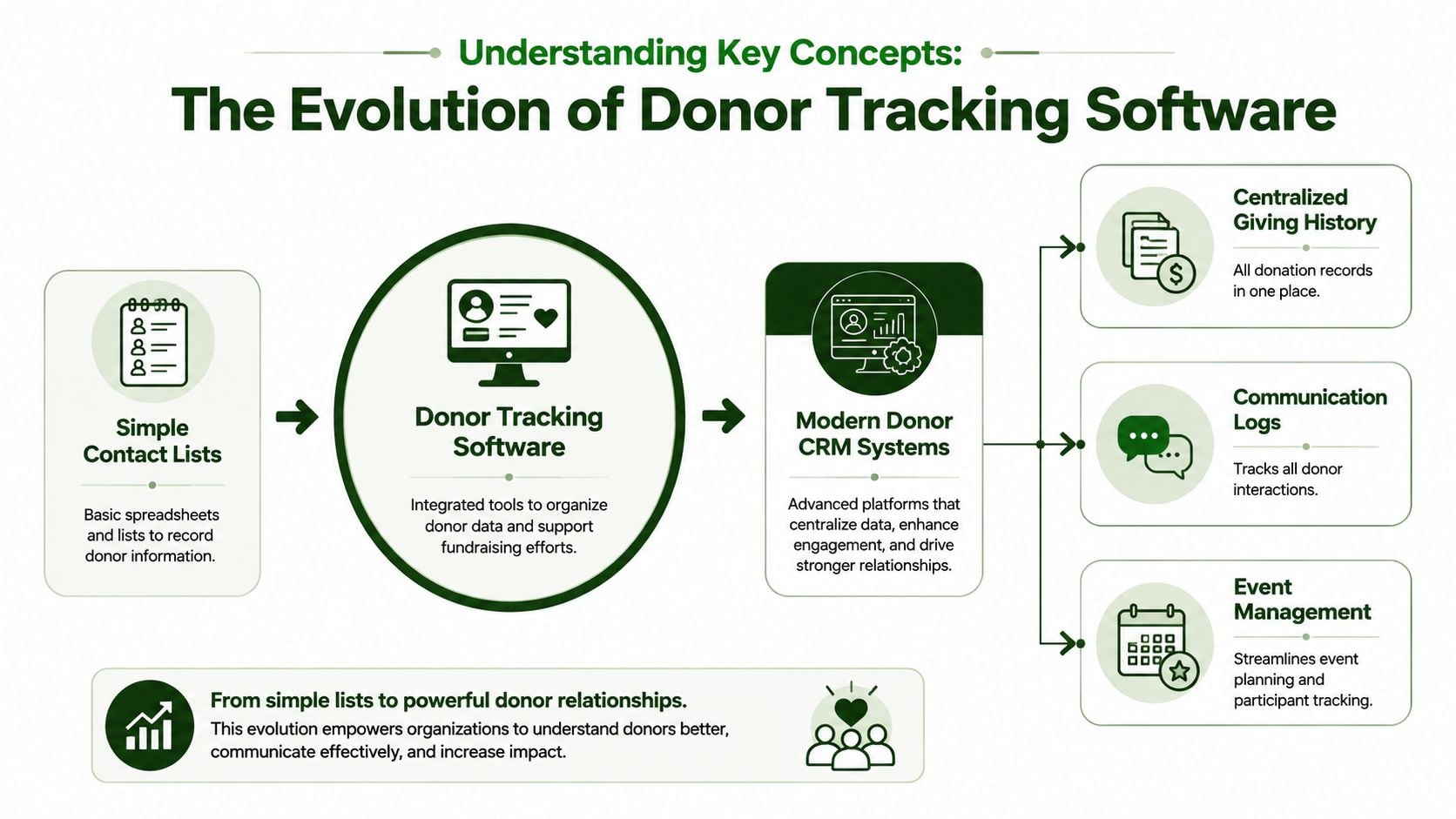
A simple way to understand donor tracking software is to see it as a church directory that also remembers giving history. Early versions worked like digital contact lists. Modern systems work more like a donor CRM or donor management system, with one profile for each supporter that can hold giving history, communication logs, event attendance, volunteer activity, and custom fields. For a plain-language overview of how that kind of system is usually described, the University of San Diego overview of donor management software is a useful reference point.
From contact list to working database
A contact list tells you who someone is. A donor CRM tells you how your church has related to that person over time. That difference matters because stewardship depends on context. If a family attends the Christmas concert every year, gives through a recurring gift, and once requested a missions designation, the system should connect those dots without staff digging through old emails.
The core idea is centralization. A centralized supporter database records each transaction's amount, date, fund designation, payment method, and campaign source, then updates the donor profile automatically. That structure makes segmentation possible, so staff can group donors by fund, giving pattern, or engagement history instead of guessing from memory.
Why structure matters for churches
Good website structure and good data structure work the same way. A clear information architecture helps people find what they need quickly, and the same logic applies inside donor software. If the records are consistently organized, a finance administrator can find restricted gifts, a pastor can see engagement history, and a board member can review trends without asking for a custom spreadsheet every time. The benefits of good website structure offer a helpful analogy here, because organized pathways reduce confusion in both places.
Clean data doesn't just help reporting. It changes the questions your team can safely ask.
For churches, the most important question is often not who gave, but where the gift belongs. Donor tracking software is not a gift log. It is a relationship database with accounting implications, especially when restricted giving and fund accounting live in the same ministry environment. A church that uses fund accounting software built for nonprofits can keep donor intent, restricted balances, and ministry reporting aligned in one place.
Essential Features and Compliance Requirements
A church finance team often notices software problems only after a routine question becomes a deadline. Which gifts were restricted? Did the camp scholarship fund receive the full amount? Was a memorial gift posted to the correct designation? Once pastors, auditors, or board members start asking those questions, careful transaction records stop being optional and start becoming part of daily accountability.
The best systems record the gift itself, not only the donor name. Nonprofit software guidance recommends capturing the amount, date, fund designation, payment method, and campaign source, then updating the donor profile automatically so staff can reduce reconciliation errors and use the same dataset for retention analysis. For churches, that difference shows up fast. A clean restricted-fund report is far easier to produce than a week of manual cross-checking.
Feature Comparison with Compliance Requirements
| Feature | Description |
|---|---|
| Transaction-level gift data | Records amount, date, designation, method, and source |
| Restricted fund tracking | Keeps donor-imposed limits visible in the record |
| Reporting and audit trails | Supports board review and year-end accountability |
| Integration with giving and banking tools | Reduces manual entry and reconciliation mistakes |
| Stewardship segmentation | Helps staff follow up based on giving behavior |
| Tax statements and donor matching | Supports compliant year-end communication |
Compliance lens: if staff cannot trace a gift from receipt to fund assignment to report, the system is not strong enough for church accounting.
The accounting side matters even more in ministry settings that manage separate funds for missions, benevolence, buildings, and youth. A unified system should keep restricted gifts, ministry budgets, giving activity, expenses, and board-ready reports connected in one place, with double-entry fund accounting and a complete audit trail. Grain Ledger's large-church accounting materials also describe multi-fund accounting, approval workflows, and GAAP-compliant reporting for board and auditor review. That is why church teams often compare donor tracking with a nonprofit fund accounting software guide, because gift records and fund reports have to agree.
For leaders weighing risk, critical compliance information for nonprofit leaders is a useful reminder that recordkeeping, controls, and reporting expectations do not disappear just because the ministry is small. The fewer manual steps you keep, the fewer places a restricted gift can be misapplied.
Selection Criteria and Evaluation Checklist
A lot of software demos sound good until you ask who must operate the system. For churches, that's usually the treasurer, the finance committee, and whoever exports data for statements, audits, and donor follow-up. The right evaluation process starts with scale, then moves to permissions, reporting, and integrations.
Some systems are built for volunteer lists. Others are built for databases that keep growing. Givebutter says its donor management CRM tools are free regardless of whether an organization has 500 or 50,000 contacts, which shows how much modern platforms depend on database scalability (Givebutter donor management CRM). That scale question should be one of the first things you ask, even if your church is much smaller today.
Checklist for vendor evaluation
- Data scalability: Can the system handle growth without slowing down or breaking reporting?
- User roles and permissions: Can you limit access for staff, volunteers, and outside bookkeepers?
- Reporting flexibility: Can you build fund-level, donor-level, and board-level reports?
- Integration depth: Does it connect with giving platforms, banks, and accounting tools?
- Cost transparency: Are pricing and add-ons clear before implementation?
- Support quality: Will someone help when imports fail or reconciliation gets messy?
Questions to ask in a demo
- Can the system track fund restrictions clearly?
- Can it separate household records when needed?
- Can it produce statements and donor summaries without manual cleanup?
- Can bank deposits, giving batches, and journal entries stay connected?
- Can our team review approvals instead of re-entering transactions?
A good evaluation also distinguishes between “nice to have” and “required for ministry control.” If the software makes giving look polished but can't manage restricted gifts well, it's not enough for a church finance workflow. If it can't explain how transactions move from donation platform to accounting records, that's a red flag.
When comparing options, keep the lens practical. Can the team use it without a long learning curve, and can it grow with the congregation without forcing another migration later? Those are the questions that save churches from buying twice.
Implementation and Adoption Best Practices
A new system fails when a church treats it like a file import instead of a workflow change. The strongest rollouts start with the people who touch the records every week, because they can point to the places where the current process breaks down. A treasurer sees which gifts get coded to the wrong fund. A bookkeeper sees which reports take too long to prepare. A pastor sees which donors need timely follow-up.
Start with the core work, not the software screens.
A rollout people will use
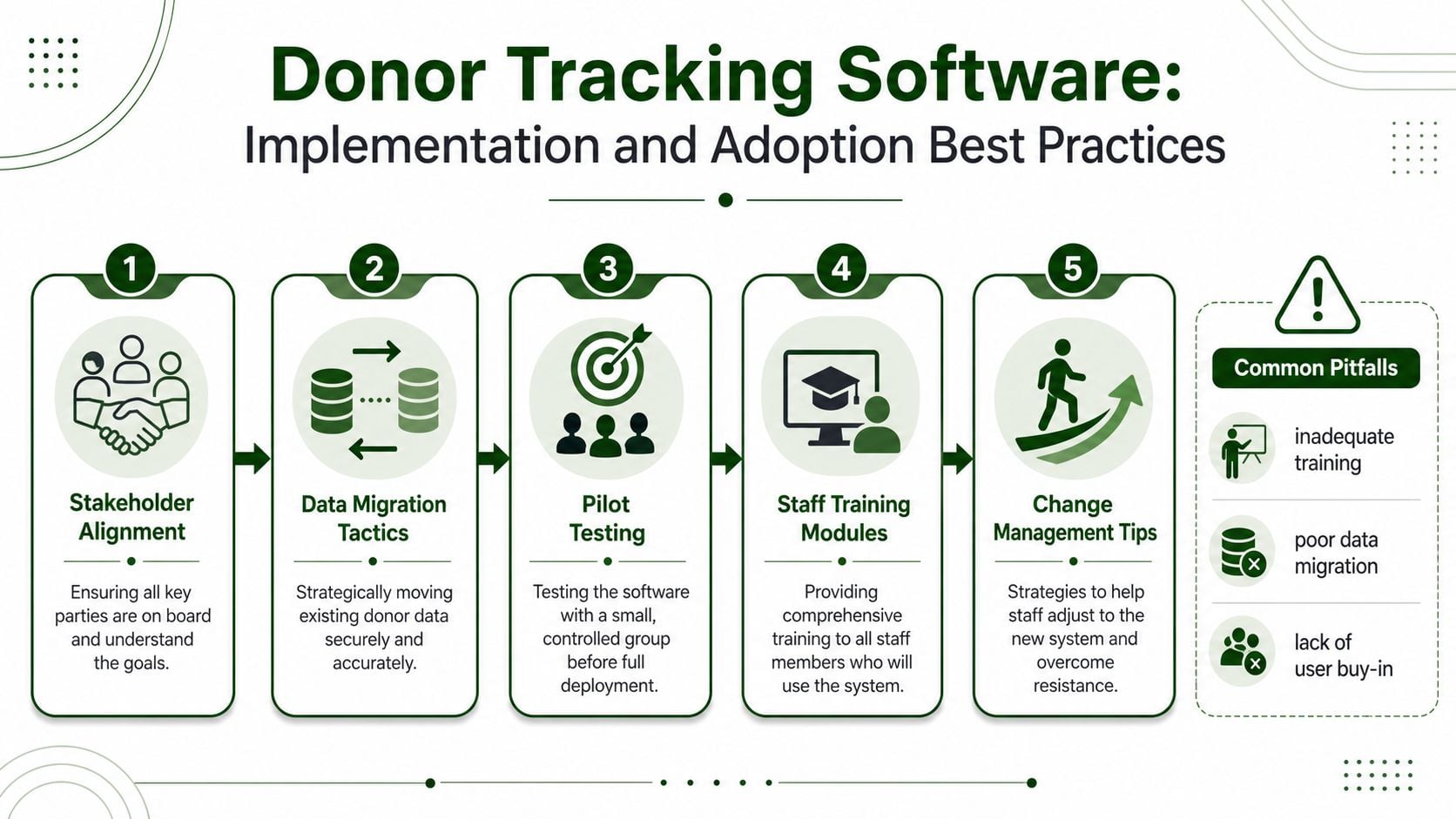
- Stakeholder alignment. Get agreement on what the system must solve, especially restricted fund handling and reporting. Church finance teams need the same picture of what counts as a gift, what counts as a fund transfer, and what needs approval before it is posted.
- Data migration tactics. Clean donor records before importing them, then map old fund names to the new structure. A messy chart of names is like a filing cabinet with labels in the wrong drawer. The system may still open, but the records will be hard to trust.
- Pilot testing. Run a small group through real gifts, real reports, and real acknowledgements before full launch. This lets the team find problems while the stakes are low, instead of discovering them after Sunday giving is already in the books.
- Staff training modules. Train people by task, not by feature list, so they learn the exact steps they will repeat. Greeters, office staff, treasurers, and bookkeepers do not need the same training, because they do not use the system in the same way.
- Change management tips. Keep support visible, answer questions quickly, and show how the new process reduces rework. People adopt a system faster when they can see that it removes duplicate entry and makes fund tracking clearer.
Common pitfalls: inadequate training, poor data migration, and lack of user buy-in.
That short list explains most implementation problems. People do not resist software because they dislike improvement. They resist it when it feels like more work, fewer answers, or less trust in the numbers. The fix is to show them that the new system shortens reconciliation, clarifies fund usage, and reduces duplicate entry.
Church teams also need to see how donor tracking connects to accounting rules. A giving record is only part of the story. If a restricted gift is recorded correctly but lands in the wrong fund, the ministry still has a compliance problem. A unified workflow helps staff follow the trail from donation to deposit to journal entry without guessing where the money sits.
For teams comparing systems, the integration path matters as much as the interface. Review the giving platform integrations so staff can see how donation tools connect with the accounting side before rollout begins. That kind of visibility helps a rollout stick, because people trust a process they can follow from end to end.
For teams that want a live walkthrough, the embedded training resource below can help staff visualize the workflow before rollout.
Integrating Fund Aware Accounting with Grain Ledger
A donor report can show what was given, but a church finance team still has to answer a harder question. Which fund received the gift, whether the gift remains restricted, and how that entry affects ministry budgets and reporting. A fund-aware accounting system answers those questions inside the same record set.
Grain Ledger uses a native fund-based ledger that keeps restricted gifts, budgets, giving activity, expenses, and board-ready reports connected, while supporting double-entry fund accounting and a complete audit trail. For a church, that means donor activity and accounting activity do not live in separate systems that need cleanup after the fact. They move together from the start.
Why a native ledger matters
Many bolt-on setups ask churches to connect a donor CRM to a separate accounting package, then sort out mismatches with exports and manual checks. A native fund ledger lowers that friction because gifts, fund balances, and expense activity sit inside the same accounting logic. That makes it easier to review restricted gifts without stopping to guess whether a transfer, expense, or donation was recorded in the right place.
Grain Ledger's implementation materials explain how giving tools feed directly into double-entry journal entries, so treasurers can review and approve transactions instead of re-keying donation batches by hand. The same materials also describe support for donor matching, tax-compliant giving statements, and analytics that identify retention trends and major gift prospects (Grain Ledger accounting software implementation) (Grain Ledger Capterra listing).
If you are reviewing how giving flows into accounting, the giving platform integrations overview shows how those connections work in practice.
What church finance teams gain
- Fund-level visibility: You can see how each ministry fund is performing without rebuilding reports.
- Cleaner reconciliation: Banking, giving, and ledger activity stay aligned.
- Better restriction control: Restricted gifts remain tied to their intended purpose.
- Board-ready reporting: Leadership sees actual fund movement instead of summary guesses.
That combination helps when different groups need different views of the same money. A department head can review line items, while finance checks the full ledger. A board can receive compliant reporting without asking staff to reconstruct the trail every month.
Related church accounting software resources
If you are comparing software, these pages map the main decision points: fund accounting, QuickBooks limits, pricing, and migration.
- Best church accounting software (2026 comparison) - canonical guide comparing 12 church accounting platforms
- Church accounting software product page - see Grain Ledger for fund accounting, giving, and bank reconciliation
- Small church accounting software - see the product page built for volunteer treasurers and church admins
- Fund accounting features - review how Grain Ledger tracks designated funds
- QuickBooks for churches - understand workarounds and when to switch
- Free church accounting software - compare free options and upgrade triggers
- Grain Ledger pricing - compare plans for small and growing churches
- Start free - try fund accounting, giving imports, and bank reconciliation together
Conclusion and Next Steps
Donor tracking software is no longer just a fundraising convenience. For churches and nonprofits, it's the bridge between donor relationships, compliance, and trustworthy financial reporting. When the system centralizes giving history, communication logs, and transaction details, it helps staff steward donors well. When it also respects fund-based accounting, it protects restricted gifts and makes board reporting far easier.
The simplest next step is to review your current workflow with honest questions. Can your team trace a gift from receipt to fund assignment without extra spreadsheets? Can you produce donor statements, lapsed-donor reports, and fund reports without manual cleanup? Can your accounting team and stewardship team work from the same records?
If the answer to any of those is no, start evaluating systems with the checklist above. Pay special attention to whether the software treats giving and accounting as separate chores or as one connected process. For churches that need true fund-level visibility, a unified system like Grain Ledger deserves a place on the shortlist because it keeps donor activity, restricted funds, and reporting in the same accounting structure.
Choose one workflow to improve first, usually restricted gifts or bank reconciliation, then pilot the software with real data and real users. That's the fastest path to a system people trust and use.
A CTA for Grain.
Ready to simplify your church finances?
Start free with church fund accounting, or watch a product demo first.