Fund Accounting Journal Entries: A Church Guide
 By Gibson Brueher, Founder of Grain Ledger
Learn how to create fund accounting journal entries for your church. This guide covers practical examples, best practices, and common mistakes to avoid in 2026.
You're standing at the finance desk with a stack of giving envelopes, several deposit records, and more than one bank statement. One gift is for ordinary ministry, another is marked for a youth mission trip, and a third belongs to a building campaign. The cash may sit in the same checking account, but the church can't treat every dollar as available for the same purpose.
About Grain Ledger: This guide includes Grain Ledger, church fund accounting software built for designated gifts and ministry funds. It connects giving platforms (Planning Center, Pushpay, Tithely, Stripe), syncs bank activity with Plaid, and produces fund-level financial reports. Start free to see how it compares for your church.
See Grain Ledger for your church
Fund accounting, giving integrations, and bank reconciliation in one platform. Free migration support for churches switching from QuickBooks or Aplos.
That's why fund accounting journal entries require more than matching debits and credits. Each entry must also tell you which fund owns the transaction, why the money was received, and whether a restriction has been satisfied. This guide follows the full path from donation receipt to spending, release, payroll allocation, interfund movement, and review.
Why Church Fund Accounting Feels Different from Regular Bookkeeping
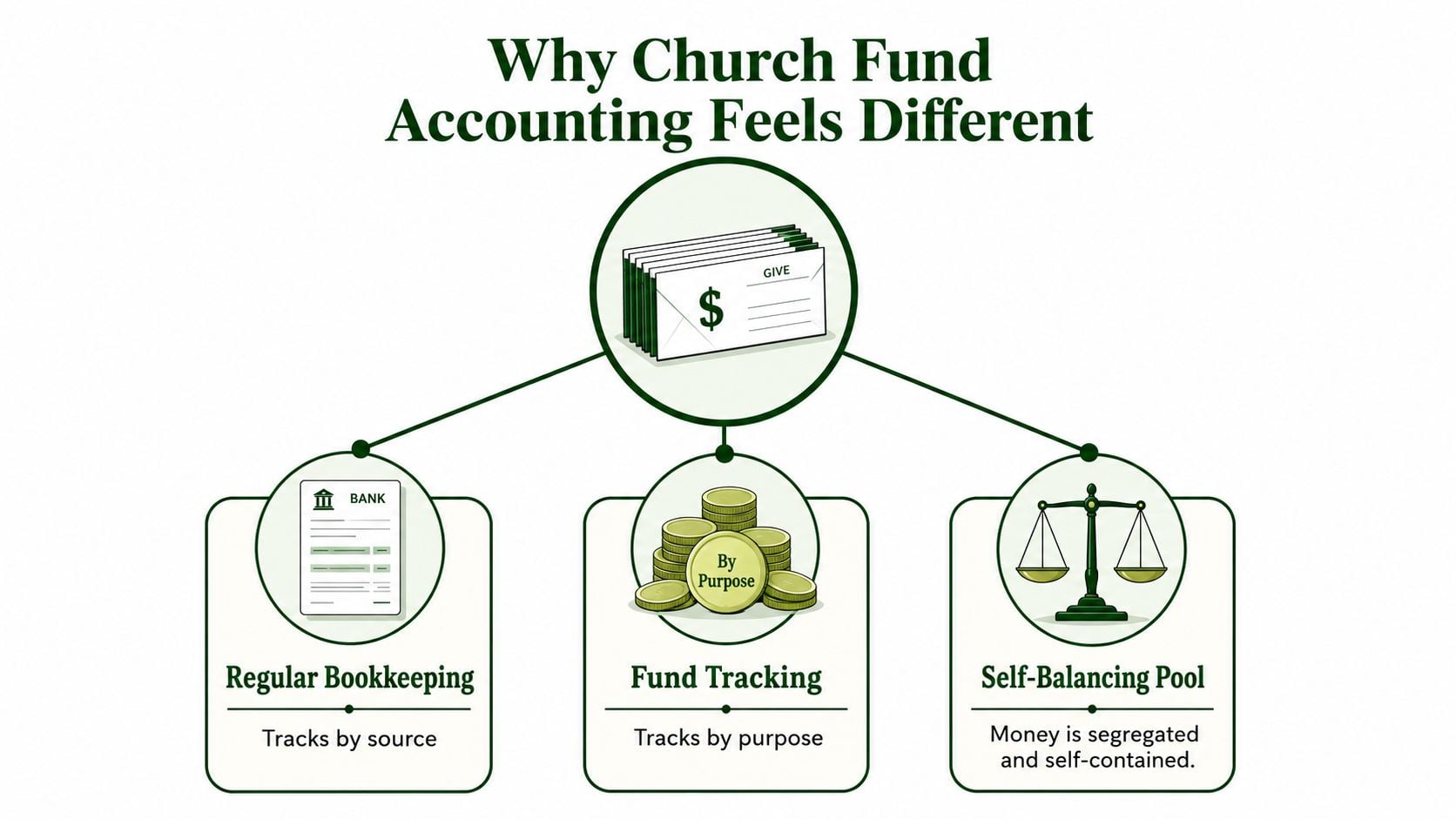
Regular bookkeeping often presents the organization as one economic pool. A church needs a more careful view. A fund is a self-balancing pool of money tracked by purpose, so the general operating balance, missions resources, youth ministry funds, and building money can each be reported without blending their obligations.
Fund accounting's governmental framework developed across several milestones. Municipal accounting reform accelerated in the 1930s, the Governmental Accounting, Auditing, and Financial Reporting guide was codified in 1968, the Governmental Accounting Standards Board was established in 1984, and GASB Statement No. 34 in 1999 added government-wide financial statements while preserving fund-level reporting. That history reflects the central purpose of fund accounting, legally restricted resources are tracked separately, and one cash receipt can be recorded in one fund while later use appears through distinct spending and reclassification entries at the fund level. This overview of governmental funds provides useful background on that structure.
Start with the fund, not the account
Most churches carry several practical fund categories:
- General operating fund: Supports ordinary ministry, payroll, utilities, and supplies.
- Designated or program-specific fund: Tracks money assigned to a ministry purpose, often through internal designation.
- Temporarily restricted fund: Holds money tied to a purpose or condition, such as a missions trip with a deadline.
- Permanently restricted fund: Holds an endowment principal that must remain intact, while only permitted earnings or distributions may be used.
The distinction matters because donor intent legally binds the treasurer. A restricted gift isn't just extra cash that can cover an unrelated bill when the operating account is tight. Your chart of accounts therefore needs a fund dimension on every line, including revenue, expense, cash, liabilities, and net assets.
Practical rule: If you can't identify the fund attached to a line, you can't confidently explain whose money changed.
Without that fund tag, an expense can silently drain money intended for something else. The debit and credit may balance perfectly, yet the church's stewardship record can still be wrong. Fund-aware posting prevents that hidden misclassification.
Posting Donations to the Right Fund
Sunday giving often creates two different accounting stories. An unrestricted gift increases cash available for ordinary ministry. A gift earmarked for a youth mission trip increases cash, but it also creates an obligation to honor the stated purpose.
For an unrestricted gift, the basic entry is:
- Debit Cash or Undeposited Funds
- Credit Contributions Revenue
- Fund tag: General operating fund
For a restricted gift, the cash debit still reflects the asset increase, but the credit belongs to the restricted classification:
- Debit Cash or Undeposited Funds
- Credit Temporarily Restricted Net Assets, or the applicable restricted-fund liability classification
- Fund tag: Youth mission trip fund
Church accounting guidance describes restricted gifts as a debit to cash or bank and a credit to temporarily restricted revenue or a restricted-fund liability, followed by a release entry when the restriction is satisfied. This guide to church journal entries also illustrates the receipt and release pattern.
| Line | Unrestricted Gift | Restricted Gift |
|---|---|---|
| Debit | Cash or Undeposited Funds | Cash or Undeposited Funds |
| Credit | Contributions Revenue | Temporarily Restricted Net Assets or Restricted-Fund Liability |
| Fund tag | General operating fund | Youth mission trip fund |
| Memo | Offering or donor record | Donor instruction and stated purpose |
If you first record the offering in Undeposited Funds, post a second bank-deposit entry when the check reaches the account:
- Debit Bank
- Credit Undeposited Funds
That clearing step moves the balance from money awaiting deposit to money confirmed by the bank statement. Keep the deposit documentation attached so another reviewer can follow the path from counted offering to bank activity.
A single check can support more than one purpose. Split it across journal-entry lines with separate fund tags rather than creating two fictional deposits. The total still matches the check, while the ledger preserves the donor's instructions. For a deeper treatment of contribution flows, see contribution accounting for churches.
In-kind gifts follow the same fund-aware discipline. If a donor gives a van, debit Vehicles and credit In-Kind Contribution Revenue at fair market value, assigning both lines to the appropriate fund and retaining documentation for the valuation.
Handling Operating Expenses and Payroll Across Funds
Start with the ordinary bills that keep the building and ministry running. If the general operating fund pays an internet bill, the entry is:
- Debit Utilities Expense, Fund 01
- Credit Cash, Fund 01
The fund tag belongs on both sides. Tagging only the expense line leaves the cash movement disconnected from the fund report and makes reconciliation harder.
Supplies, insurance, repairs, and similar operating costs follow the same logic. Ask two questions before posting: What did the church receive, and which fund should bear the cost? A ministry purchase paid from a restricted or designated fund shouldn't be pushed into the general fund just because the bank account is shared.
Payroll needs a complete allocation
Payroll becomes difficult because one pay run can include salary, housing allowance, employee withholdings, and employer taxes. For a pastor receiving salary plus housing allowance, the structure includes:
- Debit Salary Expense
- Debit Housing Allowance Expense
- Credit Federal Withholding Payable
- Credit Social Security Payable
- Credit Medicare Payable
- Credit Cash
The debits represent the church's costs. The payable credits represent amounts withheld or owed, while the cash credit reflects the net amount paid. The housing allowance must be designated in writing before it's paid. The employer match on Social Security follows the salary line into its fund, so it shouldn't disappear into an unassigned payroll account.
Suppose a youth director's compensation is shared between the general fund and youth ministry fund. The payroll entry needs two salary expense lines and matching cash allocation lines:
| Payroll Component | General Fund (70%) | Youth Fund (30%) |
|---|---|---|
| Salary Expense | 70% of allocated salary | 30% of allocated salary |
| Federal Withholding Payable | 70% allocation | 30% allocation |
| Social Security Payable | 70% allocation | 30% allocation |
| Medicare Payable | 70% allocation | 30% allocation |
| Cash | 70% of net payment | 30% of net payment |
The percentages in this illustration describe the allocation requested, not a new payroll rule. Use the actual approved compensation allocation and make sure the full entry balances.
If payroll processing is spread across systems, a resource such as Loopfour payroll workflow solutions can help your team think through payroll journal-entry workflows. The accounting principle remains the same: every payroll line carries a fund tag, or the payroll report won't reconcile to the budget by fund.
The Restricted Gift Lifecycle from Receipt to Release
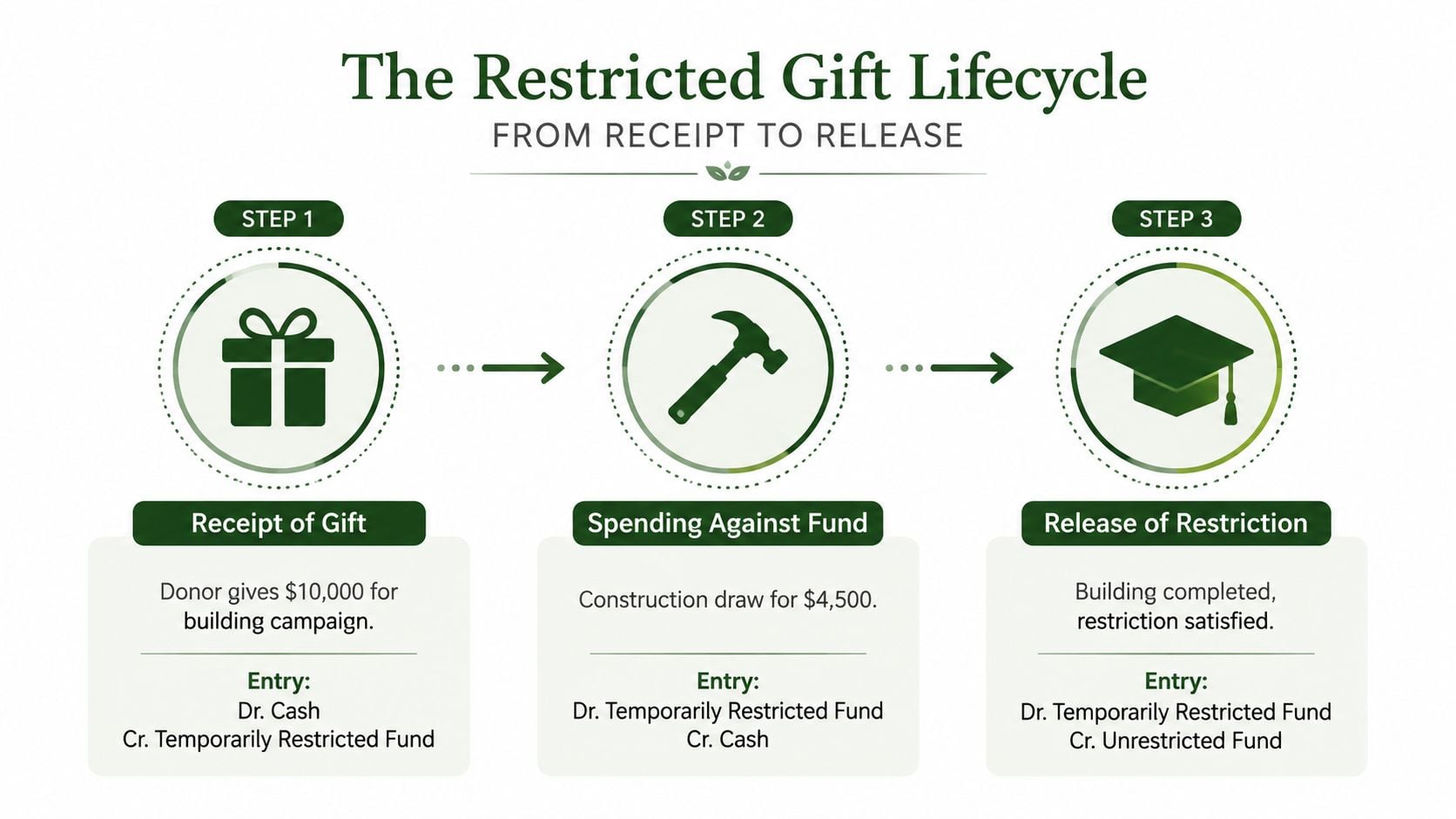
A building campaign shows why restricted accounting is a lifecycle rather than a single receipt entry. The treasurer needs to preserve the donor's purpose when the gift arrives, identify spending as construction work occurs, and reclassify the balance when the restriction has been fulfilled.
Move one records the receipt
When the donor gives $10,000 for the building campaign, post:
- Debit Cash, $10,000
- Credit Temporarily Restricted Fund, $10,000
Attach the donor letter, campaign documentation, or other evidence that states the purpose. The cash increased, but the church hasn't earned permission to use it for unrelated ministry. The restricted fund balance now shows the amount available for the campaign.
Move two records the spending
When the church pays a $4,500 construction draw, the fund-level entry records the authorized use:
- Debit Temporarily Restricted Fund, $4,500
- Credit Cash, $4,500
In a broader nonprofit presentation, spending often requires two linked entries. One records the actual expense, such as a debit to expense and credit to cash, while another releases the restriction by reclassifying net assets. A university training manual demonstrates this dual-entry logic with a $100,000 federal-grant expense, while a public accounting example shows a $10,000 restricted gift moving through program expense and a separate reclassification from net assets with donor restrictions to net assets without donor restrictions. The restricted-funds training manual explains why both functional use and classification movement need to remain visible.
Keep the construction invoice, payment record, approval, and relevant board minutes together. As spending occurs, the restricted fund balance declines, and the supporting documents show that each reduction served the stated campaign purpose.
Move three releases the restriction
When the building is complete and the restriction is satisfied, post the reclassification:
- Debit Temporarily Restricted Fund
- Credit Unrestricted Fund
That entry is not new income. It changes the classification of net assets because the church has met the donor's condition. This distinction prevents the statement of activities from overstating current revenue while still showing that the money is no longer restricted.
Canadian charity guidance similarly emphasizes identifying donor terms, assigning the correct fund code, recording the expense and release, and reconciling the result. This restricted-versus-unrestricted fund guide reinforces the need to align the general ledger, fund balances, and activity reporting.
Moving Money Between Funds the Right Way
Not every movement between funds means the same thing. A bank transfer, an expense reallocation, and a reimbursement clearing entry can all move balances, but they affect the ledger differently.
A true cash transfer occurs when money moves between bank accounts or sub-accounts. A reallocation changes which fund bears a transaction without moving cash. A clearing entry settles amounts owed between funds after one fund paid on another's behalf.
| Situation | Best Entry Type | Impact on Income Statement |
|---|---|---|
| Cash moves from one church bank account to another | True interfund transfer | No new income or expense |
| A posted expense must be shared across funds | Reallocation | Changes fund-level expense classification, not total church expense |
| One fund reimburses another for a payment | Clearing entry using Due From and Due To | No new church-wide income or expense |
For example, the church moves $2,000 from the operating fund to the benevolence fund by check. Record the receiving side as a debit to Benevolence Cash and the sending side as a credit to Operating Cash, with both lines tagged to their respective funds. If the cash doesn't move immediately, use Due From and Due To accounts so each fund remains complete and self-balancing. Fund accounting guidance identifies those accounts for interfund movements, while transfer accounts apply when actual cash moves. This fund accounting reference outlines that distinction.
The common mistake is to book an internal transfer as income in one fund and expense in another. That inflates activity and makes the church appear to have earned or spent money when it only moved its own resources.
Use a dedicated transfer account or a clear memo line. That lets reports isolate internal flows from genuine revenue and expenses. Before posting, ask whether cash changed, restriction status changed, or only the responsible fund changed. The answer determines the entry.
For a broader discussion of these distinctions, see fund-to-fund accounting.
Controls That Keep Your Entries Clean and Auditable
A balanced entry can still be poorly controlled. Auditors focus on who initiated, authorized, recorded, and processed journal entries because an accurate-looking debit and credit doesn't prove that the transaction was legitimate or properly supported.
The Federal Highway Administration audit report says journal-entry forms should capture the preparer name, reason for the entry, supporting documentation, and approver signature. In its sample of 183 entries, 12 lacked a preparer reference and 16 weren't properly approved before posting. The audit exhibit gives church treasurers a practical warning, even if their own finance team is small.
Build a lightweight approval trail
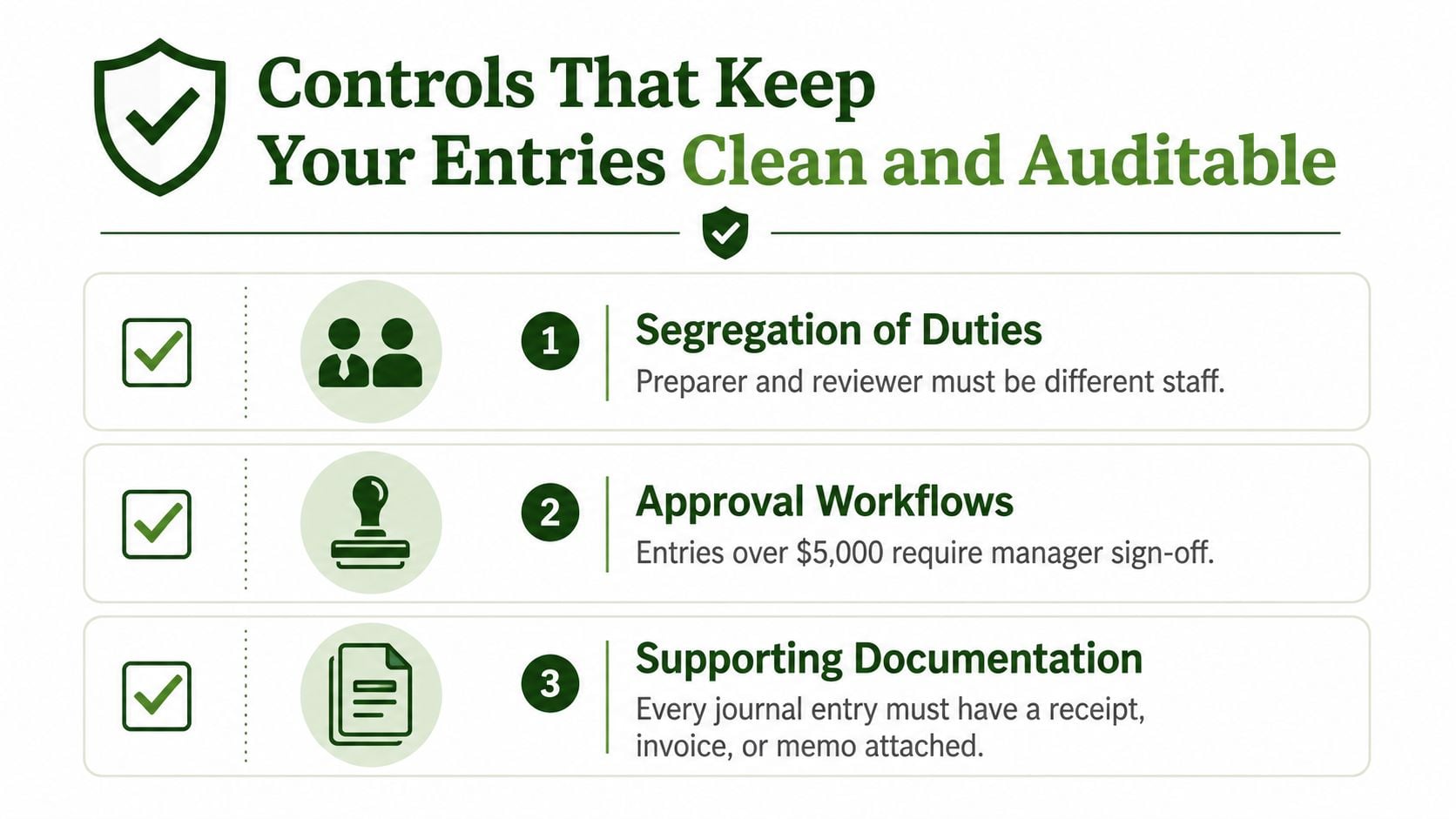
A small church doesn't need a complicated bureaucracy. It does need a repeatable review:
- Identify the preparer: Record who created the entry.
- Explain the reason: Add a memo that describes the transaction and any correction.
- Attach evidence: Include the invoice, donor letter, deposit record, board minutes, or payroll report.
- Confirm the fund: Check every debit and credit for the correct fund tag.
- Review the balance: Verify that the entry makes sense at the fund level.
Even two volunteers can separate responsibilities. One person prepares the entry, another reviews it, and a non-check-signer examines the monthly reports and reconciliations. Shared logins should be avoided where possible, because individual credentials create a clearer audit trail. Scanned receipts and stored approval notes work well when paper files are limited.
Control that matters: Don't wait for an annual cleanup. Monthly balancing and reconciliation help you correct errors while the supporting evidence is still easy to find.
Audit-focused guidance treats journal entries as a high-risk control point and recommends understanding controls over initiation, authorization, recording, and processing. The PCAOB journal-entry guidance also supports monitoring an error rate defined as errors divided by total journal entries and reducing manual posting through automation and approval workflows.
If an entry is wrong after posting, preserve the original. Use a correcting journal entry with a clear reference instead of editing history. That way, the church can show what happened, what was corrected, and who reviewed the change.
Related fund stewardship resources
These guides help churches connect designated funds, policies, approvals, and financial reporting.
- Church benevolence fund guide - set policy, approvals, and accounting controls
- Restricted fund guide - understand donor restrictions and fund balances
- Fund accounting in Grain Ledger - track designated gifts and ministry funds in the ledger
- Best church accounting software - compare software that tracks restricted gifts and ministry funds
- Schedule a Grain Ledger demo - see fund-level reports and bank reconciliation
Putting It All Together with the Right Tool
A reliable month-end review can follow the same sequence every time:
- Donation: Confirm whether the gift is unrestricted, designated, or restricted before choosing the credit account.
- Expense: Code the expense and cash movement to the fund that benefited.
- Payroll split: Allocate salary, withholdings, employer taxes, and cash consistently across funds.
- Restricted release: Record the release when the donor's purpose or condition has been satisfied.
- Interfund transfer: Decide whether the movement is a cash transfer, reallocation, or clearing entry.
The workflow becomes easier when the accounting system treats the fund as part of the transaction rather than an afterthought. A fund-aware ledger should require a fund on each journal-entry line, show restricted balances by fund, preserve supporting documentation, and provide reports that trace totals back to their entries.
Grain Ledger is one option designed around that model. Its fund accounting workflow supports matching debits and credits, fund-based posting, nonprofit net asset classification, giving integrations, and reports connected to supporting journal entries. You can review its fund accounting features to see how those workflows fit together for church finance teams.
Larger organizations may also compare broader platforms such as Dynamics 365 Finance and Operations when they need enterprise finance capabilities. The right choice depends on the church's size, reporting requirements, integrations, and the level of fund-specific control required.
The software shouldn't replace judgment. It should make the correct judgment easier to apply consistently, especially when several people share treasurer and bookkeeping responsibilities.
Grain gives churches a fund-based way to connect giving, bank activity, journal entries, restricted balances, and fund-level reports in one workflow. Visit Grain to explore how it can help your team post donations accurately, preserve donor intent, and keep every fund ready for review.
Ready to simplify your church finances?
Start free with church fund accounting, or watch a product demo first.