
How to Track Charitable Donations in Your Church
Learn how to track charitable donations with fund-based systems, reconciliation workflows, and compliance tips built for churches and finance teams.
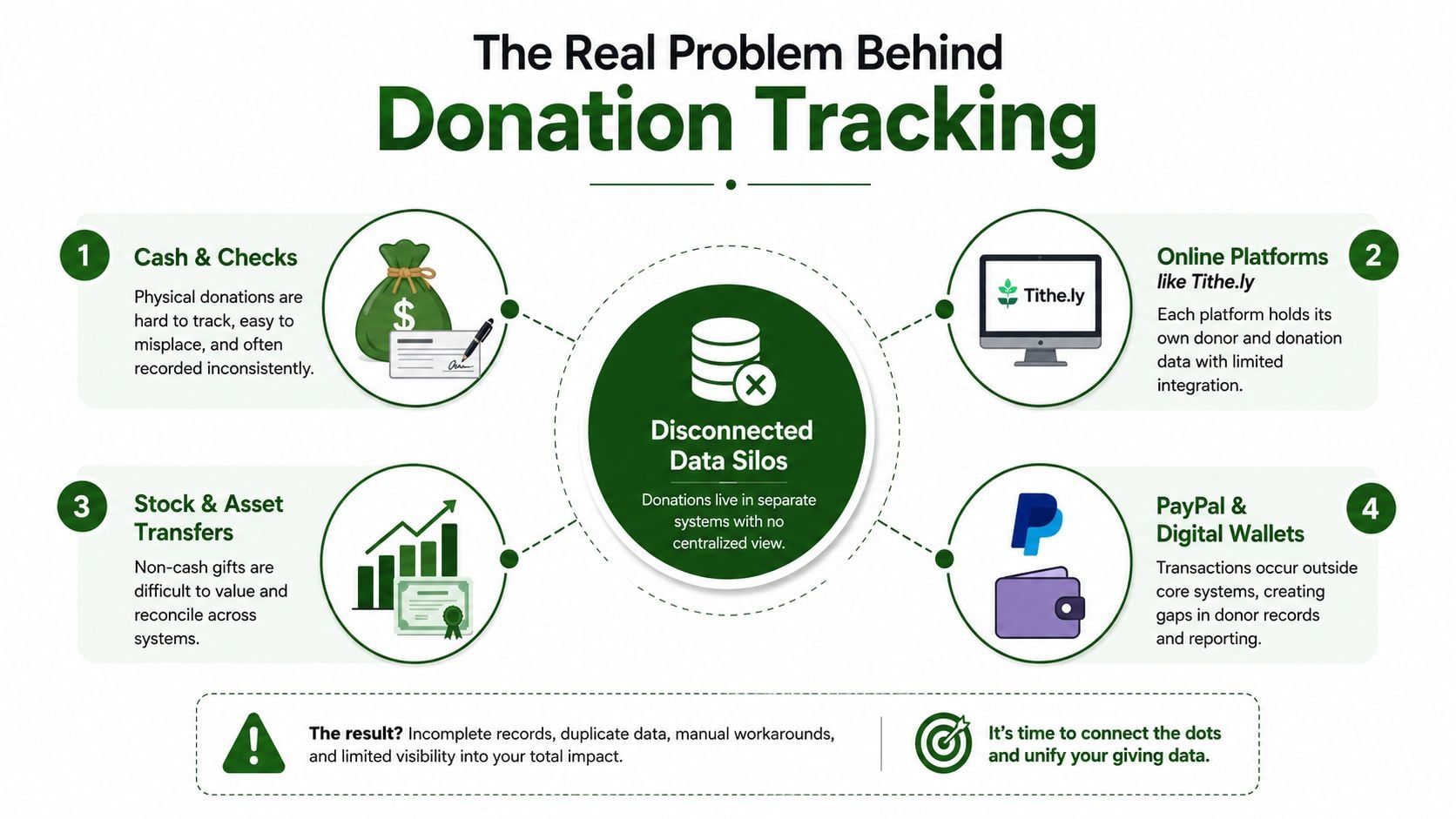
Monday morning starts with a familiar mess. The offering plate has been counted, Tithe.ly deposits have cleared, a stock gift is still pending, and a PayPal batch is sitting in limbo. The treasurer has money in several places, but none of it is tied cleanly to the ledger or the fund it was intended to support.
About Grain Ledger: This guide includes Grain Ledger, church fund accounting software built for designated gifts and ministry funds. It connects giving platforms (Planning Center, Pushpay, Tithely, Stripe), syncs bank activity with Plaid, and produces fund-level financial reports. Start free to see how it compares for your church.
See Grain Ledger for your church
Fund accounting, giving integrations, and bank reconciliation in one platform. Free migration support for churches switching from QuickBooks or Aplos.
That's why how to track charitable donations is not mainly a software question. It's a fund-architecture question. Cash, checks, online gifts, ACH transfers, and stock all need to land in the correct restricted, designated, or unrestricted bucket before anyone can reconcile them or report on them with confidence.
The Core Problem Behind Donation Tracking
A church can record every gift accurately and still lose control of its financial picture. The breakdown starts when staff sort deposits by bank account or payment platform instead of by fund. One deposit may combine general giving, a building gift, benevolence support, and a youth mission contribution. Recording only the deposit total leaves the church with cash, but not accounting information it can use.
Practical rule: A donation is not fully tracked until the church can identify the donor record, gift method, date, amount, and intended fund.
That missing fund detail creates specific problems:
- Restricted dollars subsidize operations. Staff pay bills from available cash without confirming whether those dollars belong to a donor-restricted purpose.
- Receipts duplicate or disappear. The envelope, Tithe.ly report, and bank feed may each create a separate record.
- Year-end statements fail to match deposits. Donor statements use gift dates, while bank reports may show settlement dates or bundled batches.
- Board reports lose credibility. Leaders see totals they cannot trace to a deposit slip, platform report, or fund balance.
Digital giving increases the number of records that must be matched. Online gifts, recurring transactions, bank transfers, and mailed contributions each follow different timing and reporting patterns. The church must track frequency, payment method, settlement timing, and fund assignment, not only the gift amount. The fund-accounting perspective on charitable donation tracking explains why channel-level records need to connect back to fund accounting.
Start with the buckets
Define the funds before choosing an app. Decide which gifts may support ordinary ministry, which carry donor conditions, and which amounts the pastor or board has earmarked internally while retaining authority to redirect them. That structure controls intake, receipts, reconciliations, and board reporting.
The finance team should be able to answer one question for every gift: which fund owns this activity? If the answer is unclear, the workflow is not ready for automation.
Platform settings come later. Churches struggle when software is purchased before the team decides what each gift must become in the books. Build the fund structure first, then configure every giving channel to preserve it.
Designing a Fund Structure That Actually Fits Your Church
Your fund list should reflect how the church operates, not the default chart of accounts shipped with accounting software. A small congregation doesn't need dozens of vague categories. It needs a short list that lets every receipt and expense answer one question: which fund owns this activity?
Use three primary legal categories:
- Unrestricted funds support general operations and ministry. The board can use them for ordinary expenses without donor permission.
- Temporarily restricted funds carry a donor-stated purpose or time condition. The church must use them according to that condition until it's fulfilled.
- Permanently restricted funds preserve the donor's principal or another continuing restriction, often through an endowment arrangement.
Designated funds need separate treatment. If the pastor or board earmarks money for a youth pizza night, that designation can help management and reporting, but it isn't automatically a legal donor restriction. The key test is simple:
Can the board redirect this money without donor permission?
If the answer is yes, use a designated sub-account or internal designation. If the donor imposed the condition, use a restricted fund and retain the supporting documentation.
A workable example
For a congregation with 120 members, I'd start with a structure like this:
| Fund Name | Restriction Status | Typical Donor Intent | Allowed Uses |
|---|---|---|---|
| General Fund | Unrestricted | Ordinary church ministry | Payroll, utilities, worship, administration |
| Building Fund | Temporarily restricted | Capital improvements or debt reduction | Qualifying building costs |
| Benevolence Fund | Temporarily restricted | Assistance for people in need | Approved benevolence support |
| Youth Mission Trip | Temporarily restricted | A named trip or mission effort | Trip-related costs |
| Youth Ministry Designation | Designated, internally earmarked | Youth activities | Youth expenses, subject to board authority |
| Endowment Fund | Permanently restricted | Long-term preservation of principal | Uses allowed by the endowment terms |
Each fund needs a code, a clear description, an owner for review, and a documented release rule. Don't create a “miscellaneous ministry” fund to avoid making decisions. That label hides donor intent and makes later review harder.
Church and parish guidance emphasizes that restricted, unrestricted, and designated funds should remain separately identifiable in the accounting records and annual financial statements. Separate columns, labels, or equivalent fund coding can work, provided receipts and expenditures remain traceable to the correct purpose. The guidance on restricted funds in church accounts supports this fund-level approach.
The structure should drive every later decision. At intake, the counter selects a fund. In the receipt system, the gift carries that fund. In the ledger, the revenue posts to that fund. In the board packet, the balance appears beside the related activity.
Capturing Gifts Across Cash, Checks, Online, and Bank Transfers
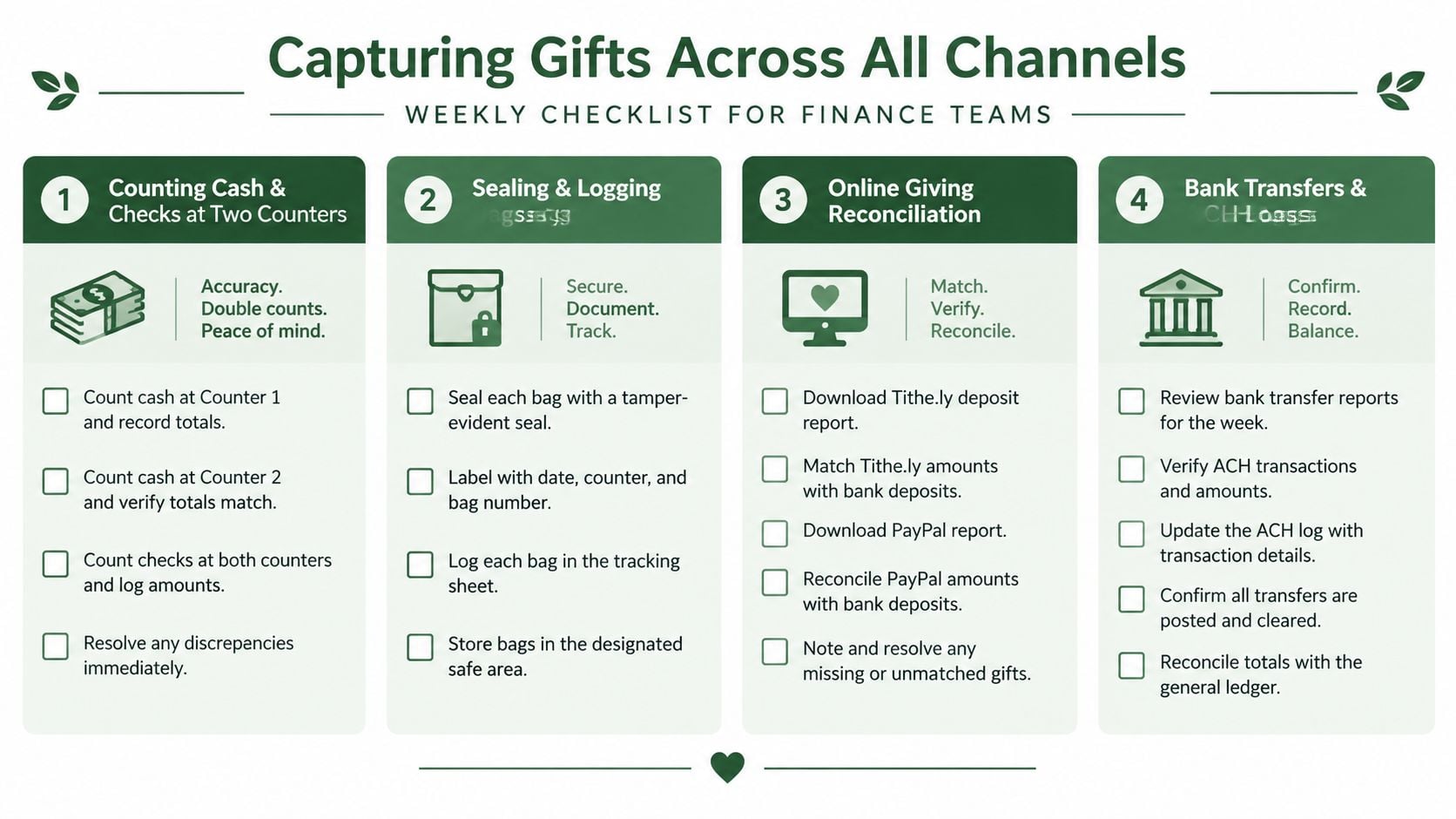
The intake process should be boring, repeatable, and difficult to bypass. Two counters handle cash and checks together. They complete a same-day count sheet, place the money and paperwork in a sealed bag, and hand it to the designated deposit person. The treasurer enters the gift records within 48 hours, while the details are still available and discrepancies can still be investigated.
Tag the fund at entry. Never wait until reconciliation to decide whether a gift belongs to the General Fund, Building Fund, benevolence, or another category. Late classification is where restricted gifts become mixed with operating revenue.
Channel-specific controls
Checks should be logged by donor, check date, amount, and fund. Envelope codes should match the donor record and fund designation. Online exports from Tithe.ly, PayPal, Pushpay, Planning Center Giving, or another platform should map to the church's fund codes before import.
ACH and bank-transfer gifts need a confirmation record tied to the donor and intended fund. Text-to-give batches should retain the platform batch identifier, settlement date, gross amount, fees, and net bank deposit. For stock gifts, record the security, number of shares, donor, and valuation at the gift date, not the date the church sells the asset. In-kind gifts belong in an in-kind log with a description, donor information, date received, and any relevant valuation documentation.
Use this 10-item intake checklist every week:
- Two-person count: Have two authorized counters verified cash and checks?
- Donor envelope: Is each identifiable gift tied to its envelope or donor record?
- Fund designation: Has the intended fund been selected at entry?
- Platform export: Has the online-giving report been saved with its batch details?
- ACH confirmation: Is each bank-transfer gift supported by a confirmation record?
- In-kind log: Has every non-cash gift been recorded separately?
- Stock valuation note: Is the valuation basis tied to the gift date?
- Deposit-slip match: Does the bank deposit slip agree with the count sheet?
- Count-sheet photo: Has a secure image of the signed count sheet been stored?
- End-of-day lockup: Are cash, checks, and records secured after counting?
For donor-facing context, churches can also review what donors should know about giving to a church. The finance team's job is to turn that giving experience into a controlled record that survives reconciliation and year-end reporting.
Reconciling Giving Platforms, Banks, and the General Ledger
Reconciliation is the spine of trustworthy donation tracking. It shouldn't wait for quarter-end or the annual audit. A weekly process catches missing gifts, duplicate entries, platform fees, and timing differences while the evidence is still easy to find.
Pull the giving-platform report grouped by fund and payment method. Match its settlement totals to the bank deposit or bank-feed activity. Then post summarized journal entries to the general ledger, rather than cluttering the ledger with every platform transaction, while retaining the gift-level detail in the supporting record set.
Consider a simple three-way match. A Pushpay report says the church collected gifts for the General Fund, Building Fund, and Youth Mission Trip. A Chase deposit shows the settlement reaching the bank. The QuickBooks entry records the same fund totals, with processing fees separated correctly. The week isn't closed until those three views agree.
| Source | What to Pull | What Must Match | Common Variance |
|---|---|---|---|
| Giving platform | Gift detail by fund, donor, method, and batch | Gross gifts and fund allocation | ACH settlement timing |
| Bank activity | Deposit amount, date, and settlement reference | Net deposit after permitted fees | Platform fees withheld |
| General ledger | Journal entry by fund and account | Fund-level totals and fee treatment | Refunds or corrections |
Anonymous gifts need a defined policy. Record the amount and fund, but don't create a donor receipt without an identifiable donor. Refunds require an audit trail that reverses the original fund allocation rather than reducing whichever fund happens to be convenient.
Monthly close questions
At month-end, review every unresolved item:
- Do platform totals agree with bank settlements?
- Are fees posted separately and consistently?
- Are pending ACH batches assigned to the correct period?
- Do refunds reverse the original fund?
- Are anonymous gifts separated from donor-attributed gifts?
- Do restricted balances agree with the general ledger and supporting agreements?
Use a zero variance tolerance for fund totals. A small overall difference can hide a material error in one restricted fund. The church may accept timing explanations, but it shouldn't accept unexplained fund differences.
For a deeper operational method, use this transaction-matching workflow for finance teams. The principle is straightforward: match evidence first, post second, and never force a reconciliation by moving a difference into a miscellaneous account.
Handling Restricted Funds and Donor Receipts the IRS Way
A church can have cash in the bank and still lack permission to spend a donor-restricted gift on an unrelated operating bill. Fund architecture determines whether each dollar remains tied to its purpose. Software cannot correct a fund structure that was wrong at gift entry.
Maintain three practical buckets in the books:
- Unrestricted: General operating money the church can use according to its approved budget.
- Designated: Money earmarked by the board or pastor for a purpose that the church can still redirect under its governing authority.
- Restricted: Money limited by the donor's stated purpose or terms.
Post each restricted gift directly to the correct fund, then charge qualifying expenses to that same fund. When the purpose or time condition is fulfilled, record the release from restriction according to the church's accounting policy. For example, after a capital campaign is fully spent on its stated project, the remaining accounting balance may be released to unrestricted net assets if the gift terms and applicable policy permit it. Leadership's desire for a cleaner report is not a valid reason to release funds.
The restricted-fund accounting workflow from AlignMINT recommends capturing donor terms at gift entry, posting transactions to the correct fund during the month, and reconciling restricted balances monthly against the general ledger, agreements, and bank activity. That sequence keeps the receipt, expense, and remaining balance tied to the same donor purpose.
Receipt rules that require discipline
For U.S. donors, a single charitable gift of $250 or more requires a contemporaneous written acknowledgment for deduction substantiation. The rule also applies to noncash contributions at that threshold. The acknowledgment should identify the donor, date, amount or description, and whether the donor received goods or services. The IRS explains the substantiation and disclosure requirements for charitable organizations.
Noncash contributions over $500 generally require Form 8283. Property contributions over $5,000 generally require a qualified appraisal. For quid pro quo payments over $75, the charity must provide written disclosure describing the value of goods or services provided, unless an applicable exception applies. See the IRS rules for substantiating charitable contributions.
For a complete guide to donor acknowledgment requirements, see our nonprofit contribution receipt guide.
A usable acknowledgment template can read:
Acknowledgment of charitable contribution
Thank you to [Donor Name] for the contribution received by [Church Name] on [Date]. The contribution was [cash amount, stock description and shares, or in-kind description]. [Church Name] provided no goods or services in return for this contribution, except for any stated intangible religious benefit. Please retain this acknowledgment with your tax records.
For stock and in-kind gifts, attach the receiving record and valuation documentation. The receipt system should preserve acknowledgment status against the individual gift, not only produce an annual total. Keep donor receipt records connected to the fund code so the church can show both what was acknowledged and where the restricted dollars were assigned.
Choosing Tools and Integrations That Keep Funds Clean
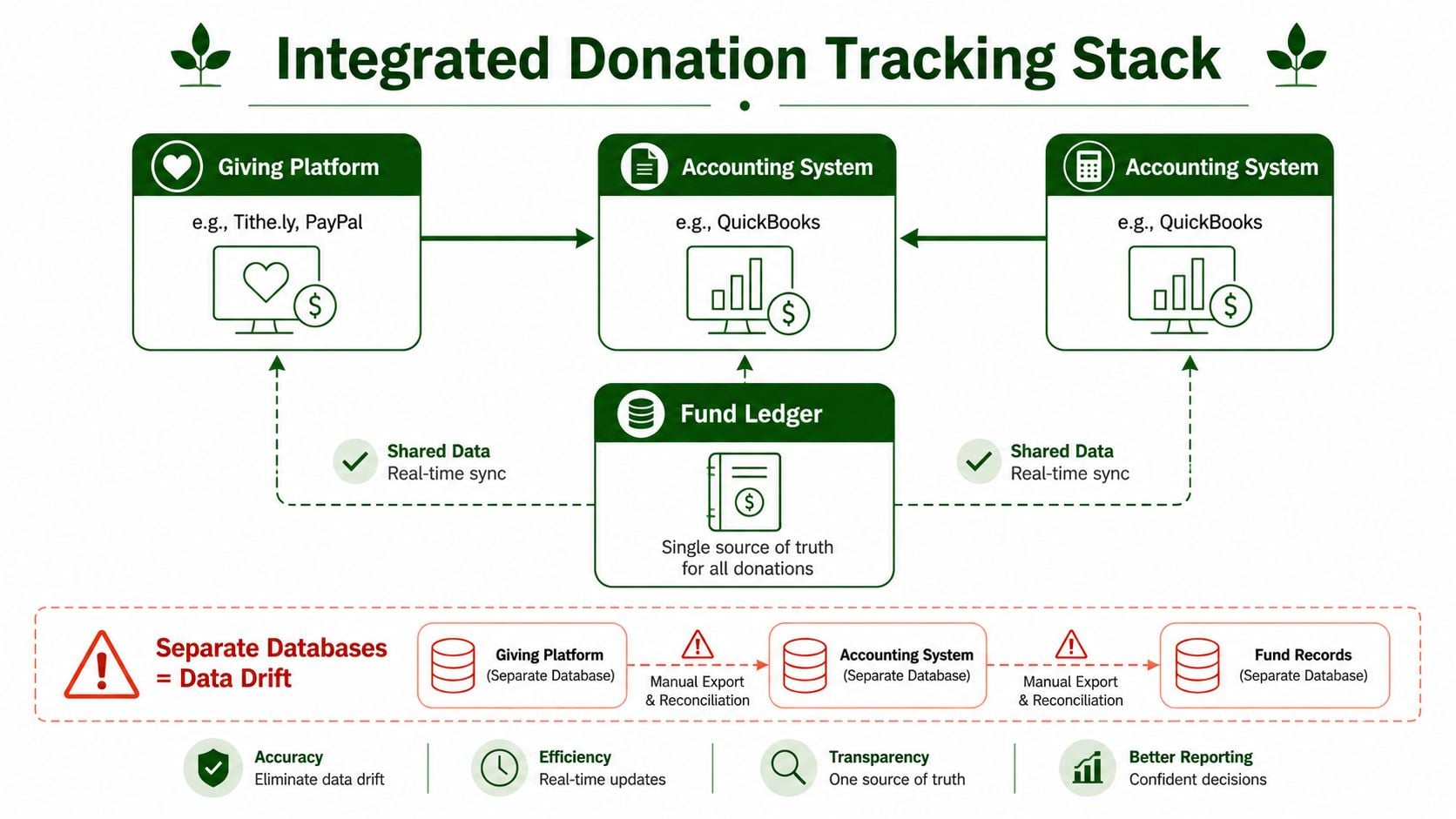
Most donation-tracking failures are architecture failures. Staff may be careful, but if Tithe.ly calls a fund “Youth Mission” while the accounting system expects “Restricted Youth,” someone must manually translate the data. Manual translation eventually produces omissions, duplicate entries, or gifts posted to the wrong fund.
An integrated stack uses one shared fund chart. A gift to the youth fund should arrive with a fund code and post to the corresponding revenue account or fund ledger, not as an unmapped lump sum. The giving platform remains the intake source, while the accounting system remains the source of financial truth.
Know what each tool is for
Standalone giving platforms such as Pushpay, Tithe.ly, and Planning Center Giving handle donor-facing collection and gift records. They aren't automatically complete fund-accounting systems. Their exports still need disciplined mapping, settlement review, and ledger posting.
General-purpose accounting systems such as QuickBooks and Xero can handle church bookkeeping when configured carefully. The common trap is treating classes, locations, or tracking tags as a substitute for true fund accounting. That approach can appear workable during routine months, then become difficult to defend when the church needs fund-level statements, restriction releases, or audit support.
A fund-native church ledger treats the fund as a primary accounting object. Grain Ledger is designed for church accounting with fund-based records, fund-level reporting, integrations with church giving providers and bank accounts, and controls intended to keep restricted funds tied to their purposes. Churches comparing broader nonprofit accounting options can compare Snyp's recommendations, but the deciding question should remain practical: can the system preserve the church's fund architecture from gift intake through reporting?
Use a controlled integration pattern
The pattern I recommend is simple:
- Export gift-level detail from the giving platform, including donor, date, method, batch, and fund code.
- Import by fund into the accounting ledger, with fees and refunds mapped separately.
- Reconcile mapped totals against bank settlements and the resulting journal entries.
- Retain the source record so the finance team can trace a board-report number back to the original batch.
Don't buy an integration because it saves data entry. Buy it because it preserves the correct fund without creating a second, invisible translation layer.
Related church accounting software resources
If you are comparing software, these pages map the main decision points: fund accounting, QuickBooks limits, pricing, and migration.
- Best church accounting software (2026 comparison) - canonical guide comparing 12 church accounting platforms
- Church accounting software product page - see Grain Ledger for fund accounting, giving, and bank reconciliation
- Small church accounting software - see the product page built for volunteer treasurers and church admins
- Fund accounting features - review how Grain Ledger tracks designated funds
- QuickBooks for churches - understand workarounds and when to switch
- Free church accounting software - compare free options and upgrade triggers
- Grain Ledger pricing - compare plans for small and growing churches
- Start free - try fund accounting, giving imports, and bank reconciliation together
Your Monthly Donation Tracking Rhythm and Next Steps
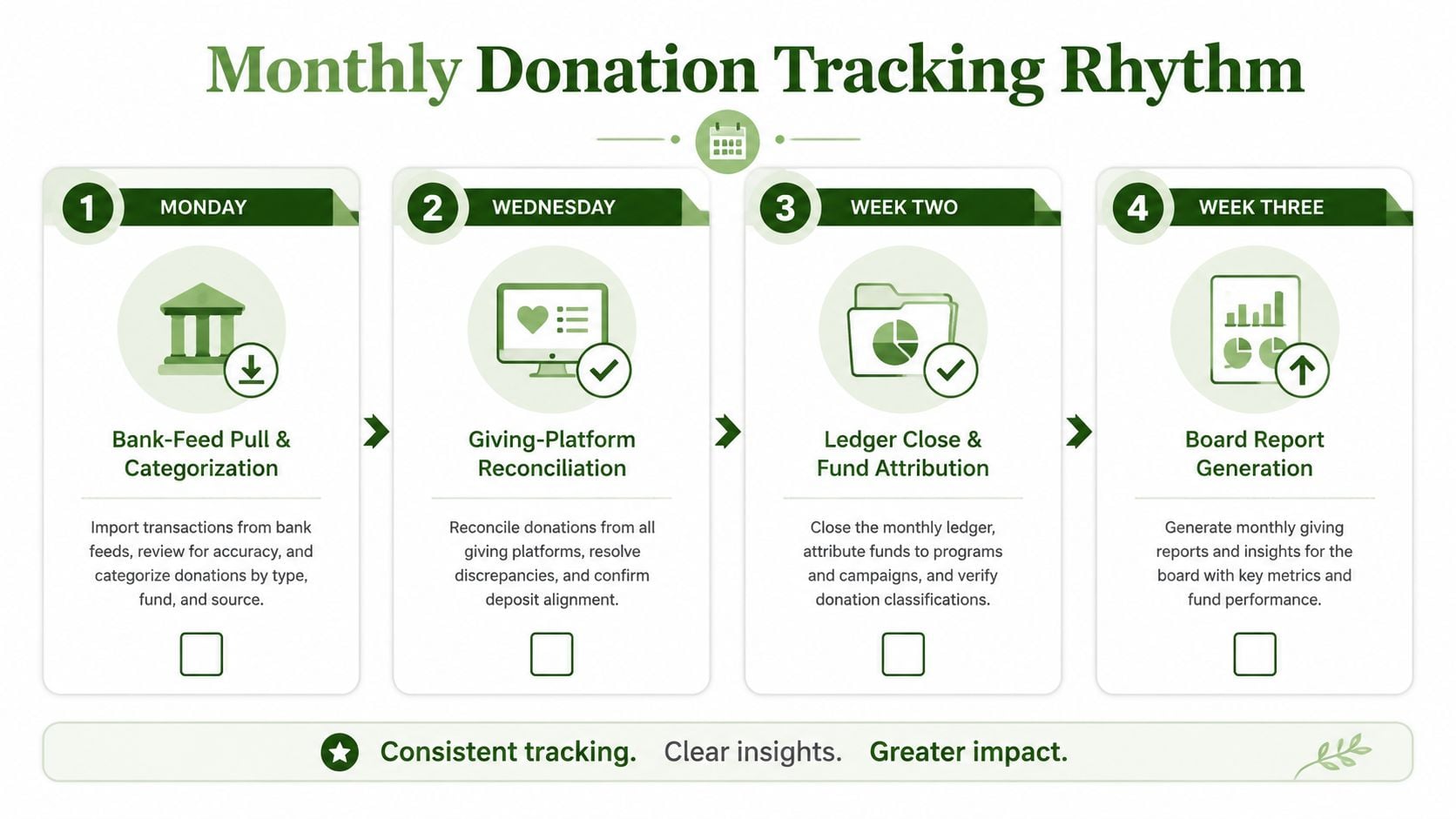
A reliable month has a rhythm. The same people perform the same checks on the same schedule, and every task produces evidence for the next one.
- Monday morning: Pull the bank feed, identify deposits, and categorize only items supported by the count sheet or settlement report.
- Midweek: Reconcile giving-platform reports by fund and payment method.
- Week two: Close the ledger with fund attribution complete, including fees, refunds, and pending items.
- Week three: Prepare the board packet with unrestricted activity, restricted-fund balances, expenses by fund, and unresolved variances.
- Week four: Run the donor receipt batch and review exceptions for stock, in-kind, anonymous, and quid pro quo gifts.
Troubleshoot the common failures
Unmatched online transfer: Compare the platform batch ID, settlement date, gross gifts, withheld fees, and net deposit. Don't post the difference to the General Fund.
Lost cash envelope: Preserve the count sheet, envelope sequence, and counter sign-offs. Record the gift as anonymous only if the donor can't be established, and investigate the control failure separately.
Duplicate check entry: Compare check number, donor, amount, and deposit batch. Reverse the duplicate entry with an explanation rather than deleting the history.
Misallocated designated gift: Determine whether the designation is board-authorized or donor-imposed. Correct the fund classification and retain the supporting communication.
A new treasurer can establish control within the next 30 days:
- Inventory every current fund and write its permitted use.
- List every active giving channel, including cash, checks, online platforms, ACH, bank transfers, and asset gifts.
- Reconcile one complete prior month from source records to bank activity and ledger.
- Configure accounting categories and fund codes around the approved structure.
- Brief the count team on the new intake slip and two-person process.
- Schedule the first board finance review using fund-level reports.
For churches collecting gifts through online forms, a form tool can also help standardize donor and fund fields. Teams evaluating options may find this best Gravity Forms alternative useful when building a simpler intake experience.
The practical outcome is bigger than cleaner bookkeeping. When every gift enters the right fund, the treasurer can explain the numbers, the pastor can see what ministry money is available, and the board can make decisions without guessing.
Before your next counting day, write down your funds, assign a code to each one, and test one full deposit from envelope to ledger. Then visit Grain to see how its fund-based accounting workflows can connect giving records, bank activity, reconciliations, and restricted-fund reporting in one system.
Ready to simplify your church finances?
Start free with church fund accounting, or watch a product demo first.